Freedom251 › Controller Mapping Software
JoyShockMapper
What JoyShockMapper is
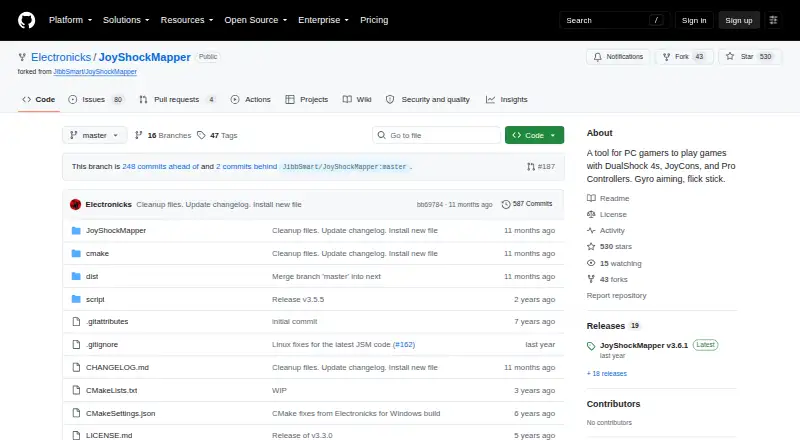
JoyShockMapper converts input from supported game controllers into keyboard, mouse, or virtual controller events for PC games. It supports gyro controls and flick stick for aiming and turning. Button mappings can include tap and hold, chorded press, or simultaneous press, while stick modes can move the mouse or trigger key presses, including scroll wheel and flick stick modes. The project lists DualSense, DualShock 4, paired JoyCons, and Nintendo Switch Pro Controller support. Commands can be loaded from text configuration files, and the download includes example gyro configurations. Virtual Xbox or DS4 controller output connects through separate ViGEm bus software. JoyShockMapper is free for Windows and Linux, but it is primarily developed for Windows and Linux builds may not always work. On Linux, it requires read and write access to /dev/uinput and the relevant /dev/hidraw device; focused-window detection works only on X11. The project directs users with problems to troubleshooting and known-issues documentation, a subreddit, and an affiliated Discord server. The releases page lists v3.6.1 as the latest release.
Who it suits
JoyShockMapper suits PC players who want to map supported controllers to keyboard, mouse, or virtual controller inputs. Its gyro and flick stick support may appeal to players who want those control options.
What it does well
- Supports gyro controls and flick stick.
- Maps buttons to keyboard or mouse inputs.
- Lists support for four controller types.
- Loads commands from text configuration files.
- Free for Windows and Linux.
What to know first
- Linux builds may not always work.
- Linux needs access to specific device files.
- Focused-window detection works only on X11.
- Virtual controller output requires separate ViGEm bus software.
Limits
JoyShockMapper is free. Linux builds may not always work; Linux focused-window detection is limited to X11, and virtual controller output requires ViGEm bus software.
Plans
| Plan | Billed and limits | Price |
|---|---|---|
| JoyShockMapper | Free download; Windows release; Linux can be built from source | Free |
| Free/open-source JoyShockMapper | downloadable executable · source available · Windows and Linux builds | Free |
As github.com lists them, read 30 Sept 2026. The maker's own page has the final word.
Getting started
- Visit the JoyShockMapper project page on GitHub.
- Download the Windows release, or build the project for Linux.
- On Linux, provide read and write access to /dev/uinput and the relevant /dev/hidraw device.
- Load commands from a text configuration file or use an included example gyro configuration.
- Install the latest ViGEm bus release if you want virtual Xbox or DS4 controller output.
Verdict
JoyShockMapper offers detailed input mapping for several controllers, including gyro and flick stick options. Windows is its primary development platform; Linux users should note the stated build and device-access caveats.
Questions
How much does JoyShockMapper cost?
It is free to download.
Which operating systems does it support?
It supports Windows and Linux. It is primarily developed for Windows, and Linux builds may not always work.
Which controllers does it support?
The project describes support for DualSense, DualShock 4, JoyCons used in pairs, and Nintendo Switch Pro Controller.
Can it output virtual controller input?
Yes. It can connect to ViGEm bus software to create virtual Xbox and virtual DS4 controllers; using that output requires installing ViGEm bus.
Where can users find help?
The project points users to its troubleshooting and known-issues documentation, the GyroGaming subreddit, and an affiliated Discord server.
Facts from JoyShockMapper's own pages
- Additional software
- Using virtual controller output requires installing the latest ViGEm bus release linked by the project. · github.com, 30 Sept 2026
- Analog triggers
- Analog triggers can have separate soft-pull and full-pull bindings; digital-trigger controllers cannot use this feature. · github.com, 15 Oct 2026
- Binding modifiers
- The command system includes tap-and-hold, simultaneous, chorded, diagonal, double-press, and gyro-button bindings. · github.com, 15 Oct 2026
- Bluetooth limitation
- The documentation says some Bluetooth adapters introduce lag with JoyCons or Pro Controllers, especially when multiple devices are connected. · github.com, 15 Oct 2026
- Button mapping
- Controller buttons can be mapped to keyboard or mouse inputs, with options including tap and hold, chorded press, and simultaneous press. · github.com, 30 Sept 2026
- Changelog development
- The changelog lists a 3.6.2 entry covering SDL3 migration, reconnect scripts, adaptive-trigger fixes, Linux FIFO command listening, and diagonal-handling improvements. · raw.githubusercontent.com, 15 Oct 2026
- Configuration
- It can load commands from text configuration files, and its download includes example gyro configuration files. · github.com, 30 Sept 2026
- Configuration model
- Users configure the program through text files and console commands, with sample files in the GyroConfigs directory. · github.com, 15 Oct 2026
- Controllers
- The project describes support for DualSense, DualShock 4, JoyCons used in pairs, and Nintendo Switch Pro Controller. · github.com, 30 Sept 2026
- Developer language and build
- The application is C++ and uses CMake, with platform-specific source directories. · github.com, 15 Oct 2026
- Developer reference
- The repository describes older versions as reference implementations for reading controller input with JoyShockLibrary. · github.com, 15 Oct 2026
- Digital bindings
- Buttons and stick directions can be mapped to keyboard keys, mouse buttons, scrolling, volume, and media controls. · github.com, 15 Oct 2026
- Documentation depth
- The README contains command references, calibration procedures, configuration-file behavior, troubleshooting, and known issues. · github.com, 15 Oct 2026
- Flick stick
- The right stick supports a flick-stick mode for rapid horizontal camera turns. · github.com, 15 Oct 2026
- Flick-stick origin
- Wikipedia credits Julian Smart with designing flick stick in 2018 and says JoyShockMapper first implemented it publicly in early 2019. · en.wikipedia.org, 15 Oct 2026
- Gyro aiming
- Gyroscope movement can control the mouse for precision aiming. · github.com, 15 Oct 2026
- Gyro and flick stick
- It supports gyro controls and flick stick for aiming and turning in PC games. · github.com, 30 Sept 2026
- Independent directory description
- SaaSHub describes the project as customizable, advanced, actively developed, and compatible with multiple controllers. · saashub.com, 15 Oct 2026
- Independent project listing
- LibHunt lists JoyShockMapper as a C++ project for DualShock 4, JoyCon, and Pro Controller gyro aiming and flick stick. · libhunt.com, 15 Oct 2026
- Latest release
- Release v3.6.1 dated February 20 lists fixes for simultaneous-press crashes, command-action crashes, overlapping presses, and scroll-wheel stick mode. · github.com, 15 Oct 2026
- License
- The repository is released under the MIT License with an as-is warranty disclaimer. · github.com, 15 Oct 2026
- Limit: anti-cheat incompatibility
- A Reddit report says Valorant's anti-cheat blocks JoyShockMapper virtual mouse input, preventing use there. · reddit.com, 15 Oct 2026
- Limit: missing flick-speed option
- Reddit feedback cites the lack of a slower-or-faster rotation control while holding flick stick. · reddit.com, 15 Oct 2026
- Limit: no graphical interface
- Reddit users repeatedly identify the lack of a GUI as a usability drawback because configurations are written in text files. · reddit.com, 15 Oct 2026
Where JoyShockMapper stands on Freedom251
- Controller Mapping Software#3 of 29
- Game Controller Mapper Software#3 of 27