Freedom251 › Game Controller Mapper Software

JoyXoff
What JoyXoff is
JoyXoff is a free Windows utility that maps Xbox controller inputs to mouse and keyboard actions, media functions, and other bindings. It works with XInput-compatible controllers, with Xbox 360 and Xbox One listed as peripherals. Users can configure controls for the desktop and set separate profiles for individual processes; those profile bindings turn off automatically when a program is fullscreen. The app includes an arcade-style virtual keyboard and a plain keyboard layout themed after Xbox One, and it can power off Xbox 360 wireless controllers. Steam users can create bindings intended to avoid Guide button conflict in Big Picture. The maker says PlayStation controllers can be used through an Xbox 360 controller emulator such as x360ce, with additional setup. JoyXoff requires Windows 8.1, while Windows 10 or later is recommended. After installation, it starts whenever Windows starts, and its files are stored in %ProgramData%\Joyxoff. The maker also describes an option to run it on UAC prompts and the sign-in screen, noting Windows UIPI restrictions on system interface access. Diego Ferracini is identified as the developer.
Who it suits
JoyXoff suits Windows users who want controller bindings for the desktop or specific programs. It is aimed at XInput-compatible controllers, with additional setup needed for PlayStation controllers.
What it does well
- Free controller-to-keyboard and mouse mapping
- Separate desktop and per-process profiles
- Includes two virtual keyboard layouts
- Can turn off Xbox 360 wireless controllers
- Steam bindings can address Guide button conflicts
What to know first
- Requires Windows 8.1 at minimum
- Fullscreen mode disables profile bindings
- Starts automatically with Windows after installation
- PlayStation controller use requires an emulator and extra setup
Plans
| Plan | Billed and limits | Price |
|---|---|---|
| JoyXoff | Free and lightweight · no ads | Free |
| Free | Free; donations optional · Windows desktop · XInput-compatible controller · no ads | Free |
As joyxoff.com lists them, read 9 Oct 2026. The maker's own page has the final word.
Getting started
- Visit the JoyXoff website.
- Install JoyXoff on a PC running Windows 8.1 or later.
- Connect an XInput-compatible controller, such as an Xbox 360 or Xbox One controller.
- Configure bindings for the desktop or create profiles for individual processes.
- For PlayStation controller use, set up an Xbox 360 controller emulator such as x360ce.
Verdict
JoyXoff offers configurable bindings for Windows users with compatible controllers, including separate settings by process. Note its Windows startup behavior and fullscreen profile limitation when deciding whether it fits your setup.
Questions
Does JoyXoff cost anything?
JoyXoff is listed as free, at no cost. Its plan is described as having no ads.
Which Windows versions does it support?
Windows 8.1 is the minimum system requirement. Windows 10 or later is recommended.
Which controllers work with JoyXoff?
It works with XInput-compatible controllers, and Xbox 360 and Xbox One controllers are listed as peripherals. The maker says PlayStation controllers can be used with an Xbox 360 controller emulator such as x360ce, with additional setup.
Can I set different controls for different programs?
Yes. Bindings can be configured separately for the desktop and individual process profiles. Profile bindings are automatically disabled when a program runs in fullscreen mode.
Does JoyXoff work with Steam Big Picture?
Steam users can create bindings intended to avoid conflict with the Guide button when using Big Picture.
Who develops JoyXoff?
The product page identifies Diego Ferracini as its developer.
Facts from JoyXoff's own pages
- Battery feature
- The wiki lists controller battery checking as a feature. · wiki.joyxoff.com, 14 Oct 2026
- Binding layers
- Primary, secondary, Alt-1 and Alt-2 binding sets are supported. · wiki.joyxoff.com, 14 Oct 2026
- Command-line interface
- The documented executable accepts commands for turning controllers off, closing the app, changing configuration directories, importing and exporting bindings, and adding or deleting profiles. · wiki.joyxoff.com, 14 Oct 2026
- Compatibility
- JoyXoff works with XInput-compatible controllers; the page lists Xbox 360 and Xbox One controllers as peripherals. · joyxoff.com, 9 Oct 2026
- Configuration storage
- Configuration files are stored under %ProgramData%\Joyxoff. · joyxoff.com, 14 Oct 2026
- Controller mapping
- The wiki identifies controller mapping as a core feature. · wiki.joyxoff.com, 14 Oct 2026
- Controller power
- JoyXoff can turn off one selected Xbox 360 controller or all connected controllers. · wiki.joyxoff.com, 14 Oct 2026
- Current version
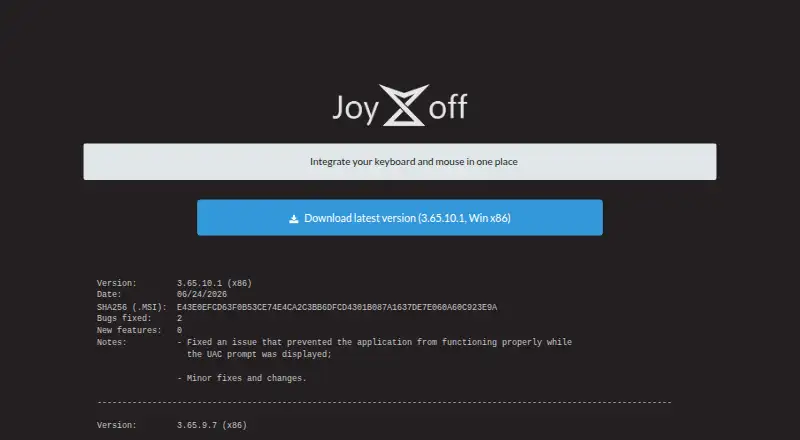
- The official site lists version 3.65.10.1 for Win x86, dated June 24, 2026. · joyxoff.com, 14 Oct 2026
- Developer
- The product page identifies Diego Ferracini as JoyXoff's developer. · joyxoff.com, 9 Oct 2026
- Documentation depth
- The official wiki provides getting-started, installation, bindings and command-line documentation with examples. · wiki.joyxoff.com, 14 Oct 2026
- Extensibility
- Import and export use .joyx binding files and can target desktop, virtual-keyboard or process profiles. · wiki.joyxoff.com, 14 Oct 2026
- Fullscreen behavior
- Bindings automatically disable when a program enters fullscreen unless profile rules override that behavior. · joyxoff.com, 14 Oct 2026
- Independent accessibility assessment
- Techlab APF France handicap reports that JoyXoff can make Windows accessible through an Xbox controller for users who have difficulty using a keyboard or mouse. · techlab-handicap.org, 14 Oct 2026
- Independent project status
- A public GitHub repository contains an unmodified MSI installer, shows 11 stars, zero forks and three commits, and does not contain the application source code. · github.com, 14 Oct 2026
- Installation behavior
- After installation, JoyXoff starts automatically every time Windows starts. · joyxoff.com, 9 Oct 2026
- Install process
- The download is a RAR archive containing an MSI installer that opens the Settings window after installation. · wiki.joyxoff.com, 14 Oct 2026
- Keyboard mapping
- Bindings can send keyboard keys, WASD, ZQSD, arrow keys and shortcuts. · wiki.joyxoff.com, 14 Oct 2026
- Languages
- The official site lists English, Brazilian Portuguese, Japanese, German, French, Colombian Spanish, Polish, Russian, Italian, Simplified Chinese and Traditional Chinese. · joyxoff.com, 14 Oct 2026
- Latest listed version
- The site lists version 3.65.10.1 for Windows x86, dated 06/24/2026, with a SHA256 checksum for the MSI. · joyxoff.com, 9 Oct 2026
- Licence
- JoyXoff is proprietary freeware: redistribution is limited to unmodified installers and the copyright notice says all rights are reserved. · joyxoff.com, 14 Oct 2026
- Limit: controller compatibility
- The official site says JoyXoff natively supports only XInput-compatible controllers; PlayStation devices require an Xbox-controller emulator. · joyxoff.com, 14 Oct 2026
- Limit: duplicated inputs
- Reddit users report that controller inputs can still reach a game while JoyXoff’s mouse-and-keyboard mode or virtual keyboard is active, causing conflicting actions. · reddit.com, 14 Oct 2026
- Limit: fullscreen UAC
- A Reddit user reports that JoyXoff did not activate on a UAC screen launched from a fullscreen Playnite setup until settings were changed. · reddit.com, 14 Oct 2026
- Limit: uninstall residue complaint
- A TeamLiquid user reported that media and mouse mappings remained after uninstalling until the software was reinstalled and mappings were removed first. · tl.net, 14 Oct 2026
Where JoyXoff stands on Freedom251
- Game Controller Mapper Software#12 of 27
- Controller Mapping Software#13 of 29