Freedom251 › Game Controller Mapper Software
LEA Extended Input
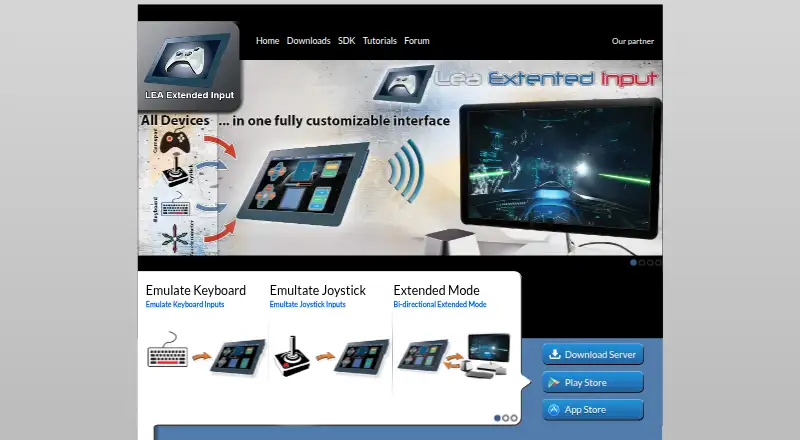
What LEA Extended Input is
LEA Extended Input lets users send keyboard and joystick inputs from client devices to a PC. Its clients are available for Android and iOS, while the standalone server runs on 64-bit editions of Windows 7 and higher. Users can choose from 13 standard controls, make their own, or import controls shared by the community, then adjust shape, size, orientation, color, and texture. A client-side macro editor is included. The server emulates four joysticks and one keyboard, and can redirect gamepad and joystick inputs to them. Multiple clients can connect to one PC, with their statuses synchronized. In Extended mode, compatible PC games can send information to the client interface, such as inventory, a mini-map, or radar. LEA offers a C# SDK, and its SDK page lists a C++ SDK as available soon. Users can export projects through LEA Resources Manager on PC to share with the community. The maker directs users to its YouTube channel for tutorials and lists a user forum. Clients and server are free.
Who it suits
LEA Extended Input suits people who want to use Android or iOS devices as input clients for a Windows PC. It may also suit compatible game projects that can send interface information to a client in Extended mode.
What it does well
- Clients and server are free.
- Supports multiple clients connected to one PC.
- Offers 13 standard controls and custom controls.
- Includes a macro editor.
- Users can share exported projects with the community.
What to know first
- Server requires 64-bit Windows 7 or higher.
- C++ SDK is listed as available soon.
- Extended mode requires a compatible PC game.
Limits
The server is available for 64-bit editions of Windows 7 and higher. The C++ SDK is listed as available soon; a C# SDK is offered.
Plans
| Plan | Billed and limits | Price |
|---|---|---|
| Free | Clients and server are free | Free |
As leaextendedinput.com lists them, read 29 Sept 2026. The maker's own page has the final word.
Getting started
- Open the LEA Extended Input website.
- Install the server on a 64-bit edition of Windows 7 or higher.
- Get the iOS client from the App Store or the Android client from Google Play.
- Connect one or more clients to the PC.
- Choose, create, or import controls and customize them as needed.
LEA Extended Input is a freemium system that turns Android and iOS devices into configurable keyboard and joystick controllers for a PC. It suits players who want bespoke touch layouts, macros, or several mobile controllers in one setup. Its broad customization and free client-and-server model are compelling, but the server must run on 64-bit Windows 7 or newer.
Overview
LEA uses mobile clients connected to a standalone PC server. The server presents client activity as keyboard and joystick input, including redirected gamepad and joystick signals, so a phone or tablet can operate games that accept those devices. It is fundamentally a PC companion rather than a mobile-only remote-control utility.
The arrangement is most useful when a touchscreen is preferable to a physical pad or when several people need controllers for one computer. Anyone without a compatible Windows machine, or anyone seeking a controller that works independently of a PC, should look elsewhere.
Key features
Build controls around a game
Users can choose among 13 standard controls, create their own, or import controls shared by the community. Each control can be changed by shape, size, orientation, color, and texture. That depth is a practical advantage for unusual game layouts, accessibility needs, or different screen sizes; it also means LEA rewards users willing to configure a layout instead of those who want an immediate fixed pad. A client-side macro editor supports more elaborate input sequences.
Server emulation and multiple clients
The standalone server emulates four joysticks and one keyboard. It can redirect gamepad and joystick inputs to those virtual devices, while multiple clients connect to the same PC and have their statuses synchronized. The four-joystick ceiling is generous for a shared gaming station, but it is still a defined limit for larger groups or more complex input rigs.
Extended mode and development tools
In Extended mode, a compatible PC game can send information to the client interface, including an inventory, mini-map, or radar. This can make a phone more than a button panel, but the benefit depends on the game supporting LEA. Developers get a C# SDK; the maker also identifies a C++ SDK as coming soon. Projects can be exported through LEA Resources Manager on PC and shared with the community, which complements the importable control library.
Pricing
| Plan | Price | Includes |
|---|---|---|
| Free | free | Clients and server are free |
There is one straightforward plan: the clients and server cost nothing. It includes keyboard/mouse output, virtual-controller output, profile switching, and per-app profiles, with multiplatform support across the product’s client and server ecosystem. There are no paid tiers, seat charges, quotas, trial periods, or renewal terms to weigh. The trade-off is not a pricing restriction but the technical setup: the server requirement and game compatibility determine whether the free package is useful.
Platforms
LEA supports Android, iOS, and Windows. The mobile client is distributed through Google Play and the App Store. The server runs on 64-bit editions of Windows 7 and higher, so an Android or iOS device alone is insufficient. Supported input types include gamepads, joysticks, and touchscreen controls.
Tutorials covering basic and advanced functions are provided through the maker’s YouTube channel, and a user forum is part of the product navigation. Those resources matter because the customization and multi-client workflow are more involved than a single fixed controller layout.
Who it's for
LEA is a strong match for PC players who want to design touch interfaces for particular games, use macros, or invite multiple phone and tablet clients to one computer. It also makes sense for developers interested in displaying game data on a client through Extended mode or integrating through the C# SDK.
It is a poor fit for users who need macOS or Linux as the server, a controller that works without a PC, or guaranteed Extended-mode features in games that do not support LEA. The four-joystick limit should also be considered before planning a larger local multiplayer setup.
Pros and cons
Pros
- Free clients and server: the complete core package costs 0.00 USD, with no paid upgrade tier.
- Deep layout control: shape, size, orientation, color, and texture settings support game-specific and accessibility-focused designs.
- Community exchange: users can import shared controls and export projects through LEA Resources Manager.
- Shared-PC capability: multiple clients can connect to one computer, with synchronized status and emulation for four joysticks plus one keyboard.
- Profiles and outputs: per-app profiles, profile switching, keyboard/mouse output, and virtual-controller output cover varied game setups.
Cons
- Windows server dependency: the server requires 64-bit Windows 7 or newer, excluding a server-only macOS or Linux arrangement.
- Extended mode is conditional: inventory, mini-map, and radar-style data appear only when a PC game supports LEA.
- Finite device capacity: emulation stops at four joysticks and one keyboard.
- Configuration overhead: extensive customization is valuable for tailored layouts but unnecessary for users seeking a ready-to-use controller.
Alternatives
Browse the Game Controller Mapper Software list for a wider category comparison.
- Monect PC Remote Play is the better choice when you want broader PC remote-control coverage across Android, iOS, macOS, the web, and Windows; it has a free core plan, while Premium has higher limits and removes ads.
- GameFlow suits users who prefer free, open-source beta software with Windows, Linux, and macOS archives.
- AntiMicroX is a free GPL v3 desktop mapper for Linux and Windows rather than a mobile-client system.
- ControllerBuddy is free and open source under GNU GPL v3.0 for Linux and Windows.
- DS5 Mapper is a free MIT-licensed option with macOS and Windows downloads.
- DS4Windows is a free Windows application for Windows 10 or newer that requires .NET 8.0 Desktop Runtime, Visual C++ Redistributable, and ViGEmBus.
- FlexInput is a free MIT-licensed open-source application for Windows 10/11 x64.
- Input Remapper is a free GPL-3.0 Linux tool for remapping input devices.
Verdict
Choose LEA Extended Input if you want free Android or iOS touch controllers that can be shaped around individual games, support macros, and share one Windows PC among multiple clients. Its strongest reason to choose it is the combination of unusually detailed control design and four-joystick multi-client emulation at no cost. Look elsewhere if you need a non-Windows server, a standalone mobile solution, or features that do not depend on a game supporting LEA’s Extended mode.
Verdict
LEA Extended Input offers customizable client controls and a server that emulates keyboard and joystick devices. Confirm that the Windows server requirement and the compatible-game condition for Extended mode fit your setup.
Questions
Is LEA Extended Input free?
Yes. The clients and server are free, and the Free plan is listed as free.
Which platforms does it support?
The listed platforms are Android, iOS, and Windows. The server requires a 64-bit edition of Windows 7 or higher.
What input devices can it use?
Listed input types include gamepads, joysticks, and touchscreen controls. The product emulates keyboard and joystick inputs from clients connected to a PC.
Can I make or share custom controls?
Yes. Users can create controls, import community-shared controls, and export projects through LEA Resources Manager on PC to share them.
Does LEA provide an SDK?
The maker offers a C# SDK. Its SDK page lists the C++ SDK as available soon.
Facts from LEA Extended Input's own pages
- Control customization
- Controls can be customized by shape, size, orientation, color, and texture. · leaextendedinput.com, 29 Sept 2026
- Custom controls
- Users can choose from 13 standard controls, create their own, or import controls shared by the community. · leaextendedinput.com, 29 Sept 2026
- Extended mode
- A PC game that supports LEA can send information to the client UI for display, such as inventory, a mini-map, or radar. · leaextendedinput.com, 29 Sept 2026
- Macros
- The client includes a macro editor for creating macros. · leaextendedinput.com, 29 Sept 2026
- Maker
- The download page carries the copyright notice “Copyright @2015 Thomas Brillet.” · leaextendedinput.com, 29 Sept 2026
- Mobile clients
- The user guide says the client is available in the App Store for iOS and on Google Play for Android. · leaextendedinput.com, 29 Sept 2026
- Multiple clients
- The product supports connecting multiple clients to one PC and synchronizes client statuses. · leaextendedinput.com, 29 Sept 2026
- Purpose
- LEA Extended Input lets users emulate keyboard and joystick inputs from client devices connected to a PC. · leaextendedinput.com, 29 Sept 2026
- SDK
- The maker offers a C# SDK; its SDK page lists the C++ SDK as available soon. · leaextendedinput.com, 29 Sept 2026
- Server capacity
- The standalone server emulates four joysticks and one keyboard and can redirect gamepad and joystick inputs to them. · leaextendedinput.com, 29 Sept 2026
- Sharing
- Users can export projects through LEA Resources Manager on PC to share them with the community. · leaextendedinput.com, 29 Sept 2026
- Tutorials and support
- The maker directs users to its YouTube channel for tutorials on basic and advanced functions and lists a user forum in its navigation. · leaextendedinput.com, 29 Sept 2026
- Windows requirement
- The server is available for 64-bit editions of Windows 7 and higher. · leaextendedinput.com, 29 Sept 2026
Where LEA Extended Input stands on Freedom251
- Game Controller Mapper Software#9 of 27