Freedom251 › Game Controller Mapper Software
DS5 Mapper
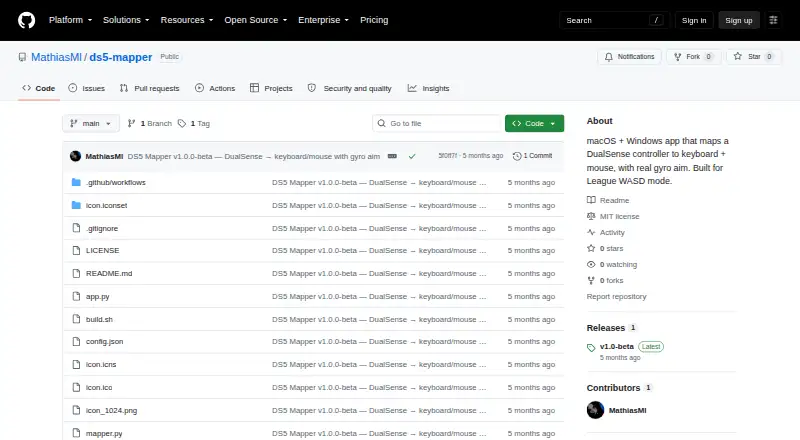
What DS5 Mapper is
DS5 Mapper turns a DualSense controller into keyboard and mouse input, including gyro-based cursor movement. It was built for League of Legends WASD mode and is described as suitable for any game that accepts keyboard and mouse input. Gyro aim uses yaw and roll, with cutoff and tiered smoothing options. Calibration carries over between launches and can be repeated in the app.
Every controller input can be assigned to a keyboard key, mouse button, macOS virtual keycode, or special key. Connect the controller over USB or Bluetooth before opening the app. DS5 Mapper reads input through SDL2 and creates keyboard and mouse events at the operating-system level; its README says it does not inject input into a game process. A stale-data watchdog and ongoing signal-stability bias correction are included to help reduce cursor drift and runaway movement.
The software is free under the MIT license, with version 1.0-beta downloads for macOS and Windows. The unsigned app requires extra steps on both systems: macOS requires a Gatekeeper bypass and Accessibility and Input Monitoring permissions, while Windows SmartScreen may prompt users to choose Run anyway.
Who it suits
DS5 Mapper suits DualSense owners who want to use keyboard and mouse controls in games, including League of Legends WASD mode. It is available for macOS and Windows, with gyro aiming and broad per-button remapping.
What it does well
- Free software released under the MIT license.
- Maps every DualSense input to keyboard or mouse controls.
- Gyro aim uses yaw and roll with smoothing options.
- Calibration persists between launches.
- USB and Bluetooth controller connections are supported.
What to know first
- The listed release is version 1.0-beta.
- macOS requires a Gatekeeper bypass and two permissions.
- Windows SmartScreen may require choosing Run anyway.
Plans
| Plan | Billed and limits | Price |
|---|---|---|
| DS5 Mapper | MIT licensed · macOS and Windows downloads | Free |
As github.com lists them, read 8 Oct 2026. The maker's own page has the final word.
Getting started
- Download the macOS or Windows build from the releases page.
- Connect the DualSense by USB or Bluetooth before launching the app.
- On macOS, bypass Gatekeeper once and grant Accessibility and Input Monitoring permissions.
- On Windows, choose Run anyway if SmartScreen blocks the unsigned app.
- Open the app, configure button bindings and gyro controls, and calibrate as needed.
DS5 Mapper is a free utility that turns DualSense controls into keyboard and mouse input, including gyro-driven cursor movement. It is best suited to players who want to use a PS5 controller with League of Legends’ WASD mode or another game that accepts keyboard and mouse input.
Overview
The app reads DualSense input through SDL2 and synthesizes keyboard and mouse events at the operating-system level with pynput. Because it does not inject input into a game process, its maker describes the approach as Vanguard-compatible. That may matter to players wary of process-level input methods, but it does not guarantee compatibility: the game still needs to accept standard keyboard and mouse input.
Connect the controller by USB or Bluetooth before launching DS5 Mapper. The available release is v1.0-beta for macOS and Windows, so users should be prepared for beta software. Its MIT license is a plus for people who value permissive open-source software, though building from source requires Python 3.10 or later, Git, and Homebrew on macOS.
Key features
- Broad button mapping: Every DualSense input can be assigned to a keyboard key, mouse button, macOS virtual keycode, or special key. This flexibility suits players adapting a controller to games designed for keyboard and mouse, rather than those seeking native gamepad support.
- Gyro aim: Yaw and roll move the mouse cursor, with cutoff and tiered smoothing to shape the response. The design gives players more control over cursor movement than a fixed gyro mapping, while still depending on whether gyro aiming suits the game and player.
- Calibration and drift handling: Calibration persists between launches and can be redone in the app. A stale-data watchdog and continuous signal-stability bias correction are intended to reduce cursor runaway and drift, useful for players who rely on gyro control over longer sessions.
- USB or Bluetooth connection: Either connection method is supported, but the controller must be connected before the app starts. Users who expect to connect or switch controllers after launch may find that sequence restrictive.
Pricing
DS5 Mapper is free: the DS5 Mapper plan costs nothing and is MIT licensed, with macOS and Windows downloads. There is no paid tier to unlock additional mappings or platform support, making it a straightforward option for players who want this specific DualSense-to-keyboard-and-mouse conversion without a subscription.
The trade-off is the beta release and the setup burden. On macOS, the unsigned app requires a one-time Gatekeeper bypass plus Accessibility and Input Monitoring permissions. On Windows, SmartScreen may block the unsigned app; the README directs users to choose Run anyway. Those steps are manageable for users comfortable changing operating-system security settings, but less suitable for anyone who wants a signed, conventionally installed utility.
Platforms
DS5 Mapper supports macOS and Windows and reads input from the DualSense controller, including gyro sensor data. On macOS, permission setup is part of using keyboard and mouse output; Windows users may encounter a SmartScreen warning. The app does not support every game by virtue of its platform coverage: a title must read keyboard and mouse input for the mapping approach to work.
Who it's for
Choose DS5 Mapper if you have a DualSense, want to play League of Legends in WASD mode or use a controller with another keyboard-and-mouse game, and value detailed button mapping with gyro cursor control. It is a particularly relevant fit when avoiding game-process injection matters. Look elsewhere if you need a stable, non-beta release, native gamepad behavior, or a setup that avoids unsigned-app warnings and permissions.
Pros and cons
- Pro: Every DualSense input is configurable. Assignments can target keyboard keys, mouse buttons, macOS virtual keycodes, or special keys, giving players room to build a layout around a specific game.
- Pro: Gyro controls include calibration and drift safeguards. Persistent calibration, smoothing options, and signal-stability measures address practical issues with gyro-driven cursor movement.
- Pro: Free on both supported desktop platforms. The free plan includes macOS and Windows downloads under the MIT license.
- Con: The release is beta. Players who prioritize a mature, finished utility may prefer a more established option.
- Con: Initial setup has security friction. macOS requires a Gatekeeper bypass and input permissions; Windows may present a SmartScreen warning.
- Con: The game must accept keyboard and mouse input. DS5 Mapper is not a general substitute for games that require native controller support.
Alternatives
For a broader set of options, browse the Game Controller Mapper Software directory. Pick Monect PC Remote Play instead if you want core PC remote-control features across Android, iOS, macOS, web, and Windows; its free plan is available, while Premium is ad-free with higher feature limits and a 12 Months plan is 12.00 CNY.
GameFlow may fit better if you want a free, open-source beta with Windows, Linux, and macOS archives, rather than DS5 Mapper’s DualSense-focused keyboard-and-mouse conversion. AntiMicroX is another free desktop application, for Linux and Windows, under GPL v3.0. ControllerBuddy is a free, open-source GNU GPL v3.0 option for Linux and Windows.
Consider LEA Extended Input if Android and iOS support alongside Windows matters; its clients and server are free. DS4Windows is a Windows-only free application with requirements including Windows 10 or newer, .NET 8.0 Desktop Runtime, Visual C++ Redistributable, and ViGEmBus driver. FlexInput is a free MIT-licensed option for Windows 10/11 (x64). If you use Linux, Input Remapper offers free Linux input-device remapping under GPL-3.0.
Verdict
DS5 Mapper is a strong fit for DualSense owners who want customizable keyboard-and-mouse controls, especially gyro aim, for games such as League of Legends’ WASD mode. Its broad mapping and zero price are the main reasons to choose it; the beta status and operating-system security steps are the main reasons to look elsewhere.
Verdict
Choose DS5 Mapper if you want to map a DualSense controller to keyboard and mouse input, including gyro aim. It supports macOS and Windows and is free; the beta release and operating-system security steps are worth considering before setup.
Questions
How much does DS5 Mapper cost?
The free plan is listed as free.
Which systems does it support?
Downloads are listed for macOS and Windows.
Can I use a DualSense wirelessly?
Yes. Connect it over USB or Bluetooth before launching DS5 Mapper.
What can I map to controller inputs?
Each DualSense input can be assigned to a keyboard key, mouse button, macOS virtual keycode, or special key.
Is DS5 Mapper open source?
It is released under the MIT license.
What extra setup is required?
On macOS, the unsigned app needs a one-time Gatekeeper bypass and Accessibility and Input Monitoring permissions. On Windows, SmartScreen may require choosing Run anyway.
Facts from DS5 Mapper's own pages
- Button mapping
- Every DS5 input can be bound to a keyboard key, mouse button, macOS virtual keycode, or special key. · github.com, 8 Oct 2026
- Button remapping
- Every DualSense input can be bound to a keyboard key, mouse button, macOS virtual keycode, or special key. · github.com, 8 Oct 2026
- Calibration
- Gyro calibration persists between launches and can be redone in the app. · github.com, 8 Oct 2026
- Connection
- The README says to connect the DualSense by USB or pair it over Bluetooth before launching. · github.com, 8 Oct 2026
- Controller connection
- The app supports connecting a DualSense by USB or Bluetooth before launch. · github.com, 8 Oct 2026
- Controller support
- It reads DualSense input through SDL2, including gyro sensor data. · github.com, 8 Oct 2026
- Drift handling
- The app includes a stale-data watchdog and continuous signal-stability bias correction to reduce cursor runaway and drift. · github.com, 8 Oct 2026
- Game compatibility
- The README says it works for any game that reads keyboard and mouse input. · github.com, 8 Oct 2026
- Game-process interaction
- The README says input is not injected into a game process and describes the approach as Vanguard-compatible. · github.com, 8 Oct 2026
- Gyro controls
- Gyro movement controls the mouse cursor using yaw and roll, with cutoff and tiered smoothing. · github.com, 8 Oct 2026
- Implementation
- It reads controller input through SDL2 and synthesizes OS-level keyboard and mouse events with pynput. · github.com, 8 Oct 2026
- Input method
- The README says keyboard and mouse events are synthesized at the operating system level and are not injected into a game process. · github.com, 8 Oct 2026
- Intended use
- It was built for League of Legends WASD mode and is described as working with any game that reads keyboard and mouse input. · github.com, 8 Oct 2026
- License
- The project is released under the MIT license. · github.com, 8 Oct 2026
- macOS requirements
- On macOS, the unsigned app requires a right-click Open on first launch and Accessibility and Input Monitoring permissions. · github.com, 8 Oct 2026
- Purpose
- DS5 Mapper maps a DualSense controller to keyboard and mouse input with gyro aim. · github.com, 8 Oct 2026
- Release
- The releases page lists version v1.0-beta with downloads for macOS and Windows. · github.com, 8 Oct 2026
- Release stage
- The releases page lists version 1.0-beta and provides downloads for macOS and Windows. · github.com, 8 Oct 2026
- Source build
- Building from source requires Python 3.10 or later, Git, and Homebrew on macOS. · github.com, 8 Oct 2026
- Windows requirements
- On Windows, SmartScreen may block the unsigned app, and the release instructions say to choose More info and Run anyway. · github.com, 8 Oct 2026
Where DS5 Mapper stands on Freedom251
- Game Controller Mapper Software#5 of 27