Freedom251 › Game Controller Mapper Software
Monect PC Remote Play
What Monect PC Remote Play is
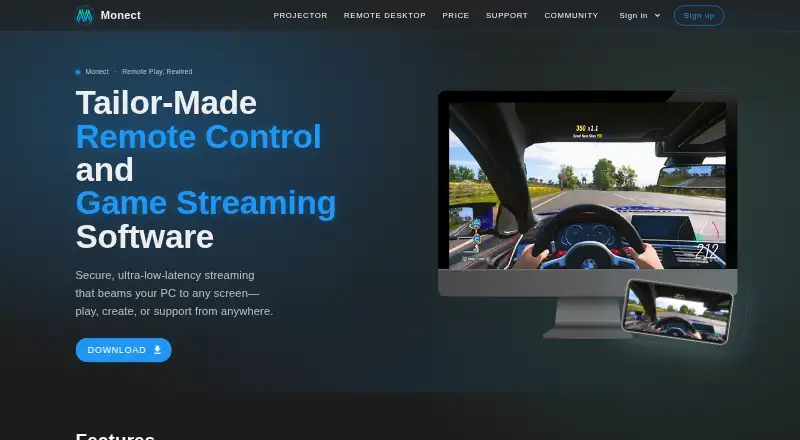
Monect PC Remote lets a smart device control a PC for gaming, work, and screen mirroring. For games, it offers custom button layouts and uses the device’s onboard sensors. Its remote desktop tools mirror the PC screen to a phone in HD with low latency, while allowing desktop control and annotation. A phone camera can serve as a virtual webcam on the PC, and the app listing says it can add up to four virtual displays. Users can also use a device as a graphics drawing tablet with pressure-sensitive stylus pens. The support guide describes connections over local Wi-Fi, internet Wi-Fi, USB tethering, or Bluetooth. Remote network connections use 256-bit AES session encoding. The product is attended and supports Windows, macOS, Android, iOS, and web browsers. PC receiver downloads are available for Windows and macOS, with companion apps for Android and iOS. The Free plan costs nothing and includes core PC remote-control features. Premium provides an ad-free experience and higher feature limits. Subscription options include 12 Months at 12 CNY a month, 6 Months at 16 CNY a month, and 3 Months at 20 CNY a month. Google Play reports that the app may share personal info, app activity, and two other data types; it may collect personal info, encrypts data in transit, and allows deletion requests.
Who it suits
Monect PC Remote suits people who want to use an Android or iOS device to control a PC for games, work, screen mirroring, or drawing. It also fits users who need several connection options or want a phone camera or virtual displays available from a PC.
What it does well
- Custom gaming button layouts use onboard device sensors.
- Mirrors a PC screen to a phone in HD with low latency.
- Can use a phone camera as a PC virtual webcam.
- Supports up to four virtual displays.
- Devices can work as drawing tablets with pressure-sensitive stylus pens.
- Remote network connections use 256-bit AES session encoding.
What to know first
- Remote control is attended.
- Premium feature limits are higher, but the free plan includes core features.
- The app may share personal info, app activity, and two other data types.
Limits
The Free plan includes core PC remote-control features. Premium provides higher feature limits and an ad-free experience; the extent of those limits is not described in these plan facts.
Plans
| Plan | Billed and limits | Price |
|---|---|---|
| Premium | Ad-free experience · Higher feature limits | On request |
| Free | Free app; contains ads and in-app purchases | Free |
| 12 Months | ¥12 per month · Total price: ¥144 · Subscription plan | 12 CNY a month |
| 6 Months | ¥16 per month · Total price: ¥96 · Subscription plan | 16 CNY a month |
| 3 Months | ¥20 per month · Total price: ¥60 · Subscription plan | 20 CNY a month |
As monect.com lists them, read 20 Sept 2026. The maker's own page has the final word.
Getting started
- Open the Monect PC Remote website.
- Download the PC receiver for Windows or macOS.
- Install the companion app on Android or iOS.
- Connect the PC and smart device using local Wi-Fi, internet Wi-Fi, USB tethering, or Bluetooth.
- Use the Free plan for core PC remote-control features, or choose a listed subscription.
Monect PC Remote Play turns an Android or iOS device into a controller and companion screen for a Windows or macOS PC. It suits people who want one mobile app for PC gaming controls, remote desktop access, mirroring, or drawing. Its range is unusual for a phone-to-PC tool, though Premium feature limits and the attended connection model make it a less natural fit for routine unattended access.
Overview
Monect brings several jobs into one connection: a phone can act as a game controller, mirror and control a desktop, serve as a webcam, or function as a drawing tablet. That breadth makes it useful when a mobile device is already at hand and a separate controller or tablet would be inconvenient.
Connections can use local Wi-Fi, internet Wi-Fi, USB tethering, or Bluetooth. Remote network connections use 256-bit AES session encoding, and file transfer is supported. The access mode is attended, so this is best for sessions where someone can initiate or participate in the connection, rather than dependable unattended support.
Key features
Gaming and desktop control
Custom gaming button layouts and device sensors let a phone take on controller duties. That flexibility may suit casual play or games that benefit from touch-specific controls, but it is not a substitute for a dedicated controller when physical controls are the priority. For desktop use, Monect offers HD, low-latency screen mirroring to a phone, with control and annotation; that makes quick access and interaction practical on a smaller screen.
Extra uses for a mobile device
A phone camera can act as a virtual webcam on a PC, and the app can add up to four virtual displays. The drawing-tablet mode supports pressure-sensitive stylus pens, giving artists a way to use a compatible device for input. These options widen Monect’s appeal beyond gaming, though each is most useful to someone who specifically needs that second role for a device.
Security and data handling
Monect states that remote network connections use 256-bit AES session encoding. Google Play reports that the app may share personal information, app activity, and two other data types; it may also collect personal information. Data is encrypted in transit, and users can request deletion.
Pricing
The Free plan costs nothing and includes core PC remote-control features. It is the sensible starting point for occasional use or for deciding whether phone-based control fits a workflow.
Three subscriptions have stated CNY prices: 12 Months costs 12 CNY a month, billed ¥12 per month for a total of ¥144; 6 Months costs 16 CNY a month, billed ¥16 per month for a total of ¥96; and 3 Months costs 20 CNY a month, billed ¥20 per month for a total of ¥60. The longer terms have lower monthly prices, while the shorter term costs more per month. These plans are subscription plans; choose among them based on the commitment and total cost that suit your expected use. The stated plan terms do not describe separate feature differences for each subscription length.
Platforms
Monect supports Windows and macOS PCs, with Android and iOS companion apps and browser access. PC receiver downloads are offered for Windows and macOS, while companion apps are offered for Android and iOS. This makes it a plausible option for mixed-device households, although the mobile app is central to its control use case. Support is available by email at [email protected].
Who it's for
Choose Monect if you want to use a phone or tablet for PC gaming controls, desktop access, screen mirroring, webcam input, or stylus drawing, especially when several of those jobs matter in one app. It is less suited to unattended access, and people who only need a gamepad mapper may prefer a focused desktop tool.
Pros and cons
- Pros: One app covers gaming controls, desktop mirroring and control, virtual webcam use, up to four virtual displays, and drawing-tablet input.
- Pros: Multiple connection methods, including USB tethering and Bluetooth, give users alternatives to Wi-Fi.
- Pros: Core PC remote-control features are available on the free plan, so users can start without a subscription.
- Cons: Attended access makes it a poor fit for unattended remote support or maintenance.
- Cons: Google Play reports potential sharing and collection of personal information and app activity, which may concern privacy-conscious users.
Alternatives
If your main need is game-controller mapping, browse Game Controller Mapper Software for a category-wide comparison. For PC access and screen control, see Remote desktop software.
- GameFlow is a free, open-source beta with Windows, Linux, and macOS archives; consider it if you want a desktop-focused option on those systems.
- AntiMicroX is a free GPL v3 desktop application for Linux and Windows.
- ControllerBuddy is free, open-source, and GPL v3.0 for Linux and Windows.
- DS5 Mapper is a free MIT-licensed option with macOS and Windows downloads.
- LEA Extended Input is a freemium option for Android, iOS, and Windows; its clients and server are free.
- DS4Windows is a free Windows application that requires Windows 10 or newer, .NET 8.0 Desktop Runtime, Visual C++ Redistributable, and ViGEmBus driver.
- FlexInput is a free MIT-licensed open-source application for Windows 10/11 (x64).
- Input Remapper is a free GPL-3.0 Linux tool for input-device remapping.
Verdict
Monect PC Remote Play is a strong choice for people who want a phone or tablet to serve several roles around a PC, from game controls to mirroring and drawing. The free core features lower the cost of trying it, while the mix of connection methods adds practical flexibility. Look elsewhere if you need unattended access, or compare Premium’s higher feature limits with its custom pricing before committing.
Verdict
Choose Monect PC Remote if you want to control a PC from a phone or tablet for gaming, desktop access, screen mirroring, or drawing. Look elsewhere if you need unattended access, or compare the free core features with Premium’s higher feature limits before choosing a plan.
Questions
Is Monect PC Remote free?
Yes. The Free plan costs nothing and includes core PC remote-control features.
What paid subscriptions are listed?
12 Months costs 12 CNY a month, 6 Months costs 16 CNY a month, and 3 Months costs 20 CNY a month.
Which platforms does it support?
Supported platforms include Windows, macOS, Android, iOS, and web browsers. PC receiver downloads are listed for Windows and macOS, and companion apps for Android and iOS.
How can the devices connect?
The documented options are local Wi-Fi, internet Wi-Fi, USB tethering, and Bluetooth.
Can it transfer files?
Yes. File transfer is listed as supported.
What does Google Play report about data safety?
The app may share personal info, app activity, and two other data types, and may collect personal info. Data is encrypted in transit, and users can request deletion.
Facts from Monect PC Remote Play's own pages
- Access mode
- attended · monect.com, 20 Sept 2026
- Connections
- The support guide documents local Wi-Fi, internet Wi-Fi, USB tethering, and Bluetooth connection methods. · monect.com, 8 Oct 2026
- Data safety
- Google Play reports that the app may share personal info and app activity plus two other data types, may collect personal info, encrypts data in transit, and allows users to request deletion. · play.google.com, 8 Oct 2026
- Drawing tablet
- The app supports using a device as a graphics drawing tablet with pressure-sensitive stylus pens. · play.google.com, 8 Oct 2026
- File transfer
- The app supports transferring files between devices. · play.google.com, 8 Oct 2026
- Free plan
- Yes · monect.com, 20 Sept 2026
- Gaming
- The app offers custom gaming button layouts and uses onboard device sensors. · play.google.com, 8 Oct 2026
- Mobile apps
- Yes · monect.com, 20 Sept 2026
- Platform downloads
- The product page lists PC receiver downloads for Windows and macOS and companion apps for Android and iOS. · monect.com, 8 Oct 2026
- Product
- Monect PC Remote lets users control a PC from a smart device for gaming, work, and screen mirroring. · monect.com, 8 Oct 2026
- Remote desktop
- The maker describes HD low-latency PC screen mirroring to a phone, with desktop control and annotation. · monect.com, 8 Oct 2026
- Security
- The app listing states that remote network connections use 256-bit AES session encoding. · play.google.com, 8 Oct 2026
- Support
- The app listing provides support by email at [email protected]. · play.google.com, 8 Oct 2026
- Supported platforms
- Windows,macOS,Android,iOS,web browser · monect.com, 20 Sept 2026
- Virtual camera
- The app can use a phone camera as a virtual webcam on a PC. · play.google.com, 8 Oct 2026
- Virtual displays
- The app listing says it can add up to four virtual displays to a PC. · play.google.com, 8 Oct 2026
Where Monect PC Remote Play stands on Freedom251
- Game Controller Mapper Software#6 of 27
- Remote desktop software#52 of 135