Freedom251 › Infographic Makers

Graficto
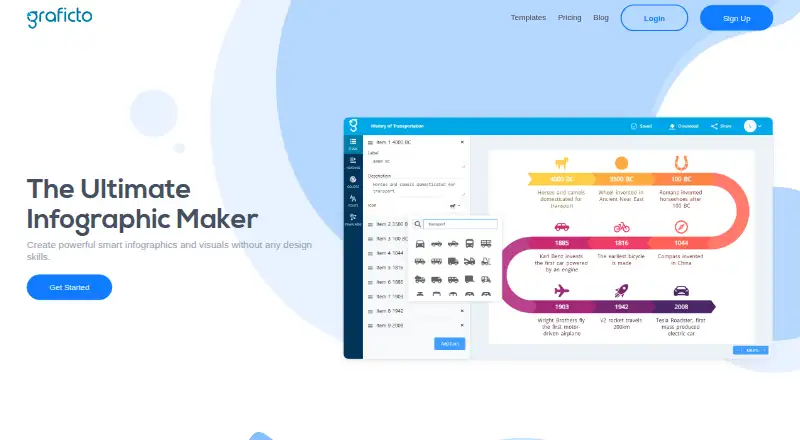
What Graficto is
Graficto is a web tool for creating infographics and smart visuals without requiring design skills. Its layouts adapt as users add, edit or remove items, or change text and icons. Users can start from hundreds of templates for lists, processes, cycles, charts and other infographic ideas, or describe a visual in a few words for AI generation. Color palettes and fonts offer customization, with custom palettes included in Premium. Graficto provides high-resolution visuals and vector exports. The free Standard plan costs nothing, allows up to five visuals and limits palettes, fonts and exports to PNG and JPG. Premium includes unlimited infographics, premium templates, palettes and fonts, custom palettes, SVG, PNG and JPG exports, high-resolution output and instant AI-generated content. Premium costs $5 a year billed yearly or $50 a month billed monthly. A Premium free trial is offered, with no duration stated. Graficto is headquartered in Kurunega, Sri Lanka.
Who it suits
Graficto suits people who need to make infographics for lists, processes, cycles or charts without relying on design skills. The Standard plan may suit occasional use, while Premium is for users who need unlimited visuals or SVG exports.
What it does well
- Hundreds of templates for different infographic types
- Layouts adapt when content changes
- AI can generate visuals from short descriptions
- Premium offers SVG, PNG and JPG exports
- Standard plan is free forever
What to know first
- Standard allows up to five visuals
- Standard exports only PNG and JPG
- Premium costs $5 a year billed yearly
- Premium costs $50 a month billed monthly
Limits
Standard allows up to five visuals, has limited palettes and fonts, and exports only to PNG and JPG.
Plans
| Plan | Billed and limits | Price |
|---|---|---|
| Standard | Free forever · Up to 5 visuals · Free templates · Limited color palettes · Limited fonts · Export to PNG and JPG | Free |
| Premium (yearly) | Billed yearly · Unlimited infographics · Premium templates, palettes, and fonts · Custom color palettes · SVG, PNG, and JPG exports · High resolution exports · Instant AI-generated content | $5 a year |
| Premium (monthly) | Monthly · Unlimited infographics · Premium templates, palettes, and fonts · Custom color palettes · SVG, PNG, and JPG exports · High resolution exports · Instant AI-generated content | $50 a month |
As graficto.com lists them, read 8 Oct 2026. The maker's own page has the final word.
Getting started
- Open https://graficto.com/ in a web browser.
- Choose the free Standard plan or explore the Premium free trial.
- Start with a template or describe an infographic for AI generation.
- Adjust the visual using palettes and fonts, then export in a format available on your plan.
Graficto is a browser-based infographic builder for people who need structured visuals without specialist design skills. It is best suited to individuals and small teams producing information-led graphics that change over time. The free tier is useful for trying the workflow, while serious or frequent production requires Premium.
Overview
Graficto concentrates on infographics and “smart visuals” rather than presenting itself as an all-purpose design suite. Its layouts respond when you add, edit, or remove items, or change text and icons, so revisions can preserve the overall composition instead of forcing a complete manual rearrangement. That behavior is particularly useful for charts, processes, and other graphics whose content is still being refined.
Hundreds of templates cover lists, processes, cycles, charts, and other familiar infographic structures. You can also describe an infographic in a few words and have AI generate a visual, providing a quick starting point when you know the message but not the layout. Palettes and fonts allow further styling, and a brand kit is included for keeping visual work aligned with an identity.
Key features
Responsive layouts and templates
Dynamic layouts are Graficto’s strongest practical feature. Content changes are reflected in the composition, which should reduce repetitive repositioning during updates. The template range gives common data and explanation formats a ready-made structure, although a template still needs content and styling decisions to become a finished communication.
AI generation and customization
Prompt-based generation can move from a short concept to a draft quickly. The published features do not establish how much editing a generated result will need, so users with strict brand or data-visualization requirements should treat AI as a starting point rather than a guaranteed final design. Standard offers limited palettes and fonts; Premium adds custom color palettes and premium palettes and fonts.
Exports
Standard exports to PNG and JPG. Premium adds SVG alongside PNG and JPG, plus high-resolution exports. SVG matters when a graphic must remain sharp at different sizes or continue into a vector workflow; the free tier is therefore less suitable for print-oriented or production reuse.
Pricing
| Plan | Price and terms | What you get |
|---|---|---|
| Standard | 0.00 USD, free forever | Up to five visuals, free templates, limited palettes and fonts, PNG and JPG export |
| Premium (yearly) | $5 a year, billed yearly | Unlimited infographics, premium templates, palettes and fonts, custom palettes, SVG/PNG/JPG, high-resolution exports, instant AI-generated content |
| Premium (monthly) | $50 a month, billed monthly | The same Premium feature set |
Standard is appropriate for occasional experimentation or a small number of finished visuals. Its five-visual ceiling and restricted styling and export choices become obstacles for an ongoing content library. Premium is the practical choice for regular publishing, vector output, custom branding, or unlimited creation. Annual billing is dramatically cheaper than the listed monthly term, so monthly billing makes sense mainly when you need short-term flexibility. You can cancel in account settings and retain Premium features through the paid period; purchases are not refunded.
Platforms
Graficto runs on the web, so it does not require a separate desktop or mobile installation. Payments support major cards including Visa, Mastercard, and Amex, as well as PayPal and Apple Pay. Paddle stores payment data. Graficto describes technical and organizational security measures but does not guarantee complete security, and its terms say the service is not tailored to regulations such as HIPAA or FISMA.
Who it's for
Choose Graficto if you make infographics for reports, explanations, processes, or presentations and expect the underlying information to change. It is also a reasonable fit for users who want templates and AI assistance without learning a conventional design application. Standard suits light or trial use; Premium suits teams or creators needing repeated output, custom palettes, high resolution, or SVG. It is a weaker choice when you need a broad design suite, regulated-industry tailoring, or a free plan without a strict visual cap.
Pros and cons
- Pros: layouts adapt as content changes, reducing manual rework on evolving graphics.
- Pros: hundreds of templates cover common infographic structures.
- Pros: AI can generate a visual from a short description, and Premium includes instant AI-generated content.
- Pros: Premium combines custom palettes, brand-oriented styling, high-resolution output, and SVG export.
- Cons: Standard stops at five visuals and limits palettes, fonts, and exports to PNG and JPG.
- Cons: the listed monthly Premium price is far higher than the annual price, making monthly use costly.
- Cons: the Premium trial length is unspecified, and purchases are non-refundable.
- Cons: the service is not tailored to HIPAA, FISMA, or similar industry-specific compliance needs.
Alternatives
For a broader directory of options, see Infographic Makers.
Animaker is the better choice when you need animation tools, mobile apps, API access, or can accept watermarked exports on its free plan.
Visme suits projects organized around slides and pages, with web, Windows, macOS, and iOS support and a free plan offering 500MB storage.
Drawtify is worth considering if you prefer desktop-capable access and a lower-priced paid monthly option, while accepting limits such as SD exports on Free.
Infografix is a free alternative for users who want Android, iOS, and web access without stated usage limits.
Napkin AI is preferable when AI credits, file import, and unlimited PNG and PDF export matter more than avoiding branding on free visuals.
GetInfographic is an alternative for credit-based generation across web, API, and extension environments.
GraphMake fits users seeking many widgets, editable templates, and PNG, PDF, and JSON project export without a free trial.
Infogiph is an option for GIF or MP4 output and a large template library, though its free visuals carry a watermark.
Verdict
Graficto is a good choice for creators who want infographic layouts that survive content changes, plus templates and AI to accelerate drafting. Premium is the sensible plan for ongoing work because it removes the five-visual ceiling and unlocks custom styling, high-resolution files, and SVG. Look elsewhere if you need a general design platform, regulated-industry support, or a genuinely unrestricted free workflow.
Verdict
Graficto offers templates, adaptable layouts and AI generation for infographic creation. Standard is limited to five visuals, while Premium adds unlimited output and more export formats.
Questions
Is Graficto free?
Yes. Standard is free forever and allows up to five visuals.
How much does Premium cost?
Premium costs $5 a year when billed yearly or $50 a month when billed monthly.
Which export formats does Graficto support?
Standard exports to PNG and JPG. Premium adds SVG and includes PNG and JPG, plus high-resolution exports.
Can I cancel a Premium subscription?
You can cancel from account settings at any time and keep Premium features until the subscription period ends. Purchases are not refunded.
What platform does Graficto run on?
Graficto is available on the web.
Facts from Graficto's own pages
- AI generation
- Users can describe an infographic in a few words and generate visuals with AI. · graficto.com, 8 Oct 2026
- Billing and cancellation
- Users can cancel a subscription from account settings at any time and keep Premium features until the subscription period ends; the pricing page says purchases are not refunded. · graficto.com, 8 Oct 2026
- Compliance limit
- The terms say the site is not tailored for industry-specific regulations such as HIPAA or FISMA. · graficto.com, 8 Oct 2026
- Customization
- Users can choose from color palettes and fonts, and Premium includes custom color palettes. · graficto.com, 8 Oct 2026
- Dynamic layouts
- Visuals dynamically change as users add, edit, or remove items or change text and icons. · graficto.com, 8 Oct 2026
- Exports
- Graficto offers high-resolution visuals and vector exports; Premium lists SVG, PNG, and JPG formats. · graficto.com, 8 Oct 2026
- Free tier limit
- The Standard plan allows up to five visuals and limits palettes, fonts, and export formats to PNG and JPG. · graficto.com, 8 Oct 2026
- Headquarters
- Kurunega, Sri Lanka · graficto.com, 28 Sept 2026
- Payment options
- The pricing page says Graficto accepts major credit cards including Visa, Mastercard, and Amex, as well as PayPal and Apple Pay. · graficto.com, 8 Oct 2026
- Premium trial
- The pricing page offers a Premium free trial but does not state its duration. · graficto.com, 8 Oct 2026
- Privacy and payments
- The privacy policy says payment data is stored by Paddle and describes collection of account, device, and usage information. · graficto.com, 8 Oct 2026
- Purpose
- Graficto makes infographics and smart visuals without requiring design skills. · graficto.com, 8 Oct 2026
- Security
- The privacy policy says Graficto has technical and organizational security measures, while noting it cannot guarantee complete security. · graficto.com, 8 Oct 2026
- Support
- The site links to a Help Center, and its privacy policy provides [email protected] for inquiries. · graficto.com, 8 Oct 2026
- Templates
- Graficto offers hundreds of templates for lists, processes, cycles, charts, and other infographic ideas. · graficto.com, 8 Oct 2026
Where Graficto stands on Freedom251
- Infographic Makers#10 of 26