Freedom251 › Infographic Makers

GetInfographic
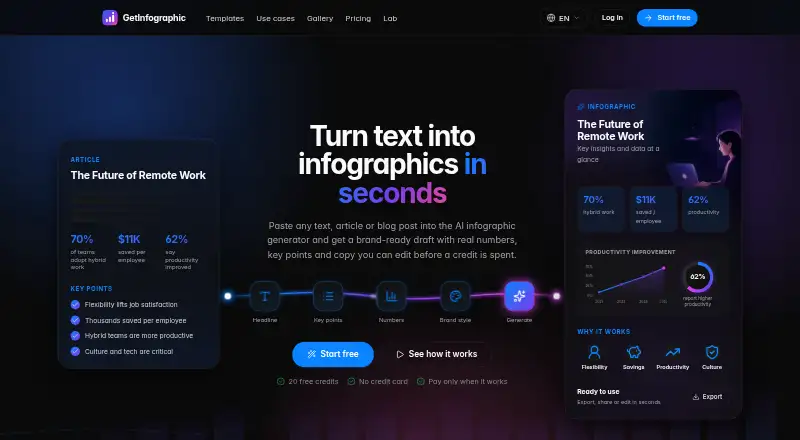
What GetInfographic is
GetInfographic turns text, articles, and blog posts into branded visuals such as infographics, carousels, quote cards, calls to action, featured images, and product shots. It extracts a headline, key points, and statistics from submitted text; users can review and edit those details before image generation. A Brand Kit applies the user's colors, fonts, and logo. The maker says the service supports content in any language, including right-to-left scripts such as Persian and Arabic. It is available on the web, through a browser extension, and via an API, with visual generation also available in the WordPress editor. The free plan costs nothing and includes starter credits, every tool, instant generation, and no card requirement. Creator costs $9 a month for 200 credits; Pro costs $19 a month for 500 credits. Both paid plans include up to 4K output without a watermark, Brand Kit, and WordPress and API access. Business costs $49 a month and includes 1,500 monthly credits, batch backfill at half price, webhooks, and multiple sites. Monthly plans can be cancelled anytime without a contract.
Who it suits
GetInfographic suits people who turn written content into branded visuals for articles, blogs, or social channels. Its web, extension, API, and WordPress options accommodate different creation workflows.
What it does well
- Edits extracted headlines, key points, and figures.
- Brand Kit applies colors, fonts, and logo.
- Supports right-to-left content such as Persian and Arabic.
- Credits are charged only after successful image generation.
- Monthly plans can be cancelled anytime.
What to know first
- Free plan includes starter credits, not a stated unlimited allowance.
- Creator costs $9 a month.
- Monthly plan credits refresh each billing period.
Limits
The Free plan provides starter credits. Creator includes 200 credits per month, Pro includes 500, and Business includes 1,500; monthly credits refresh each billing period. Credits are deducted only when an image generates successfully.
Plans
| Plan | Billed and limits | Price |
|---|---|---|
| Free | Try every tool · instant generation · no card required | Free |
| Pro | monthly · 500 credits/month · up to 4K, no watermark · Brand Kit and logo · WordPress and API access | $19 a month |
| Business | monthly · 1,500 credits/month · lowest credit price · batch backfill at half price · webhooks and multiple sites | $49 a month |
| Creator | monthly · 200 credits/month · up to 4K, no watermark · Brand Kit and logo · WordPress and API access | $9 a month |
As getinfographic.com lists them, read 14 Oct 2026. The maker's own page has the final word.
Getting started
- Open https://getinfographic.com/.
- Use the web app, browser extension, WordPress editor, or API.
- Choose the Free plan to try every tool with starter credits and no card requirement, or select a paid monthly plan.
- Submit text, an article, or a blog post.
- Review and edit the extracted headline, key points, and figures.
- Apply a Brand Kit and generate a visual.
GetInfographic converts submitted writing into editable visual assets. It is best suited to publishers and marketing teams that want to repurpose articles in their existing WordPress, browser-extension, or API workflows. Its appeal is control over extracted text and brand styling; the key trade-off is managing monthly generation credits.
Overview
The tool pulls a headline, key points, and statistics from text, articles, or blog posts, then lets users revise them before generating an image. That editorial checkpoint makes it a more considered option for teams that need to verify figures and wording rather than pass an automated extraction straight to design. It is focused on turning written content into visuals, not on serving as a general-purpose design workspace.
Key features
GetInfographic produces infographics, carousels, quote cards, calls to action, featured images, and product shots. That range gives content teams several formats for adapting a source article to different uses. The Brand Kit applies colors, fonts, and a logo, a practical advantage for organizations publishing recurring assets under a consistent identity.
Generation is available in the WordPress editor, a browser extension, and through the API. Those options suit teams that want creation connected to publishing or other software workflows, rather than confined to a standalone editor. The maker says the product handles content in any language, including right-to-left scripts such as Persian and Arabic.
Credits are charged only when an image generates successfully. Monthly plan credits refresh each billing period, while one-off top-ups do not expire; that distinction favors occasional users who want to preserve unused top-up capacity, but makes recurring monthly allowances less flexible across billing cycles. The privacy policy says submitted content is not used to train models and personal data is not sold. It also says passwords are stored as hashes, card details are handled by Stripe, and users can request deletion of generated images and job data. The maker states that data is protected with enterprise-grade encryption and that support questions are usually answered by real people within a few hours.
Pricing
GetInfographic has a free plan and three month-to-month paid plans, with no contract and cancellation at any time. Free costs nothing and includes starter credits, access to every tool, instant generation, and no card requirement. It is a sensible way to try the workflow, but the stated allowance is only starter credits, so it is not a defined monthly production tier.
Creator costs $9 a month, billed monthly, for 200 credits per month, output up to 4K without a watermark, Brand Kit and logo use, and WordPress and API access. It is the entry paid option for individuals or small publishing teams with modest image needs. Pro costs $19 a month, billed monthly, and raises the allowance to 500 credits while retaining those output, branding, and access features. The larger quota suits more regular production; the plan details do not identify additional features over Creator.
Business costs $49 a month, billed monthly, for 1,500 credits per month, the lowest price per credit, batch backfill at half price, webhooks, and multiple sites. It is the clearest fit for higher-volume or multi-site operations. Across paid plans, monthly credits refresh every billing period, so readers should compare the allowance with expected successful image generations rather than assume unused monthly capacity carries forward.
Platforms
GetInfographic is available on web and through an extension and API. WordPress editor generation and API access are included in the paid Creator and Pro plans; the Business plan adds webhooks and multiple-site support. These integrations are a strength for publishing workflows, while the plan structure makes the access and volume most relevant to paid users.
Who it's for
Choose GetInfographic if your work starts with written content and you need editable extraction, repeatable brand styling, and several output formats. It is particularly suited to publishers and marketing teams already using WordPress or connecting content workflows through an API. It is less compelling for someone seeking a broad design environment or for occasional use that does not justify a recurring credit allowance.
Pros and cons
- Pros: Users can edit extracted headlines, points, and figures before generation, helping keep automated content under editorial control.
- Pros: The Brand Kit and multiple visual formats support consistent repurposing across content needs.
- Pros: WordPress, extension, and API workflows offer more than standalone web access.
- Pros: Successful-generation-only charges and non-expiring top-up credits reduce the risk of paying credits for failed image generation or losing top-up balances over time.
- Cons: Monthly credits refresh each billing period, limiting flexibility for users whose image demand varies month to month.
- Cons: The free plan offers starter credits rather than a stated recurring monthly quota, so its fit for continued production is unclear.
- Cons: The entry paid tier provides 200 credits per month; higher-volume users need Pro or Business for larger stated allowances.
Alternatives
Visme is worth considering if you want a broader web and desktop/mobile-platform option with a free Basic plan offering 500MB storage and up to 50 slides or pages per project, rather than GetInfographic's text-to-visual workflow.
MilleMots is an alternative for mobile users who want a free plan capped at three infographics per month, one free edit per month, 14 layout styles, voice, text, and document inputs, and six languages.
Datastory may suit teams centered on data visualizations: its free Starter plan includes 10 visualizations, up to three team members, 100 AI credits per month, and unlimited open-data downloads.
Infogiph is another API and web option, with a free plan that allows five lifetime AI generations, unlimited exports, templates and an editor, plus several export formats; its free exports carry a watermark.
Infogram offers web and API access and a Basic plan with one user, 35-plus interactive chart types, up to 10 projects, up to five pages per project, 13 map types, and online publishing.
InfographicMaker.org is a web option whose free Starter plan includes five infographic drafts, community templates, and PNG export; its Studio plan adds unlimited infographics, brand kits, fonts, and more export options.
Jeda.ai is another web-based alternative.
MakeInfographic.ai is worth comparing if a free plan with 20 monthly credits and five 1K infographics per month fits your needs.
For more options, see AI Infographic Makers and Infographic Makers.
Verdict
GetInfographic is a strong choice for content teams that routinely turn written material into branded visuals and value an editing step before image generation. Its formats, integrations, and non-expiring top-up credits make it adaptable, but the recurring monthly quotas are the main reason to look elsewhere if demand is sporadic or a broader design workspace is the priority.
Verdict
GetInfographic combines text extraction, editable content, and branding across several visual formats. Compare plan credit allowances with your expected image generation needs; one-off top-up credits do not expire, while monthly credits refresh each billing period.
Questions
How much does GetInfographic cost?
The Free plan costs nothing. Creator is $9 a month, Pro is $19 a month, and Business is $49 a month.
What does the free plan include?
It includes starter credits, every tool, instant generation, and no card requirement.
Which platforms and integrations are available?
GetInfographic is available on the web, through a browser extension, and via an API. The maker also says users can generate visuals in the WordPress editor.
What languages does it support?
The maker says it supports content in any language, including right-to-left scripts such as Persian and Arabic.
Do credits expire?
One-off top-up credits never expire. Monthly plan credits refresh each billing period.
Can a paid plan be cancelled?
Plans are month-to-month and can be cancelled anytime, with no contract.
Facts from GetInfographic's own pages
- Account sharing
- The web app, WordPress plugin, browser extension, and API share one account's brand settings and credits. · getinfographic.com, 14 Oct 2026
- API keys
- The setup guide says dashboard API keys can be named, revoked, and regenerated. · getinfographic.com, 14 Oct 2026
- Article extraction
- The service extracts a headline, key points, and only statistics that appear in the supplied text. · getinfographic.com, 14 Oct 2026
- Branding
- The Brand Kit applies the user's colors, fonts, and logo to generated visuals. · getinfographic.com, 8 Oct 2026
- Brand Kit
- Saved colors, fonts, and logos are automatically applied to generated visuals. · getinfographic.com, 14 Oct 2026
- Browser extension
- A browser extension lets users select text on a webpage and create an image through a right-click action. · getinfographic.com, 14 Oct 2026
- Cancellation
- Subscriptions are month to month and can be cancelled at any time. · getinfographic.com, 14 Oct 2026
- Commercial rights
- Terms say users retain ownership of submitted text and generated images and may use generated images commercially. · getinfographic.com, 14 Oct 2026
- Credit charges
- Credits are deducted only when an image generates successfully; one-off top-up credits never expire, while monthly plan credits refresh each billing period. · getinfographic.com, 8 Oct 2026
- Credit charging
- Credits are deducted only after a successful render, while failed renders are free. · getinfographic.com, 14 Oct 2026
- Credit expiry
- Monthly credits refresh each billing period, while one-off top-up credits do not expire. · getinfographic.com, 14 Oct 2026
- Data controls
- Users can access, correct, export, or delete their data, and can delete accounts from the dashboard. · getinfographic.com, 14 Oct 2026
- Data handling
- The privacy policy says account passwords are stored as hashes, payment card details are handled by Stripe, and users can request deletion of generated images and job data. · getinfographic.com, 8 Oct 2026
- Developer fact
- The WordPress developer profile identifies deepwp24 as a Germany-based WordPress developer who joined in May 2026. · profiles.wordpress.org, 14 Oct 2026
- Documentation depth
- Public guidance covers plugin setup, API-key handling, brand settings, generation defaults, output settings, and bulk tools. · getinfographic.com, 14 Oct 2026
- Editing
- Users can review and edit the headline, key points, and figures before generating an image. · getinfographic.com, 8 Oct 2026
- Editing workflow
- Users can edit the extracted headline, figures, and points before image generation uses credits. · getinfographic.com, 14 Oct 2026
- Formats
- The product supports infographics, carousels, quote cards, calls to action, featured images, and product shots. · getinfographic.com, 8 Oct 2026
- Integrations
- The maker says users can generate visuals in the WordPress editor, through a browser extension, or through its API. · getinfographic.com, 8 Oct 2026
- Languages
- The maker says it supports content in any language, including right-to-left scripts such as Persian and Arabic. · getinfographic.com, 8 Oct 2026
- Language support
- The site says content can be generated in any language, including right-to-left Persian and Arabic, without machine translation. · getinfographic.com, 14 Oct 2026
- Launch date
- The developer profile records the initial GetInfographic plugin release in June 2026. · profiles.wordpress.org, 14 Oct 2026
- Layout types
- Built-in formats include pros-and-cons, comparisons, how-to steps, statistics, lists, and timelines. · getinfographic.com, 14 Oct 2026
- Limit: AI accuracy
- Terms warn that AI output can contain errors and should be reviewed before publication. · getinfographic.com, 14 Oct 2026
Where GetInfographic stands on Freedom251
- Infographic Makers#3 of 26
- AI Infographic Makers#3 of 24