Freedom251 › AI Infographic Makers
InfographicMaker.org
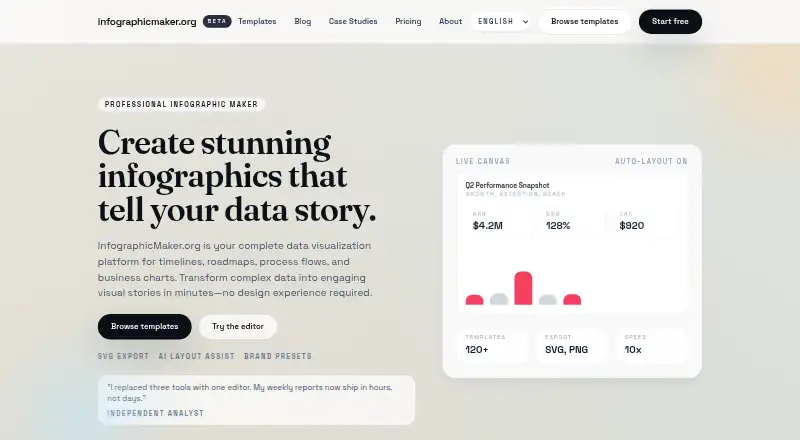
What InfographicMaker.org is
InfographicMaker.org is a web-based data visualization platform for making timelines, roadmaps, process flows, and business charts. Data can be entered in the editor, pasted as a table, or brought in through a CSV connection. The editor provides automatic layout, reusable content blocks, and controls for fonts, colors, and logos. More than 120 templates cover formats such as comparisons, maps, and charts as well as timelines and process flows. Users can choose a long, scrollable canvas or a fixed presentation size, and update labels or fonts for the language they need. Finished work can be exported as PNG, SVG, or PDF, or shared with a live link; publishing is static rather than interactive. The free Starter plan allows five drafts, community templates, and PNG export. Studio costs $24/mo and adds unlimited infographics, brand kits and fonts, SVG and PDF export, and priority support. Enterprise pricing is custom, with custom templates, advanced brand controls, white-label exports, and dedicated support. The company says it was founded in 2024.
Who it suits
It suits marketing teams, business analysts, educators, and content creators who need to build and share data visuals. The free plan may suit users making up to five drafts.
What it does well
- More than 120 templates across several formats
- Accepts pasted tables, CSV, or direct data entry
- Offers long-scroll and fixed-size canvases
- Exports to SVG, PNG, and PDF
- Labels and fonts can be adapted for any language
What to know first
- Free plan limits users to five drafts
- Free plan exports only PNG
- Publishing is static, not interactive
Limits
Starter is free and allows five infographic drafts, community templates, and PNG export. SVG and PDF exports and unlimited infographics are listed with Studio at $24 a month.
Plans
| Plan | Billed and limits | Price |
|---|---|---|
| Starter | 5 infographic drafts · Community templates · PNG export | Free |
| Studio | $24 / month · Unlimited infographics · Brand kits + fonts · SVG + PDF export · Priority support | $24 a month |
| Enterprise | Custom · Custom templates · Advanced brand controls · White-label exports · Dedicated support | On request |
As infographicmaker.org lists them, read 7 Oct 2026. The maker's own page has the final word.
Getting started
- Visit https://infographicmaker.org/.
- Use the web-based editor.
- Choose Starter, Studio, or Enterprise based on the listed plan features.
- Provide data by direct entry, pasted table, or CSV connection.
- Choose a template and canvas size, then export or share the finished infographic.
InfographicMaker.org is a web-based data-visualization editor for building timelines, roadmaps, process flows, comparisons, maps, and business charts. It fits marketing teams, analysts, educators, and creators who need branded graphics from structured data. Its strongest case is a template-led workflow with direct data input and practical export formats; the five-draft free tier and static publishing narrow its appeal for larger or interactive projects.
Overview
Founded in 2024 by designers, data scientists, and developers, InfographicMaker.org focuses on turning data into presentation-ready infographics. You can paste a table, connect a CSV, or type values into the data panel, then use auto layout to arrange the result. More than 120 templates cover timelines, process flows, comparisons, maps, and charts, giving teams a starting structure instead of a blank canvas.
The editor supports reusable content blocks and brand controls for fonts, colors, and logos. Infographics can be edited for any language by changing labels or switching fonts. Canvas options include long, scrollable layouts and fixed dimensions for presentations, so the format can match either an online narrative or a slide deck.
Key features
Data-driven creation
CSV connection is the clearest productivity feature: charts can be updated from imported data rather than rebuilt manually. Pasting tables and entering values directly cover smaller jobs and quick revisions. The site names CSV as its integration; it does not describe connections to other services.
Branding and layouts
Auto layout, reusable blocks, and controls for fonts, colors, and logos make repeated marketing or reporting work more consistent. Brand kits and custom templates are reserved for higher plans, so the free tier is better for evaluating the editor than enforcing a full organization-wide identity.
Output and sharing
SVG, PNG, and PDF exports cover web graphics, raster images, and print or presentation handoffs. Publishing a live link is supported, but the publishing mode is static rather than interactive; choose it for fixed visual communication, not exploratory dashboards.
Pricing
| Plan | Price | Includes |
|---|---|---|
| Starter | free | 5 infographic drafts, community templates, PNG export |
| Studio | $24 a month, billed $24 / month | Unlimited infographics, brand kits plus fonts, SVG and PDF export, priority support |
| Enterprise | Custom pricing | Custom templates, advanced brand controls, white-label exports, dedicated support |
Starter is suitable for occasional users who can stay within five drafts and only need PNG files. It omits the broader export set and formal brand-kit controls, making it a poor fit for teams delivering editable vector or PDF assets. Studio is the practical choice for regular production: unlimited infographics remove the draft cap, while brand kits, fonts, SVG, and PDF support justify the $24 monthly cost for branded collateral. Enterprise targets organizations that need custom templates, white-label output, and dedicated support; its price is negotiated rather than published.
Platforms
InfographicMaker.org runs on the web. Support is listed as priority for Studio and dedicated for Enterprise, with questions handled at [email protected].
Who it's for
Marketing teams can standardize recurring graphics with reusable blocks and brand controls. Business analysts benefit from CSV-driven chart updates and fixed-size presentation canvases. Educators and content creators can use the template library, multilingual label editing, and scrollable formats for lessons or articles. It is less suitable when a project requires interactive publishing, named integrations beyond CSV, or more than five free drafts.
Pros and cons
Pros
- Multiple data-entry paths: CSV, pasted tables, and direct entry accommodate both recurring datasets and one-off visuals.
- Useful export range: Studio adds SVG and PDF to PNG, supporting web, print, and presentation workflows.
- Flexible canvas formats: Scrollable and fixed-size options suit long-form pages and slides.
- Brand consistency: Brand controls, reusable blocks, and Studio brand kits reduce repeated formatting work.
Cons
- Free-plan ceiling: Five infographic drafts and PNG-only export limit experimentation and handoff options.
- Static publishing: Live links do not provide interactive data exploration.
- CSV is the named integration: Teams dependent on broader connected data sources may need another tool.
- Enterprise cost is uncertain: Custom pricing makes budgeting harder for organizations needing white-label output.
Alternatives
Choose Visme instead if you need desktop and mobile apps alongside web access, storage-based plans, or up to 50 slides or pages per project on its free Basic plan.
MilleMots is a better fit for mobile-first creation, with Android and iOS apps, voice, text, and document input, 14 layout styles, and six languages on its free plan.
Pick Datastory when team size and AI-assisted data work matter: its free tier allows 10 visualizations, three team members, and 100 AI credits monthly.
GetInfographic suits users seeking an API, browser extension, and web app with credit-based generation.
Choose Infogiph for animated outputs such as GIF and MP4, alongside PNG and SVG exports.
Infogram is the alternative for interactive chart types and online publishing.
Jeda.ai is a web option with a free trial and daily AI-processing actions.
Choose MakeInfographic.ai for a credit-based web workflow; its free plan limits monthly credits and does not include PNG or PDF downloads.
For broader discovery, browse AI Infographic Makers, Infographic Makers, or Infographic Software.
Verdict
InfographicMaker.org is a sound choice for teams and individuals who want template-driven, data-backed infographics with brand controls and SVG/PDF output. Studio is the sensible plan for ongoing branded production. Look elsewhere if you need interactive publishing, extensive integrations, mobile or desktop apps, or a free tier larger than five drafts.
Verdict
InfographicMaker.org combines templates, data input, brand controls, and several export formats in a web editor. Check the five-draft free-plan limit and static publishing if those affect your workflow.
Questions
Is there a free plan?
Yes. Starter costs nothing and includes five infographic drafts, community templates, and PNG export.
How much does Studio cost?
Studio costs $24 a month. It includes unlimited infographics, brand kits and fonts, SVG and PDF export, and priority support.
What platforms does InfographicMaker.org support?
The product is available on the web.
Can I use my own data?
Yes. You can enter data directly, paste a table, or connect a CSV to update charts.
What file formats can I export?
The product supports PNG, SVG, and PDF exports. PNG is included with Starter; SVG and PDF are listed with Studio.
Does it support different languages?
The FAQ says infographics are editable, so users can update labels or switch fonts for the language they need.
Facts from InfographicMaker.org's own pages
- Audience
- The site says the product is suited to marketing teams, business analysts, educators, and content creators. · infographicmaker.org, 7 Oct 2026
- Canvas sizing
- The FAQ says users can create long-form scrollable canvases or choose a fixed size for presentations. · infographicmaker.org, 7 Oct 2026
- Company history
- The About page says InfographicMaker.org was founded in 2024 by a team of designers, data scientists, and developers. · infographicmaker.org, 7 Oct 2026
- Data input
- Users can paste a table, connect a CSV, or enter data directly in the data panel. · infographicmaker.org, 7 Oct 2026
- Exports and sharing
- The product supports SVG, PNG, and PDF exports, plus publishing a live link for sharing. · infographicmaker.org, 7 Oct 2026
- Features
- The editor offers auto layout, brand controls for fonts, colors, and logos, and support for reusable content blocks. · infographicmaker.org, 7 Oct 2026
- Founded
- 2024 · infographicmaker.org, 28 Sept 2026
- Headquarters
- The About page does not state a headquarters location. · infographicmaker.org, 7 Oct 2026
- Integrations
- The site specifically describes connecting a CSV to update charts; it does not name other integrations on the page. · infographicmaker.org, 7 Oct 2026
- Purpose
- InfographicMaker.org describes itself as a data visualization platform for timelines, roadmaps, process flows, and business charts. · infographicmaker.org, 7 Oct 2026
- Security
- The official pages reviewed did not state specific security or compliance certifications. · infographicmaker.org, 7 Oct 2026
- Support
- The site lists priority support with Studio, dedicated support with Enterprise, and [email protected] for questions. · infographicmaker.org, 7 Oct 2026
- Supported languages
- The FAQ says infographics are editable and users can update labels or switch fonts for any language they need. · infographicmaker.org, 7 Oct 2026
- Templates
- The site advertises more than 120 templates for formats including timelines, process flows, comparisons, maps, and charts. · infographicmaker.org, 7 Oct 2026
Where InfographicMaker.org stands on Freedom251
- AI Infographic Makers#13 of 24
- Infographic Software#26 of 42
- Infographic Makers#18 of 26