Freedom251 › AI Infographic Makers

Infolustra
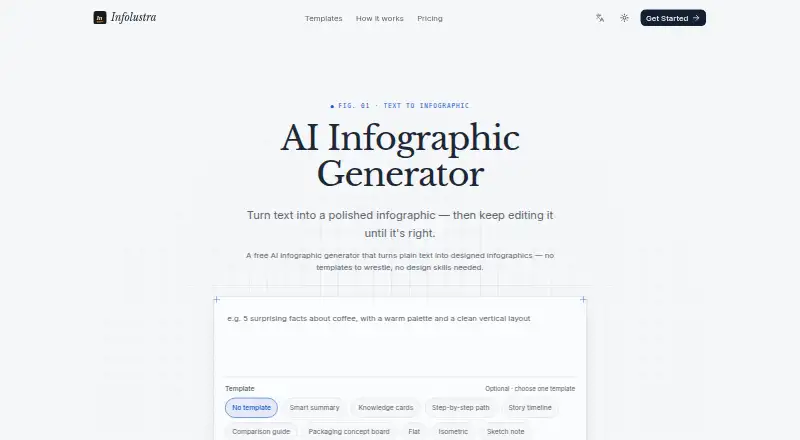
What Infolustra is
Infolustra turns plain text into infographics that users can keep editing. Describe the graphic, choose a shape and style, generate it, then refine wording, colors, or layout with further instructions. The site says generation takes about a minute and that it retains each refined version. Formats include vertical 2:3, square, and landscape 3:2. Example uses include timelines, comparison charts, visual resumes, flowcharts, mind maps, org charts, conceptual frameworks, and graphical abstracts. Styles include Smart summary, Story timeline, Flat, Isometric, Sketch note, Chalkboard, Paper cutout, Clay, Minimal, Corporate, Editorial, Neon, Watercolor, and Bento. The site also links to NotebookLM infographic prompts and a style library. Each generated or edited image uses 10 credits. The Free plan provides 10 credits at signup, enough for one image, with iterative editing and no credit card requirement. A one-time Credit pack costs 9.00 USD for 200 credits that never expire. Monthly plans start with Starter at $19 a month for 700 credits; Pro costs $59 a month for 2,100 credits and priority support.
Who it suits
Infolustra suits people who want to turn text into editable graphics such as timelines, flowcharts, or comparison charts. Its formats and styles also serve different visual presentation needs, while the free signup credits offer one image to start.
What it does well
- Keeps refined versions in a history.
- Offers three aspect ratios.
- Includes varied templates and visual styles.
- Free signup includes 10 credits.
- Credit packs do not expire.
What to know first
- Each generated or edited image costs 10 credits.
- Starter provides 700 credits per month.
- Pro costs $59 a month.
Limits
The Free plan provides 10 credits at signup, enough for one image; each generated or edited image costs 10 credits. The cheapest monthly plan, Starter at $19 a month, provides 700 credits per month.
Plans
| Plan | Billed and limits | Price |
|---|---|---|
| Free | 10 credits on signup (1 image) · No credit card required · Full iterative editing | Free |
| Starter | 700 credits / month (~70 images) · Generate + edit, all aspect ratios · Version history | $19 a month |
| Pro | 2,100 credits / month (~210 images) · Everything in Starter · Priority support | $59 a month |
| Credit pack | 200 credits, one-time. Never expires. · 200 credits · HK$70 option also shown · WeChat Pay available with HKD | $9, paid once |
As infolustra.com lists them, read 4 Oct 2026. The maker's own page has the final word.
Getting started
- Visit the Infolustra website and sign up to receive the Free plan’s 10 credits.
- Describe the infographic you want to create.
- Choose vertical 2:3, square, or landscape 3:2, then select a style.
- Generate the image and refine its wording, colors, or layout with instructions.
- Choose a one-time Credit pack or a monthly plan if you need more credits.
Verdict
Infolustra offers a text-to-infographic workflow with ongoing edits and multiple styles and formats. Consider the 10-credit cost per image when choosing between the free allowance, a one-time pack, or a monthly plan.
Questions
Does Infolustra have a free plan?
Yes. Free provides 10 credits at signup, enough for one image, and includes iterative editing without a credit card.
How much do the paid plans cost?
Starter costs $19 a month for 700 credits. Pro costs $59 a month for 2,100 credits and priority support. A one-time Credit pack costs 9.00 USD for 200 credits that never expire.
How many credits does an image use?
Each generated or edited image costs 10 credits.
Which infographic formats are available?
The generator offers vertical 2:3, square, and landscape 3:2 aspect ratios.
Can I edit an infographic after generating it?
Yes. You can refine wording, colors, or layout with instructions, and the site says refined versions are kept in a history.
What does Infolustra say about payment and personal information?
Its privacy policy says full card numbers are not stored on its servers, it does not sell personal information, and it may share data with service providers under confidentiality agreements or to meet legal obligations and protect rights or safety.
Facts from Infolustra's own pages
- Credit cost
- One generated or edited image costs 10 credits. · infolustra.com, 4 Oct 2026
- Data use
- The privacy policy says it does not sell personal information and may share data with service providers under confidentiality agreements, or to meet legal obligations and protect rights or safety. · infolustra.com, 4 Oct 2026
- Formats
- The generator offers vertical 2:3, square, and landscape 3:2 aspect ratios. · infolustra.com, 4 Oct 2026
- Generation time
- The site says an infographic can be generated in about a minute. · infolustra.com, 4 Oct 2026
- NotebookLM
- The site links to NotebookLM infographic prompts and a NotebookLM style library. · infolustra.com, 4 Oct 2026
- Payment data
- The privacy policy says payment details are handled by third-party payment processors and full card numbers are not stored on its servers. · infolustra.com, 4 Oct 2026
- Product
- Infolustra turns plain text into designed infographics that users can continue editing. · infolustra.com, 4 Oct 2026
- Security
- The privacy policy says Infolustra uses encryption in transit, access controls, and regular security reviews. · infolustra.com, 4 Oct 2026
- Support
- The Pro plan includes priority support, and the privacy policy says users can contact the service with support requests through the website-provided email address. · infolustra.com, 4 Oct 2026
- Templates
- The site offers templates and styles including Smart summary, Story timeline, Flat, Isometric, Sketch note, Chalkboard, Paper cutout, Clay, Minimal, Corporate, Editorial, Neon, Watercolor, and Bento. · infolustra.com, 4 Oct 2026
- Use cases
- Examples include timelines, comparison charts, visual resumes, flowcharts, mind maps, org charts, conceptual frameworks, and graphical abstracts. · infolustra.com, 4 Oct 2026
- Version history
- The site says every refined version is kept. · infolustra.com, 4 Oct 2026
- Workflow
- Users describe an infographic, choose its shape and style, generate it, and refine the wording, colors, or layout with instructions. · infolustra.com, 4 Oct 2026
Where Infolustra stands on Freedom251
- AI Infographic Makers#14 of 24
- Infographic Software#27 of 42
- Infographic Makers#19 of 26