Freedom251 › AI Infographic Makers

Infogiph
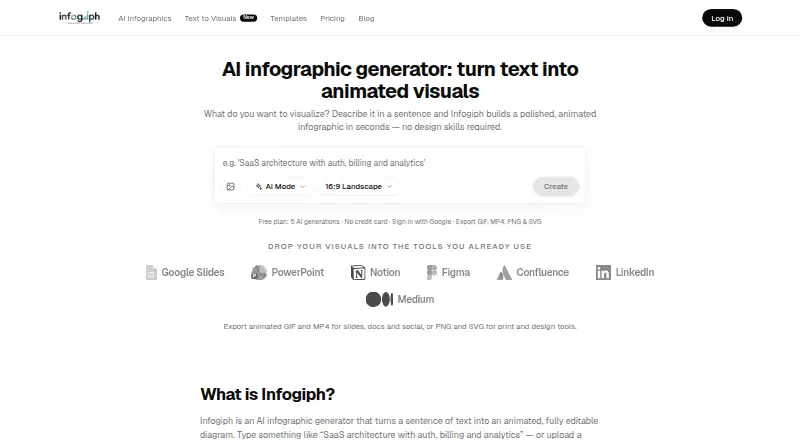
What Infogiph is
Infogiph creates animated, editable infographics and diagrams from text prompts or uploaded sketches and screenshots. On its canvas, users can adjust labels, icons, colors, layout, and animation pacing. The homepage describes more than 114 templates across 15 categories; the Free plan lists 106 templates and the full editor. Exports include animated GIF and MP4, plus static PNG and SVG. PDF export is not available. The service names Google Slides, PowerPoint, Notion, Figma, Confluence, LinkedIn, and Medium as destinations for visuals, and describes uses in product marketing, engineering and DevRel, operations, and education. Infogiph is a web service; API access is listed as a Max plan benefit. Free includes five lifetime AI generations, while the terms also state that free accounts are limited to one generation per day. Pro costs $12.00 per month and Max costs $29.00 per month. Prompts and uploaded images are sent to OpenRouter or Google for generation; the privacy policy says uploaded images are not stored on Infogiph’s servers after processing.
Who it suits
Infogiph suits people creating diagrams or infographics for marketing, engineering and DevRel, operations, or education. It may also suit users who want to edit visuals on a canvas and export them in animated or static formats.
What it does well
- Editable labels, icons, colors, layout, and pacing
- Animated GIF and MP4 exports
- Static PNG and SVG exports
- Free plan includes the full editor
- Names seven destinations for visuals
What to know first
- Free plan includes five lifetime AI generations
- Terms also limit free accounts to one generation daily
- PDF export is not available
- API access is listed only with Max
Limits
The Free plan lists five lifetime AI generations, while the terms state that free accounts are limited to one AI generation per day. Free exports include an Infogiph watermark; Pro includes 500 generations per month, and Max lists unlimited generations.
Plans
| Plan | Billed and limits | Price |
|---|---|---|
| Free | Free forever · 5 AI generations (lifetime) · Unlimited exports · All 106 templates & full editor · GIF, MP4, PNG & SVG export (1080p-class) · Infogiph watermark | Free |
| Pro | 500 AI generations / month · Unlimited exports · No watermark · HD 2× exports (4K-class MP4 & PNG) · Priority AI generation · Commercial usage license | $12 a month |
| Max | Unlimited AI generations · Everything in Pro · Brand kit · Team workspace & shared diagrams · Priority support · Early access + API | $29 a month |
As infogiph.com lists them, read 4 Oct 2026. The maker's own page has the final word.
Getting started
- Open https://www.infogiph.com/.
- Sign in with Google or GitHub OAuth.
- Choose Free, Pro, or Max based on the listed generation and team features.
- Create a visual from a text prompt or upload a sketch or screenshot.
- Edit the visual on the canvas and export it as GIF, MP4, PNG, or SVG.
Infogiph is a web-based tool for creating animated infographics and diagrams from prompts, sketches, or screenshots. It best suits people who need editable visuals for product communication, technical explanation, operations, or education. Its strongest case is the combination of canvas editing and animated exports; its free generation allowance is too small for regular use.
Overview
Rather than stopping at a generated image, Infogiph lets users adjust labels, icons, colors, layout, and animation pacing on a canvas. That makes it a more flexible fit for refining a visual to suit a presentation or post. The maker describes 114+ animated templates across 15 categories, while the Free plan promises access to 106 templates—a difference worth bearing in mind if a particular template count matters.
Google Slides, PowerPoint, Notion, Figma, Confluence, LinkedIn, and Medium are named as destinations for visuals. These are useful places to use the output, but the product description does not establish direct integrations. Infogiph is best judged as a creation and export tool, not as a connected publishing workflow.
Key features
Prompt- and image-based creation
Users can begin with a text prompt or upload a sketch or screenshot. This supports both creating from a written brief and reworking an existing reference. Because the result stays editable, users can correct labels or adjust its visual treatment without treating the first generation as final. The trade-off is a reliance on a limited generation quota at the lower tier.
Motion, formats, and editing
GIF and MP4 exports cover animated use, while PNG and SVG provide static options. Free includes unlimited exports in these formats at 1080p-class resolution, but Pro is required for the stated HD 2×, 4K-class MP4 and PNG exports. PDF export is not offered. The ability to tune animation pacing adds useful control for moving visuals; users who need a PDF workflow should look elsewhere.
Privacy and ownership
Prompts and uploaded images go to OpenRouter or Google for diagram generation, and uploaded images are not stored on Infogiph’s servers after processing. Traffic uses HTTPS; OAuth tokens use secure HTTP-only cookies managed by Better Auth. Sign-in is through Google or GitHub, with no passwords received or stored by Infogiph. Users own the diagrams they create and grant Infogiph a limited license to process content to provide and improve the service. The maker says it does not sell personal data and identifies Vercel, Cloudflare, Google Firebase, and Stripe among its infrastructure and payment providers.
Pricing
Infogiph is freemium, with paid plans starting at $12 a month. The free tier allows unlimited exports and the full editor, but its generation quota is unusually restrictive for anyone creating regularly: the pricing page says five lifetime generations, while the terms say free accounts are limited to one AI generation per day. Those limits differ; occasional exploration is the safest fit until the allowance is clear.
- Free — free, billed Free forever. Includes five lifetime AI generations, unlimited exports, all 106 templates, the full editor, GIF, MP4, PNG, and SVG export at 1080p-class resolution, and an Infogiph watermark. It is suitable for trying the editor or making a few visuals, not sustained AI-assisted production.
- Pro — $12 a month. Includes 500 AI generations per month, unlimited exports, no watermark, HD 2× exports (4K-class MP4 and PNG), priority AI generation, and a commercial usage license. This is the practical tier for individual creators who need frequent generation, higher-resolution output, or commercial use.
- Max — $29 a month. Includes unlimited AI generations and everything in Pro, plus a brand kit, team workspace and shared diagrams, priority support, early access, and API access. It is aimed at teams or users with high generation volume; those who do not need collaboration, branding, or API access have less reason to pay the premium over Pro.
Platforms
Infogiph is presented as a website service, with API access included on Max. The web editor fits browser-based work; API access gives Max users another way to incorporate the service. No other platform is identified.
Who it's for
Product marketers, engineering and DevRel teams, operations staff, and educators are named use cases. Infogiph is a good fit when those users need a diagram or infographic that can be edited after generation and delivered as motion or a static image. It is less compelling for people who need frequent free generation, PDF output, or a confirmed direct connection to the named publishing destinations.
Pros and cons
- Pro: Prompt and image inputs, followed by canvas editing, support both new visual concepts and revisions to existing references.
- Pro: Animated and static exports cover several common destinations, and Free allows unlimited exports.
- Pro: Pro adds a commercial usage license and higher-resolution MP4 and PNG export.
- Con: Free generation is capped at five lifetime generations on the pricing page, while the terms state one per day.
- Con: Free exports carry a watermark and do not include the stated 4K-class export quality.
- Con: PDF export is unavailable, and named destinations should not be mistaken for confirmed integrations.
Alternatives
Consider Visme if you need a broader web, desktop, and mobile platform footprint or projects measured in slides and pages; its Basic plan includes 500MB storage and 50 slides or pages per project. Choose MilleMots instead for a mobile-first infographic workflow: its free plan supports three infographics per month, one free edit per month, 14 layout styles, and six languages. Datastory is a better match for data visualizations and small teams, with 10 visualizations, up to three team members, and 100 AI credits per month on its free Starter plan.
GetInfographic is another freemium alternative with API, extension, and web platforms; its Free plan offers credits to try its tools without a card. For interactive charts and maps, Infogram offers 35+ chart types and 13 map types on Basic. InfographicMaker.org may suit users who want a straightforward free starting point of five drafts and PNG export, or a Studio tier with brand kits and SVG export.
Jeda.ai is an alternative with a free plan and free trial. MakeInfographic.ai is another option for users comparing freemium infographic tools; its free tier includes 20 monthly credits and five 1K infographics per month.
For a broader comparison, see AI Infographic Makers and Infographic Makers.
Verdict
Choose Infogiph if you need editable, animated diagrams and want control over both the visual details and export format. Pro is the sensible tier for regular individual creation, while Max makes sense when a team needs shared diagrams, a brand kit, or API access. Look elsewhere if PDF export or a generous free generation allowance is essential.
Verdict
Infogiph combines prompt- or image-based diagram generation with canvas editing and several export formats. Check the free-generation limits and the plan features before choosing a tier.
Questions
Is there a free plan?
Yes. Free is listed at $0.00 per free and includes five lifetime AI generations, unlimited exports, the full editor, all 106 listed templates, and a watermark on exports. The terms also state a one-generation-per-day limit for free accounts.
What do the paid plans cost?
Pro costs $12.00 per month. Max costs $29.00 per month.
What platforms does Infogiph support?
Infogiph is a website service. API access is listed as a Max plan benefit.
What file formats can I export?
Exports include animated GIF and MP4, as well as static PNG and SVG. PDF export is not available.
Who owns diagrams made with Infogiph?
The terms state that users own the diagrams they create. Users grant Infogiph a limited license to process content to provide and improve the service.
Where are prompts and uploaded images sent?
The privacy policy says they are sent to OpenRouter or Google for diagram generation. Uploaded images are not stored on Infogiph’s servers after processing.
Facts from Infogiph's own pages
- Account access
- The privacy policy says users sign in through Google or GitHub OAuth and that Infogiph does not receive or store their passwords. · infogiph.com, 4 Oct 2026
- Data handling
- The maker says it does not sell personal data and identifies Vercel, Cloudflare, Google Firebase, and Stripe among its infrastructure and payment providers. · infogiph.com, 4 Oct 2026
- Editing
- Users can edit labels, icons, colors, layout, and animation pacing on the canvas. · infogiph.com, 4 Oct 2026
- Exports
- Exports include animated GIF and MP4 and static PNG and SVG. · infogiph.com, 4 Oct 2026
- Integrations
- The homepage names Google Slides, PowerPoint, Notion, Figma, Confluence, LinkedIn, and Medium as destinations for visuals. · infogiph.com, 4 Oct 2026
- Limits caveat
- The terms state that free accounts are limited to one AI generation per day, while the pricing page lists five lifetime generations for Free. · infogiph.com, 4 Oct 2026
- Ownership
- The terms state that users own diagrams they create and grant Infogiph a limited license to process content to provide and improve the service. · infogiph.com, 4 Oct 2026
- Platform
- The maker presents Infogiph as a website service and lists API access as a Max plan benefit. · infogiph.com, 4 Oct 2026
- Privacy
- The privacy policy says prompts and uploaded images are sent to AI providers OpenRouter or Google for diagram generation, and uploaded images are not stored on its servers after processing. · infogiph.com, 4 Oct 2026
- Product
- Infogiph generates animated, editable infographics and diagrams from text prompts or uploaded sketches and screenshots. · infogiph.com, 4 Oct 2026
- Security
- The privacy policy states that traffic is encrypted with HTTPS and OAuth tokens use secure HTTP-only cookies managed by Better Auth. · infogiph.com, 4 Oct 2026
- Support
- The contact page lists [email protected] for account, export, template, and editor questions, and [email protected] for bug reports. · infogiph.com, 4 Oct 2026
- Templates
- The homepage describes 114+ editable animated templates across 15 categories. · infogiph.com, 4 Oct 2026
- Use cases
- The maker describes uses for product marketing, engineering and DevRel, operations, and education. · infogiph.com, 4 Oct 2026
Where Infogiph stands on Freedom251
- AI Infographic Makers#5 of 24
- Infographic Makers#11 of 26