Freedom251 › Infographic Makers
Drawtify
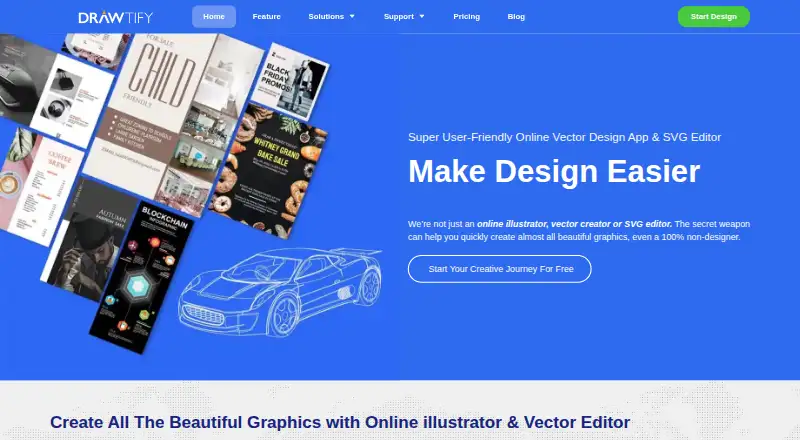
What Drawtify is
Drawtify is a vector editor for making designs with illustration tools, templates, and design elements. It is available on the web and as a desktop app for Windows and macOS. Its template library and illustration features support a range of design work, while the plan determines the available template and element selection, image upload allowance, and export options.
The Free plan costs nothing, billed monthly. It includes the vector editor, limited design templates and elements, 40 MB of image uploads, SD image exports, PDF exports, and folders. The Monthly plan lists more than 3,000 design templates and 1,000 design elements, a 1 GB image upload allowance, HD and vector exports, AI background removal, and PDF exports. Monthly Pro and Yearly Pro are described as fully functional plans and list the same template, element, upload, export, and background-removal provisions as Monthly.
Drawtify can suit people who want browser access or a desktop application, with a free option for basic design tasks and plans that include larger libraries, more upload capacity, and additional export formats. The listed plans distinguish their features and billing periods, with the free option billed monthly and the Pro plans available monthly or yearly.
Who it suits
Drawtify suits people who want a vector design tool with illustration tools and a template library. Its web, Windows, and macOS availability gives users a choice between browser access and a desktop app.
What it does well
- Available on web, Windows, and macOS.
- Includes a vector editor and illustration tools.
- Offers design templates and elements.
- Free plan includes PDF exports and folders.
- Paid plans include HD and vector exports.
What to know first
- The Free plan limits image uploads to 40 MB.
- Free image exports are SD.
- Free includes limited templates and design elements.
- AI background removal is listed on the paid plans.
Limits
The Free plan has limited templates and elements, 40 MB image uploads, and SD image exports. It includes PDF exports and folders.
Plans
| Plan | Billed and limits | Price |
|---|---|---|
| Free | Monthly · Vector editor · chart tools · barcode generator · photo editor · animation tools · 20K+ icons/shapes · limited templates/elements · 40 MB uploads · SD exports · watermark removal | Free |
| Monthly | Monthly · Vector editor · chart tools · barcode generator · photo editor · animation tools · 20K+ icons/shapes · 3,000+ templates · 1,000+ elements · 1 GB uploads · HD/vector exports | $9.99 a month |
| Monthly Pro | Monthly · Fully functional · vector editor · chart tools · barcode generator · photo editor · animation tools · 3,000+ templates · 1,000+ elements · 1 GB uploads · HD/vector exports | $14.99 a month |
| Logo Maker & Animator lifetime | Lifetime license · Mac/Windows desktop app · 7-day free trial | $29.99, paid once |
| Drawtify Designer lifetime | Lifetime license · Mac/Windows desktop app · 7-day free trial | $39.99, paid once |
| Infographic Creator lifetime | Lifetime license · Mac/Windows desktop app · 7-day free trial | $49.99, paid once |
| Yearly Pro | $179.88 list price, shown discounted to $99.99 yearly · Fully functional · vector editor · chart tools · barcode generator · photo editor · animation tools · 3,000+ templates · 1,000+ elements · 1 GB uploads · HD/vector exports | $99.99 a year |
As drawtify.com lists them, read 14 Oct 2026. The maker's own page has the final word.
Getting started
- Open the Drawtify website.
- Choose the Free, Monthly, Monthly Pro, or Yearly Pro plan.
- Use Drawtify on the web or choose its Windows or macOS desktop app.
- Create designs with the vector editor, templates, and illustration tools.
- Export using the formats included with your plan.
Drawtify is a vector graphics editor that pairs editable templates with tools for illustration, photo editing, layout, typography, and animation. It suits beginners and graphic creators who want to make both static designs and motion graphics in one app. Its strongest case is that range; the free plan has tight upload and export-quality limits.
Overview
Vector drawing and SVG editing sit alongside photo and page-layout tools, so Drawtify can support projects that move beyond filling in a template. Editable starting points may help non-designers get a design underway, while illustration tools give more experienced creators room to shape it. That breadth is useful for varied work, though it does not make the plan limits disappear.
The motion editor offers up to 27 basic movement instructions and 14 text movement instructions. Built-in plugins produce barcodes, QR codes, charts, and maps, which can save a switch to another tool when a design needs one of those elements. Drawtify also says its design resources and editable templates may be used commercially.
Key features
Drawtify imports and exports JPG, PNG, PDF, and SVG graphics. For animation, it exports SVG, GIF, APNG, MP4, and WebM, a useful spread for projects with different output needs. Its resource library includes high-definition pictures from Pixabay and Unsplash.
The online version provides autosave, online storage, and folder editing for Free and PRO users. Those features help keep online work organized, but they do not change the free tier’s 40 MB image-upload cap or SD image exports. The desktop download calls for Windows 7 or later or macOS High Sierra or later, at least 2 GB RAM, and a 2.2 GHz CPU.
Pricing
The Free plan costs nothing and includes 40 MB image uploads, SD image exports, and limited templates and design elements. It is a reasonable way to explore the editor, but the small upload allowance and restricted library make it a poor fit for sustained work with larger images or varied templates.
Monthly costs $9.99 a month, billed Monthly. It raises image uploads to 1 GB and includes 3000+ templates and 1000+ design elements, but still comes without some pro features. It fits users who need a broader library and larger uploads without the fully functional tier.
Monthly Pro costs $14.99 a month, billed Monthly. It keeps the 1 GB upload allowance and the same library sizes while offering full functionality, making it the more suitable monthly option for users who need the complete feature set.
Yearly Pro has custom pricing. It includes a fully functional plan, 3,000+ design templates, 1,000+ design elements, 1 GB image uploads, HD and vector exports, and AI background removal. Those output and editing features matter for users whose work needs higher-quality exports or background removal; the monthly prices do not establish whether the yearly term saves money.
Platforms
Drawtify is available on the web and as a desktop app for Windows and macOS. The browser version adds autosave and online storage, while the desktop option serves users who prefer an installed editor and meet its stated system requirements.
Who it's for
Drawtify is a good fit for beginners who want templates and graphic creators who need vector drawing, illustration, and motion tools together. It is less suited to users who need generous uploads or HD and vector exports on a free plan, or who only need a focused infographic maker.
Pros and cons
- Pros: Vector, photo, layout, typography, and animation tools share one editor, which suits creators working across static and moving designs.
- Pros: SVG support, five animation export formats, and plugins for charts, maps, barcodes, and QR codes cover several practical output and design needs.
- Pros: Free and PRO online users get autosave, online storage, and folder editing.
- Cons: The Free plan limits uploads to 40 MB and exports to SD quality, with only limited templates and design elements.
- Cons: Monthly includes some pro features only in the more expensive Monthly Pro plan, so the $9.99 a month tier may not cover every workflow.
Alternatives
For motion-first projects, Animaker is worth considering: its free plan has basic animation tools and limited premium assets, but watermarks exports. Visme may suit slide and page projects, with 500MB storage and up to 50 slides or pages per project on its free Basic plan. If a free infographic-focused option is the priority, Infografix is free to use, with no usage limits stated.
Napkin AI is another option for AI-generated visuals: its free plan includes 500 AI credits per week, unlimited editing and file import, and PNG and PDF exports with Napkin branding. GetInfographic offers a free plan with credits to get started, access to every tool, and instant generation. Graficto suits users who want a limited free visual maker, with up to five visuals and PNG and JPG export. GraphMake offers a free plan with 80+ visual widgets, makers, and utilities, 92+ editable templates, standard PNG, and PDF and JSON project export. Infogiph may suit users seeking infographic templates and animated exports; its free plan includes five lifetime AI generations, unlimited exports, all 106 templates, and a watermark.
Readers comparing tools by category can browse Infographic Makers, Vector Graphics Software, Infographic Software, and Graphic Design Software.
Verdict
Choose Drawtify if you want a single editor for vector work, templates, and animation, especially on the web or across Windows and macOS. Its main advantage is the range of tools and export formats; look elsewhere if the free plan’s upload and SD-export limits are too restrictive, or if you need fully functional editing without the Monthly Pro price.
Verdict
Choose Drawtify if you want a vector editor with template and illustration tools, particularly if web, Windows, or macOS access suits your workflow. The Free plan covers basic editing and includes PDF exports. Consider a paid plan if you need the larger template and element library, 1 GB uploads, HD and vector exports, or AI background removal.
Questions
Is Drawtify free?
Yes. The Free plan costs nothing, is billed monthly, and includes the vector editor, limited templates and elements, 40 MB image uploads, SD image exports, PDF exports, and folders.
Which platforms are available?
Drawtify is available on the web and as a desktop app for Windows and macOS.
What does the Monthly plan include?
It lists 3,000+ design templates, 1,000+ design elements, 1 GB image uploads, HD and vector exports, AI background removal, and PDF exports.
What are Monthly Pro and Yearly Pro?
Both are described as fully functional plans. Their listed features include 3,000+ templates, 1,000+ elements, 1 GB image uploads, HD and vector exports, and AI background removal.
Does Drawtify have a template library?
Yes. The Free plan has limited design templates and elements; the listed paid plans include 3,000+ templates and 1,000+ elements.
Facts from Drawtify's own pages
- Animation
- Its motion editor advertises 27 basic movement instructions plus 14 text movement instructions. · drawtify.com, 14 Oct 2026
- API and SDKs
- The official documentation describes built-in design plug-ins and Google Drive API usage but does not publish a developer API or SDK reference. · drawtify.com, 14 Oct 2026
- App status
- The Mac App Store listing shows version 1.27.5 dated December 2023 and requires macOS 10.15 or later. · apps.apple.com, 14 Oct 2026
- Asset libraries
- Official documentation lists about 1,000 design elements, 20,000 vector icons and shapes, 100,000 HD backgrounds, 200 color schemes and about 1 million HD pictures sourced through Unsplash and Pixabay. · docs.drawtify.com, 14 Oct 2026
- Commercial use
- The feature page says design resources and editable templates may be used commercially. · drawtify.com, 8 Oct 2026
- Company size
- LinkedIn lists Drawtify, Inc. as a privately held software-development company with 2–10 employees. · linkedin.com, 14 Oct 2026
- Design tools
- The product includes vector drawing, photo editing, animation, layout, and typography tools. · drawtify.com, 8 Oct 2026
- Desktop app
- Yes · drawtify.com, 19 Sept 2026
- Documentation
- The documentation site covers the product, interface, resources, workflows and tutorials, and links to a complete documentation index. · docs.drawtify.com, 14 Oct 2026
- Free plan
- Yes · drawtify.com, 19 Sept 2026
- Illustration tools
- Yes · drawtify.com, 19 Sept 2026
- Import and export
- The software imports JPG, PNG, JIF, SVG and PDF assets and exports JPG, PNG, PDF, SVG, GIF, APNG, MP4 and WebM outputs, with direct printing. · drawtify.com, 14 Oct 2026
- Integrations
- The privacy policy states that Google and Dropbox OAuth are used for sign-in or saving work, and Google Drive API access can create folders or save files after authorization. · drawtify.com, 14 Oct 2026
- Integrations and resources
- Drawtify says its resource library includes high-definition pictures from Pixabay and Unsplash. · drawtify.com, 8 Oct 2026
- Intended users
- The feature page says the editable templates are intended to help graphic creators and beginners, especially non-designers. · drawtify.com, 8 Oct 2026
- Layers and 3D
- The product advertises unlimited layers, layer locking/hiding and built-in 3D effects. · drawtify.com, 14 Oct 2026
- Layout
- Layout functions include guides, scaling, layers, alignment, grouping and drag-and-drop replacement of images, icons and shapes. · drawtify.com, 14 Oct 2026
- Licence
- Drawtify’s terms grant use of its software but prohibit copying site code or assets and reverse engineering, indicating a proprietary product rather than open-source software. · drawtify.com, 14 Oct 2026
- Limit: colour coverage
- A Capterra reviewer says not all colours are available and asks for broader colour selection. · capterra.com, 14 Oct 2026
- Limit: dated content
- A Capterra reviewer says many templates and elements feel dated and need redesign, and that the editor is difficult to learn compared with other online editors. · capterra.com, 14 Oct 2026
- Limit: free tier
- TrustRadius reviewers report that the free version limits vector-format downloads, layers and font choices, while free outputs carry watermarks. · trustradius.com, 14 Oct 2026
- Limit: performance
- G2 and TrustRadius reviewers mention occasional slowness or lag, especially with high-end graphics or while uploading images. · g2.com, 14 Oct 2026
- Motion graphics
- Its motion editor offers up to 27 basic movement instructions and 14 text movement instructions. · drawtify.com, 8 Oct 2026
- Multi-page editing
- Multi-page documents can show facing pages, isolate the first page and reorder pages. · drawtify.com, 14 Oct 2026
Where Drawtify stands on Freedom251
- Infographic Makers#2 of 26
- Vector Graphics Software#4 of 51
- Graphic Design Software#26 of 150
- Design tools#26 of 146
- Infographic Software#9 of 42