Freedom251 › Game Boy Emulators
GoBoy
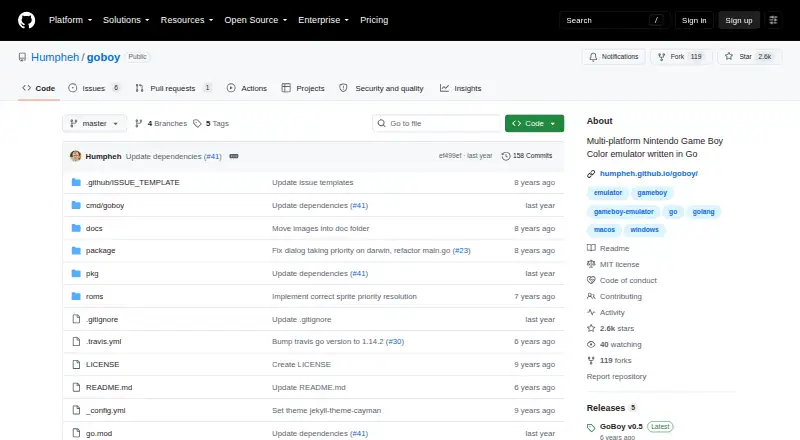
What GoBoy is
GoBoy is a free, open-source emulator for Nintendo Game Boy and Game Boy Color, available for Linux, macOS, and Windows. It runs most Game Boy games and some Game Boy Color games, with colour and sound support. For battery-backed ROMs, it creates a save file beside the ROM and updates it every second while the game runs. Debugging options include printing opcodes and register values and toggling individual sound channels. The listed controls are the arrow keys, Z, X, Enter, and Backspace, with shortcuts for palette cycling and fullscreen. GoBoy uses the Pixel library for graphics and controls, which requires OpenGL; Linux builds also require GTK, and Windows 10 builds require MinGW. The project describes itself as a work in progress and a development exercise, and lists unresolved graphics, audio, and cartridge issues. Save states and boot ROM support remain TODOs. It says it passes Blargg's cpu_instrs and instr_timing test ROMs. The repository identifies the license as MIT, and users can download a release or install from source with Go.
Who it suits
GoBoy suits people looking for a free Game Boy emulator on Linux, macOS, or Windows, particularly those interested in debugging options. Users who need save states or boot ROM support should note that both remain TODOs.
What it does well
- Free and open source under the MIT license
- Runs most Game Boy games
- Supports colour and sound
- Battery-backed ROM saves update every second
- Offers opcode, register, and sound-channel debugging
What to know first
- Game Boy Color support covers some games
- Save states and boot ROM support are TODOs
- Graphics, audio, and cartridge issues remain unresolved
- Requires OpenGL; Linux and Windows 10 builds have added dependencies
Limits
GoBoy has no save states or real-time clock support, and boot ROM support remains a TODO. The project also lists unresolved graphics, audio, and cartridge issues.
Plans
| Plan | Billed and limits | Price |
|---|---|---|
| GoBoy | No paid plans or pricing stated on the pages opened | Free |
As github.com lists them, read 9 Oct 2026. The maker's own page has the final word.
Getting started
- Open the GoBoy GitHub repository.
- Choose a release download or install from source with Go using the repository’s documented commands.
- Check that OpenGL is available; Linux builds also require GTK, and Windows 10 builds require MinGW.
- Run GoBoy and use the arrow keys, Z, X, Enter, and Backspace as controls.
GoBoy is a Go-based emulator for Nintendo Game Boy and Game Boy Color software. It suits desktop players, emulator hobbyists, and developers who value inspection controls over a finished commercial-style interface. Choose it for a free, open-source way to explore classic ROMs; look elsewhere if save states, complete cartridge compatibility, or a polished release are essential.
Overview
GoBoy runs most Game Boy games and some Game Boy Color games, with colour and sound support. That coverage is useful for routine play and experimentation, but unresolved graphics, audio, and cartridge issues make results less dependable across a larger library. The project passes Blargg's cpu_instrs and instr_timing test ROMs, a positive sign for core CPU behavior that does not remove the emulator's broader compatibility limits.
The project calls itself a work in progress and says it was primarily built as a development exercise. That explains its emphasis on diagnostics, while also setting expectations for unfinished behavior. GoBoy is MIT-licensed, and the project welcomes pull requests from contributors.
Key features
Debugging and sound controls
GoBoy can print opcodes and register values, giving developers and technically curious players visibility into emulated execution. Individual sound channels can be toggled, which is useful when investigating audio behavior or isolating a problem in a ROM. These controls are a genuine advantage for development work, but they matter little to someone seeking a purely plug-and-play player.
Input and display shortcuts
The default controls are the arrow keys, Z, X, Enter, and Backspace. Shortcuts cycle palettes and switch fullscreen mode. The documented layout is straightforward for a keyboard, although the available controls are the ones provided by the project rather than a broader controller configuration system.
Battery saves, but no save states
For battery-backed ROMs, GoBoy creates a save file beside the ROM and updates it every second while the game is running. That supports the original style of persistent game saves and reduces the risk of losing recent progress during normal play. There are no save states, however, so you cannot capture a quick snapshot before a difficult section or return instantly to an earlier moment. Real-time clock support is also absent.
Installation and requirements
You can download a release or build from source with Go using the repository's documented commands. Graphics and input use the Go Pixel library and require OpenGL. Linux builds also require GTK, while Windows 10 builds require MinGW. Those dependencies are manageable for developers, but they make a preconfigured consumer experience less certain than the zero-cost price might imply.
Pricing
| Plan | Price | What you get |
|---|---|---|
| GoBoy | free | Open-source emulator for Game Boy and Game Boy Color, with colour, sound, debugging options, battery-backed saves, and desktop builds |
There is no paid tier or free trial. The free plan is therefore the complete offering, making GoBoy suitable for anyone who wants to experiment without a purchase. Its cost advantage does not change the missing save states, absent real-time clock, or unresolved emulator issues.
Platforms
GoBoy supports Linux, macOS, and Windows. The operating-system choice is broad for a desktop emulator, but platform setup still depends on the stated OpenGL requirement, with GTK additionally needed for Linux builds and MinGW for Windows 10 builds.
Who it's for
GoBoy is a strong fit for developers learning emulator internals, contributors interested in a Go project, and players who mainly need standard battery saves and are comfortable with an unfinished implementation. Its opcode, register, and per-channel audio controls provide practical investigative value that many casual players will never use.
It is a poor fit for anyone who relies on save states, needs a real-time clock, expects every cartridge type to work consistently, or wants a mature interface with minimal setup. The work-in-progress status and unresolved graphics, audio, and cartridge problems should be treated as central selection criteria, not minor caveats.
Pros and cons
Pros
- Free and MIT-licensed: there is no purchase barrier, and the source is open for inspection and contribution.
- Useful developer diagnostics: opcode and register output, plus individual sound-channel toggles, support debugging and emulator development.
- Colour and sound support: it handles most Game Boy games and some Game Boy Color games rather than limiting itself to monochrome software.
- Automatic battery saves: save files sit beside ROMs and update every second during play.
- Three desktop operating systems: Linux, macOS, and Windows are supported.
Cons
- No save states or real-time clock: quick snapshots and clock-dependent behavior are unavailable.
- Unfinished compatibility: unresolved graphics, audio, and cartridge issues can undermine dependable play.
- Build dependencies: OpenGL is required, with GTK on Linux and MinGW for Windows 10 builds.
- Work-in-progress status: the project is a development exercise rather than a finished, consumer-focused emulator.
Alternatives
Browse the Game Boy Emulators list when you want to compare this category broadly. GBCC is another free Game Boy and Game Boy Color emulator for Android, Linux, macOS, and Windows. Choose SkyEmu if you need Android, iOS, web, or desktop availability and can accept beta-quality DS emulation; it also offers stable builds for free and is open source.
Virtual Jaguar is free across Android, iOS, Linux, macOS, web, and Windows, but its open-source emulator core requires a libretro frontend such as RetroArch. binjgb is a free MIT-licensed option for Linux, macOS, web, and Windows with no stated pricing or usage limits. ChillyGB is free GPL-3.0 software for Linux, web, and Windows, while Coffee GB is a free MIT-licensed emulator for Android, Linux, macOS, and Windows; its ROM files are not included.
SameBoy is worth choosing when Super Game Boy emulation matters alongside Game Boy and Game Boy Color support; it is open source, free to use, and also has an iOS build. GB Enhanced+ is another free open-source GPLv2 emulator for Linux, macOS, and Windows.
Verdict
Choose GoBoy if you want a no-cost, open-source desktop emulator with meaningful opcode, register, and sound-channel diagnostics, and you can live with an evolving project. Its main reason to look elsewhere is the combination of missing save states and unresolved graphics, audio, and cartridge support: players who value reliable broad compatibility or polished convenience will be better served by a more complete alternative.
Verdict
GoBoy provides Game Boy emulation with colour, sound, battery-backed saves, and debugging options at no charge. Its work-in-progress status and listed unresolved issues are important to weigh, especially if you need save states or boot ROM support.
Questions
Is GoBoy free?
Yes. The listed plan is free, and the repository identifies the license as MIT.
Which systems does it emulate?
GoBoy supports Nintendo Game Boy and Nintendo Game Boy Color. It runs most Game Boy games and some Game Boy Color games.
Which computer platforms are supported?
The listed platforms are Linux, macOS, and Windows. OpenGL is required; Linux builds also require GTK, and Windows 10 builds require MinGW.
Does GoBoy support save states?
No. Save states are listed as a TODO. Battery-backed ROMs instead get a save file beside the ROM, updated every second while the game runs.
How can I get GoBoy?
Users can download a release or install from source with Go using the repository’s documented commands.
Can users contribute?
Yes. The project invites users to open pull requests and contribute to emulator development.
Facts from GoBoy's own pages
- Colour and sound
- The emulator supports colour and sound. · github.com, 9 Oct 2026
- Controls
- The listed controls are the arrow keys, Z, X, Enter, and Backspace; the palette can be cycled with = in DMG mode and F toggles fullscreen. · humpheh.github.io, 9 Oct 2026
- Debugging
- Debug functions can print opcodes and register values at each step and toggle individual sound channels. · github.com, 9 Oct 2026
- Dependencies
- Graphics rendering and control binding use the Go pixel library and require OpenGL; Linux builds also require GTK, and Windows 10 builds require MinGW. · github.com, 9 Oct 2026
- Development status
- The project describes itself as a work in progress and says it was primarily built as a development exercise. · github.com, 8 Oct 2026
- Game support
- The emulator can run most Game Boy games and some Game Boy Color games, with color and sound support. · github.com, 8 Oct 2026
- Installation
- Users can download a release or install from source with Go using the repository's documented commands. · github.com, 9 Oct 2026
- Known limitations
- The project lists sprite rendering glitches, MBC3 banking and clock support, audio issues, and save states as bugs or TODO items. · github.com, 9 Oct 2026
- License
- The repository identifies its license as MIT. · github.com, 9 Oct 2026
- Platforms
- GoBoy is compatible with macOS, Windows, and Linux. · github.com, 9 Oct 2026
- Purpose
- GoBoy is a Go-written Nintendo Game Boy and Game Boy Color emulator that can run most GB games and some CGB games. · github.com, 9 Oct 2026
- Release
- The releases page lists GoBoy v0.5 as the latest release and describes improvements to audio timing, graphics rendering, and performance. · github.com, 9 Oct 2026
- Requirements
- GoBoy uses the Pixel library for graphics and controls, which requires OpenGL; the page also lists GTK for Linux builds and MinGW for Windows 10 builds. · github.com, 8 Oct 2026
- Save files
- For battery-backed ROMs, GoBoy creates a .sav file beside the ROM and updates it every second while the game runs. · github.com, 9 Oct 2026
- Status
- The project describes itself as a development exercise that is still a work in progress. · github.com, 9 Oct 2026
- Support and contributions
- The project invites users to open pull requests and contribute to emulator development. · github.com, 8 Oct 2026
- Testing
- The project says it passes Blargg's cpu_instrs and instr_timing test ROMs and runs those checks on each commit. · github.com, 9 Oct 2026
Where GoBoy stands on Freedom251
- Game Boy Emulators#9 of 23