Freedom251 › Game Boy Emulators
ChillyGB
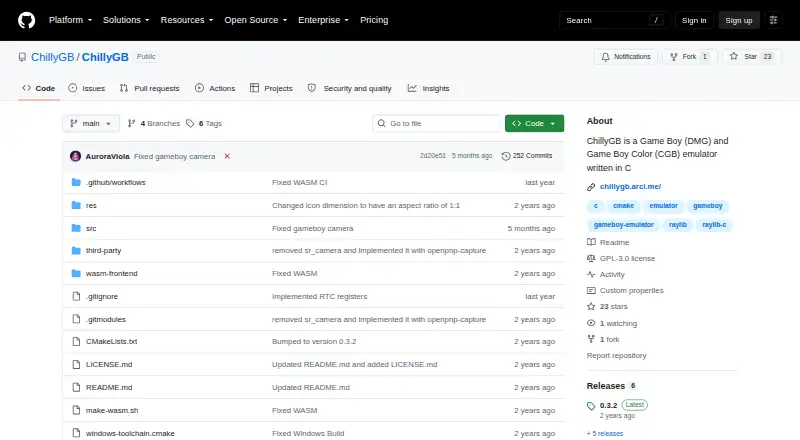
What ChillyGB is
ChillyGB is a free emulator for Game Boy (DMG) and Game Boy Color (CGB) games, written in C. The project lists Windows, Linux, Nintendo Switch, and a WebAssembly browser version. Supported cartridge types include MBC1, MBC2, MBC3 with a real-time clock, MBC5, MBC7, and Pocket Camera. Features include BootROM support, BESS-compliant save states, a palette editor, integer scaling, a pixel grid, color correction, and GameGenie and GameShark cheats. Players can use basic gamepads and edit inputs; the Pocket Camera can use a webcam. A debugger provides instruction, memory, stack, and register views, plus status and editors for listed PPU registers. The browser port's audio is described as buggy. Link cable emulation and netplay are not supported, and the project excludes SGB functions, MBC6, HUc1, HUc3, and infrared communication. ChillyGB is licensed under GNU GPL v3.0. Version 0.3.2 is listed as the latest release; save states made before 0.3.0 will not work.
Who it suits
ChillyGB suits players looking for a free Game Boy or Game Boy Color emulator on Windows, Linux, Switch, or in a browser. Its debugger may also suit users who want instruction, memory, stack, and register views.
What it does well
- Supports Game Boy and Game Boy Color.
- Includes save states and real-time clock support.
- Offers GameGenie and GameShark cheats.
- Includes a debugger with register views.
- Licensed under GNU GPL v3.0.
What to know first
- Link cable emulation is not supported.
- Netplay is not supported.
- Browser-port audio is described as buggy.
- Save states from before version 0.3.0 will not work.
Plans
| Plan | Billed and limits | Price |
|---|---|---|
| ChillyGB | GPL-3.0 software · no paid plans stated | Free |
As github.com lists them, read 4 Oct 2026. The maker's own page has the final word.
Getting started
- Visit the ChillyGB project page.
- Choose a listed platform: Windows, Linux, Nintendo Switch, or the linked browser version.
- Use the project's release or browser route for the selected platform.
ChillyGB is a free emulator for Game Boy and Game Boy Color games, with versions for desktop, browser, and Nintendo Switch. It is best suited to players who want display controls, cheats, or debugging tools as well as gameplay. Its range of cartridge support is a strength, but the lack of link cable emulation and netplay makes it a poor choice for multiplayer.
Overview
ChillyGB aims for simplicity and accuracy while covering both the original Game Boy (DMG) and Game Boy Color (CGB). Its combination of cartridge support, display adjustments, save states, and a debugger gives it more depth than a basic emulator. The breadth is useful for players exploring different kinds of games and for developers inspecting how a game runs.
That breadth has boundaries. ChillyGB will not implement Super Game Boy functions, MBC6, HUc1, HUc3, or infrared communication. Link cable emulation and netplay are also absent, so it is not the right fit for connected play. The browser version has a separate caveat: its audio has some bugs.
Key features
Cartridges, saves, and cheats
Supported cartridges include no-MBC, MBC1, MBC2, MBC3 with a real-time clock, MBC5, MBC7, and Pocket Camera. This covers a wide range of cartridge types, including RTC-dependent games and the Pocket Camera, but not the unsupported cartridge families. BESS-compliant save states help players resume games, while GameGenie and GameShark cheats offer a way to modify gameplay.
There is a compatibility cutoff for saves: states created before version 0.3.0 do not work with the 0.3.2 release. Players moving from an older version should account for that rather than assume their saved states will carry over.
Display and controls
Integer scaling, a pixel grid, GBC color correction, and a palette editor give players several ways to adjust the image. Basic gamepad support and an input editor cover common control needs. These options make ChillyGB more adaptable for people who care about how games look or want to change their inputs, though they do not compensate for the missing multiplayer features.
Camera and debugging
Pocket Camera games can use webcam support. On Nintendo Switch, the project also describes Pocket Camera support through the IR sensor and native accelerometer support for MBC7 games, adding platform-specific ways to use those accessories.
The debugger provides instruction, memory, stack, and register viewers, along with editors for LCDC, STAT, IE, and IF and status for other PPU registers. That makes ChillyGB a more compelling option for people examining game behavior than for players who only need a straightforward way to launch games.
Planned work
Online multiplayer through an emulated link cable, rewind, a ROM folder, MBC5 rumble, and a GB Printer are planned. They should not be treated as current capabilities: in particular, anyone who needs link play or rumble now should choose a different emulator.
Pricing
ChillyGB is free: the ChillyGB plan costs nothing, and the software is licensed under GNU General Public License v3.0. There are no paid plans stated, so there is no higher tier to consider for additional features. The free version includes the emulator’s stated capabilities, with no trial period or subscription terms to weigh.
Platforms
ChillyGB supports Windows, Linux, WebAssembly in a browser, and Nintendo Switch. The browser version provides an option for playing without a desktop release, but its audio bugs may make it a less suitable choice for sound-sensitive play. Release notes mention Windows, Linux, and Switch support, while the README links to the browser port.
Who it's for
ChillyGB is a strong fit for solo players who want save states, cheats, picture adjustments, and a broad selection of cartridge support in a free emulator. Its debugger also makes it worth considering for developers or technically curious players who want to inspect instructions, memory, registers, or PPU state. It is not a good match for people whose priority is link cable play or netplay, or who need one of the explicitly unsupported cartridge or peripheral features.
Pros and cons
- Pro: Support for multiple MBC types, RTC cartridges, MBC7, and Pocket Camera gives it useful range across Game Boy and Game Boy Color titles.
- Pro: Display adjustments, cheats, save states, and a debugger serve different needs without a paid tier.
- Pro: Windows, Linux, browser, and Switch support provide several ways to use it.
- Con: No link cable emulation or netplay rules it out for multiplayer sessions.
- Con: Save states from before version 0.3.0 are incompatible with 0.3.2, which can interrupt a move to the current release.
- Con: Browser audio has bugs, and SGB functions, MBC6, HUc1, HUc3, and infrared communication are out of scope.
Alternatives
For a broader comparison, browse the Game Boy Emulators directory. Choose Virtual Jaguar if you want an open-source emulator core on Android, iOS, macOS, or other listed platforms and are comfortable using a libretro frontend such as RetroArch. GBCC is another free emulator option for Android, Linux, macOS, and Windows.
SkyEmu may suit you better if you want broader platform availability, including iOS and macOS; its DS emulation is beta quality. Consider binjgb for a free, MIT-licensed option on Linux, macOS, web, or Windows. Coffee GB is a free alternative for Android, Linux, macOS, and Windows; its ROM files are not included.
GoBoy is another free option for Linux, macOS, and Windows. SameBoy is worth considering if you want Super Game Boy emulation, which ChillyGB does not support; it is free on Linux, macOS, and Windows and is also available on iOS. GB Enhanced+ is a free, GPLv2-licensed option for Linux, macOS, and Windows.
Verdict
Choose ChillyGB if you want a free Game Boy and Game Boy Color emulator with broad cartridge coverage, useful display and cheat options, and a detailed debugger across desktop, browser, and Switch. Its main advantage is the range of tools alongside standard emulation. Look elsewhere if multiplayer, browser audio reliability, or one of its excluded cartridge and peripheral features is central to your needs.
Verdict
ChillyGB offers a broad set of emulation, display, input, and debugging features across several listed platforms. Note that it lacks link cable emulation and netplay, and older save states are incompatible with the listed 0.3.2 release.
Questions
How much does ChillyGB cost?
It is listed as free, with a free plan at no cost. No paid plans are stated.
Which systems and platforms does it support?
It supports Game Boy (DMG) and Game Boy Color (CGB). Listed platforms are WebAssembly/browser, Windows, Linux, and Nintendo Switch.
Does it support save states, link cable emulation, or netplay?
Save states are supported. Link cable emulation and netplay are not.
Is ChillyGB open source?
It is licensed under GNU General Public License v3.0.
Are older save states compatible with version 0.3.2?
The 0.3.2 release notes say save states made before version 0.3.0 will not work.
Does the browser version have any stated limitation?
The project notes that audio in the WebAssembly browser version is a little buggy.
Facts from ChillyGB's own pages
- Cartridges
- Cartridge support includes no MBC, MBC1, MBC2, MBC3 with RTC, MBC5, MBC7, and Pocket Camera. · github.com, 4 Oct 2026
- Cheats and camera
- It supports GameGenie and GameShark cheats and webcam support for the Pocket Camera. · github.com, 4 Oct 2026
- Controls and camera
- The README lists basic gamepad support, input editing, and webcam support for Pocket Camera. · github.com, 3 Oct 2026
- Controls and display
- The project lists basic gamepad support, integer scaling, a pixel grid, GBC color correction, and an input editor. · github.com, 4 Oct 2026
- Debugger
- The listed debugger includes instruction, memory, stack, and register viewers, plus LCDC, STAT, IE, and IF editors. · github.com, 4 Oct 2026
- Emulation features
- Listed features include GBC support, BootROM support, a palette editor, Pixel FIFO, and BESS-compliant save states. · github.com, 4 Oct 2026
- Latest listed release
- The releases page labels version 0.3.2 as the latest release. · github.com, 3 Oct 2026
- License
- The software is licensed under GNU General Public License v3.0. · github.com, 4 Oct 2026
- Nintendo Switch features
- The README lists Pocket Camera support through the IR sensor and native accelerometer support with MBC7 games for Switch. · github.com, 3 Oct 2026
- Not supported
- The project says it will not implement SGB functions, MBC6, HUc1, HUc3, or infrared communication. · github.com, 4 Oct 2026
- Planned features
- Planned items include online multiplayer via emulated link cable, rewind, frame blending, and GB Printer support. · github.com, 4 Oct 2026
- Platform releases
- Release notes mention Windows, Linux, and Switch support; the README also links to a WASM browser port. · github.com, 4 Oct 2026
- Product
- ChillyGB is a Game Boy (DMG) and Game Boy Color (CGB) emulator written in C that aims for simplicity and accuracy. · github.com, 4 Oct 2026
- Purpose
- ChillyGB is a Game Boy (DMG) and Game Boy Color (CGB) emulator written in C that aims for simplicity and accuracy. · github.com, 3 Oct 2026
- Save state compatibility
- The 0.3.2 release notes say save states made before version 0.3.0 will not work. · github.com, 4 Oct 2026
- Unsupported features
- The project says it will not implement SGB functions, MBC6, HUc1, HUc3, or infrared communication. · github.com, 3 Oct 2026
- Web version
- The project links to a browser version and notes that audio in the WASM port is a little bugged. · github.com, 4 Oct 2026
Where ChillyGB stands on Freedom251
- Game Boy Emulators#4 of 23