Freedom251 › Label Design Software
gLabels
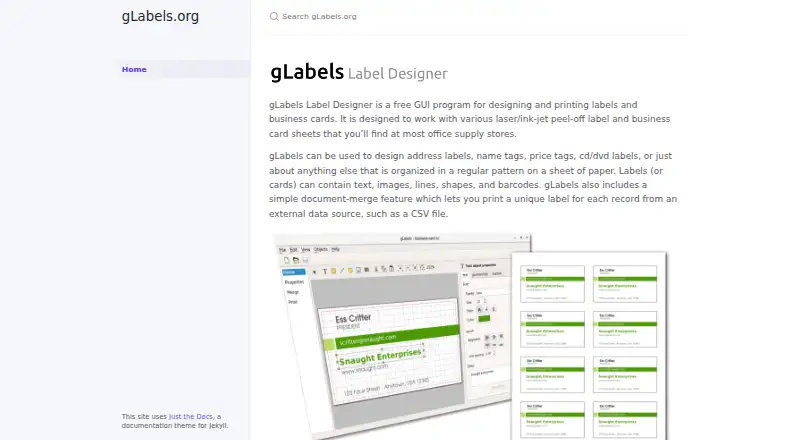
What gLabels is
gLabels is a free desktop program for designing and printing labels and business cards on peel-off sheets for laser or ink-jet printers. Designs can combine text, images, lines, shapes, and barcodes. Its document-merge feature takes records from an external data source such as a CSV file and can produce a different label for each record. The project gives address labels, name tags, price tags, and CD/DVD labels as example uses. It is listed for Linux, macOS, and Windows. The project describes gLabels-qt as development toward the next major release, gLabels 4, but says there are currently no official gLabels 4 releases or self-hosted binary snapshots; users are encouraged to build the code themselves. Planned additions include a Qt6 rewrite, an activity-based interface, user-defined variables, continuous-roll label support, and new product templates. gLabels-qt is free software under GNU GPL version 3 or, at the user's option, a later version, and is distributed without warranty. The legacy 3.x version has not been supported since 2018.
Who it suits
gLabels may suit people who need to lay out labels or business cards for laser or ink-jet sheets. Its merge feature is relevant to users printing distinct labels from external records such as a CSV file.
What it does well
- Free desktop label and business-card designer.
- Designs can include barcodes and images.
- Document merge supports unique labels per record.
- Listed for Linux, macOS, and Windows.
What to know first
- No official gLabels 4 release is available.
- No self-hosted binary snapshots are available.
- The project encourages users to build the code.
- Legacy 3.x has lacked support since 2018.
Limits
The Free plan is listed as free. gLabels 4 has no official release or self-hosted binary snapshot, and the legacy 3.x version has not been supported since 2018.
Plans
| Plan | Billed and limits | Price |
|---|---|---|
| Free | Free GUI label and business-card designer | Free |
As glabels.org lists them, read 4 Oct 2026. The maker's own page has the final word.
Getting started
- Visit the gLabels website.
- Choose a platform: Linux, macOS, or Windows.
- Use the Free plan at no cost.
- For gLabels-qt, build the code yourself; the project has no self-hosted binary snapshots.
gLabels is a desktop label and business-card designer for laser and ink-jet sheets. It suits people who need flexible layouts, barcode elements, or one label per row in a CSV file. Its free, cross-platform approach is compelling for straightforward in-house printing, but the next-generation build is not an official release and the older supported path has ended.
Overview
gLabels focuses on printable peel-off label and business-card stock rather than a general page-layout workflow. You can assemble text, images, lines, shapes, and barcodes on a sheet, then print designs such as address labels, name tags, price tags, and CD/DVD labels. That scope makes it a practical fit for offices, clubs, classrooms, and small operations that already have compatible laser or ink-jet printers.
The document-merge feature is the most useful step beyond one-off artwork. It takes an external source such as a CSV file and produces a distinct label for each record, which is better suited to address lists, inventories, or event badges than manually duplicating a design. It remains a desktop application, so it does not provide a browser-based collaboration model.
Key features
- Sheet design: Text, images, lines, shapes, and barcodes cover the core visual and identification needs of labels and business cards.
- Variable data printing: Document merge turns each external record into its own label, reducing repetitive editing when a list changes.
- Printer support: Laser and ink-jet printers are explicitly supported, matching common office label-sheet workflows.
- Development direction: gLabels-qt, the planned gLabels 4 line, is a Qt6 rewrite with an activity-based interface, user-defined variables, continuous-roll label support, and new product templates. Those additions indicate a broader future workflow, but they are not delivered as an official release today.
Pricing
The Free plan costs nothing and provides the free GUI label and business-card designer. There are no paid tiers, seat charges, renewal terms, or usage quotas stated for this plan. That makes gLabels a sensible choice when the requirement is local design and printing without a software fee.
Free does not mean a polished commercial support cycle. gLabels-qt is offered under the GNU GPL version 3, or any later version at the user's option, and is distributed without warranty, including implied warranties of merchantability or fitness for a particular purpose. The project says there are currently no official gLabels 4 releases or self-hosted binary snapshots; users are encouraged to build the development code themselves. The legacy 3.x branch has not been supported since 2018, so organizations that need a maintained, packaged release should account for that operational risk.
Platforms
gLabels runs on Linux, macOS, and Windows as desktop software. Its printer model targets laser and ink-jet devices, with no web or mobile deployment indicated. Cross-platform desktop coverage is useful for mixed-device households and small teams, while the lack of a hosted workspace matters if several people need to edit or print from a shared browser environment.
Who it's for
Choose gLabels for address lists, name tags, price tags, or media labels when you want a free local application and need barcodes or CSV-driven output. It is particularly well matched to users comfortable selecting a label-sheet template and managing files on their own computer.
Look elsewhere if you require an officially released gLabels 4 package, vendor-backed warranty, or a cloud-first workflow. Building an unreleased development version is a poor fit for teams that value predictable deployment over open-source access.
Pros and cons
Pros
- Free on three desktop platforms: Linux, macOS, and Windows users can use the same core concept without a license fee.
- Useful data merge: CSV-style record input can generate unique labels at scale instead of forcing manual duplication.
- Barcode-ready layouts: Barcodes sit alongside text, images, and drawing primitives in one label design.
- Open-source licensing: GPLv3-or-later terms allow use without a proprietary subscription model.
Cons
- Unreleased next version: gLabels 4 has no official release or binary snapshot, making the Qt6 direction inconvenient for users who need installers.
- Legacy branch is unsupported: 3.x has had no support since 2018, limiting the appeal of relying on the older line.
- No warranty: The development software is supplied without merchantability or fitness guarantees, which raises the stakes for business-critical printing.
- Desktop-only workflow: There is no stated browser-based editing or shared online workspace.
Alternatives
For a broader shortlist, see Label Design Software.
- PrintSpirit is a better fit when you want a freemium cloud-based designer, batch printing, storage, and sharing, with Android, API, Linux, macOS, web, and Windows coverage.
- Brother P-touch Editor suits users with select Brother P-touch or QL models who want free software on Windows, macOS, iOS, or Android.
- ZebraDesigner is the alternative for Zebra Link-OS and Link-OS Basic printer workflows, including a free Essentials edition.
- EASYLABEL fits Tharo-printer owners seeking a free Start plan or paid Windows editions with broader printer and driver support.
- FreeLabels Desktop is another free Linux, macOS, and Windows desktop option with no account, watermark, or license fee.
- LabelForge is a free, open-source alternative under the MIT License.
- Union Label is preferable when you need a web or Windows product with user-based plans and Excel/CSV import.
- Avery Design & Print is the straightforward web choice for designs intended for printable Avery products.
Verdict
gLabels is a strong match for cost-conscious users who need local label or business-card layouts, barcodes, and CSV-driven variable printing across Linux, macOS, or Windows. Choose it for the free, focused desktop workflow; look elsewhere when official packaged releases, ongoing legacy support, warranty coverage, or online collaboration are more important than open-source flexibility.
Verdict
gLabels covers label and business-card design, including barcode elements and record-based printing. The current gLabels-qt development version has no official release or self-hosted binary snapshot, while legacy 3.x is no longer supported.
Questions
How much does gLabels cost?
The Free plan costs nothing.
Which platforms does gLabels support?
It is available for Linux, macOS, and Windows.
Can it print barcodes or variable data?
Yes. Designs can contain barcodes, and document merge can create a distinct label for each record from an external data source such as a CSV file.
What printers and label stock does it support?
It is designed for laser or ink-jet peel-off label and business-card sheets.
Is gLabels open source?
gLabels-qt is free software under GNU GPL version 3 or, at the user's option, any later version.
Is gLabels 4 available as a release?
The project says there are currently no official gLabels 4 releases or self-hosted binary snapshot releases.
Facts from gLabels's own pages
- Build availability
- The project says it has no self-hosted binary snapshot releases available and encourages users to build the code themselves. · github.com, 4 Oct 2026
- Current release
- The project says there are currently no official releases of gLabels 4. · github.com, 4 Oct 2026
- Data merge
- Its document-merge feature can print a unique label for each record from an external data source such as a CSV file. · glabels.org, 4 Oct 2026
- Design elements
- Labels can contain text, images, lines, shapes, and barcodes. · glabels.org, 4 Oct 2026
- Label formats
- It is designed for laser or ink-jet peel-off label and business-card sheets. · glabels.org, 4 Oct 2026
- Legacy support
- The maker says the legacy 3.x version has not been supported since 2018. · glabels.org, 4 Oct 2026
- License
- gLabels-qt is free software under the GNU GPL version 3 or, at the user's option, any later version. · github.com, 4 Oct 2026
- Platforms
- The project describes gLabels 4 as cross-platform and links build instructions for Linux, Windows, and Mac. · github.com, 4 Oct 2026
- Purpose
- gLabels is a GUI program for designing and printing labels and business cards. · glabels.org, 4 Oct 2026
- Typical uses
- The maker lists address labels, name tags, price tags, and CD/DVD labels as examples. · glabels.org, 4 Oct 2026
- Version 4 features
- The listed additions include a Qt6 rewrite, a new activity-based UI, user-defined variables, continuous-roll label support, and new product templates. · github.com, 4 Oct 2026
- Version status
- The maker describes gLabels-qt as the development version of the next major release, gLabels 4. · github.com, 4 Oct 2026
- Warranty
- The project states that gLabels-qt is distributed without warranty, including implied warranties of merchantability or fitness for a particular purpose. · github.com, 4 Oct 2026
Where gLabels stands on Freedom251
- Label Design Software#8 of 32
- Label Printing Software#6 of 18