Freedom251 › Remote desktop software

Getscreen.me
by Getscreen.me
What Getscreen.me is
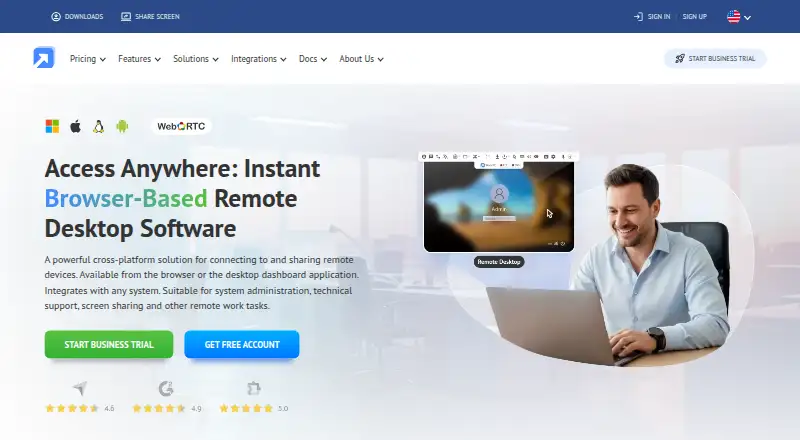
Getscreen.me is browser-based remote access software for system administration, technical support, screen sharing, and other remote work. It supports both ongoing access to permanent devices and one-time quick support connections. From its control panel, users can control screens, manage files, open terminal sessions, record sessions, and review connection history. A browser can also be used to control Android smartphones, tablets, and digital displays. Supported platforms include Windows, macOS, Linux, Android, and web browsers.
The product lists an HTTP API, iFrame embedding, SAML/SSO, Active Directory synchronization, and a Chrome extension. The extension lists helpdesk integrations including Zendesk, ServiceNow, Freshchat, Tawk.to, and Jivo. Authentication controls include two-factor authentication through email, Telegram, or Google Authenticator, IP whitelisting, and single sign-on. Getscreen.me says video and executable command data are encrypted with 128-bit AES within WebRTC and SSL protocols by default. Its self-hosted offering keeps data in the customer’s environment without relying on third-party servers. The free plan allows two permanent devices and one technician seat, with file transfers up to 50 MB per file; Quick Support is available on paid plans.
Who it suits
Getscreen.me suits IT administrators and support teams that need browser-based access to computers or Android devices, with tools for screen control, file handling, and session records. Its self-hosted option may suit organizations that want remote access data kept within their own environment.
What it does well
- Supports Windows, macOS, Linux, Android, and web browsers.
- Offers permanent access and one-time quick support connections.
- Includes file management, terminal sessions, recording, and connection history.
- Lists HTTP API, iFrame, SAML/SSO, and Active Directory synchronization.
- Self-hosting keeps data within the customer’s environment.
- Two-factor authentication supports email, Telegram, or Google Authenticator.
What to know first
- The free plan is limited to two permanent devices and one technician seat.
- Quick Support is available only on paid plans.
- Free-plan file transfers are limited to 50 MB per file.
Limits
The Free Version includes two permanent devices, one technician seat, unlimited session time, and file transfers up to 50 MB per file; Quick Support is unavailable. The 14-day Business Trial provides unlimited seats, unlimited devices, and the full feature set without requiring a card.
Plans
| Plan | Billed and limits | Price |
|---|---|---|
| Free | 2 devices · 50 MB per file · 1 seat | Free |
| Standard | 4 GB maximum file size · 1 GB video storage per technician | On request |
| Advanced | Unlimited invitations · Unlimited file size · 2 GB video storage per technician · 100 API requests per hour per device | On request |
| Enterprise | Unlimited invitations · Unlimited file size · 5 GB video storage per technician · 1,000 API requests per hour per device | On request |
| Free Version | 2 permanent devices · 1 technician seat · unlimited session time · file transfers up to 50 MB per file · no Quick Support | Free |
| Business Trial | 14-day access · Unlimited seats · unlimited devices · full feature set · no card required | Free |
| Personal Lifetime | One-time payment - lifetime license · 50 permanent devices · 10 Quick Support invitations per day · file transfers up to 4 GB | On request |
As getscreen.me lists them, read 20 Sept 2026. The maker's own page has the final word.
Getting started
- Visit the Getscreen.me website.
- The listed plans include a Free plan and a 14-day Business Trial.
- Supported platforms include Windows, macOS, Linux, Android, and web browsers.
- The product supports permanent device access and one-time Quick Support connections; Quick Support is available only on paid plans.
- The product lists integrations and authentication controls.
Overview
Getscreen.me is a browser-based remote access service for administration and technical support. It suits administrators and support teams that need to reach desktop and Android devices, with session tools and a self-hosted option. Its breadth is useful, but the free plan excludes Quick Support and limits access to two permanent devices.
Key features
The service supports permanent access as well as one-time Quick Support connections. Screen control, file management, terminal sessions, recording, and connection history give administrators tools for routine maintenance and support work in one control panel. The catch is practical: teams handling ad hoc support requests need a paid plan for Quick Support.
Getscreen.me supports Windows, macOS, Linux, Android, and web browsers. From a browser, users can control Android phones, tablets, and digital displays, extending its reach beyond desktop support. File transfer and session recording are supported, though free users are limited to 50 MB per file.
Integration options include an HTTP API, iFrame embedding, SAML/SSO, Active Directory synchronization, and a Chrome extension. The extension connects with Zendesk, ServiceNow, Freshchat, Tawk.to, and Jivo, making the product a more natural fit for teams working through those helpdesk tools. Security controls include two-factor authentication via email, Telegram, or Google Authenticator, IP whitelisting, and single sign-on. Video and executable command data are encrypted with 128-bit AES within WebRTC and SSL protocols by default.
The self-hosted offering keeps data within the customer’s environment and avoids reliance on third-party servers. That is a meaningful option for organizations that want to keep remote-access data in their own environment, while teams seeking a hosted setup can use the browser-based service.
Pricing
Getscreen.me has a free plan, paid plans, and a 14-day Business Trial. The trial provides unlimited seats and devices with the full feature set, requires no card, and ends after 14 days. It is useful for evaluating a team workflow, but it is not a lasting free tier.
| Plan | Price | What it includes |
|---|---|---|
| Free | free | 2 permanent devices, 1 technician seat, unlimited session time, file transfers up to 50 MB per file, and no Quick Support. |
| Personal Lifetime | $149 a month (billed One-time payment) | Lifetime access, 50 devices, 10 invitations per day, 4 GB file transfers, and 1 GB video storage. |
| Standard | Custom pricing | 4 GB maximum file size and 1 GB video storage per technician. |
| Advanced | Custom pricing | Unlimited invitations, unlimited file size, 2 GB video storage per technician, and 100 API requests per hour per device. |
| Enterprise | Custom pricing | Unlimited invitations, unlimited file size, 5 GB video storage per technician, and 1,000 API requests per hour per device. |
The Free plan can cover a single technician managing two permanent devices, but its file cap and lack of Quick Support rule it out for many support desks. Personal Lifetime raises the device allowance to 50 and adds larger transfer and recording-storage allowances; its displayed price is $149 a month, billed as a one-time payment, with lifetime access. Teams needing larger file limits, more storage, or higher API allowances must consider the custom-priced tiers. Advanced and Enterprise raise API limits and storage, while Standard keeps file size at 4 GB.
Platforms
Getscreen.me supports Windows, macOS, Linux, Android, and web browsers. Its platform range also includes an API, Chrome extension, and self-hosted deployment. Android control through a browser is a distinguishing practical strength for teams supporting mobile devices alongside computers.
Who it's for
Getscreen.me is best suited to administrators and support teams that value browser access, Android control, or the option to keep data in their own environment. Its combination of permanent access and paid Quick Support can cover both ongoing device management and one-time assistance. Individuals or very small teams may be able to start with the two-device free plan, but it is a poor fit if they need Quick Support or regularly transfer files larger than 50 MB.
Pros and cons
- Pro: Permanent access and one-time support connections serve both ongoing administration and ad hoc help, though Quick Support requires a paid plan.
- Pro: Browser-based control of Android phones, tablets, and digital displays extends support beyond desktop systems.
- Pro: Self-hosting keeps data within the customer’s environment for organizations that want to avoid third-party servers.
- Pro: The control panel includes file management, terminal sessions, recording, and connection history, while integrations include an API and helpdesk-connected Chrome extension.
- Con: The free plan covers only two permanent devices and one technician, and it does not include Quick Support.
- Con: The 50 MB per-file free transfer limit can constrain support workflows involving larger files.
- Con: Standard, Advanced, and Enterprise use custom pricing, so teams cannot compare their costs from a published price.
Alternatives
Consider TeamViewer Remote if you want a free plan explicitly for personal, non-commercial use; its listed platform range includes iOS, which Getscreen.me does not list.
Zoho Assist is an option for a free plan covering one technician and five devices, compared with Getscreen.me’s two permanent devices and one seat. ManageEngine Remote Access Plus offers a free plan for up to 10 devices, while Getscreen.me’s free plan is capped at two.
HopToDesk has a free plan for two users and up to three devices with no time limit and no credit card required. Jump Desktop may suit readers who want browser access across platforms and unlimited computers on its free plan; its apps may require a one-time purchase.
Admin By Request Secure Remote Access is an alternative with a free plan for up to 25 seats and support for self-hosted deployment. MeshCentral is a free, open-source, self-hosted option. Remote Desktop offers a free plan for one licensed user, one concurrent connection, and three unattended devices.
For a broader comparison, browse remote desktop software, unattended remote access software, or remote support software.
Verdict
Choose Getscreen.me if your team needs browser-based access across desktop and Android devices, useful session tools, or a self-hosted deployment. The main reason to look elsewhere is the free plan’s narrow reach: two permanent devices, a 50 MB file cap, and no Quick Support. For teams that need ad hoc support or more capacity, the paid tiers expand the offer, but three use custom pricing.
Verdict
Choose Getscreen.me if you need browser-based remote access with session tools, Android control, or a self-hosted option. The free plan covers two permanent devices, while teams needing Quick Support must use a paid plan.
Questions
Is there a free plan?
Yes. The Free Version costs nothing and includes two permanent devices, one technician seat, and file transfers up to 50 MB per file.
Is there a free trial?
Yes. The Business Trial provides 14-day access with unlimited seats and devices and the full feature set, with no card required.
Which platforms does Getscreen.me support?
It lists Windows, macOS, Linux, Android, and web browsers.
Does it offer self-hosting?
Yes. Its self-hosted offering keeps data within the customer’s environment and avoids reliance on third-party servers.
Which integrations are listed?
Getscreen.me lists an HTTP API, iFrame embedding, SAML/SSO, Active Directory synchronization, and a Chrome extension. The extension lists Zendesk, ServiceNow, Freshchat, Tawk.to, and Jivo.
Facts from Getscreen.me's own pages
- Access mode
- both · getscreen.me, 20 Sept 2026
- Authentication controls
- Listed controls include two-factor authentication via email, Telegram, or Google Authenticator, IP whitelisting, and single sign-on. · getscreen.me, 7 Oct 2026
- Company
- Getscreen.me says it was founded in Cyprus in 2018 by two people and lists Point B Ltd at an address in Limassol, Cyprus. · getscreen.me, 7 Oct 2026
- Connection types
- The product supports permanent remote access and one-time quick support connections. · getscreen.me, 7 Oct 2026
- File transfer
- Yes · getscreen.me, 20 Sept 2026
- File transfer limit
- The free plan permits file transfers up to 50 MB per file. · getscreen.me, 7 Oct 2026
- Free plan
- Yes · getscreen.me, 20 Sept 2026
- Free plan limit
- The free plan supports up to two permanent devices, and Quick Support is available only on paid plans. · getscreen.me, 7 Oct 2026
- Headquarters
- Limassol, Cyprus · getscreen.me, 28 Sept 2026
- Helpdesk integrations
- The Chrome extension page lists integrations including Zendesk, ServiceNow, Freshchat, Tawk.to, and Jivo. · getscreen.me, 7 Oct 2026
- Integrations
- The maker lists HTTP API and iFrame embedding, plus SAML/SSO, Active Directory synchronization, and a Chrome extension. · getscreen.me, 7 Oct 2026
- Mobile access
- Getscreen.me supports remote control of Android smartphones, tablets, and digital displays from a browser. · getscreen.me, 7 Oct 2026
- Mobile apps
- Yes · getscreen.me, 20 Sept 2026
- Platforms
- The maker lists Windows, macOS, Linux, and Android compatibility, with access through web browsers and a Chrome extension. · getscreen.me, 7 Oct 2026
- Product
- Getscreen.me provides browser-based remote access for system administration, technical support, screen sharing, and other remote work. · getscreen.me, 7 Oct 2026
- Security
- The security page says video and executable command data are encrypted with 128-bit AES within WebRTC and SSL protocols by default. · getscreen.me, 7 Oct 2026
- Self-hosting
- The self-hosted offering is described as keeping data within the customer’s environment and avoiding reliance on third-party servers. · getscreen.me, 7 Oct 2026
- Session recording
- Yes · getscreen.me, 20 Sept 2026
- Session tools
- Its control panel includes screen control, file management, terminal sessions, session recording, and connection history. · getscreen.me, 7 Oct 2026
- Support
- The maker says support is available through its website form or email and also provides a knowledge base, guides, and video tutorials. · getscreen.me, 7 Oct 2026
- Supported platforms
- Windows,macOS,Linux,Android,web browser · getscreen.me, 20 Sept 2026
Where Getscreen.me stands on Freedom251
- Remote desktop software#10 of 135
- Unattended Remote Access Software#4 of 29
- Remote Support Software#7 of 49
- Remote Desktop Access Software#4 of 28
- Remote support tools#11 of 47