Freedom251 › Development Environment Managers
frum
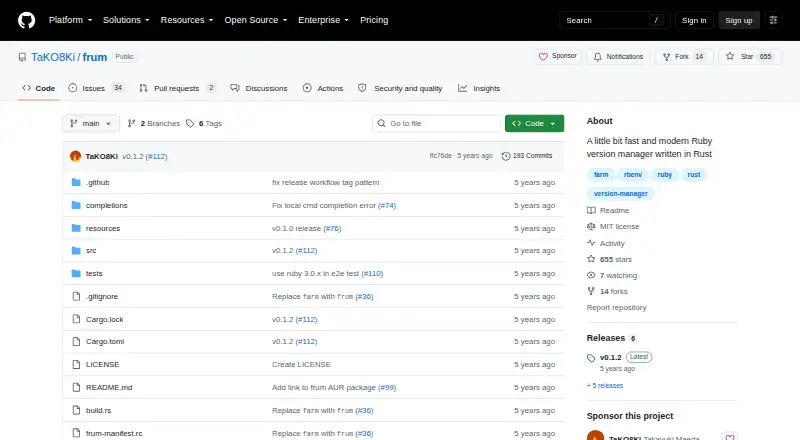
What frum is
frum is a free Ruby version manager written in Rust. It installs and removes Ruby versions, lists available and installed versions, and lets you select a global or local version. It also reads `.ruby-version` files, so a project can specify the Ruby version to use. The project describes frum as pure Rust and says it does not use ruby-build. Installation options include Homebrew, Arch Linux packages, Cargo, and release binaries. Setup instructions cover Bash, Zsh, and Fish, and the project lists shell auto-completion. Ruby installation accepts configuration options such as an OpenSSL directory and jemalloc. The README reports that evaluating `frum init` ran about six times faster than evaluating `rbenv init` in its benchmark. Linux and macOS are listed as supported platforms; Windows is mentioned in the project’s goals. The latest listed release is v0.1.2. The project is MIT licensed and welcomes contributions, issues, and pull requests.
Who it suits
frum suits Ruby developers who want to manage project-specific or global Ruby versions, including through `.ruby-version` files. It is aimed at users of Linux or macOS and supports setup in Bash, Zsh, and Fish.
What it does well
- Reads project `.ruby-version` files.
- Supports global and local Ruby versions.
- Offers Homebrew, Arch, Cargo, and binary installation.
- Includes shell auto-completion.
- Accepts OpenSSL directory and jemalloc options.
What to know first
- Windows is mentioned in goals, not listed as supported.
- Latest listed release is v0.1.2.
Plans
| Plan | Billed and limits | Price |
|---|---|---|
| frum | Ruby version manager · MIT licensed | Free |
As github.com lists them, read 8 Oct 2026. The maker's own page has the final word.
Getting started
- Choose an installation route: Homebrew or Linuxbrew, Arch Linux packages, Cargo, or a release binary.
- Install frum using the selected route.
- Follow the initialization instructions for Bash, Zsh, or Fish.
- Use frum commands to install Ruby versions and set a global or local version. [Use `.ruby-version` files for project version selection.]
frum is a free, MIT-licensed tool for managing Ruby versions, best suited to developers who want project-level pins alongside a machine-wide default. Its focused scope and shell support are appealing; teams seeking a broader environment manager should look elsewhere.
Overview
frum handles the main version-management tasks: installing and removing Ruby versions, listing available or installed versions, and choosing a local or global version. Project pins use .ruby-version, with automatic switching to apply the project’s choice as you move between repositories. This keeps project requirements separate from your global default without adding a multi-language environment layer.
The implementation is pure Rust and does not use ruby-build. The project reports that evaluating frum init runs about six times faster than evaluating rbenv init in its benchmark. That comparison is relevant to shell initialization, not a claim that Ruby builds or applications run six times faster.
Key features
Ruby version control
Local and global selection, project files, and automatic switching make frum a practical fit for developers working across repositories that require different Ruby versions. Its commands also cover installation, uninstallation, and version listings, so the core workflow stays within one tool.
Configurable builds and shell setup
Ruby installation accepts options such as an OpenSSL directory and jemalloc allocator selection, which gives developers control over build configuration. Bash, Zsh, and Fish setup instructions and auto-completion are useful for common shell workflows. The README documents installation through Homebrew or Linuxbrew, Arch Linux packages, Cargo, and release binaries.
Pricing
frum costs free. The free plan is the tool itself, with MIT licensing; there is no paid tier or trial to weigh against it. That makes it easy to adopt for individual Ruby development, though its single-language scope is the trade-off rather than a cheaper plan withholding broader capabilities.
Platforms
frum supports macOS and Linux, with installation routes including package managers, Cargo, and release binaries. Windows appears in the project’s goals, but is not among the operating systems its README identifies as supported; Windows users should not assume the same level of support as on macOS or Linux.
Who it's for
Choose frum if Ruby is your target language and you want project-specific versions, a global default, shell integration, and configurable builds without paying for a version manager. It is less suited to developers looking for one system to coordinate multiple languages or a broader development environment.
Pros and cons
- Pros: Free and MIT-licensed, with local and global Ruby selection, .ruby-version support, and automatic switching for project workflows.
- Pros: Bash, Zsh, and Fish setup plus completion cover common shell use, and build options include OpenSSL directory and jemalloc selection.
- Cons: Its scope is limited to Ruby, so it is not a replacement for a multi-language environment manager.
- Cons: Windows is a project goal rather than a platform the README identifies as supported.
Alternatives
Development Environment Managers is a useful starting point if you want to compare tools beyond Ruby version management.
- GHCup is the free option to consider for Haskell toolchain installation and management rather than Ruby version control.
- ActiveState Platform may suit teams that need an organization-focused platform: its free plan is limited to public projects, and paid organization pricing is custom.
- devenv is a free, MIT-licensed alternative for broader environment management if you can work with its Nix requirement.
- Flox is worth considering if you want a broader environment tool and its Personal plan’s public and private FloxHub environment allowances fit your needs.
- FVM is a free alternative for Flutter SDK version management.
- Jabba is a free option for Java version management.
- vfox is another free version-management option if you want an Apache 2.0-licensed tool.
- DDEV is a free, Apache 2.0-licensed alternative to consider for a different development workflow.
Verdict
frum is a strong fit for Ruby developers who want local and global version control, automatic project switching, and shell integration at no cost. Its main reason to choose it is that focused Ruby workflow; look elsewhere if you need a multi-language environment manager or dependable Windows support.
Verdict
frum covers core Ruby version management, project version files, and shell integration. Its listed platform support is Linux and macOS, while Windows appears only among project goals.
Questions
How much does frum cost?
Its listed plan is free.
Which operating systems does frum support?
The README lists macOS and Linux as supported platforms and mentions Windows in its goals. Release binaries are linked for Linux and macOS.
Can frum select a Ruby version for a project?
Yes. It works with `.ruby-version` files and can set local or global Ruby versions.
Is frum open source?
The repository identifies its license as MIT.
Which shells have setup instructions?
The README provides initialization instructions for Bash, Zsh, and Fish.
Facts from frum's own pages
- Benchmark
- The README reports that eval "$(frum init)" runs about six times faster than eval "$(rbenv init -)" in its benchmark. · github.com, 8 Oct 2026
- Completion
- The README lists auto-completion as a feature. · github.com, 7 Oct 2026
- Contributions
- The project welcomes contributions, issues, and pull requests. · github.com, 8 Oct 2026
- Download
- The README links to release binaries for Linux and macOS. · github.com, 7 Oct 2026
- Implementation
- The project describes its implementation as pure Rust and says it does not use ruby-build. · github.com, 8 Oct 2026
- Installation
- The README lists Homebrew, Arch Linux packages, Cargo, and release binaries as installation methods. · github.com, 7 Oct 2026
- Installation methods
- The README documents installation through Homebrew or Linuxbrew, Arch Linux packages, Cargo, or release binaries. · github.com, 8 Oct 2026
- Install options
- Ruby installation accepts configuration options including an OpenSSL directory and jemalloc allocator selection. · github.com, 8 Oct 2026
- License
- The repository identifies its license as MIT. · github.com, 8 Oct 2026
- Maintainer
- GitHub identifies TaKO8Ki as Takayuki Maeda and lists Kyoto, Japan on the profile. · github.com, 7 Oct 2026
- Performance claim
- The README reports that evaluating frum init runs about six times faster than evaluating rbenv init in its benchmark. · github.com, 7 Oct 2026
- Platform support
- The README lists macOS and Linux as supported platforms and mentions Windows in its goals. · github.com, 8 Oct 2026
- Purpose
- frum is a Ruby version manager written in Rust. · github.com, 8 Oct 2026
- Release
- The releases page lists v0.1.2 as the latest release. · github.com, 8 Oct 2026
- Ruby builds
- frum install accepts Ruby configuration options including an OpenSSL directory and jemalloc. · github.com, 7 Oct 2026
- Ruby selection
- frum works with .ruby-version files and can set global or local Ruby versions. · github.com, 7 Oct 2026
- Ruby version files
- frum works with .ruby-version files. · github.com, 8 Oct 2026
- Shell completion
- The listed features include auto-completion. · github.com, 8 Oct 2026
- Shells
- The README provides setup instructions for Bash, Zsh, and Fish. · github.com, 7 Oct 2026
- Shell setup
- The README provides initialization instructions for Bash, Zsh, and Fish. · github.com, 8 Oct 2026
- Version management
- Commands include installing and uninstalling Ruby versions, listing available or installed versions, and setting global or local versions. · github.com, 8 Oct 2026
Where frum stands on Freedom251
- Development Environment Managers#17 of 50