Freedom251 › Development Environment Managers
vfox
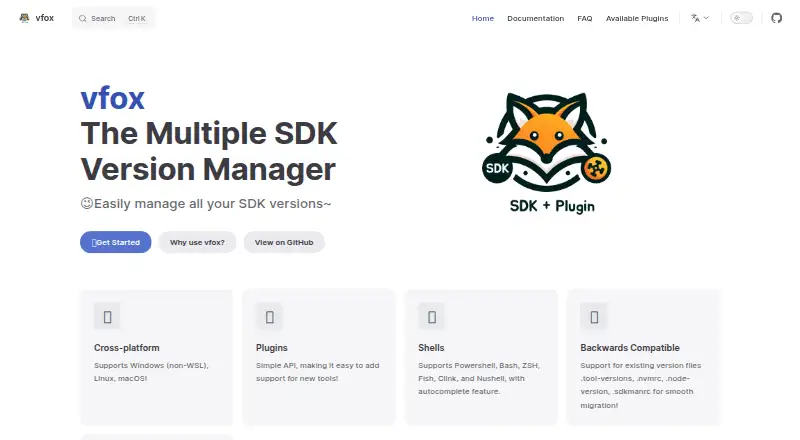
What vfox is
vfox is a free, cross-platform version manager for development runtimes and SDKs on Linux, macOS, and Windows. It can manage versions at project, session, or global scope and switch automatically when entering a project directory. Project versions can be recorded in `.vfox.toml` and shared with a team. Plugins add support for tools and runtime environments; the public registry includes community plugins for Bun, Clang, CMake, Crystal, Dart, Deno, and .NET.
Documented shells include PowerShell, Git Bash, Bash, ZSH, Fish, CMD, Clink, Cmder, and Nushell. CMD supports only global scope and is not recommended. Plugins that support legacy version files can read formats such as `.nvmrc`, with that capability enabled by default. For Docker, CI/CD, and other non-interactive shells, the documentation recommends `vfox exec` to run commands in a managed SDK environment. The project also describes using that command in a VS Code task. Its multi-user guide recommends group permissions for shared SDK storage on Linux and macOS and warns that world-writable permissions allow others to modify or delete files. vfox is released under the Apache 2.0 License.
Who it suits
vfox suits developers who switch among projects requiring different runtime or SDK versions. Its project configuration and plugin system can also support teams managing shared version choices.
What it does well
- Supports project, session, and global version scopes.
- Automatically switches versions when entering a project directory.
- Shared `.vfox.toml` configuration supports team use.
- Apache 2.0 licensed.
What to know first
- CMD supports only global scope and is not recommended.
- Proxy support is limited to HTTP(S) protocols.
- Interactive shell hooks are not intended for non-interactive shells.
Limits
CMD supports only global version scope and is not recommended. vfox currently supports only HTTP(S) proxy protocols.
Plans
| Plan | Billed and limits | Price |
|---|---|---|
| vfox | Apache 2.0 licensed | Free |
As vfox.dev lists them, read 4 Oct 2026. The maker's own page has the final word.
Getting started
- Visit the vfox website.
- Install on Windows through Scoop, winget or the setup installer.
- On a Unix-like system, install through Homebrew, a package repository or the install script.
- Choose project, session or global version scopes for your workflow.
- Record project versions in `.vfox.toml` if you want to share them with a team.
- Use `vfox exec` to run commands in a managed SDK environment from CI/CD or a container.
Overview
vfox is a cross-platform manager for choosing development runtime and SDK versions. It is best suited to developers moving between projects with different version requirements, particularly teams that want to share those choices. Its project-aware switching is useful; the proxy restriction and limited CMD support narrow its fit.
Key features
Versions can be selected globally, for a session, or for an individual project, with automatic switching when you enter a project directory. This keeps a project on its required runtime without changing your machine-wide selection. Project versions can be recorded in .vfox.toml for teammates to share, while users can keep separate configuration and version selections even when they share installed SDK files.
Plugins extend support to runtimes and tools, and the public registry accepts community submissions. Documented examples include Bun, Clang, CMake, Crystal, Dart, Deno, and .NET. Plugins that support legacy files can read formats such as .node-version, .nvmrc, and .sdkmanrc; that compatibility is enabled by default, which helps projects retain existing version-file conventions.
For Docker, CI/CD, scripts, and other non-interactive environments, vfox exec runs commands in a managed SDK environment. This is the recommended route because shell activation hooks are intended for interactive shells. The documentation also demonstrates using the command in a VS Code task.
One constraint matters for network setups: vfox supports only HTTP(S) proxy protocols. Linux and macOS users sharing an SDK directory should use group permissions; broad, world-writable access can allow users to alter or delete other people's SDK files.
Pricing
vfox is free and open source under the Apache 2.0 License. The listed vfox plan costs nothing and includes runtime management, dependency locking, configuration as code, and shell integration. There are no paid tiers or seat and quota limits described in the plan, making it a straightforward choice for individual use or teams willing to manage their own setup.
Platforms
vfox supports Linux, macOS, and Windows. Documented shells include PowerShell, Git Bash, Bash, ZSH, Fish, CMD, Clink, Cmder, and Nushell. CMD is the exception: it supports global scope only and is not recommended, so users who need project or session scopes should choose another supported shell. Installation paths include Scoop, winget, or a setup installer on Windows, and Homebrew, package repositories, or an install script on Unix-like systems.
Who it's for
Choose vfox if your projects require different runtimes or SDK versions and you want automatic per-project selection, shareable configuration, or a plugin-based way to extend tool coverage. It also suits CI and container workflows when commands are run through vfox exec. It is a less suitable fit if your environment requires a proxy protocol beyond HTTP(S), or if CMD is your shell and you need more than global version selection.
Pros and cons
- Pros: Project, session, and global scopes give developers control over where version choices apply.
- Pros: Shared .vfox.toml settings and default legacy-file support can help teams coordinate without abandoning existing project conventions.
- Pros: The free Apache 2.0 license and community plugin registry provide a no-cost foundation that can be extended.
- Cons: CMD supports only global scope, limiting its usefulness for project-specific work.
- Cons: Only HTTP(S) proxies are supported, which can exclude environments using other proxy protocols.
- Cons: Non-interactive use calls for vfox exec rather than interactive shell activation hooks.
Alternatives
devenv is another free option for Linux, macOS, and Windows, but it requires Nix and also works on WSL. Consider it if that dependency fits your environment. Flox has a free Personal plan with CLI and Catalog access, unlimited public FloxHub environments, and three private environments; choose it if those environment limits and services better match your workflow. ActiveState Platform offers a free organization plan for public projects and a paid enterprise option with custom pricing, making it an alternative when that public-project model suits your needs. DDEV, Devilbox, DevPod, FlyEnv, and Lando are also options to compare.
Browse Development Environment Management Tools and Development Environment Managers for more options.
Verdict
Choose vfox for free, cross-platform runtime management when per-project version switching, shareable configuration, and extensible plugin support are the priorities. Its clearest reasons to look elsewhere are the HTTP(S)-only proxy support and CMD's global-only scope.
Verdict
vfox provides version management across platforms, shells, and project scopes, with plugins extending tool coverage. Users of non-interactive environments should use the documented `vfox exec` approach.
Questions
Is vfox free?
Yes. The listed vfox plan costs nothing and is Apache 2.0 licensed.
Which operating systems does vfox support?
Linux, macOS and Windows.
Which shells can I use?
Documented shells include PowerShell, Git Bash, Bash, ZSH, Fish, CMD, Clink, Cmder and Nushell. CMD supports only global scope and is not recommended.
Can I use existing version files?
Plugins with legacy-file support can read formats such as `.node-version`, `.nvmrc` and `.sdkmanrc`. This capability is enabled by default.
Can I use vfox in CI or Docker?
Yes. The documentation recommends `vfox exec` for Docker, CI/CD and other non-interactive shells.
Who maintains vfox, and what is its license?
The site identifies Han Li in its copyright notice and says vfox is released under the Apache 2.0 License.
Facts from vfox's own pages
- Audience
- The introduction recommends vfox for people switching between projects that require different runtime environments or versions. · vfox.dev, 4 Oct 2026
- Automatic switching
- It can automatically switch to the appropriate version when entering a project directory. · vfox.dev, 4 Oct 2026
- CI and containers
- For Docker, CI/CD, and other non-interactive shells, the FAQ recommends `vfox exec` because shell activation hooks are intended for interactive shells. · vfox.dev, 4 Oct 2026
- CI and scripts
- The vfox exec command runs commands in a managed SDK environment and is recommended for Docker, CI/CD, and other non-interactive shells. · vfox.dev, 4 Oct 2026
- Compatibility
- It supports existing version-file formats including .node-version, .nvmrc, and .sdkmanrc. · vfox.dev, 4 Oct 2026
- Configuration
- It saves tool version information in a .vfox.toml file that can be shared across projects and teams. · vfox.dev, 4 Oct 2026
- IDE integration
- The documentation gives an example of using vfox exec in a VS Code task to run a project with a selected SDK version. · vfox.dev, 4 Oct 2026
- Installation
- The quick start documents Windows installation through Scoop, winget, or a setup installer, and Unix-like installation through Homebrew, package repositories, or an install script. · vfox.dev, 4 Oct 2026
- Integrations
- The documentation lists community plugins for tools including Bun, Clang, CMake, Crystal, Dart, Deno, and .NET. · vfox.dev, 4 Oct 2026
- Legacy configuration
- Plugins with support can read legacy version files such as `.nvmrc`, and this capability is enabled by default. · vfox.dev, 4 Oct 2026
- License
- The site states that vfox is released under the Apache 2.0 License. · vfox.dev, 4 Oct 2026
- License and maintainer
- The site says vfox is released under the Apache 2.0 License and identifies Han Li in its copyright notice. · vfox.dev, 4 Oct 2026
- Notable limit
- The configuration guide says vfox currently supports only HTTP(S) proxy protocols. · vfox.dev, 4 Oct 2026
- Plugin registry
- The site describes its listed plugins as community plugins from the registry. · vfox.dev, 4 Oct 2026
- Plugins
- A plugin system lets users add support for tools and runtime environments, and the public plugin registry accepts community submissions. · vfox.dev, 4 Oct 2026
- Purpose
- vfox is a cross-platform version manager for installing and switching between development runtimes and SDKs. · vfox.dev, 4 Oct 2026
- Security
- The multi-user guide recommends group permissions for a shared SDK directory and warns that broad 777 permissions expose it to unauthorized users. · vfox.dev, 4 Oct 2026
- Security guidance
- For shared SDK storage on Linux and macOS, the guide recommends group permissions and warns that world-writable permissions can let users modify or delete others’ SDK files. · vfox.dev, 4 Oct 2026
- Shared configuration
- Tool versions can be recorded in `.vfox.toml` to share consistent project configuration with a team. · vfox.dev, 4 Oct 2026
- Shells
- Documented supported shells include PowerShell, Git Bash, Bash, ZSH, Fish, CMD, Clink, Cmder, and Nushell; CMD supports only global scope. · vfox.dev, 4 Oct 2026
- Shell support
- Supported shells include PowerShell, Git Bash, Bash, ZSH, Fish, CMD, Clink, Cmder, and Nushell; CMD supports only global scope and is not recommended. · vfox.dev, 4 Oct 2026
- Team use
- The multi-user guide describes sharing installed SDK files while users keep separate configuration and version selections. · vfox.dev, 4 Oct 2026
- Version scopes
- It supports project, session, and global version scopes, with automatic switching when entering a project directory. · vfox.dev, 4 Oct 2026
- What it does
- vfox is a cross-platform version manager for installing and switching development environments and runtime versions. · vfox.dev, 4 Oct 2026
Where vfox stands on Freedom251
- Development Environment Managers#41 of 50
- Development Environment Management Tools#22 of 26