Freedom251 › Development Environment Managers

DevPod
What DevPod is
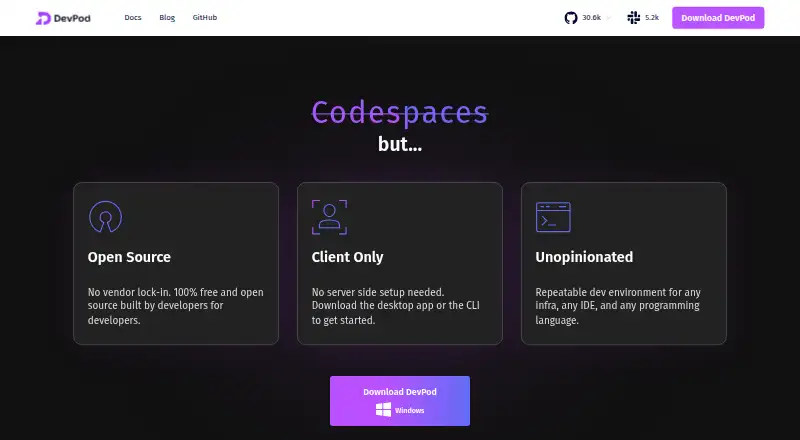
DevPod creates reproducible development environments in separate containers specified through devcontainer.json. Environments can run on a local computer, a reachable remote machine, or public or private cloud infrastructure. DevPod runs on the user’s computer and does not require a server backend; it is described as open-source and extensible. It supports VS Code and the JetBrains suite, while other IDEs can connect through SSH. Maintained providers include Docker, Kubernetes, SSH, AWS, Google Cloud, Azure, and DigitalOcean, and users can add providers from GitHub, a URL, or a local provider.yaml file. Features include prebuilds, automatic inactivity shutdown, and Git and Docker credential synchronization. Port forwarding requires an IDE or SSH connection because the agent SSH server starts when that session begins. DevPod is free and open source. Desktop downloads are available for macOS Silicon and Intel, Windows, and Linux; the CLI is available for macOS, Windows, and Linux AMD or ARM.
Who it suits
DevPod suits developers who want reproducible container environments across local, remote, and cloud machines. It also suits teams using VS Code, JetBrains IDEs, or SSH-connected alternatives.
What it does well
- Runs without a server backend.
- Supports VS Code and the JetBrains suite.
- Maintained providers cover local and cloud infrastructure options.
- Prebuilds and inactivity shutdown are supported.
- Free and open source.
What to know first
- Port forwarding requires an IDE or SSH connection.
- Telemetry events are sent for non-trivial CLI commands.
Plans
| Plan | Billed and limits | Price |
|---|---|---|
| Open Source | 100% free and open source · no vendor lock-in · client-only · any infrastructure, IDE, or programming language · public and private repositories | Free |
As devpod.sh lists them, read 15 Oct 2026. The maker's own page has the final word.
Getting started
- Visit the DevPod website.
- Choose DevPod Desktop or the CLI for macOS, Windows, or Linux.
- Install the desktop download for your system, or obtain the CLI for your operating system and processor architecture.
- Specify your development environment through devcontainer.json.
- Select a maintained provider or add one from GitHub, a URL, or a local provider.yaml file.
- Connect with VS Code, a JetBrains IDE, or another IDE through SSH.
DevPod is a free, open-source client for creating reproducible container-based development environments from devcontainer.json. It suits developers and teams who need the same setup on laptops, remote machines, or multiple clouds. The trade-off is that you manage the underlying infrastructure yourself rather than receiving a hosted workspace.
Overview
DevPod runs entirely on your computer and does not require a DevPod server backend. It can create environments on a local computer, a reachable remote machine, or public and private cloud infrastructure. That makes it a practical choice for organizations with mixed infrastructure, while putting responsibility for access, capacity, and provider configuration on the user.
Its container definition is the standard devcontainer.json, so projects already organized around development containers can adopt it without changing their basic workflow. It is a weaker fit for anyone seeking a managed, browser-first workspace with infrastructure supplied by the product.
Key features
Providers and extensibility
Maintained providers cover Docker, Kubernetes, SSH, AWS, Google Cloud, Azure, and DigitalOcean. You can add a provider from GitHub, a URL, or a local provider.yaml file. This is a significant strength for teams that move between local and hosted resources, although the broad choice also means there is no single simplified deployment path.
IDE support
DevPod integrates with VS Code and the full JetBrains suite. Other editors can connect over SSH, giving teams more freedom than a tool tied to one desktop IDE. Port forwarding is only available while an IDE or SSH connection is active because the agent SSH server starts with that session; persistent forwarding is therefore not a standalone feature.
Workflow and credentials
Prebuilds can reduce repeated setup work, and automatic inactivity shutdown can limit waste on running environments. Git HTTPS and SSH credentials, along with Docker registry credentials, can be forwarded into containers, which helps private repositories and images work inside isolated environments. Machine providers can use secure tunnels such as AWS Instance Connect, Google Cloud IAP, and Azure Bastion.
Local capabilities and telemetry
DevPod supports local Kubernetes, Compose workflows, IDE integration, and resource controls. It is described as 100% open source and extensible, with community discussion through Slack. Non-trivial CLI commands send events containing the command and basic execution-environment information to a self-hosted telemetry backend. That behavior matters to organizations with strict telemetry policies and should be reviewed before standardizing the CLI.
Pricing
| Plan | Price | What it includes |
|---|---|---|
| Open source | free | 100% free and open source; client-only |
There are no paid seats, usage quotas, or renewal terms in this plan. The absence of a hosted backend also means the software price does not cover the compute, storage, or provider charges for the machines and clouds you use. It is a straightforward choice for individual developers and teams comfortable operating their own infrastructure.
Platforms
DevPod Desktop is available for macOS Silicon, macOS Intel, Windows, and Linux as AppImage or tar.gz. The CLI supports macOS, Windows, and Linux on AMD or ARM. This coverage suits mixed-platform teams, while the actual environment can still depend on the selected provider.
Who it's for
Choose DevPod if your projects use devcontainer.json and you need a repeatable setup across Docker, Kubernetes, SSH hosts, or major cloud providers. It is especially suitable for teams that want IDE choice and client-side control. Look elsewhere if you want a vendor-managed development environment, automatic infrastructure provisioning, or port forwarding that remains available without an active IDE or SSH session.
Pros and cons
- Pro: One open-source client spans local, remote, and public or private cloud environments.
- Pro: VS Code, JetBrains, and SSH connections accommodate varied editor preferences.
- Pro: Prebuilds, inactivity shutdown, credential synchronization, and resource controls address common operational needs.
- Con: You must choose and configure the underlying infrastructure; DevPod is not a hosted workspace service.
- Con: Port forwarding depends on an active IDE or SSH session.
- Con: Non-trivial CLI commands emit telemetry events with command and environment information.
Alternatives
For a wider comparison, see Development Environment Management Tools, Cloud Development Environments, Development Environment Managers, and Container Development Environments.
- ActiveState Platform is a freemium option with a free organization plan for public projects and a paid enterprise offering.
- devenv is free MIT-licensed open source for Linux, macOS, and Windows, but requires Nix.
- Flox offers a free Personal plan with public environments and three private FloxHub environments.
- vfox is a free Apache 2.0-licensed tool for Linux, macOS, and Windows.
- DDEV is free, open-source, and Apache 2.0 licensed for Linux, macOS, and Windows.
- Devilbox is a free option spanning Linux, macOS, Windows, self-hosted, and web platforms.
- FlyEnv has a free tier with local-site and project limits plus short trials for selected features.
- Lando is a free, open-source choice for Linux, macOS, and Windows.
Verdict
DevPod is a strong recommendation for developers and teams standardizing devcontainer.json environments across varied machines and clouds. Its main reason to choose it is provider and IDE flexibility without a required DevPod backend. Look elsewhere if you want hosted infrastructure or session-independent port forwarding, or if CLI telemetry is unacceptable.
Verdict
DevPod provides containerized, reproducible environments with multiple provider and IDE options while running client-side. Port forwarding depends on an IDE or SSH session, and non-trivial CLI commands send telemetry events.
Questions
Is DevPod free?
Yes. The listed Open source plan costs nothing and is described as 100% free and open source.
Which operating systems does DevPod support?
Desktop downloads are available for macOS Silicon and Intel, Windows, and Linux. The CLI is available for macOS, Windows, and Linux on AMD or ARM.
Which development environment providers does it support?
Maintained providers include Docker, Kubernetes, SSH, AWS, Google Cloud, Azure, and DigitalOcean. Users can add providers from GitHub, a URL, or a local provider.yaml file.
Which IDEs can connect to DevPod?
DevPod supports VS Code and the full JetBrains suite. Other IDEs can connect through SSH.
Does DevPod require a server backend?
No. DevPod runs on the user's computer and does not require a server backend.
Does DevPod forward ports?
Port forwarding requires an IDE or SSH connection because the agent SSH server is deployed when that session starts.
Facts from DevPod's own pages
- Automatic shutdown
- Official providers can stop unused machines after inactivity while preserving workspace data and state. · devpod.sh, 15 Oct 2026
- Client model
- DevPod runs solely on the user's computer and does not require a server backend. · devpod.sh, 30 Sept 2026
- Client-only design
- The product runs from a local desktop application or CLI and does not require a server backend. · devpod.sh, 15 Oct 2026
- Community maintenance concern
- A November 30, 2025 GitHub issue says maintainers lacked bandwidth to review changes and were focused on vCluster, prompting a community-maintained fork proposal. · github.com, 15 Oct 2026
- Community support
- The homepage directs users to join the DevPod Slack conversation with users and maintainers. · devpod.sh, 30 Sept 2026
- Company rename
- A company announcement dated August 15, 2025 says Loft Labs became vCluster Labs while its other projects continued under their existing names. · vcluster.com, 15 Oct 2026
- Company size
- Wellfound lists Loft Labs as a 51–200-person startup headquartered in San Francisco. · wellfound.com, 15 Oct 2026
- Credential handling
- DevPod can forward Git HTTPS and SSH credentials and Docker registry credentials into development containers. · devpod.sh, 30 Sept 2026
- Credential synchronization
- The agent can inject Git and Docker credentials into workspaces. · devpod.sh, 15 Oct 2026
- Custom providers
- Users can add providers from GitHub, a URL, or a local provider.yaml file. · devpod.sh, 30 Sept 2026
- DevContainer standard
- DevPod reuses the open DevContainer specification to keep environments consistent across backends. · devpod.sh, 15 Oct 2026
- Downloads
- DevPod Desktop is available for macOS Silicon, macOS Intel, Windows, and Linux AppImage or tar.gz, while the CLI is available for macOS, Windows, and Linux AMD or ARM. · devpod.sh, 30 Sept 2026
- Execution locations
- Providers can place workspaces on a local computer, reachable remote machine, Kubernetes cluster, or public or private cloud. · devpod.sh, 15 Oct 2026
- Features
- DevPod supports prebuilds, automatic inactivity shutdown, and Git and Docker credential synchronization. · devpod.sh, 30 Sept 2026
- Funding
- Wellfound lists $4.6 million raised in one seed round dated September 22, 2021. · wellfound.com, 15 Oct 2026
- Homebrew distribution
- Homebrew provides a devpod cask with brew install --cask devpod and listed version 0.6.15 when opened. · formulae.brew.sh, 15 Oct 2026
- IDE support
- Official documentation lists VS Code and the full JetBrains suite, while other IDEs can connect through SSH. · devpod.sh, 15 Oct 2026
- Independent directory view
- Toolradar lists DevPod as free with no paid tier and highlights consistent environments, local or remote execution, and open-source portability. · toolradar.com, 15 Oct 2026
- Infrastructure
- Providers can create environments on a local computer, reachable remote machine, or public or private cloud. · devpod.sh, 30 Sept 2026
- Installation platforms
- Desktop downloads are provided for macOS Apple Silicon, macOS Intel, Windows, and Linux AppImage or tar.gz. · devpod.sh, 15 Oct 2026
- Limit: administration
- MakerStack notes that DevPod has no centralized admin panel, audit logs, or enterprise SSO. · makerstack.co, 15 Oct 2026
- Limit: polish
- MakerStack says the desktop application is functional but not as polished as alternatives such as Codespaces. · makerstack.co, 15 Oct 2026
- Limit: provider setup
- MakerStack reports that provider plugins can be finicky during authentication. · makerstack.co, 15 Oct 2026
- Linux requirements
- The AppImage documentation lists glibc 2.35 or newer plus FUSE2 and graphics libraries; tested distributions include Debian 12+, Ubuntu 22.04+, Fedora 36+, openSUSE, and Arch Linux. · devpod.sh, 15 Oct 2026