Freedom251 › Runtime Version Managers
rbenv
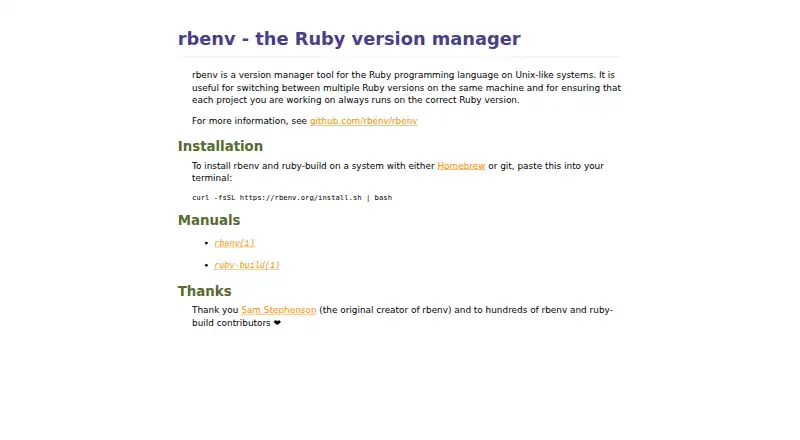
What rbenv is
rbenv manages Ruby versions on Linux and macOS, allowing each project to use the version it needs. When a project contains a `.ruby-version` file, rbenv reads it and changes the active Ruby as you move into that project's directory. You can also choose a version for all projects, a particular project, or just the current shell session. rbenv creates shims for Ruby executables so commands are directed to the selected version. Plugins can hook into or replace much of its default behavior.
rbenv handles version selection; installing Ruby requires the separate ruby-build plugin. That plugin downloads, compiles, and installs Ruby, with definitions for CRuby, JRuby, mruby, picoruby, and TruffleRuby. Its definitions cover versions bundled with ruby-build, so a new Ruby release may require upgrading the plugin first. Installation routes include Homebrew on macOS or Linux, Git, and packages for several Linux distributions. rbenv is free and open source under the MIT license. Its capabilities include project version pinning, lockfile support, automatic switching, shell integration, and CI/CD use. The project describes its installer as intended for casual use on a user's own development machine.
Who it suits
rbenv suits Ruby developers on Linux or macOS who want projects to select their own Ruby versions, or who need global and shell-level selection. Its CI/CD support and plugin mechanism may also suit workflows that need version selection in build processes or customized behavior.
What it does well
- Automatically switches versions based on a project's `.ruby-version` file.
- Supports global, per-project, and shell-session version selection.
- Shims route Ruby executable commands to the selected version.
- Plugins can hook into or override much of the default behavior.
- Free and open source under the MIT license.
What to know first
- Installing Ruby requires the separate ruby-build plugin.
- New Ruby releases may require upgrading ruby-build first.
- The installer is intended for casual use on a user's own development machine.
Limits
The core rbenv tool selects versions; Ruby installation is provided by the separate ruby-build plugin. ruby-build only knows the versions bundled with it, so installing a newly released Ruby may require upgrading ruby-build first.
Plans
| Plan | Billed and limits | Price |
|---|---|---|
| Free | Ruby version switching · plugin mechanism | Free |
As rbenv.org lists them, read 8 Oct 2026. The maker's own page has the final word.
Getting started
- Visit https://rbenv.org/.
- Choose an installation route: Homebrew on macOS or Linux, Git, or a package for a supported Linux distribution.
- Install ruby-build separately if you need to download, compile, and install Ruby versions.
- Set a version globally, for a project, or for the current shell session.
- Use a project's `.ruby-version` file for automatic switching as you change directories.
Verdict
Choose rbenv if you want Ruby version selection tied to project directories, with global and shell-level options as well. Its free, open-source approach and plugin support are useful for customizing version selection. Look elsewhere if you need the core tool itself to install Ruby; that task requires ruby-build.
Questions
Is rbenv free?
Yes. The listed plan is free, and the project is open source under the MIT license.
Which operating systems does it support?
The listed platforms are Linux and macOS.
Does rbenv install Ruby versions?
Ruby installation is provided by the separate ruby-build plugin, which downloads, compiles, and installs versions.
Can it switch Ruby versions automatically for each project?
Yes. rbenv reads a project's `.ruby-version` file and switches versions as you change project directories.
Which Ruby implementations does ruby-build define?
Its definitions include CRuby, JRuby, mruby, picoruby, and TruffleRuby.
Can rbenv be used in CI/CD?
Yes. CI/CD usage is listed as supported.
Facts from rbenv's own pages
- Command shims
- rbenv generates shims for Ruby executables to route commands to the selected Ruby version. · rbenv.org, 8 Oct 2026
- Installation options
- The project documents installation through Homebrew on macOS or Linux, Git, and packages for several Linux distributions. · github.com, 8 Oct 2026
- Intended users
- The installer documentation describes rbenv-installer as intended for casual use on a user's own development machine. · github.com, 8 Oct 2026
- Plugins
- rbenv supports plugins that can hook into or override almost any aspect of its default behavior. · rbenv.org, 8 Oct 2026
- Project selection
- rbenv reads a project's .ruby-version file and switches Ruby versions when you change project directories. · github.com, 8 Oct 2026
- Purpose
- rbenv manages Ruby versions on Unix-like systems so projects can use the Ruby version they require. · rbenv.org, 8 Oct 2026
- Ruby implementations
- ruby-build includes definitions for CRuby, JRuby, mruby, picoruby, and TruffleRuby. · rbenv.org, 8 Oct 2026
- Ruby installation
- The rbenv install command is provided by the separate ruby-build plugin, which downloads, compiles, and installs Ruby versions. · rbenv.org, 8 Oct 2026
- Security and compliance
- The repository identifies the project license as MIT. · github.com, 8 Oct 2026
- Shell and global selection
- rbenv can set Ruby versions globally, per project, or for the current shell session. · rbenv.org, 8 Oct 2026
- Support
- The project directs users to its GitHub issue tracker for bugs and ruby-build Discussions for build troubleshooting. · github.com, 8 Oct 2026
- Version list limit
- ruby-build only knows versions bundled with the project, so installing a newly released Ruby version may require upgrading ruby-build first. · rbenv.org, 8 Oct 2026
Where rbenv stands on Freedom251
- Runtime Version Managers#21 of 30
- Development Environment Managers#39 of 50