Freedom251 › Runtime Version Managers
fnm
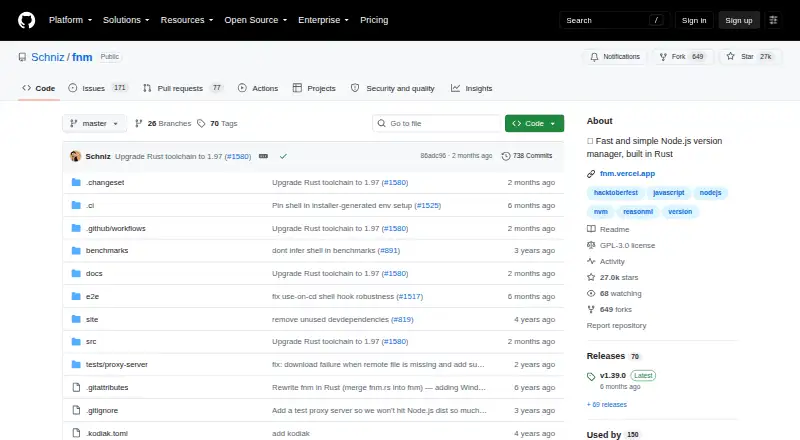
What fnm is
fnm is a free Node.js version manager, built in Rust for developers working from a command line or shell. It supports macOS, Windows, and Linux, and is distributed as a single file through installation scripts, package managers, Cargo, or release binaries. fnm can use `.node-version` and `.nvmrc` files to manage project-specific versions. With shell setup enabled, it can switch Node.js versions automatically as you change directories. Setup instructions cover Bash, Zsh, Fish, PowerShell, Windows Command Prompt, and Cmder. The binary includes completions for Bash, Zsh, Fish, and PowerShell. On macOS and Linux, the installation script requires `curl` and `unzip`. The project identifies its license as GPL-3.0 and invites contributions through pull requests, with issues available for project interaction. Its project page reports no published security advisories, while noting that it has not set up a SECURITY.md file. No paid plans are listed.
Who it suits
fnm suits developers who manage Node.js versions from a command line and want shell integration across macOS, Windows, or Linux. It can also suit projects that use `.node-version` or `.nvmrc` files.
What it does well
- Free, with no paid plans listed
- Supports macOS, Windows, and Linux
- Works with `.node-version` and `.nvmrc`
- Can switch versions when changing directories
- Shell setup instructions cover six environments
What to know first
- macOS and Linux install script requires curl and unzip
- Project has no SECURITY.md file
Plans
| Plan | Billed and limits | Price |
|---|---|---|
| fnm | No paid plans listed | Free |
As github.com lists them, read 30 Sept 2026. The maker's own page has the final word.
Getting started
- Open the fnm project website on GitHub
- Choose an installation route: installation script, package manager, Cargo, or release binary
- On macOS or Linux, install `curl` and `unzip` before using the installation script
- Follow the project’s setup instructions for Bash, Zsh, Fish, PowerShell, Windows Command Prompt, or Cmder
- Enable shell integration if you want automatic version switching when changing directories
Overview
fnm is a Rust-based Node.js version manager for developers who prefer to manage runtimes from the command line. It is a strong fit for project-based Node.js work across desktop operating systems, but not for developers who need one tool to manage several languages.
Its strongest practical advantage is tying Node.js selection to project files and shell behavior, so the intended version can follow a project as you move between directories. Multiple installation routes and broad shell setup support add flexibility, while the macOS and Linux script prerequisites are a small but real setup consideration.
Key features
fnm recognizes .node-version and .nvmrc files, letting a project specify its Node.js version. With shell setup enabled, fnm can switch versions automatically when you change directories. That pairing is useful for developers moving among projects with different Node.js requirements, though its scope is a single language rather than a general development environment manager.
The README provides integration instructions for Bash, Zsh, Fish, PowerShell, Windows Command Prompt, and Cmder. The binary includes completions for Bash, Zsh, Fish, and PowerShell. This supports a broad range of command-line setups, but the documented completions do not extend to Command Prompt or Cmder.
Distribution as a single file, together with installation scripts, package managers, Cargo, and release binaries, gives developers several ways to install fnm. The macOS and Linux script requires curl and unzip; those who lack either utility can use another installation method.
The project invites pull requests and directs users to issues for project interaction. GitHub reports no published security advisories, but the project has not set up a SECURITY.md file. That is a reason to note the absence of a formal security-policy document, not evidence of a known advisory. The repository identifies the license as GPL-3.0.
Pricing
fnm has one plan, free, and no paid plans. There is no free trial; the free offering is the product’s plan rather than a time-limited evaluation. There are no stated seat or usage limits to weigh, and no paid tier for readers seeking a different feature set. Its GPL-3.0 license is relevant for developers considering how the software fits their projects.
Platforms
fnm supports Linux, macOS, and Windows. This cross-platform reach suits developers who work across those desktop systems, while installation-script users on macOS and Linux need curl and unzip. Other distribution options make the script requirement avoidable.
Who it's for
Choose fnm if you manage Node.js from a shell and want project version files and directory changes to guide runtime selection. It is especially well suited to developers who switch among Node.js projects and want shell integrations across Bash, Zsh, Fish, PowerShell, Windows Command Prompt, or Cmder. Look elsewhere if you need version management for multiple programming languages.
Pros and cons
- Project-specific version selection: support for .node-version and .nvmrc helps keep a project’s Node.js choice explicit.
- Automatic directory switching: shell setup can select a version as you change projects, reducing manual switching.
- Flexible distribution: scripts, package managers, Cargo, and release binaries offer alternatives to a single installation path.
- Wide shell coverage: setup guidance spans six shells, though completions are provided for only four.
- Limited to Node.js: its single-language scope is a drawback for developers who want one manager for several runtimes.
- No SECURITY.md: the project lacks a formal security-policy file, even though no advisories are published.
Alternatives
For a broader comparison, browse Runtime Version Managers or Development Environment Managers.
nvm is another free, open-source Node.js version manager and supports Linux, macOS, self-hosted environments, and Windows. Consider it if its stated open-source Node.js focus or platform scope better fits your needs.
mise is a free, MIT-licensed option for macOS, Linux, and Windows. Choose it if those licensing terms or its stated cross-platform availability are a better fit.
asdf is a free, open-source tool version manager for Linux and macOS. It is the alternative to consider if you want a tool manager and do not need Windows support.
rustup is a free version manager for Linux, macOS, and Windows. Its available description does not establish a more specific distinction, so compare it on the basis of your own requirements.
elan is free, supports Linux, macOS, and Windows, and uses Lean version management with Apache-2.0 and MIT licenses. Consider it if Lean is the language you need to manage.
nodenv is a free Node.js version manager for Unix-like systems, making it a possible alternative when that platform scope suits your setup.
goenv offers free Go version management for Linux and macOS. GVM is another free Go version manager for those operating systems; either is more relevant when managing Go rather than Node.js.
Verdict
fnm is a sound choice for command-line developers who want project-specific Node.js versions, automatic shell switching, and support across Linux, macOS, and Windows without a paid plan. Its main reason to choose it is the combination of project-file handling and shell integration; look elsewhere if you need multi-language management or want a project with a published SECURITY.md policy.
Verdict
fnm offers project-specific Node.js version management and shell integrations across major desktop platforms. Its installation script has extra prerequisites on macOS and Linux, and the project has not set up a SECURITY.md file.
Questions
How much does fnm cost?
The listed fnm plan is free, at no cost. No paid plans are listed.
Which operating systems does fnm support?
The project lists macOS, Windows, and Linux.
Which project version files can fnm use?
fnm works with `.node-version` and `.nvmrc` files.
Which shells have setup instructions?
The README provides setup instructions for Bash, Zsh, Fish, PowerShell, Windows Command Prompt, and Cmder.
Is fnm open source, and what license does it use?
The repository identifies its license as GPL-3.0.
What does the project report about security?
The project page reports no published security advisories and says it has not set up a SECURITY.md file.
Facts from fnm's own pages
- Automatic switching
- Shell setup can enable automatic Node.js version switching when changing directories. · github.com, 30 Sept 2026
- Completions
- The binary includes completions for Bash, Zsh, Fish, and PowerShell. · github.com, 30 Sept 2026
- Cross-platform
- The project lists support for macOS, Windows, and Linux. · github.com, 30 Sept 2026
- Installation
- fnm is distributed as a single file and supports installation scripts, package managers, Cargo, and release binaries. · github.com, 30 Sept 2026
- Install prerequisites
- The macOS and Linux installation script requires `curl` and `unzip` to be installed. · github.com, 30 Sept 2026
- License
- The repository identifies its license as GPL-3.0. · github.com, 30 Sept 2026
- Purpose
- fnm is a fast and simple Node.js version manager built in Rust. · github.com, 30 Sept 2026
- Security advisories
- The project page reports that there are no published security advisories. · github.com, 30 Sept 2026
- Security policy
- GitHub reports that the project has not set up a SECURITY.md file. · github.com, 30 Sept 2026
- Shell integrations
- The README provides setup instructions for Bash, Zsh, Fish, PowerShell, Windows Command Prompt, and Cmder. · github.com, 30 Sept 2026
- Support and contributions
- The README invites pull requests and links to issues for project interaction. · github.com, 30 Sept 2026
- Version files
- fnm works with `.node-version` and `.nvmrc` files. · github.com, 30 Sept 2026
- Who it is for
- Its documented features and integrations are aimed at developers managing Node.js versions from their command line and shell. · github.com, 30 Sept 2026
Where fnm stands on Freedom251
- Runtime Version Managers#6 of 30
- Development Environment Managers#16 of 50