Freedom251 › Runtime Version Managers

mise
What mise is
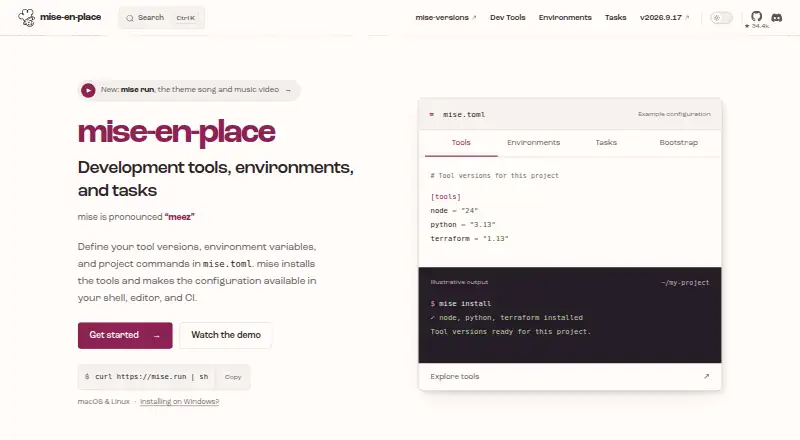
mise manages development tools, environment variables, and project tasks through a project configuration file. It installs runtimes and command-line tools, selects versions for projects, and can share those choices with teams and CI. Its registry contains more than 1,000 tools. Configuration can load environment variables from dotenv files, secrets, or shell commands, and tasks can define commands such as builds, tests, and linting, with dependencies and arguments. For machine setup, mise bootstrap can declare packages, dotfiles, repositories, and services. Shell hooks are listed for bash, zsh, fish, nushell, PowerShell, and other shells. Documentation covers CI use, including GitHub Actions, GitLab CI, and Xcode Cloud. Community editor plugins are listed for Emacs, IntelliJ, Neovim, and VSCode, though support depends on the editor, extension, and language. Security controls include configuration trust, safe and paranoid modes, and verification options such as checksums, signatures, provenance, and artifact attestations. Safe mode can restrict project configuration behaviors including tasks, plugins, environment settings, and hooks. mise is MIT licensed, free, and runs on Linux, macOS, and Windows.
Who it suits
mise suits developers and teams who want to manage tool versions, project environments, and task commands from configuration. Its CI support and machine-setup options may also suit people coordinating development setups across projects or machines.
What it does well
- Manages runtimes and command-line tool versions
- Loads environment variables from several configuration sources
- Tasks support dependencies and arguments
- Lists CI integrations and shell hooks
- MIT licensed and free
What to know first
- Editor plugin support varies by editor, extension, and language
- Safe mode can restrict project configuration behavior
Plans
| Plan | Billed and limits | Price |
|---|---|---|
| Open source | MIT licensed · macOS, Linux, and Windows | Free |
As mise.jdx.dev lists them, read 7 Oct 2026. The maker's own page has the final word.
Getting started
- Visit the mise website.
- Install mise for Linux, macOS, or Windows.
- Use a project configuration file to select tool versions and configure environment variables.
- Define project tasks and their dependencies or arguments as needed.
- Use mise bootstrap to declare packages, dotfiles, repositories, or services for machine setup.
mise suits developers and teams that want one configuration-driven workflow for runtimes, command-line tools, environment values, and project commands. It is strongest in repositories where local and CI setups need to stay aligned. Its breadth is useful, but it also demands careful configuration and trust choices.
Overview
mise manages development tools, environment variables, and project tasks through a project configuration file. It installs runtimes and command-line tools, selects versions per project, and shares those selections with teammates and continuous-integration systems. That combination can reduce drift between a developer laptop and automated builds.
The same configuration can load values from dotenv files, secrets, and shell commands. Tasks cover build, test, lint, and other commands, with dependencies and arguments. A bootstrap command can declare packages, dotfiles, repositories, and services for setting up a machine. This is a broad replacement for keeping separate conventions for version managers, environment files, task runners, and workstation setup.
Key features
Toolchains and project tasks
A registry of more than 1,000 tools gives mixed-language projects a wide base of runtimes and command-line utilities. Per-project versions are practical when a repository must use a specific toolchain, and sharing the declarations with CI helps keep automated work consistent. Task graphs let commands express dependencies, while affected-build support can focus work on impacted parts of a project. Remote caching and cache scope covering both relevant levels can reduce repeated work when the surrounding workflow is configured to use them.
Environment and machine setup
Loading environment values from configuration, dotenv files, secrets, and shell commands brings project context into the same workflow as tool selection. That is convenient for teams with repeatable setup rules, though it also means configuration deserves the same scrutiny as executable scripts. Bootstrap extends the model to packages, dotfiles, repositories, and services, making mise more suitable for standardizing a whole development machine than a narrowly focused runtime manager.
Shell, CI, and editor coverage
Shell hooks are listed for bash, zsh, fish, nushell, PowerShell, and other shells, so the workflow can follow developers across common command environments. Documentation covers GitHub Actions, GitLab CI, and Xcode Cloud. Community plugins exist for Emacs, IntelliJ, Neovim, and VSCode, but editor support depends on the particular editor, extension, and language; teams should not assume uniform IDE behavior.
Security controls
Configuration trust, safe and paranoid modes, checksums, signatures, provenance, and artifact attestations provide meaningful controls for a system that can install plugins, run tasks, and alter project environments. Safe mode can restrict tasks, template execution, plugin installation, project environment settings, and hooks. Those safeguards are a strong reason to consider mise in repositories that accept shared configuration, while they add decisions and friction for users who want a minimal setup.
Pricing
mise is open source and MIT licensed. The Open source plan costs nothing and covers macOS, Linux, and Windows. There is no free trial because the software is free, and no paid tier or seat charge is stated. This makes the full feature set accessible to individuals and teams, with no paid-plan upgrade path described.
Platforms
mise runs on Linux, macOS, and Windows. Shell hooks broaden its fit across command-line environments, while editor integrations remain dependent on community plugins and the chosen development stack.
Who it's for
Choose mise for multi-language repositories, teams standardizing local and CI toolchains, and developers who want tasks, environment loading, and machine bootstrap in one configuration. It is particularly compelling when task dependencies, affected builds, and shared caches matter. A single-language project needing only one runtime may find its wider configuration and security model unnecessary.
Pros and cons
Pros
- Broad tool coverage: More than 1,000 registry entries support projects using several runtimes and command-line tools.
- One workflow across contexts: Project versions and tasks can be shared between local machines, teams, and CI services.
- Deep automation: Task graphs, affected builds, remote caching, and bootstrap cover work beyond version switching.
- Serious trust options: Safe and paranoid modes plus verification mechanisms help control configuration and artifacts.
- No license cost: The MIT-licensed software is free on all three supported desktop operating systems.
Cons
- More configuration responsibility: Environment loading, hooks, tasks, and plugins create more trust decisions than a focused version manager.
- Uneven editor experience: IDE support depends on community plugins, editor, extension, and language.
- Potentially excessive scope: Small projects may not need machine bootstrap, task graphs, or cache controls alongside runtime selection.
Alternatives
For a broader comparison, see Runtime Version Managers, Monorepo Management Tools, and Development Environment Managers.
- GHCup is a free Haskell toolchain installer and manager for users focused on that ecosystem.
- Jabba is a free Java version manager when Java-only control is the priority.
- rustup is a free choice for Rust toolchain management.
- axe-playwright is free MIT-licensed software built around a Playwright peer dependency.
- elan is a free Lean version manager.
- fnm is a free option for focused runtime version management.
- nvm is a free open-source Node.js version manager.
- asdf is a free open-source tool version manager for Linux and macOS.
Verdict
mise is the right choice for developers and teams that want one free, cross-platform configuration to coordinate tool versions, environments, tasks, machine setup, and CI. Its main advantage is that breadth; its main drawback is the added configuration and trust surface. Look elsewhere when you need only a narrowly scoped runtime manager or guaranteed editor integration.
Verdict
mise brings tool versions, environment variables, and project tasks into one configuration-driven workflow. Its security controls offer ways to restrict configuration behavior, while editor support varies by setup.
Questions
Is mise free?
Yes. The Open source plan costs $0 and is MIT licensed.
Which operating systems does mise support?
It is listed for Linux, macOS, and Windows.
What does mise manage?
It manages development tools, environment variables, and project tasks through a project configuration file. It installs runtimes and command-line tools and selects versions per project.
Can teams use mise in CI?
Yes. The documentation describes CI use, including GitHub Actions, GitLab CI, and Xcode Cloud.
Which editors and shells does it support?
Community editor plugins are listed for Emacs, IntelliJ, Neovim, and VSCode, with support depending on the editor, extension, and language. Shell hooks are listed for bash, zsh, fish, nushell, PowerShell, and other shells.
What security controls does mise provide?
Its documentation describes configuration trust, safe and paranoid modes, and verification options including checksums, signatures, provenance, and artifact attestations.
Facts from mise's own pages
- CI integration
- The documentation describes using mise in CI, including GitHub Actions, GitLab CI, and Xcode Cloud. · mise.jdx.dev, 7 Oct 2026
- Editor integrations
- The IDE guide lists community plugins for Emacs, IntelliJ, Neovim, and VSCode, and says support depends on the editor, extension, and language. · mise.jdx.dev, 7 Oct 2026
- Environments
- It can load environment variables from configuration, dotenv files, secrets, and shell commands. · mise.jdx.dev, 7 Oct 2026
- License
- The project is open source and MIT licensed. · mise.jdx.dev, 7 Oct 2026
- Machine setup
- mise bootstrap can declare packages, dotfiles, repositories, and services for machine setup. · mise.jdx.dev, 7 Oct 2026
- Purpose
- mise manages development tools, environment variables, and project tasks through a project configuration file. · mise.jdx.dev, 7 Oct 2026
- Security controls
- The security documentation describes configuration trust, safe and paranoid modes, and verification options including checksums, signatures, provenance, and artifact attestations. · mise.jdx.dev, 7 Oct 2026
- Shell support
- Shell hooks are listed for bash, zsh, fish, nushell, PowerShell, and other shells. · mise.jdx.dev, 7 Oct 2026
- Support
- The project directs questions to GitHub Discussions, bug reports to GitHub Issues, and security reports to the private process in SECURITY.md. · mise.jdx.dev, 7 Oct 2026
- Tasks
- Tasks can define build, test, lint, and other commands with dependencies and arguments. · mise.jdx.dev, 7 Oct 2026
- Tool registry
- The homepage says the tool registry contains more than 1,000 tools. · mise.jdx.dev, 7 Oct 2026
- Tool versions
- It installs runtimes and command-line tools, selects versions per project, and shares those choices with teams and CI. · mise.jdx.dev, 7 Oct 2026
- Untrusted configurations
- Safe mode can restrict project configuration behavior, including tasks, template execution, plugin installation, project environment settings, and hooks. · mise.jdx.dev, 7 Oct 2026
Where mise stands on Freedom251
- Runtime Version Managers#11 of 30
- Monorepo Management Tools#17 of 33
- Development Environment Managers#26 of 50