Freedom251 › Runtime Version Managers
elan
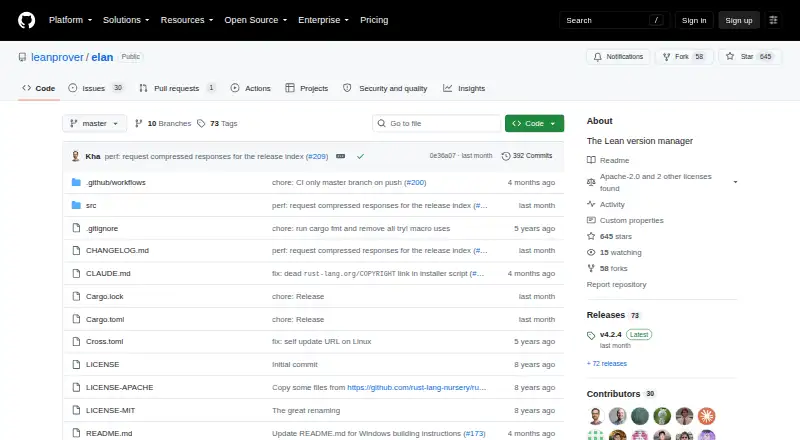
What elan is
elan manages installations of the Lean theorem prover on Linux, macOS, and Windows. Its `lean` and `lake` commands select the version named in a project's `lean-toolchain` file and download it when needed. The `elan` command also lets users install, select, run, and uninstall Lean versions manually. This supports project version pinning, lockfiles, automatic switching, shell integration, and CI/CD use. Installation options include shell instructions for Linux and macOS, a PowerShell method for Windows, and release downloads for supported platforms. The README recommends the Nixpkgs version on NixOS because toolchains downloaded by elan require patching there. Lake needs git to download dependencies. The project describes elan as an adaptation of rustup for Lean infrastructure. It is free under Apache-2.0 and MIT licenses, and the latest release listed is v4.2.4. The README says the self-uninstall command removes elan and reverts shell configuration changes made during installation.
Who it suits
elan suits Lean users who want project-specific toolchain selection or manual control of installed Lean versions. It is available across Linux, macOS, and Windows.
What it does well
- Selects Lean versions from project configuration.
- Supports manual toolchain management.
- Includes shell integration and automatic switching.
- Free under Apache-2.0 and MIT licenses.
What to know first
- Lake needs git to download dependencies.
- NixOS toolchains downloaded by elan require patching.
- NixOS users are advised to install the Nixpkgs version.
Plans
| Plan | Billed and limits | Price |
|---|---|---|
| elan | Lean version management · Apache-2.0 and MIT licenses | Free |
As github.com lists them, read 28 Sept 2026. The maker's own page has the final word.
Getting started
- Open the elan GitHub repository.
- Choose the shell installation instructions for Linux or macOS, the PowerShell instructions for Windows, or a release download for a supported platform.
- Install git if you plan to use Lake to download dependencies.
- Use a project’s lean-toolchain file to select its Lean version, or use elan to manage versions manually.
Elan manages Lean theorem prover installations, with project-level version selection and manual control of toolchains. It suits Lean developers who want projects to select their own compiler version without giving up the ability to manage versions directly. Its narrow focus is a strength for Lean work, though NixOS users need to take a different installation route.
Overview
Elan’s lean and lake commands read a project’s lean-toolchain file and select the specified Lean version, downloading it when needed. This makes project version pinning practical across local work and CI/CD, rather than relying on a manually maintained global choice.
The separate elan command handles manual installation, selection, execution, and removal of Lean versions. The project describes its lineage as a rustup fork adapted for Lean infrastructure, so its remit is language and SDK version management—not a general development environment manager.
Key features
Project-driven and manual toolchains
Automatic switching follows the project’s toolchain file, while manual commands let developers manage Lean versions themselves. That combination serves teams working across projects pinned to different versions as well as users who need to choose a version outside a project. Project pinning, lockfile support, shell integration, and CI/CD usage are supported.
Installation and platform caveats
Installation guidance covers shell setup on Linux and macOS, PowerShell on Windows, and release downloads for supported platforms. NixOS users should install the Nixpkgs version: elan-downloaded toolchains require patching on that system. Lake also needs git to download dependencies, so a Lean installation alone does not cover that prerequisite.
Elan can uninstall itself and revert the shell configuration changes it made during installation. The repository lists Apache-2.0 and MIT licenses.
Pricing
Elan is free: the elan plan costs nothing and includes Lean version management. There is no free trial because the software is already free, and no paid tier or seat-based plan is described. Its free plan gives up nothing to a paid edition; the trade-off is simply that elan manages Lean versions rather than offering broader language coverage.
Platforms
Elan supports Linux, macOS, and Windows. Its published installation paths vary by operating system, with shell installation for Linux and macOS and PowerShell for Windows. NixOS users should follow the Nixpkgs recommendation rather than depend on elan-downloaded toolchains.
Who it's for
Choose elan if Lean is part of your work and you want project configuration to govern the Lean version, with manual toolchain commands available when needed. Its project pinning and CI/CD support make it suitable for keeping development and automated builds aligned. It is not the right choice for someone seeking one manager for several unrelated language runtimes, and NixOS users should use the recommended Nixpkgs package.
Pros and cons
- Project-specific version selection: the toolchain file can select and trigger download of the Lean version a project needs.
- Manual control remains available: elan can install, select, run, and uninstall versions directly.
- Broad desktop OS support: Linux, macOS, and Windows are supported, with installation paths for each.
- NixOS requires a workaround: downloaded toolchains need patching, so the recommended Nixpkgs version is the better route.
- Lake dependency downloads need git: users must have that dependency available for Lake to fetch packages.
Alternatives
For Lean version management, elan is the focused fit. If the goal is another ecosystem or a broader version-management choice, these free alternatives target different scopes: rustup is another free manager for Linux, macOS, and Windows; fnm is free and supports the same three platforms; nvm is a free Node.js version manager, with Linux, macOS, self-hosted, and Windows support; asdf is a free open-source tool version manager for Linux and macOS; goenv and GVM are free Go version managers for Linux and macOS; PHPBrew is a free PHP version manager for Linux, macOS, and self-hosted setups, though building PHP requires development packages and unsupported older versions may fail; and RVM is another free option with Linux, macOS, self-hosted, web, and Windows platform support.
Browse Runtime Version Managers or Development Environment Managers for more options.
Verdict
Lean developers who want project-pinned toolchains and direct version control should choose elan: it automates the routine version switch without removing manual management. Look elsewhere if you need a multi-language manager; on NixOS, use the Nixpkgs version instead of elan-downloaded toolchains.
Verdict
elan automates Lean version selection from project configuration while also allowing manual toolchain management. NixOS users should follow the stated Nixpkgs recommendation, and Lake dependency downloads require git.
Questions
Is elan free?
Yes. The listed plan is free.
Which operating systems does elan support?
It supports Linux, macOS, and Windows.
Can elan select a Lean version for a project?
Yes. Its `lean` and `lake` commands use the version in the project’s `lean-toolchain` file and download it when necessary.
Can I manage Lean versions manually?
Yes. The `elan` executable can install, select, run, and uninstall Lean versions.
What licenses does elan use?
The repository lists Apache-2.0 and MIT licenses.
What should NixOS users know before installing?
The README recommends the Nixpkgs version because elan-downloaded toolchains require patching on NixOS.
Facts from elan's own pages
- Automatic toolchain selection
- Its lean and lake binaries select and, when necessary, download the Lean version specified in a project's lean-toolchain file. · github.com, 28 Sept 2026
- Dependency
- The README says git is needed for Lake to download dependencies. · github.com, 28 Sept 2026
- Install methods
- The README provides shell installation for Linux and macOS, PowerShell installation for Windows, and release downloads for supported platforms. · github.com, 28 Sept 2026
- Latest release
- The GitHub releases page identifies v4.2.4 as the latest release. · github.com, 28 Sept 2026
- License
- The repository lists Apache-2.0 and MIT licenses. · github.com, 28 Sept 2026
- Manual toolchain management
- The elan executable can install, select, run, and uninstall Lean versions manually. · github.com, 28 Sept 2026
- NixOS
- The README recommends installing the Nixpkgs version because elan-downloaded toolchains require patching on NixOS. · github.com, 28 Sept 2026
- Project lineage
- The README describes elan as basically a fork of rustup adapted for Lean infrastructure. · github.com, 28 Sept 2026
- Purpose
- elan manages installations of the Lean theorem prover. · github.com, 28 Sept 2026
- Uninstallation
- The README says elan self uninstall should remove elan and revert the shell configuration changes made during installation. · github.com, 28 Sept 2026
Where elan stands on Freedom251
- Runtime Version Managers#5 of 30
- Development Environment Managers#11 of 50