Freedom251 › AI Screenshot-to-Code Tools
Fronty
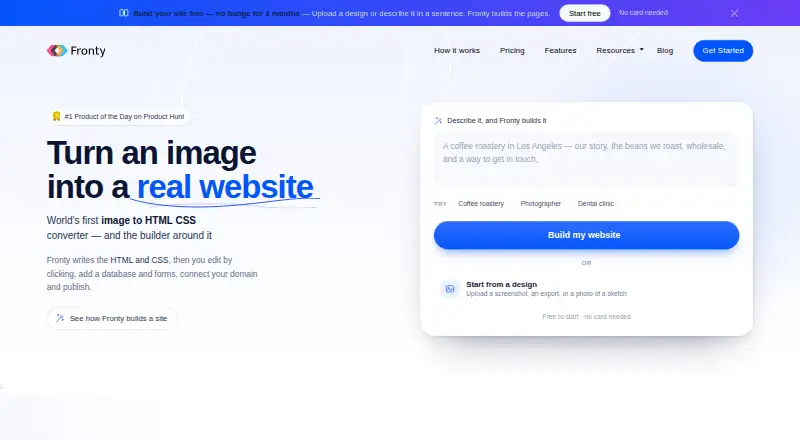
What Fronty is
Fronty generates HTML and CSS websites from prompts, screenshots, designs, existing URLs, templates, or a blank start. Its AI editor can also change a real page in response to natural-language instructions. The online visual editor lets users click page elements to edit them, adjust layouts, preview responsive views, and use history and autosave without installing software. Fronty provides structured website tables, dynamic content, and forms whose submissions appear in a dashboard inbox. Users can publish with managed hosting and HTTPS, connect a custom domain on paid plans, or download standalone HTML to host elsewhere. The service describes capabilities for page titles and descriptions, clean URLs, an updating sitemap, semantic headings, and labelled controls. Its free plan costs nothing and publishes to a fronty.live address with Fronty branding; page and usage allowances vary by plan. Documentation labels forms, dynamic content, and publishing as limited or in rollout. Export is limited to 200 non-deleted pages and may retain CDN dependencies.
Who it suits
It suits people creating, editing, publishing, or exporting websites without code. Teams can use roles for owners, admins, editors, and viewers.
What it does well
- Creates HTML and CSS from prompts, images, designs, or URLs
- Visual editing works without installing software
- Includes responsive preview, history, and autosave
- Offers managed hosting, HTTPS, and code export
- Free plan publishes to a fronty.live address
What to know first
- Free plan includes Fronty branding
- Page and usage allowances vary by plan
- Forms and dynamic content have limits
- Export is limited to 200 non-deleted pages
Limits
The free plan publishes on a fronty.live address with Fronty branding, and page and usage allowances vary by plan. Forms and submissions are limited, dynamic content and item pages have limits, and publishing is in a limited rollout. Export is capped at 200 non-deleted pages, uses English as the document language, and may retain CDN dependencies.
Plans
| Plan | Billed and limits | Price |
|---|---|---|
| Free | Publish on a free fronty.live address · Fronty branding · page and usage allowances vary by plan | Free |
As fronty.com lists them, read 3 Oct 2026. The maker's own page has the final word.
Getting started
- Open Fronty's website and choose a prompt, screenshot, design, URL, starter template or blank start.
- Generate the site and edit page elements in the online visual editor.
- Use layout controls and responsive preview to refine pages; changes autosave.
- Add tables or forms if needed and review submissions in the dashboard inbox.
- Publish with managed hosting, or download a ZIP of the HTML/CSS to host elsewhere.
- Choose a paid plan if you need custom-domain availability.
Overview
Fronty turns prompts, screenshots, designs, URLs, templates or blank starts into HTML and CSS websites, then lets users edit, publish and export them. It suits freelancers, small teams and non-coders who need a visual route from concept to a hosted site. The broad workflow is useful for marketing and informational sites, but its limits around forms, dynamic content, publishing and exports matter for more demanding projects.
Key features
Generation can begin with a sentence, screenshot, uploaded design, existing URL, starter template or blank page. The AI editor then accepts natural-language instructions to change a real page, making it practical to refine an initial result without rebuilding sections manually. Figma import is not supported, so Figma-based teams must use another input route.
The browser visual editor supports click-to-edit page elements, canvas and layout controls, responsive preview, history and autosave. That keeps design iteration in one place and avoids installed software. Team roles for owners, admins, editors and viewers give shared projects clearer access boundaries.
Fronty adds structured website tables, dynamic content and item pages, plus form building with submissions delivered to a dashboard inbox. These capabilities can support modest content collections and contact flows, but forms and submissions are limited, and dynamic content is bounded. They should not be treated as a replacement for a full database-backed application or mature workflow system.
Publishing includes managed hosting, custom-domain connection on paid plans, automatic HTTPS certificates and backups. Users can also download standalone HTML and host it elsewhere. Export is limited to 200 non-deleted pages, uses English as the document language and may retain CDN dependencies, so portability is useful but not completely self-contained.
SEO-oriented controls include page titles, descriptions, clean URLs, an updating sitemap, semantic headings and labelled controls. Documented integrations cover business-email DNS checks, forms, maps, video, charts, calendars and checkout components. There is no general webhook, Zapier, Make or CRM connection path. Fronty uses HTML/CSS and supports responsive code and ZIP export.
Pricing
The Free plan costs nothing and publishes to a free fronty.live address with Fronty branding. Page and usage allowances vary by plan, so the free tier is best for trying the workflow, personal experiments or a small branded project rather than a polished client launch.
Paid plans provide custom-domain availability and remove the free-address constraint, while other allowances depend on the selected plan. Because forms, dynamic content and publishing are limited capabilities, buyers should confirm that the intended page, submission and publishing quotas fit before committing. The free tier gives up custom-domain presentation and carries branding.
Platforms
Fronty runs on the web and exposes an API. Sites use HTML and CSS, with responsive code and downloadable ZIP export. No installed desktop editor is required.
Who it's for
Fronty is a strong fit for non-technical founders, designers working from screenshots, freelancers producing brochure sites and teams that want role-based editing with managed hosting. It is less suitable for organizations needing extensive form processing, unrestricted dynamic catalogs, broad automation integrations, non-English export control or a fully independent hosting package.
Pros and cons
Pros
- Many starting points: prompts, screenshots, designs, URLs, templates and blank pages support different project stages.
- AI and visual editing together: natural-language revisions complement click-based layout work.
- Useful publishing options: managed hosting, custom domains, automatic HTTPS and backups reduce routine deployment work.
- Portable output: HTML/CSS and ZIP export allow hosting outside Fronty, within the 200-page and CDN-dependency constraints.
- Team controls: owner, admin, editor and viewer roles suit shared site production.
Cons
- Bounded data features: forms, submissions, dynamic content and item pages have limits.
- Limited automation: no general webhook, Zapier, Make or CRM route is documented.
- Export constraints: exports are capped at 200 non-deleted pages, use English and may depend on a CDN.
- Free-tier compromises: fronty.live publishing and Fronty branding are unsuitable for many client-facing launches.
- No Figma import: Figma-centered teams cannot bring designs in directly.
Alternatives
Choose Figma Make when a macOS or web workflow with daily and monthly AI-credit allowances fits better. Kombai is worth considering for extension or desktop coverage and a credit-based free tier. Pick Anima when Figma imports, website clones or plugin code generation are central. Builder.io suits teams wanting API, extension and web access with user, agent-credit and publishing caps. CoderUI is an option for credit-based paid plans spanning all frameworks. Codia AI offers a free plan with its specific limits unstated. Quest is a free extension and web option with one code download. v0 fits users who want Vercel deployment, design mode and GitHub sync, with a 7-message-per-day free tier.
See the AI Screenshot-to-Code Tools list when comparing Fronty with a broader set of screenshot-oriented builders.
Verdict
Choose Fronty if you want to turn visual references or plain-language ideas into editable, responsive HTML/CSS sites, publish them quickly and retain downloadable code. Look elsewhere when your project depends on extensive forms, complex dynamic content, broad third-party automation, unrestricted exports or a direct Figma pipeline.
Verdict
Fronty combines AI-assisted site generation with visual editing, publishing, and HTML export. Check the plan allowances and documented limits on forms, dynamic content, and publishing before choosing it.
Questions
Does Fronty have a free plan?
Yes. The Free plan costs nothing and publishes on a fronty.live address with Fronty branding; page and usage allowances vary by plan.
What platforms does Fronty support?
Fronty is available on the web and through an API. Its website output is HTML and CSS.
Can I export a site?
Yes. Fronty offers ZIP code export for standalone HTML. The documented export is limited to 200 non-deleted pages and may retain CDN dependencies.
Can I connect a custom domain?
Custom-domain availability is included in paid plans. Fronty says it issues HTTPS certificates automatically for connected domains.
What can I use to start a site?
The creation flow supports prompts, screenshots, designs, existing URLs, starter templates and blank starts.
Does Fronty support Figma import?
No. Figma import is not supported.
Facts from Fronty's own pages
- AI data handling
- Fronty says it does not sell customer content or use it to train third-party foundation models, and notes AI providers may retain inputs and outputs for limited periods under their terms. · fronty.com, 2 Oct 2026
- AI editing
- The AI editor works on the page in the editor from natural-language requests, and is included on every plan with monthly message allowances that vary by plan. · fronty.com, 3 Oct 2026
- AI generation
- The creation flow supports prompts, screenshots or designs, existing URLs, starter templates, and blank starts. · fronty.com, 3 Oct 2026
- Business email
- Fronty checks MX, SPF, DKIM, and DMARC records for providers such as Google Workspace, Microsoft 365, Zoho Mail, Fastmail, and Proton Mail, but does not host or read the mailbox. · fronty.com, 3 Oct 2026
- Code export
- Pro and higher plans can export site code as a ZIP of standalone HTML pages for hosting elsewhere. · fronty.com, 3 Oct 2026
- Data and forms
- Fronty offers website databases, dynamic content and form building, with form replies shown in the dashboard. · fronty.com, 2 Oct 2026
- Database and forms
- Fronty provides structured website tables and forms whose submissions appear in the dashboard inbox. · fronty.com, 3 Oct 2026
- Domains and HTTPS
- Paid plans include custom-domain availability, and Fronty says it issues HTTPS certificates automatically for connected domains. · fronty.com, 3 Oct 2026
- Export limits
- The documented export is limited to 200 non-deleted pages, uses English as the document language, and may retain CDN dependencies. · fronty.com, 3 Oct 2026
- Headquarters
- Van Nuys, California, United States · fronty.com, 28 Sept 2026
- Integrations
- Fronty documents custom domains, business-email DNS, forms, and map, video, chart, calendar, and checkout components; it says no general webhook, Zapier, Make, or CRM connection path was found. · fronty.com, 3 Oct 2026
- Integrations and providers
- The privacy policy names Paddle for payment processing, Anthropic for AI generation and polishing, Cloudflare for CDN and domain-related services, and Google OAuth for sign-in when selected. · fronty.com, 2 Oct 2026
- Intended users
- Fronty describes a workflow for creating and editing websites without code, including generating pages from a picture or sentence and publishing on a custom domain. · fronty.com, 3 Oct 2026
- Notable limits
- Fronty's documentation labels forms and submissions as limited, dynamic content and item pages as available with limits, and publishing as a limited rollout. · fronty.com, 2 Oct 2026
- Publishing
- Users can connect a custom domain, publish a site with managed hosting and HTTPS, and get backups. · fronty.com, 2 Oct 2026
- Security
- Fronty says it uses encryption in transit, access controls, security logging, abuse monitoring, rate limits, anti-bot checks, content security controls and hosted-content security scanning. · fronty.com, 2 Oct 2026
- Security and privacy
- Fronty's privacy policy names Cloudflare services for CDN, DNS, custom-hostname/TLS features, Turnstile, security, and edge delivery, and states that it does not sell personal information or share it for cross-context behavioral advertising. · fronty.com, 3 Oct 2026
- SEO and accessibility
- Fronty describes page titles, descriptions, clean URLs, an updating sitemap, semantic headings and labelled controls among its site capabilities. · fronty.com, 2 Oct 2026
- Support
- Fronty directs users to support for account-specific problems and asks them to include the website, page, public URL, expected and actual result, and time of the issue. · fronty.com, 3 Oct 2026
- Visual editing
- The online visual editor lets users click page elements to edit them without installing software. · fronty.com, 2 Oct 2026
- Visual editor
- Users can edit page elements by clicking them, with canvas editing, layout controls, responsive preview, history, and autosave. · fronty.com, 3 Oct 2026
- What it does
- Fronty uses AI to generate editable websites from a description or uploaded design, then lets users edit and publish them. · fronty.com, 3 Oct 2026
- Who it is for
- Fronty describes workflows for creating, editing, publishing and exporting websites, including use of team roles for owners, admins, editors and viewers. · fronty.com, 2 Oct 2026
Where Fronty stands on Freedom251
- AI Screenshot-to-Code Tools#12 of 24