Freedom251 › AI Screenshot-to-Code Tools

CSSPicker Screenshot to Code
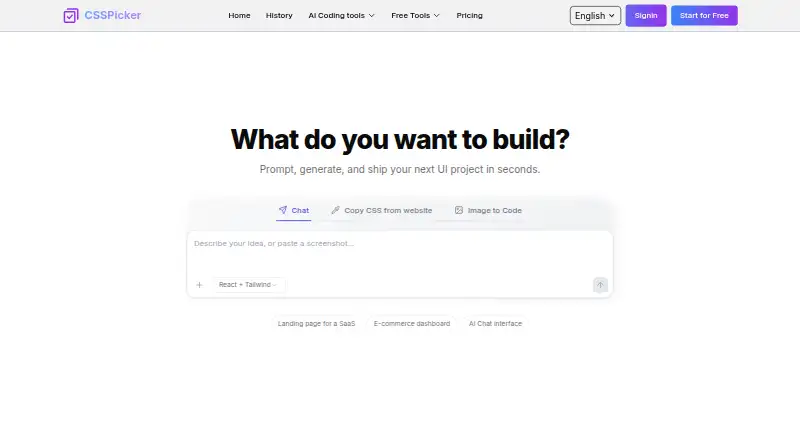
What CSSPicker Screenshot to Code is
CSSPicker Screenshot to Code turns interface images into HTML, React, Vue, or Tailwind CSS output. Upload PNG, JPG, JPEG, or WebP files, then inspect the generated code in a built-in editor, make changes, or ask AI to refine it. You can copy the result or download it. Inputs may be website captures, Figma exports, mockups, wireframes, UI images, mobile app screenshots, or photos of sketches, but direct Figma import is not supported. CSSPicker is available on the web and as a Chrome extension. The extension extracts HTML and CSS from selected webpage elements and can convert them to React or Tailwind, including inherited styles, pseudo states, responsive media queries, and iframe styles. The maker describes output as mobile-first and responsive for desktop, tablet, and mobile, though complex conversions may need adjustments. Its page identifies Gemini 3 and Claude 4.5. A free plan has limited credits; paid packs are $19.99 a month, $89 a year, or $150, paid once. Generated content is retained for up to 15 days on free accounts and 100 days on paid accounts.
Who it suits
It suits developers and designers who want to turn interface images or webpage elements into editable code. The extension is also described for learning, inspiration, and adapting UI patterns; check original-site terms and intellectual-property rules before reusing production code or branded assets.
What it does well
- Accepts four common image formats.
- Editor supports manual and AI refinements.
- Exports code by copy or download.
- Extension captures styles and responsive media queries.
- Free plan is available with limited credits.
What to know first
- Direct Figma import is not supported.
- Complex conversions may need minor adjustments.
- Free plan has limited credits.
- Free generated content is retained for up to 15 days.
Limits
The free plan has limited credits, and generated content is saved for up to 15 days for free users. Paid plans list unlimited generations for their billing period, with generated content retained for up to 100 days. Complex screenshot conversions may need minor adjustments.
Plans
| Plan | Billed and limits | Price |
|---|---|---|
| LifeTime Pack | $150/Lifetime · Unlimited AI generations · Unlimited CSSPicker Extension use · All AI tools for web development · Code export · Image to code | $150, paid once |
| Monthly Pack | $19.99 USD per month · Unlimited AI generations per month · Unlimited CSSPicker Extension use · All AI tools for web development · Code export · Image to code | $19.99 a month |
| Yearly Pack | $89 USD per year · Unlimited AI generations per year · Unlimited CSSPicker Extension use · All AI tools for web development · Code export · Image to code | $89 a year |
As csspicker.dev lists them, read 3 Oct 2026. The maker's own page has the final word.
Getting started
- Visit https://www.csspicker.dev/ to use the web tool.
- Upload a PNG, JPG, JPEG, or WebP image, such as a mockup or screenshot.
- Choose generated HTML, React, Vue, or Tailwind CSS output.
- Preview and adjust the code in the built-in editor, or ask AI to refine it.
- Copy or download the generated code, or use the Chrome extension to work from selected webpage elements.
Verdict
CSSPicker offers both screenshot conversion and webpage-element extraction, with an editor for reviewing and refining output. Consider its limited free credits, possible adjustment needs, and retention periods when choosing a plan.
Questions
Is CSSPicker Screenshot to Code free?
A free plan is available with limited credits. Paid options are $19.99 a month, $89 a year, and $150, paid once.
What code formats can it generate?
It generates HTML, React, Vue, or Tailwind CSS from uploaded screenshots. The Chrome extension can convert extracted webpage HTML and CSS to React or Tailwind.
Can I import directly from Figma?
No. Figma exports can be uploaded as image inputs, but direct Figma import is not supported.
Which platforms are available?
CSSPicker is available on the web and as a Chrome extension.
How long is generated content saved?
Generated content is saved for up to 15 days for free users and up to 100 days for paid users.
What do the paid packs include?
The Monthly Pack, Yearly Pack, and LifeTime Pack list unlimited AI generations for their stated billing period, unlimited extension use, AI tools for web development, code export, and image to code.
Facts from CSSPicker Screenshot to Code's own pages
- AI models
- The screenshot-to-code page says the tool is powered by Gemini 3 and Claude and identifies Gemini 3 and Claude 4.5 in its feature description. · csspicker.dev, 3 Oct 2026
- Data retention
- The terms say generated content is saved for up to 15 days for free users and up to 100 days for paid users. · csspicker.dev, 3 Oct 2026
- Export
- Generated code can be downloaded or copied to the clipboard. · csspicker.dev, 3 Oct 2026
- Extension
- The CSSPicker Chrome extension can extract HTML and CSS from selected webpage elements and convert the result to React or Tailwind code. · csspicker.dev, 3 Oct 2026
- Extension features
- The maker says the extension can capture inherited styles, pseudo states, responsive media queries, and styles inside iframes. · csspicker.dev, 3 Oct 2026
- Free tier
- The maker says a free plan is available with limited credits. · csspicker.dev, 3 Oct 2026
- Image inputs
- The upload accepts PNG, JPG, JPEG, and WebP files. · csspicker.dev, 3 Oct 2026
- Intended use
- The maker describes the extension as useful for learning, inspiration, and adapting UI patterns, and advises checking the original site's terms and intellectual property rules before reusing production code or branded assets. · csspicker.dev, 3 Oct 2026
- Known limitation
- The maker says complex screenshot conversions may need minor adjustments. · csspicker.dev, 3 Oct 2026
- Paid tier support
- The maker says Pro plans offer higher conversion limits and priority support. · csspicker.dev, 3 Oct 2026
- Preview and editing
- Users can preview generated code in a built-in editor, adjust it, or ask AI to refine it. · csspicker.dev, 3 Oct 2026
- Responsive output
- The maker says generated code is mobile-first and responsive by default for desktop, tablet, and mobile screens. · csspicker.dev, 3 Oct 2026
- Screenshot conversion
- The tool converts uploaded screenshots into HTML, React, Vue, or Tailwind code. · csspicker.dev, 3 Oct 2026
Where CSSPicker Screenshot to Code stands on Freedom251
- AI Screenshot-to-Code Tools#10 of 24