Freedom251 › AI Screenshot-to-Code Tools
CopyWeb
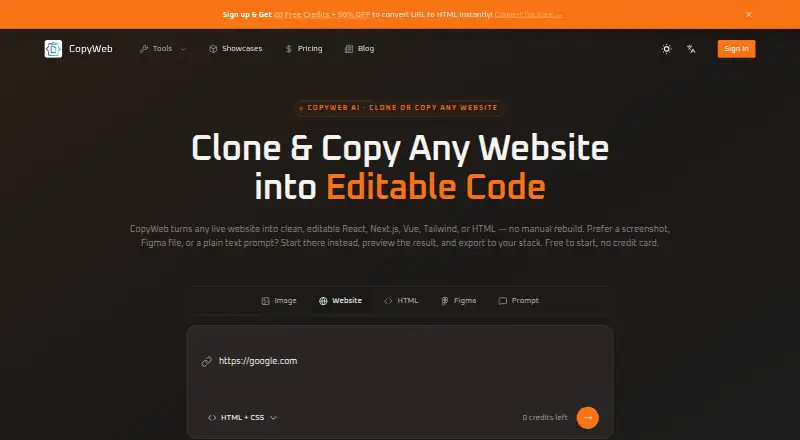
What CopyWeb is
CopyWeb is a web service that converts visual or written inputs into editable frontend code. You can provide a live URL, screenshot, mockup, Figma file or text prompt, then generate React, Next.js, Vue, Tailwind CSS or portable HTML/CSS output. Its website cloner renders a target page before rebuilding it as a component tree, preserving mobile and tablet responsive behavior. Repeated patterns become reusable named components, while referenced images, icons and fonts are fetched and their paths adjusted for a self-contained result. CopyWeb says the cloner removes analytics scripts, advertising tags and other third-party bloat. A separate URL-to-HTML tool creates one offline-ready file containing embedded CSS, fonts and images and uses Browserless technology. The service is aimed at frontend developers, designers, founders and freelancers. Uploaded screenshots, URLs, Figma files and prompts are processed for code generation and are not stored permanently; collected data is protected with encryption and access controls. CopyWeb offers a free plan, plus one-time Small, Medium and Large credit bundles with different limits and features.
Who it suits
CopyWeb fits frontend developers, designers, founders and freelancers who want to turn references or prompts into editable code. It is also useful when a project needs responsive output, reusable components or a single self-contained HTML file.
What it does well
- Accepts URLs, screenshots, mockups, Figma files and text prompts
- Outputs React, Next.js, Vue, Tailwind or HTML/CSS
- Preserves mobile and tablet behavior in cloned sites
- Extracts repeated patterns into reusable named components
- Creates one-file HTML with embedded assets for offline use
- Uploaded inputs are not stored permanently
What to know first
- Paid credits expire after one year
- Small and Medium plans do not list React or Vue output
- Priority support, private mode and Stripe checkout are listed with Large
- The service is web-based
Limits
Small provides 100 credits for use within one year, Medium 400 credits for one year and Large 1,000 credits for one year. React/Vue/HTML output, priority support, private mode and Stripe checkout are listed with Large.
Plans
| Plan | Billed and limits | Price |
|---|---|---|
| Medium | $0.075 / credit · one-time · use within 1 year · 400 credits · URL/Figma/CSS/HTML/image conversions · website cloner · preview and export | $29.90, paid once |
| Large | $0.04 / credit · one-time · use within 1 year · 1,000 credits · React/Vue/HTML output · priority support · private mode · Stripe checkout | $39.90, paid once |
| Small | $0.099 / credit · one-time · use within 1 year · 100 credits · URL/Figma/CSS/HTML/image conversions · website cloner · preview and export | $9.90, paid once |
As copyweb.net lists them, read 1 Oct 2026. The maker's own page has the final word.
Getting started
- Open CopyWeb in a web browser
- Choose the free plan or a one-time credit bundle
- Submit a URL, screenshot, mockup, Figma file or text prompt
- Select the desired frontend framework or HTML/CSS output
- Preview the generated code
- Export the result
Verdict
Pick CopyWeb when you need editable frontend code from a website, design file, screenshot or prompt, especially with responsive and reusable structure. Consider another option if you need credits that can be used beyond one year.
Questions
Does CopyWeb offer a free plan?
Yes. CopyWeb has a free plan and also offers free trial access.
What do the paid plans cost?
Small is $9.90, paid once, Medium is $29.90, paid once and Large is $39.90, paid once. Each is billed as a one-time credit bundle and can be used within one year.
Which code frameworks are supported?
CopyWeb can produce React, Next.js, Vue, Tailwind CSS or portable HTML/CSS.
Can it import Figma designs?
Yes. Figma files are supported input sources.
Are uploaded files stored permanently?
CopyWeb says screenshots, URLs, Figma files and prompts are processed for code generation and are not stored permanently.
How can users get support?
Support is available at [email protected] and through the CopyWeb Discord community.
Facts from CopyWeb's own pages
- Asset handling
- The cloner fetches referenced images, icons, and fonts and rewires their paths for a self-contained result. · copyweb.net, 1 Oct 2026
- Browserless technology
- The URL-to-HTML page says CopyWeb is powered by Browserless technology. · copyweb.net, 1 Oct 2026
- Component structure
- The cloner extracts repeating patterns into reusable named components. · copyweb.net, 1 Oct 2026
- Core function
- CopyWeb turns live websites, screenshots, Figma designs, or text prompts into clean, editable frontend code. · copyweb.net, 1 Oct 2026
- Framework output
- The service can produce React, Next.js, Vue, Tailwind CSS, or portable HTML/CSS. · copyweb.net, 1 Oct 2026
- Intended users
- CopyWeb describes its audience as frontend developers, designers, founders, and freelancers. · copyweb.net, 1 Oct 2026
- Privacy
- Uploaded screenshots, URLs, Figma files, and prompts are processed for code generation and are not stored permanently. · copyweb.net, 1 Oct 2026
- Responsive layouts
- CopyWeb preserves mobile and tablet responsive behavior in cloned output. · copyweb.net, 1 Oct 2026
- Security
- CopyWeb says collected data is stored securely and protected with encryption and access controls. · copyweb.net, 1 Oct 2026
- Support
- Users can contact [email protected] or join the CopyWeb Discord community. · copyweb.net, 1 Oct 2026
- Tracker removal
- CopyWeb says it strips analytics scripts, ad tags, and third-party bloat from cloned websites. · copyweb.net, 1 Oct 2026
- URL-to-HTML
- Its URL-to-HTML tool creates a single self-contained file with embedded CSS, fonts, and images for offline use. · copyweb.net, 1 Oct 2026
- Website cloning
- Its AI website cloner renders a target page before reconstructing it as a component tree. · copyweb.net, 1 Oct 2026
Where CopyWeb stands on Freedom251
- AI Screenshot-to-Code Tools#11 of 24