Freedom251 › AI Screenshot-to-Code Tools

Codia AI
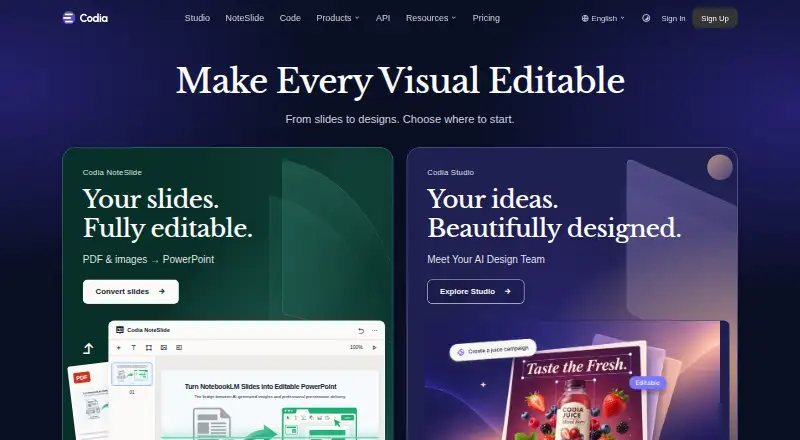
What Codia AI is
Codia AI turns screenshots, PDFs, slides, images, and design files into editable designs and other creative outputs. Its Screenshot to Figma workflow detects text and layout, then rebuilds them as editable Figma layers. It can convert designs from Photoshop, Canva, Notion, and Office into Figma, and generate code from Figma designs or other inputs for React, Vue, SwiftUI, Flutter, Android, and plain HTML. NoteSlide converts NotebookLM exports, PDFs, and image-based slides into editable PowerPoint or Keynote presentations. The product family also includes Figma and Canva plugins and Visual Struct API, which converts UI screenshots and mockups into structured JSON, SVG, and Figma-compatible files. Codia lists integrations with Figma, Canva, Photoshop, Sketch, Cursor, Claude Desktop, and ChatGPT. It offers a free plan and web, API, and extension access. Converted work may need manual review, and OCR depends on source quality.
Who it suits
Codia identifies UI/UX designers, developers, product managers, entrepreneurs, design teams, and enterprises as users. It may suit people turning visual references into editable designs or code.
What it does well
- Free plan is available.
- Converts screenshots and files into editable Figma designs.
- NoteSlide outputs editable PowerPoint or Keynote presentations.
- Visual Struct API outputs JSON, SVG, and Figma-compatible files.
- Responsive code generation is supported.
What to know first
- OCR quality depends on the source.
- Converted output should be reviewed manually.
- Saved projects and task history remain until deleted or account closure.
Plans
| Plan | Billed and limits | Price |
|---|---|---|
| Free plan | Free plan available; specific limits not stated | Free |
As codia.ai lists them, read 30 Sept 2026. The maker's own page has the final word.
Codia AI is a conversion suite for people moving between visual designs, presentations, and software code. It is best suited to designers, developers, and product teams already using Figma or slide files. The broad workflow coverage is compelling, provided you are willing to inspect generated results and manage how long saved project history remains.
Overview
Codia groups Codia Studio, NoteSlide, Figma and Canva plugins, and Visual Struct API into one product family. It accepts Figma files, screenshots, PNG, JPG, WebP, PDFs, and prompts, then produces editable designs, PowerPoint or Keynote presentations, code, SVG, and JSON. That makes it a practical bridge between design and development work rather than a single-purpose converter.
Founded in 2023 and headquartered in Dover, Delaware, Codia says uploaded files and generated assets remain customer content. Private files, prompts, and outputs are not used to train models unless you opt in or a separate written agreement says otherwise. Transient processing copies are deleted within seven days, while saved projects and task history remain until you delete them or close the account. Browser, API, and checkout traffic use HTTPS/TLS, and enterprise reviews can address encryption, retention, data-processing agreements, and private deployment.
Key features
Design and screenshot conversion
Screenshot to Figma detects text and layout, rebuilding an image as editable Figma layers. Codia also converts PDFs, Photoshop files, and material from Canva, Notion, or Office into editable Figma designs. This is useful when a team has visual references but lacks the original source file. Codia recommends manual review, and OCR quality depends on the source, so it is a starting point for reconstruction rather than a guarantee of pixel-perfect fidelity.
Slides and presentations
NoteSlide turns NotebookLM PDF exports, ordinary PDFs, and image-based slide files into editable PowerPoint or Keynote presentations. It suits teams that need to revise a deck whose source is effectively a document or set of images. The editable result is more useful than a static export, but the same review requirement applies to text recognition and layout.
Design-to-code
Codia accepts screenshots, PDFs, or Figma files and generates code for React, Vue, plain HTML/CSS, Flutter, SwiftUI, Swift, Kotlin, Jetpack Compose, React Native, Android, iOS, and macOS workflows. Responsive code is supported, and Tailwind CSS is among the listed framework options. This breadth helps teams targeting several platforms, although generated code still calls for engineering cleanup and validation before production use.
API, plugins, and automation
Visual Struct API converts UI screenshots and mockups into structured JSON, SVG, and Figma-compatible files. Codia lists Figma, Canva, Photoshop, and Sketch workflows, plus MCP connections for Cursor, Claude Desktop, and ChatGPT. Enterprise API processing can handle batches of up to 1,000 images simultaneously, making the API more relevant to organizations with repeatable conversion pipelines than to occasional individual jobs.
Pricing
Codia has a freemium model and a free plan priced at $0. That makes it suitable for exploring the workflows or handling light use, while teams with predictable volume should confirm limits before standardizing on it. There is no published paid-plan price; larger or specialized deployments therefore require custom pricing.
Support is offered through Slack and email, with email checked daily. Data ownership remains with the customer, but saved projects and task history persist until removed, an important account-management consideration for shared or sensitive work.
Platforms
Codia is available through web, extension, and API access. Its plugins and MCP integrations extend workflows into Figma, Canva, Photoshop, Sketch, Cursor, Claude Desktop, and ChatGPT rather than confining work to a standalone editor.
Who it's for
UI/UX designers can recover editable layers from screenshots and documents; frontend and full-stack developers can use design-to-code output across web, mobile, and cross-platform frameworks. Product managers, entrepreneurs, design teams, and enterprises may benefit when the same assets move through presentation, design, and implementation stages. It is less suitable for users who need conversion output without manual checking or who require clearly published usage quotas before committing.
Pros and cons
- Pro: One product family covers screenshot, document, slide, design, code, and structured API conversions.
- Pro: Responsive output and support for React, Vue, HTML/CSS, Flutter, SwiftUI, Kotlin, Jetpack Compose, and React Native broaden its development use.
- Pro: Customer ownership and an opt-in-only model-training policy provide clear control over uploaded work.
- Con: Converted designs, OCR, and generated code require manual review, especially when source quality is poor.
Alternatives
Choose AI Screenshot-to-Code Tools when you want a broader directory of screenshot-to-code options. Figma Make is the better fit for a Figma-centered workflow with a Starter allowance of 150 AI credits per day and 500 per month, or a Professional Full seat at $16 a month billed monthly with 3,000 credits. Kombai suits users wanting desktop extensions and a Free plan with 300 credits per month and one seat.
Anima is preferable when capped Figma imports, website clones, and plugin code generations are enough. Builder.io fits teams needing a free collaborative space with one included user, up to five users, 60 monthly Agent Credits, one published app, and 15 publishes per month. CoderUI is a straightforward paid alternative at $29 a month for 500 credits and all frameworks. Fronty is an option for publishing to a free fronty.live address, while Quest offers a free account with one code download. v0 is the stronger choice for prompt-led app work, with a free tier of seven messages per day and Vercel deployment, or Plus at $30 a month.
Verdict
Choose Codia AI if your work regularly crosses screenshots, documents, slide decks, editable design files, and multi-platform code, and you value Figma, plugin, API, or MCP connectivity in one family. Look elsewhere if you need guaranteed conversion accuracy, transparent quotas, or a clearly priced plan for sustained volume.
Verdict
Codia brings design conversion, slide editing, and code generation into one product family. Its free plan offers a way to explore these workflows, but users should review conversions and consider how saved project history is retained.
Facts from Codia AI's own pages
- API and MCP
- Codia documents VisualStruct API and MCP integrations with tools including Cursor, Claude, and ChatGPT. · codia.ai, 30 Sept 2026
- API output
- Visual Struct API converts UI screenshots and mockups into structured JSON, SVG, and Figma-compatible files. · codia.ai, 30 Sept 2026
- Code generation
- Codia converts Figma designs into code for web, iOS, Android, macOS, and cross-platform development. · codia.ai, 30 Sept 2026
- Data ownership
- Codia says uploaded files and generated assets remain customer content and that it does not claim ownership of them. · codia.ai, 30 Sept 2026
- Design conversion
- It can turn screenshots, PDFs, Photoshop files, and content from Canva, Notion, or Office into editable Figma designs. · codia.ai, 30 Sept 2026
- Design to code
- Codia says its design-to-code workflow accepts screenshots, PDFs, or Figma files and outputs code for React, Vue, SwiftUI, Flutter, Android, or plain HTML. · codia.ai, 30 Sept 2026
- Founded
- Codia says it was founded in 2023. · codia.ai, 30 Sept 2026
- Headquarters
- Dover, Delaware, United States · codia.ai, 23 Sept 2026
- Integrations
- The maker lists Figma, Canva, Photoshop, and Sketch workflows, and says its MCP support works with Cursor, Claude Desktop, and ChatGPT. · codia.ai, 30 Sept 2026
- Known limitations
- Codia recommends reviewing converted output manually and says OCR depends on source quality. · codia.ai, 30 Sept 2026
- Model training
- Codia says private customer files, prompts, or outputs are not used to train AI models unless the customer opts in or a separate written agreement says otherwise. · codia.ai, 30 Sept 2026
- NoteSlide
- NoteSlide converts NotebookLM PDF exports, regular PDFs, and image-based slides into editable PowerPoint or Keynote presentations. · codia.ai, 30 Sept 2026
- Privacy
- Codia says it does not use private customer files, prompts, or outputs to train models unless the customer opts in or a separate written agreement provides otherwise. · codia.ai, 30 Sept 2026
- Products
- Its product family includes Codia Studio, NoteSlide, Figma and Canva plugins, and Visual Struct API. · codia.ai, 30 Sept 2026
- Retention
- Transient processing copies are deleted within 7 days, while saved projects and task history remain until the user deletes them or closes the account. · codia.ai, 30 Sept 2026
- Screenshot conversion
- The Screenshot to Figma workflow detects text and layout and rebuilds screenshots as editable Figma layers. · codia.ai, 30 Sept 2026
- Security
- The maker says browser, API, and checkout traffic uses HTTPS/TLS and that enterprise review can cover encryption, retention, DPA, and private deployment requirements. · codia.ai, 30 Sept 2026
- Slide conversion
- NoteSlide converts NotebookLM PDF exports and image-based slide files into editable PowerPoint or Keynote presentations. · codia.ai, 30 Sept 2026
- Support
- Codia offers support through Slack and email, and says it checks email daily and responds as quickly as possible. · codia.ai, 30 Sept 2026
- Supported formats
- Codia lists PowerPoint, Figma, Canva, Keynote, SVG, and JSON among its editable output formats. · codia.ai, 30 Sept 2026
- Usage limits
- The API workflow page lists batch processing up to 1,000 images simultaneously as an enterprise feature. · codia.ai, 30 Sept 2026
- What it does
- Codia converts screenshots, PDFs, slides, images, and design files into editable designs and other creative formats. · codia.ai, 30 Sept 2026
- Who it serves
- Codia identifies UI/UX designers, frontend and full-stack developers, product managers, entrepreneurs, design teams, and enterprises as users. · codia.ai, 30 Sept 2026
Where Codia AI stands on Freedom251
- AI Screenshot-to-Code Tools#6 of 24