Anima
What Anima is
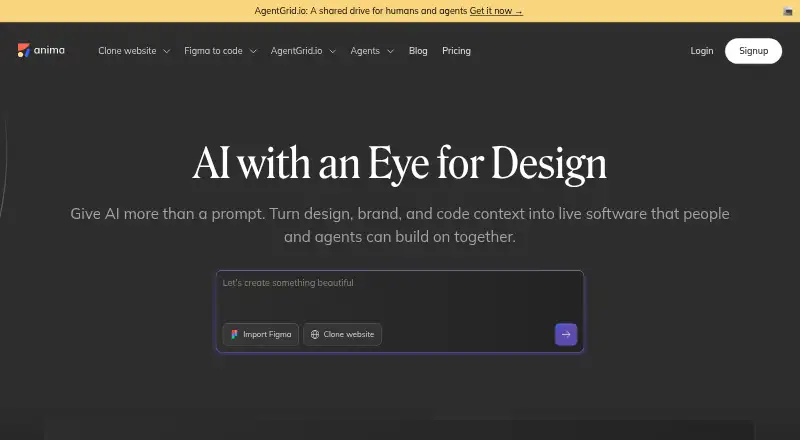
Anima turns Figma designs, text prompts, and website URLs into editable web apps with production-ready code. It can bring multiple pages from a live site into one app and connect their routes and navigation. Generated output includes HTML or React, with choices such as CSS, Tailwind, inline styles, TypeScript, and JavaScript. The Playground includes a database and user authentication through email and password or Google sign-in. Projects can be deployed to a custom domain, shared at a default Anima URL, or exported as React, HTML, or Tailwind code. Design plugins or integrations cover Figma, Adobe XD, and Sketch; its wider integrations include tools such as VS Code, Cursor, Vercel, Firebase, and Contentful. Anima also offers an API and SDK for automated code generation and an MCP connection for AI coding agents. Its free plan limits daily chat messages, imports or website clones, and plugin code generations. Enterprise is listed at $500/mo (annual). Anima states that it is SOC 2 Type II and GDPR compliant and that customer data is stored in the United States.
Who it suits
Anima is aimed at product, design, and R&D teams working from designs or site references to web apps. Its code-generation API, SDK, and AI-agent connection may also suit teams automating development workflows.
What it does well
- Converts Figma designs, prompts, and URLs into web apps.
- Imports multiple site pages with connected routes.
- Exports React, HTML, or Tailwind code.
- Playground includes a database and user authentication.
- Free plan is available.
What to know first
- Free plan caps daily messages and generations.
- Enterprise is listed at $500/mo (annual).
- Anima states all data storage is in the United States.
Plans
| Plan | Billed and limits | Price |
|---|---|---|
| Free | 5 AI Playground chat messages/day · 5 Figma imports or website clones · 5 Figma-plugin code generations | Free |
| Enterprise | paid annually · SSO · MFA · enterprise-grade SLAs · increased chat limit · unlimited code exports · custom design system · private cloud · bring your own LLM · zero data persistence · custom frameworks | $500 a month |
| Pro | 200 chat messages/month · 500 code exports · 128k prompt context · hosting for 30 screens and 3 projects · custom domains · priority support | On request |
| Business | 500 chat messages/month · 1,500 code exports · 128k prompt context · hosting for 200 screens and 15 projects · custom domains · premium support · $49/mo per additional seat | On request |
As animaapp.com lists them, read 30 Sept 2026. The maker's own page has the final word.
Anima is a web app builder that turns designs, prompts, and existing websites into editable code-based projects. It suits product and design teams that want to carry a visual starting point into development; its strongest case is the range of inputs and export paths, while its free quotas are small and its only priced paid plan is aimed at enterprises.
Overview
Anima connects design work with a production-oriented web workflow: import a Figma file, describe an idea with a prompt, or bring in pages from a live site, then continue editing the resulting app. Website imports can combine multiple pages into one project with routes and navigation connected, which is useful when recreating a broader site rather than a single screen.
The result is not limited to a hosted preview. Anima can publish to a custom domain or an Anima URL, and export React, HTML, or Tailwind code. That flexibility makes it more compelling for teams with a development handoff than for someone seeking only a no-code site publisher.
Key features
Design-to-code workflow
Anima supports Figma, Adobe XD, and Sketch integrations, with Figma design-file support, design tokens, asset handoff, code snippets, version history, and a developer inspect view. Generated output can use HTML or React, with CSS, Tailwind, inline styles, TypeScript, or JavaScript options. This range gives teams a way to carry design choices into implementation, though the value depends on whether their preferred framework and editing workflow fit those options.
App behavior and integrations
The Playground includes a built-in database and email/password or Google sign-in authentication, so a generated project can extend beyond a static mockup. Integrations span tools such as VS Code, Cursor, Vercel, Netlify, AWS Amplify, Firebase, Strapi, Contentful, Material UI, Ant Design, and Shadcn. An API and SDK support automated code generation, and an MCP connection links Anima to AI coding agents.
Security and support
Anima states that it is SOC 2 Type II and GDPR compliant, encrypts stored customer data with AES-256, and uses SSL for database communication and TLS 1.2 or better for API communication. Data storage takes place in the United States. It says customer code will not be used to train or fine-tune models without explicit permission from its owner. A community forum and help center provide support channels.
Pricing
Anima is freemium. The Free plan costs nothing and allows five AI Playground chat messages per day, five Figma imports or website clones, and five Figma-plugin code generations. Those caps make it suitable for trying the workflow or occasional small tasks, but not sustained team production.
Pro has custom pricing, with 200 chat messages per month, 500 code exports, 128k prompt context, hosting for 30 screens and three projects, custom domains, and priority support. It is the more natural fit for an individual or small team needing regular use, but the price is needed to judge its value.
Business also has custom pricing. It raises the allowances to 500 monthly chat messages and 1,500 code exports, and hosting to 200 screens and 15 projects; it includes 128k prompt context, custom domains, and premium support. Additional seats cost $49/mo each, so growing teams should account for seat costs alongside the base plan.
Enterprise costs $500 a month, billed paid annually. It adds SSO, MFA, enterprise-grade SLAs, increased chat limits, unlimited code exports, a custom design system, private cloud, bring your own LLM, zero data persistence, and custom frameworks. The annual billing commitment and enterprise-oriented controls make it a poor fit for casual use, but the listed price and security options give larger organizations a defined starting point.
Platforms
Anima is available as an extension and on the web. Its design integrations and developer tools make it relevant across design and engineering workflows, but these are the platforms stated for the product itself.
Who it's for
Anima is best suited to product, design, and R&D teams that need to turn visual concepts or existing websites into editable web projects and hand code into a development workflow. It is less suitable for users who need high-volume use on a free plan, or buyers who require a known Pro or Business price before evaluating a subscription.
Pros and cons
- Pro: Multiple inputs—Figma designs, prompts, and website URLs—let teams start from different stages of a project.
- Pro: Multi-page website imports retain routes and navigation, making the workflow more useful for whole-site recreation than isolated screens.
- Pro: Export and publishing options include React, HTML, Tailwind, and custom domains, giving teams alternatives to staying inside a hosted preview.
- Con: The free plan limits daily chats and caps imports or clones and plugin generations at five, restricting repeated experimentation.
- Con: Pro and Business have custom pricing, leaving their cost harder to assess against their monthly quotas and hosting caps.
- Con: Enterprise is the only priced paid plan, at $500 a month with annual billing, which is a substantial commitment for smaller teams.
Alternatives
For a broader comparison of tools in this workflow, see AI Screenshot-to-Code Tools, Developer Handoff Software, Web Design Software, and AI App Builders.
- Figma Make is another freemium option on macOS and web; choose it if its stated AI-credit allowance and $16.00 USD monthly Professional Full seat plan better match your budget.
- Kombai offers a free plan with 300 credits per month and supports extension, Linux, macOS, and Windows; consider it if those credit terms or desktop platforms matter more.
- Builder.io has a free plan with one included user, up to five users per space, 60 monthly Agent Credits, one published app, and 15 publishes per month; choose it if those publishing and team allowances fit your needs.
- CoderUI has a free trial and a $29 a month Pro plan with 500 monthly credits, all frameworks, and advanced customization; it may suit buyers who prefer a stated monthly price.
- Codia AI is a freemium option with API, extension, and web platforms; consider it as another option in the category.
- Fronty offers a free plan that publishes to a fronty.live address with Fronty branding; consider it if that publishing arrangement suits your project.
- Quest is free and includes one code download with basically all features; choose it if a single download is enough.
- v0 has a free plan with seven messages per day, Vercel deployment, Design Mode, and GitHub sync; consider it if those specific workflow elements are a closer fit.
Verdict
Choose Anima if your team wants to move from designs, prompts, or existing multi-page sites into editable web code, with both publishing and developer integrations in the same workflow. Its breadth is the main reason to pick it; the small free quotas and the $500 a month annual Enterprise plan are reasons to look elsewhere if you need generous low-cost usage or a lower-priced paid tier.
Verdict
Anima brings design and website inputs into an editable app workflow, with code export, publishing, and integrations. The free plan has quotas, and Enterprise is the only listed priced paid plan.
Facts from Anima's own pages
- AI training policy
- Anima says it will not train or fine-tune models using customer code without explicit permission from the code owner. · support.animaapp.com, 30 Sept 2026
- API and agents
- Anima offers an API and SDK for automating code generation and an MCP connection for AI coding agents. · animaapp.com, 30 Sept 2026
- Audience
- Anima describes its users as product, design, and R&D teams and says more than 1.8 million builders have used it. · animaapp.com, 30 Sept 2026
- Backend features
- The Playground includes a built-in database and user authentication with email/password and Google sign-in options. · docs.animaapp.com, 30 Sept 2026
- Code output
- Anima generates HTML or React code, with options including CSS, Tailwind, inline styles, TypeScript, and JavaScript. · animaapp.com, 30 Sept 2026
- Core workflow
- Anima turns Figma designs, text prompts, or website URLs into working web apps with editable production-ready code. · docs.animaapp.com, 30 Sept 2026
- Data residency
- Anima states that all of its data storage takes place in the United States. · support.animaapp.com, 30 Sept 2026
- Design tools
- Anima provides plugins or integrations for Figma, Adobe XD, and Sketch. · support.animaapp.com, 30 Sept 2026
- Headquarters
- Tel Aviv, Israel and New York City, United States · animaapp.com, 28 Sept 2026
- Integrations
- Official technology integrations include Figma, VS Code, Cursor, Vercel, Netlify, AWS Amplify, Firebase, Strapi, Contentful, Material UI, Ant Design, Tailwind, and Shadcn. · animaapp.com, 30 Sept 2026
- Publishing
- Projects can be deployed to a custom domain, shared through a default Anima URL, or exported as React, HTML, or Tailwind code. · docs.animaapp.com, 30 Sept 2026
- Security compliance
- Anima states that it is SOC 2 Type II compliant and GDPR compliant. · support.animaapp.com, 30 Sept 2026
- Security controls
- Customer data is encrypted with AES-256 at rest, database communication uses SSL, and API communication uses TLS 1.2 or better. · support.animaapp.com, 30 Sept 2026
- Support
- Anima provides a community forum and a help center for users. · support.animaapp.com, 30 Sept 2026
- Website cloning
- Anima can import multiple pages from a live website into one editable app with routes and navigation connected. · animaapp.com, 30 Sept 2026
Where Anima stands on Freedom251
- Figma Plugins#1 of 14
- Web Design Software#3 of 41
- AI App Builders#5 of 39
- Developer Handoff Software#4 of 25
- AI Screenshot-to-Code Tools#4 of 24