Freedom251 › Color Palette Generators

ColorBox
What ColorBox is
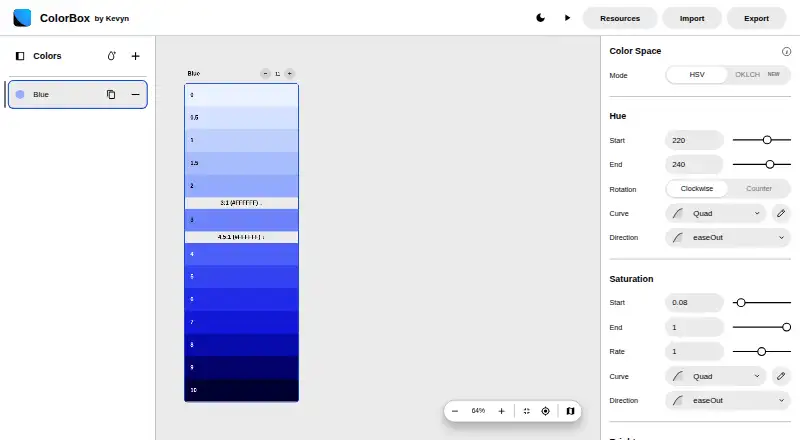
ColorBox is a tool for creating color systems and accessible palettes, available on the web and as an extension. Users can work with multiple colors in one tab and share a system as a URL or JSON. Contrast indicators show levels including 3:1, 4.5:1, and 7:1, and color-space modes include HSV and OKLCH. For dark-mode work, Auto Dark Mode generates an inverted set from the original inputs; users can also duplicate and edit an inverted set manually. Hue progression can rotate clockwise or counterclockwise. Export options include Config, Output, Tailwind, CSS, OKLCH, and Swift. The maker describes a Figma workflow using a plugin and JSON import, with options to customize step names and generate Figma Paint Styles. A Sketch workflow goes through that Figma import route before exporting as SVG. The maker also describes using the color algorithm through NPM with exported JSON. ColorBox was founded in 2018 and is based in San Francisco. Its Free plan costs nothing and ad-free.
Who it suits
ColorBox suits designers and developers creating, sharing, or exporting color systems and accessible palettes. Its listed Figma, Sketch, and code workflows may suit people working across those tools.
What it does well
- Works with multiple colors in one tab
- Shows 3:1, 4.5:1, and 7:1 contrast levels
- Generates inverted color sets
- Exports CSS, Tailwind, Swift, and other formats
- Free and ad-free
What to know first
- Custom curves were not yet available in ColorBox
- Sketch workflow requires the Figma import and SVG export route
- Improvement updates are directed to the maker’s Twitter account
Plans
| Plan | Billed and limits | Price |
|---|---|---|
| Free | Free to use · ad-free | Free |
As colorbox.io lists them, read 8 Oct 2026. The maker's own page has the final word.
Getting started
- Visit colorbox.io or use the extension.
- Create a color system and adjust multiple colors in one tab.
- Check contrast indicators and choose HSV or OKLCH mode.
- Share the system as a URL or JSON, or export it in a listed format.
- For the described Figma workflow, import the system through the plugin using JSON.
ColorBox is a palette-building tool for people creating color systems who need to check contrast and carry colors into design or code workflows. Its strongest case is a free, ad-free toolkit with dark-mode variants and several export routes; the main caveat is that some design handoffs require workarounds.
Overview
ColorBox lets users adjust multiple colors in one tab and share a system as a URL or JSON. That makes it more useful for building a coordinated palette than for picking a single isolated color. Hue progression can run in either direction, and the HSV and OKLCH modes give users two ways to work with color.
Key features
Contrast indicators show 3:1, 4.5:1, and 7:1 levels across color sets. That gives designers a practical accessibility check while refining a palette, rather than leaving contrast as a separate final task.
Auto Dark Mode generates an inverted set from the original inputs; users can also duplicate a set and edit the inversion themselves. Automatic generation is a quick starting point, while manual edits allow more control over the result. Custom curves, however, were not yet available in ColorBox as described, limiting users who want to shape hue progression with their own curves.
Export choices include Config, Output, Tailwind, CSS, OKLCH, and Swift. The maker also describes using exported JSON with the color algorithm through NPM to generate colors in code. Figma users can import a system through a plugin and JSON, customize step names, and generate Paint Styles. The Sketch route is less direct: it goes through the Figma plugin, then SVG export, then import into Sketch.
Pricing
ColorBox’s Free plan costs nothing and is free to use without ads. Palette generation and accessibility checks are included. There is no free trial because the product is free; no paid plan or seat-based restriction is part of this offer. For users who need palette creation, contrast checks, and export options, the zero-cost plan avoids a subscription decision.
Platforms
ColorBox is available on the web and as an extension. Its Figma workflow is plugin-based; Sketch users can reach the app through the multi-step SVG workaround rather than a direct Sketch route.
Who it's for
ColorBox suits designers and developers building multi-color systems who want contrast indicators, dark-mode variants, and exports that connect to common design and code workflows. It is less suitable for teams that need custom curve controls in the app or a direct Sketch handoff.
Pros and cons
- Pros: Free and ad-free, with palette generation and contrast indicators in the same workflow.
- Pros: Dark-mode generation, editable inverted sets, and exports spanning CSS, Tailwind, OKLCH, Swift, and more support both design and implementation.
- Cons: Custom curves were not yet available in the app, so hue progression cannot be shaped that way.
- Cons: Sketch export depends on a Figma-and-SVG detour, adding steps for Sketch-centered work.
Alternatives
For a wider comparison of palette tools, browse Color Palette Generators.
Choose Pantone Connect Palette Generator if access to more than 15,000 colors and its Search, Pick, and Measure tools matter more; its free Basic plan requires an account and supports saving and sharing up to 10 palettes.
Color Palette Generator AI is a fit for users who prioritize unlimited generations, every export format, shareable links, and API access without an account.
Windows users looking for free, open-source software can consider Colora. ColorDesigner offers a free tier with ads, 12 tools, limited saved colors and palettes, one project, and HEX export. Colorfool is another free web option, with accessibility checks not paywalled.
ColorKit is another free color-tools option. ColorMagic offers free web and API access and says palette generation is unlimited, though the site may show ads. ColorPalette Pro is a free web alternative whose maker says ads or subscriptions are not planned.
Verdict
Choose ColorBox if you want a free, ad-free way to build and share color systems, check contrast, create dark-mode variants, and export into design or code workflows. Look elsewhere if custom curves are essential or you need a direct Sketch workflow.
Verdict
ColorBox offers palette creation, contrast indicators, dark-mode variants, and several export paths at no cost. Its Sketch route is indirect, and custom curves were not yet available in the app as described.
Questions
How much does ColorBox cost?
The Free plan costs nothing and is ad-free.
Which platforms is ColorBox available on?
ColorBox is available on the web and as an extension.
Can ColorBox show palette contrast?
Yes. It shows contrast levels including 3:1, 4.5:1, and 7:1.
Can I use ColorBox color systems in Figma or Sketch?
The maker describes importing into Figma through a plugin and JSON. For Sketch, the described workflow goes through that Figma plugin, exports as SVG, and brings the SVG into Sketch.
What export formats does ColorBox offer?
Listed options are Config, Output, Tailwind, CSS, OKLCH, and Swift.
Does ColorBox support custom curves?
The maker's article says custom curves were available in the algorithm but not yet available in ColorBox at the time of publication.
Facts from ColorBox's own pages
- Code workflow
- The maker says the color algorithm can be consumed through NPM, using exported JSON to generate colors in code. · kvyn.medium.com, 8 Oct 2026
- Color spaces
- The web app lists HSV and OKLCH as color-space modes. · colorbox.io, 8 Oct 2026
- Contrast indicators
- The tool can show contrast levels including 3:1, 4.5:1, and 7:1 on color sets. · kvyn.medium.com, 8 Oct 2026
- Custom curves
- The maker's article says custom curves were available in the algorithm but not yet available in ColorBox at the time of publication. · kvyn.medium.com, 8 Oct 2026
- Dark mode
- Auto Dark Mode generates an inverted color set from the original set's inputs, and users can also duplicate and manually edit an inverted set. · kvyn.medium.com, 8 Oct 2026
- Export formats
- The web app lists export options for Config, Output, Tailwind, CSS, OKLCH, and Swift. · colorbox.io, 8 Oct 2026
- Figma integration
- The maker describes importing a ColorBox color system into Figma with a plugin and JSON, with options to customize step names and generate Figma Paint Styles. · kvyn.medium.com, 8 Oct 2026
- Founded
- 2018 · colorbox.io, 28 Sept 2026
- Headquarters
- San Francisco, United States · colorbox.io, 28 Sept 2026
- Hue rotation
- Hue progression can rotate clockwise or counterclockwise. · kvyn.medium.com, 8 Oct 2026
- Multiple colors
- Users can modify multiple colors within one tab and share a color system as a URL or JSON. · kvyn.medium.com, 8 Oct 2026
- Purpose
- ColorBox is a tool for creating color systems and accessible palettes. · kvyn.medium.com, 8 Oct 2026
- Sketch workflow
- The maker describes a workaround for Sketch: import through the Figma plugin, export as SVG, then bring that SVG into Sketch. · kvyn.medium.com, 8 Oct 2026
- Support and updates
- The maker points users to the maker's Twitter account for updates about ColorBox improvements. · kvyn.medium.com, 8 Oct 2026
Where ColorBox stands on Freedom251
- Color Palette Generators#4 of 34
- Figma Plugins#4 of 14