Freedom251 › Color Palette Generators

Colorfool
What Colorfool is
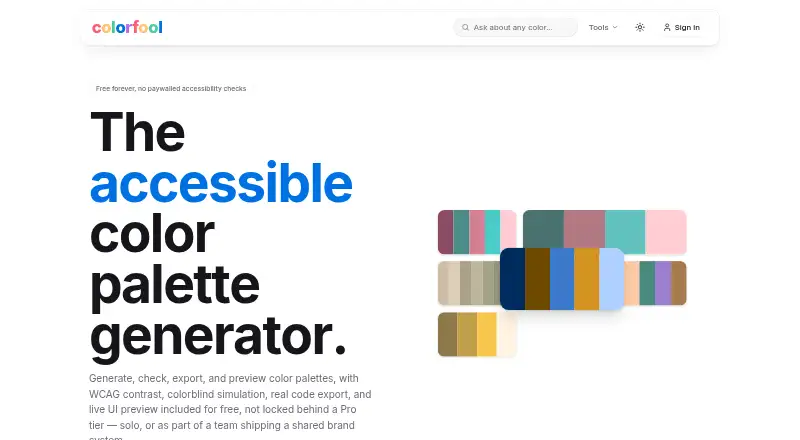
Colorfool is a web-based palette tool for creating, checking, previewing, and exporting color schemes. Its generator offers harmony-based palettes, color locking, and controls for lightness and saturation. You can check WCAG contrast and simulate colorblindness on every palette, then preview colors in sample layouts for a hero, dashboard, buttons, and a form. An AI generator builds palettes from a mood, theme, or object description and accepts conversational refinements. The image scanner extracts colors in the browser; the site says the image is not uploaded. A separate scanner accepts an image or live website URL. Colorfool can also create a one-page brand guide with color roles, accessible pairings, and usage notes for printing or saving as PDF. Export options include CSS, SCSS, Tailwind, Figma/Tokens, JSON, Sketch, CMYK, PNG, ASE, .sketchpalette, .swatches, and PPTX. Its free plan costs nothing, with no paywalled accessibility checks.
Who it suits
Colorfool suits people creating palettes for digital interfaces or brand systems, whether working alone or handing work to a team or client. It also fits users who need palette checks, image or website color extraction, or a printable guide.
What it does well
- Free plan includes accessibility checks.
- AI palettes accept conversational refinements.
- Image scanning happens in the browser.
- Exports cover design and print formats.
- Creates printable or PDF-ready brand guides.
What to know first
- Available on web only.
- Procreate .swatches export is best-effort.
Plans
| Plan | Billed and limits | Price |
|---|---|---|
| Free | Free forever · no paywalled accessibility checks | Free |
As colorfool.co lists them, read 15 Oct 2026. The maker's own page has the final word.
Getting started
- Open https://colorfool.co/ in a web browser.
- Create a palette with a harmony scheme, an AI description, an image, or a website URL.
- Adjust colors and review the palette preview and accessibility checks.
- Export the palette or create a one-page style guide for printing or PDF saving.
Colorfool is a free browser-based workspace for building and evaluating color palettes. It suits designers, developers, brand owners, and teams that need accessible colors, practical previews, and implementation-ready files in one place. Its breadth is a real advantage, although specialists seeking a native desktop workflow or a tightly defined proprietary export may prefer another tool.
Overview
Colorfool covers the full path from idea to handoff: generate or extract colors, test their relationships and contrast, preview them in interface-like layouts, then export them for design and development. It supports both solo work and shared brand-system projects, with saved palettes and a brand color library for keeping decisions organized.
Palette creation can start with harmony rules or an image. The in-browser image scanner extracts colors without uploading the image, while a separate scanner accepts an image or a live website URL. That makes the service useful for studying visual references, though it is a color-extraction aid rather than a paint-matching or physical-material specification tool.
Key features
Generate, refine, and validate
Seven harmony schemes—analogous, complementary, split-complementary, triadic, tetradic, square, and monochrome—provide structured starting points. Color locking lets you preserve chosen colors while adjusting the rest, and lightness and saturation controls support finer tuning. These controls are valuable when a palette must remain coherent but still meet a particular visual brief.
Accessibility is built into every palette: WCAG contrast ratios and colorblind simulation are free rather than reserved for a paid tier. That is a strong reason to choose Colorfool for interface or brand work where readable pairings matter. The AI generator offers another starting route, accepting a mood, theme, or object description and handling conversational refinements; it is best for exploratory briefs rather than replacing deliberate color decisions.
Preview and extract
The preview places the palette on a hero area, dashboard, buttons, and a form. Seeing colors in these common UI contexts is more informative than viewing swatches alone, especially when deciding which colors should carry emphasis, actions, or surfaces. Image extraction works in the browser, and the website scanner can pull a palette from a live URL, making reference analysis quick.
Style guides and exports
The style-guide generator produces a one-page brand guide with color roles, accessible pairings, and usage notes. It can be printed or saved as a PDF, which gives teams a compact handoff document. Export coverage is unusually broad: CSS variables, SCSS, Tailwind configuration, Figma/Tokens, JSON, Sketch, CMYK, PNG, ASE, .sketchpalette, .swatches, and PPTX. The .swatches file follows a community-documented structure because Procreate publishes no official specification, so treat that output as best-effort rather than guaranteed compatibility.
Pricing
Free — free, free forever. There is no trial period because the product is free, and accessibility checks are not paywalled. The plan includes the listed generation and extraction methods, saved palettes, a brand color library, print-color support, previews, style guides, and the full export set. For an individual or team that needs a complete palette workflow without subscription administration, this is the straightforward choice. There are no published seat limits, quotas, or renewal charges to weigh.
Platforms
Colorfool runs on the web, so it is suited to users who want a browser-based workflow rather than a Windows, iOS, Android, or extension-specific application.
Who it's for
Choose Colorfool for accessible web and product palettes, brand-system exploration, client handoff, or image-and-website color extraction. Developers benefit from CSS, SCSS, Tailwind, and JSON outputs; designers and brand teams benefit from previews, saved libraries, style guides, and design-tool exports. It is less suitable when you require a native desktop editor or an officially specified Procreate file format.
Pros and cons
- Pros: WCAG contrast ratios and colorblind simulation are free on every palette.
- Pros: Harmony controls, locking, and lightness/saturation adjustment support disciplined refinement.
- Pros: Browser image extraction does not upload the image, and a website scanner adds live-URL analysis.
- Pros: Exports span developer code, design tools, print formats, presentations, and raster files.
- Cons: The .swatches export is community-documented and best-effort, not an official Procreate specification.
- Cons: Web-only delivery will not suit users who need a native offline application.
Alternatives
Browse Color Palette Generators for a wider directory of options. Pick Pantone Connect Palette Generator instead when Pantone’s 15,000-plus-color library, measurement tools, and Android, iOS, extension, and web access matter; its free Basic plan requires an account and limits saved and shared palettes. Color Palette Generator AI is the better fit for unlimited AI generations, every export format, shareable links, and an API without an account.
Choose Colora for free, open-source Windows software under the BSD 3-Clause license. ColorBox is a free, ad-free extension and web option. ColorDesigner suits users who want 12 free tools, limited saves, one project, and HEX export, with a paid tier beyond those caps. ColorKit is another free web choice with account-based saving. ColorMagic offers free, reportedly unlimited palette generation through web and API access, though ads may appear. ColorPalette Pro is a free web alternative with no ads or subscriptions planned.
Verdict
Colorfool is the right pick for anyone who wants a free, end-to-end palette workflow with accessibility checks, realistic UI previews, image and website extraction, and unusually wide exports. Look elsewhere if your priority is native desktop software or dependable, officially specified Procreate import.
Verdict
Colorfool brings palette creation, accessibility checks, previews, and varied exports together in a free web tool. Note that its .swatches output follows a community-documented format rather than an official Procreate specification.
Questions
How much does Colorfool cost?
The Free plan costs nothing and is listed as free forever.
Are accessibility checks included?
Yes. WCAG contrast ratios and colorblind simulation are free on every palette.
What platforms does Colorfool support?
Colorfool is available on the web.
What export formats are available?
Exports include CSS, SCSS, Tailwind, Figma/Tokens, JSON, Sketch, CMYK, PNG, ASE, .sketchpalette, .swatches, and PPTX.
Can Colorfool create a brand guide?
Yes. Its style guide generator creates a one-page guide with color roles, accessible pairings, and usage notes that can be printed or saved as a PDF.
Can I use a .swatches export with Procreate?
The palette page offers .swatches, but describes it as best-effort because Procreate does not publish an official specification.
Facts from Colorfool's own pages
- Accessibility
- The site says WCAG contrast ratios and colorblind simulation are free on every palette. · colorfool.co, 29 Sept 2026
- AI generation
- The AI generator accepts a mood, theme or object description and supports conversational refinements. · colorfool.co, 15 Oct 2026
- Audience
- Legit.Show lists designers, developers, accessibility advocates, UI/UX professionals and brand teams as intended users. · legit.show, 15 Oct 2026
- Code export
- Palettes can be exported as CSS variables, SCSS, Tailwind configuration, or JSON. · colorfool.co, 29 Sept 2026
- Code exports
- The homepage lists CSS variables, SCSS, Tailwind configuration and JSON export. · colorfool.co, 15 Oct 2026
- Colorblind simulation
- Colorfool advertises colorblind simulation on every palette without a paywall. · colorfool.co, 15 Oct 2026
- Color theory
- The site describes analogous, complementary, split-complementary, triadic, tetradic, square, and monochrome harmony schemes. · colorfool.co, 29 Sept 2026
- Contrast checking
- The contrast checker reports WCAG ratios for text and background colors and classifies AA or AAA results. · colorfool.co, 15 Oct 2026
- Documentation
- The opened official pages are interactive tool pages and explain usage inline; no separate public API, SDK or help-center documentation page was identified in the site navigation. · colorfool.co, 15 Oct 2026
- Exports
- A palette page lists export options including CSS, SCSS, Tailwind, Figma/Tokens, JSON, Sketch, CMYK, PNG, ASE, sketchpalette, swatches, and PPTX. · colorfool.co, 29 Sept 2026
- Harmony palettes
- The generator supports harmony-aware palettes, color locking, and adjustments to lightness and saturation. · colorfool.co, 29 Sept 2026
- Image scanner
- The scanner extracts palettes from images entirely in the browser and says images are never uploaded. · colorfool.co, 15 Oct 2026
- Legit.Show accessibility
- Legit.Show measured an accessibility frame score of 96 out of 100. · legit.show, 15 Oct 2026
- Legit.Show discoverability
- Legit.Show measured a discoverability frame score of 87 out of 100. · legit.show, 15 Oct 2026
- Legit.Show performance
- Legit.Show measured a performance frame score of 99 out of 100. · legit.show, 15 Oct 2026
- Legit.Show privacy
- Legit.Show measured a privacy frame score of 25 out of 100. · legit.show, 15 Oct 2026
- Legit.Show reliability
- Legit.Show measured a reliability frame score of 100 out of 100. · legit.show, 15 Oct 2026
- Legit.Show security
- Legit.Show measured a security frame score of 45 out of 100. · legit.show, 15 Oct 2026
- Legit.Show standards
- Legit.Show measured a standards frame score of 92 out of 100. · legit.show, 15 Oct 2026
- Licence
- The opened official pages do not state an open-source licence or provide source-code licensing terms. · colorfool.co, 15 Oct 2026
- Limit: consent controls
- Legit.Show reported that the site sets cookies or loads scripts without a consent prompt. · legit.show, 15 Oct 2026
- Limit: content security policy
- Legit.Show reported that the site has HSTS but no Content-Security-Policy header. · legit.show, 15 Oct 2026
- Limit: privacy notice
- Legit.Show reported finding no privacy policy on the public site. · legit.show, 15 Oct 2026
- Live UI preview
- The product previews palettes on a hero, dashboard, buttons and a form. · colorfool.co, 15 Oct 2026
Where Colorfool stands on Freedom251
- Color Palette Generators#9 of 34