Freedom251 › Color Palette Generators

ColorKit
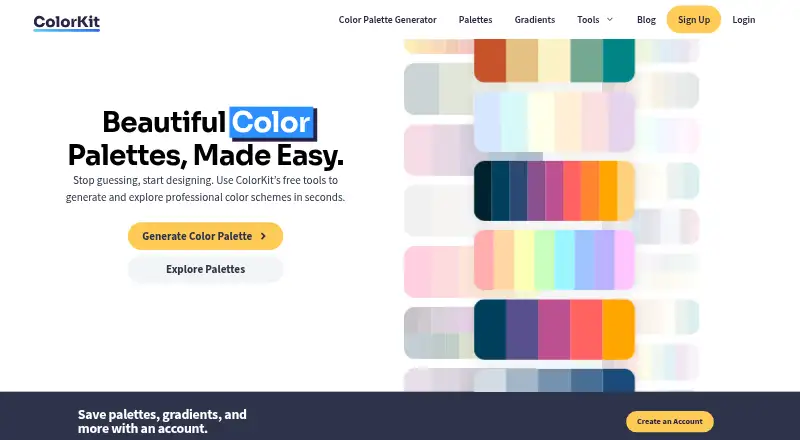
What ColorKit is
ColorKit is a free web toolkit for creating palettes, gradients, and other design colors. Its palette generator offers AI prompts, preset styles, color locking, and controls for hue, brightness, saturation, and temperature. Palettes can be exported as PNG, copied as CSV or an array, or shared by URL. The image palette tool extracts between 2 and 10 colors, lets users adjust color points, and can make a PNG collage; ColorKit says those images are not uploaded to its server. Its gradient maker supports linear, radial, and conic gradients, adjustable stops, AI generation, CSS copying, and PNG or code export, with up to eight stops per gradient. Other tools include a contrast checker, color picker, shade generator, SVG color changer, background maker, and color mixer. The tools are available in a browser on phones, tablets, and computers. The image palette tool needs no signup; a free account lets users save palettes and gradients.
Who it suits
ColorKit is aimed at designers and artists working with color. It suits people who want palette, gradient, contrast, and export tools in a browser.
What it does well
- Free web tools require no paid plan.
- Image palette tool works without signup.
- Image palette tool says images stay off its server.
- Palette exports include PNG, CSV, array, and URL.
- Gradients support CSS copying and up to eight stops.
What to know first
- A free account is needed to save palettes and gradients.
- The site uses Simple Analytics and Google Analytics.
- Account email and activity are stored for email marketing.
Plans
| Plan | Billed and limits | Price |
|---|---|---|
| Free | Free color tools; free account for saving palettes and gradients | Free |
As colorkit.co lists them, read 3 Oct 2026. The maker's own page has the final word.
Getting started
- Open https://colorkit.co/ in a browser.
- Choose a palette, image palette, gradient, contrast, or another color tool.
- Use the image palette tool without signing up, or create a free account to save palettes and gradients.
- Adjust colors and settings for the selected tool.
- Export or copy the result in an available format.
ColorKit is a browser toolkit for generating palettes, shaping gradients, pulling colors from images, and checking contrast. It is a strong fit for designers and artists who move between several color tasks and want image extraction to work without an account. The trade-off is that its broad set of utilities is less focused than a dedicated specialist tool.
Overview
ColorKit puts color ideation and production helpers in one web workspace. You can move from an AI-assisted palette to a gradient, inspect colors in an image, and check text contrast without changing applications. The image palette tool runs on phones, tablets, and computers, and the service says those images are never uploaded to its server, which is a meaningful safeguard for client or private artwork.
The toolset also includes a color picker, gradient palette generator, shade generator, SVG color changer, background maker, and color mixer. That range favors people who need a dependable collection of small utilities rather than a single deep workflow.
Key features
Palette creation
The generator accepts AI prompts and offers pastel, vivid, earthy, deep jewel, muted, neon ink, and mono tint styles. Hue, brightness, saturation, and temperature controls let you steer results instead of accepting a one-click suggestion. Locking one color while regenerating the others is valuable when a brand color or approved swatch must remain fixed. Palette history helps compare iterations, while AI contrast and colorblind settings support accessibility reviews.
Exports cover PNG, CSV, arrays, and shareable URLs. Palette and shade tools can also produce CSS variables, SCSS, JSON, or a Tailwind configuration, so developers can use the result directly rather than retype values. HEX, RGB, and HSL are supported formats.
Image extraction and privacy
The image palette tool extracts two to ten colors. You can reposition color points manually and generate a PNG collage, giving you control when automatic sampling misses an important area. It is completely free without signup, making it suitable for a quick reference from a photograph or illustration. Saving a palette for later does require the optional free account.
Gradients and contrast
The gradient maker handles linear, radial, and conic gradients, with adjustable stops, rotation, and AI generation. A gradient supports up to eight stops, and results can be copied as CSS or exported as a PNG or code. The contrast checker calculates text/background ratios and can choose colors from an uploaded image or an image URL, useful when validating an existing visual rather than inventing one.
Pricing
Free — free. The plan includes the free color tools, while a free account enables saving palettes and gradients. There is no free trial because the product is free, and no paid tier or seat charge is given. The practical limitation is account dependence: image extraction remains available without registration, but retaining work across sessions requires creating an account.
ColorKit's privacy policy says it uses Simple Analytics and Google Analytics and stores email addresses and account activity with Bento for email marketing. Account holders or commenters may request a copy or deletion of personal data, subject to retention for administrative, legal, or security reasons. Support is through a contact form requiring a name, email, and message.
Platforms
ColorKit is web-based. The image palette workflow runs in browsers on phones, tablets, and computers, so it does not require a desktop installation or a particular operating system.
Who it's for
Designers and artists who want palette inspiration, image-derived swatches, gradient construction, and contrast checking in one place will get the most from ColorKit. Front-end teams also benefit from CSS, SCSS, JSON, and Tailwind exports. It is less compelling for someone seeking only a narrowly specialized palette generator or a native desktop application.
Pros and cons
- Pro: Image extraction works without signup and keeps images off ColorKit's server according to its stated policy.
- Pro: Palette controls, locking, history, style modes, and accessibility settings support deliberate iteration rather than random sampling.
- Pro: Multiple developer-friendly exports reduce handoff friction.
- Pro: Linear, radial, and conic gradients include CSS, image, and code outputs.
- Con: Saving palettes and gradients requires a free account, even though core image extraction does not.
- Con: The gradient editor caps a gradient at eight color stops, which may constrain unusually complex blends.
- Con: Analytics and email-marketing services process usage and account data, a consideration for privacy-sensitive users.
Alternatives
Browse Color Palette Generators when you want a wider directory of palette-focused options.
- Pantone Connect Palette Generator suits users who need Pantone's 15,000-plus colors and Search, Pick, and Measure tools across Android, iOS, web, and extension platforms; its Basic plan is free with an account and allows saving and sharing up to 10 palettes.
- Color Palette Generator AI is the better pick for unlimited generations, every export format, shareable links, and an API without an account.
- Colora is a free, open-source Windows alternative under the BSD 3-Clause license.
- ColorBox offers a free, ad-free extension and web experience.
- ColorDesigner fits users who want 12 free tools, but its free tier limits saved colors, palettes, and projects and includes ads.
- Colorfool is a free web option with accessibility checks that are not paywalled.
- ColorMagic is a free web/API service advertising unlimited palette generation, though it may show ads.
- ColorPalette Pro is a free web alternative with no ads or subscriptions planned.
Verdict
Choose ColorKit if you want one free browser toolkit covering palette design, image sampling, gradients, exports, and contrast checks, especially when signup-free image work matters. Look elsewhere if you need a native app, a more specialized palette workflow, or gradients with more than eight stops.
Verdict
ColorKit combines palette creation, image color extraction, gradient building, and related color utilities at no cost. Its image tool does not require signup, while saving palettes or gradients requires a free account.
Questions
Is ColorKit free?
Yes. ColorKit lists a free plan with color tools. Creating an account is also free.
Do I need an account to use the image palette tool?
No. The image palette tool is usable without signup. A free account is needed to save palettes and gradients.
Which platforms does ColorKit support?
ColorKit is available on the web. Its image palette tool runs in a browser on phones, tablets, and computers.
What can I export from ColorKit?
Palette exports include PNG, CSV, arrays, and URL sharing. Palette and shade tools can also export CSS variables, SCSS, JSON, or a Tailwind config.
Can ColorKit extract colors from an image?
Yes. Its image palette tool extracts between 2 and 10 colors, supports manual color point adjustments, and can create a PNG collage.
How many color stops can a gradient have?
A gradient can contain up to eight color stops.
Facts from ColorKit's own pages
- Account
- Creating a ColorKit account is free and allows users to save palettes and gradients. · colorkit.co, 3 Oct 2026
- Audience
- ColorKit says it is built for designers and artists. · colorkit.co, 3 Oct 2026
- Browser support
- The image palette tool runs in a browser on phones, tablets, and computers. · colorkit.co, 3 Oct 2026
- Contrast checker
- The contrast checker calculates text and background contrast ratios and can pick colors from an uploaded image or image URL. · colorkit.co, 3 Oct 2026
- Creators
- The About page says ColorKit was created in the United States by Andy Feliciotti and Ryan Robinson. · colorkit.co, 3 Oct 2026
- Data practices
- The privacy policy says ColorKit uses Simple Analytics and Google Analytics, and stores email address and account activity with Bento for email marketing. · colorkit.co, 3 Oct 2026
- Data rights
- The privacy policy says users with an account or comments can request a copy of personal data or ask for its erasure, subject to administrative, legal, or security retention needs. · colorkit.co, 3 Oct 2026
- Exports
- The gradient maker offers CSS copying and export options including PNG download or code copying. · colorkit.co, 3 Oct 2026
- Free access
- The image palette tool is described as completely free and usable without signup; an optional free account is needed to save palettes for later. · colorkit.co, 3 Oct 2026
- Gradient features
- The gradient maker supports linear, radial, and conic gradients, adjustable color stops, rotation, AI generation, and CSS copying. · colorkit.co, 3 Oct 2026
- Gradient limit
- A gradient can contain up to eight color stops. · colorkit.co, 3 Oct 2026
- Gradient maker
- The gradient maker supports linear, radial, and conic gradients and can copy CSS or export an image or code. · colorkit.co, 3 Oct 2026
- Image palettes
- The image tool extracts between 2 and 10 colors, supports manual color point adjustments, and can create a PNG collage. · colorkit.co, 3 Oct 2026
- Image privacy
- ColorKit states that images used by its image palette tool are never uploaded to its server. · colorkit.co, 3 Oct 2026
- Integrations and formats
- The site says its palette and shade tools can export CSS variables, SCSS, JSON, or a Tailwind config. · colorkit.co, 3 Oct 2026
- Maker
- The site credits Andy Feliciotti as its maker, and his portfolio identifies ColorKit as one of his projects. · colorkit.co, 3 Oct 2026
- Other tools
- The site lists a color picker, gradient palette generator, color shade generator, SVG color changer, background maker, and color mixer. · colorkit.co, 3 Oct 2026
- Palette export
- Palettes can be exported as PNG, copied as CSV or an array, or shared by URL. · colorkit.co, 3 Oct 2026
- Palette generation
- Its palette generator supports AI prompts, style modes, color locking, and controls for hue, brightness, saturation, and temperature. · colorkit.co, 3 Oct 2026
- Palette generator
- The palette generator supports AI contrast, palette history, export, hue, brightness, saturation, temperature, and colorblind settings. · colorkit.co, 3 Oct 2026
- Palette styles
- Palette styles include pastel, vivid, earthy, deep jewel, muted, neon ink, and mono tint, and users can lock a color while generating the rest of a palette. · colorkit.co, 3 Oct 2026
- Privacy practices
- The privacy policy says the site uses Simple Analytics and Google Analytics, and stores email addresses and account activity with Bento for email marketing. · colorkit.co, 3 Oct 2026
- Product
- ColorKit describes itself as a set of modern web tools for improving designs, including a color palette generator and gradient creator. · colorkit.co, 3 Oct 2026
- Purpose
- ColorKit describes itself as a toolkit built for designers and artists, with color inspiration and tools for creating palettes. · colorkit.co, 3 Oct 2026
Where ColorKit stands on Freedom251
- Color Palette Generators#12 of 34