Freedom251 › Color Palette Generators
AccessibleColor.design
What AccessibleColor.design is
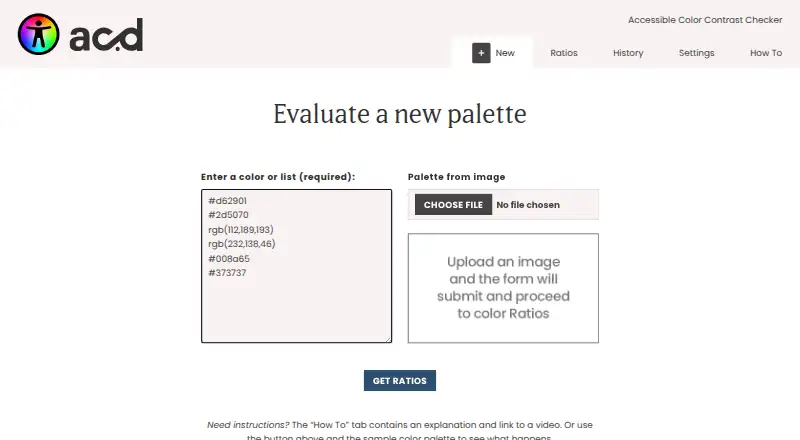
AccessibleColor.design is a free, open-source web tool for designers and developers checking whether color palettes meet WCAG 2.1 contrast targets. You can enter individual colors or lists using hexadecimal or rgb() values on separate lines. The tool also extracts a palette from an uploaded image for evaluation. Results compare colors with light, dark, or another supplied palette color against Level AA and AAA targets. It identifies the most legible pair in the list, while warning that this pair can still miss minimum requirements. HSL controls let you change saturation and lightness while retaining the hue and intended color direction. Palette history, a Clear All control, and settings for default light and dark colors are included. Progressive Web App features support offline use. The project uses an MIT license, but its repository is archived and read-only. The visual interface is not optimized for screen readers, and results do not guarantee compliance.
Who it suits
It suits designers and developers assessing brand palettes for accessibility. It is also useful for people who need image-based palette extraction or offline web access.
What it does well
- Free and open source under an MIT license
- Checks WCAG 2.1 AA and AAA contrast targets
- Extracts palettes from uploaded images
- HSL controls preserve hue while adjusting colors
- Progressive Web App supports offline use
What to know first
- Visual interface is not optimized for screen readers
- Results do not guarantee accessibility compliance
- GitHub repository is archived and read-only
Limits
The tool warns that its most legible color pair may still fail minimum requirements, and its results are not a guarantee of compliance. The visual interface is not optimized for screen readers.
Getting started
- Open the AccessibleColor.design website
- Enter colors as hex or rgb() values on separate lines
- Upload an image to extract a palette if needed
- Review WCAG 2.1 AA and AAA contrast results
- Adjust saturation or lightness with HSL controls
- Use the History tab to revisit palettes
Verdict
AccessibleColor.design combines palette extraction, contrast checks, and color adjustment in a free web interface. Its accessibility caveats and archived repository matter when deciding whether it fits an ongoing workflow.
Questions
How much does AccessibleColor.design cost?
It is free and open source under the MIT license.
Which platform does it support?
It is a web tool with Progressive Web App features for app-like offline use.
What color formats can I enter?
You can enter hexadecimal or rgb() values individually or as lists on separate lines.
Can it create palettes from images?
Yes. Upload an image to extract a palette for evaluation.
Which accessibility standards does it check?
It reports contrast against WCAG 2.1 Level AA and AAA targets.
Is the project still writable on GitHub?
The repository was archived and made read-only on May 6, 2026.
Facts from AccessibleColor.design's own pages
- Accepted colors
- The tool accepts individual colors as hex or rgb() values, entered on separate lines. · accessiblecolor.design, 11 Oct 2026
- Accessibility limitation
- The site says the visual tool is not optimized for screen readers and its results are not a guarantee of compliance. · accessiblecolor.design, 11 Oct 2026
- Color adjustment
- Users can adjust colors with HSL controls to change saturation or lightness while retaining the hue and color intention. · accessiblecolor.design, 11 Oct 2026
- Color input
- It accepts individual colors or lists in hexadecimal and rgb() formats. · accessiblecolor.design, 11 Oct 2026
- Contrast checks
- It compares colors against light, dark, and other colors in the supplied palette using WCAG 2.1 AA and AAA contrast targets. · accessiblecolor.design, 11 Oct 2026
- Contrast targets
- It reports contrast results against WCAG 2.1 Level AA and AAA targets, using light, dark, or another supplied palette color. · accessiblecolor.design, 11 Oct 2026
- Founded
- 2017 · accessiblecolor.design, 28 Sept 2026
- HSL adjustment
- Its HSL controls let users adjust saturation and lightness while aiming to preserve a color’s hue and brand intent. · accessiblecolor.design, 11 Oct 2026
- Image palettes
- Users can upload an image to create a palette for evaluation. · accessiblecolor.design, 11 Oct 2026
- Intended users
- The tool is aimed at designers and developers assessing brand color palettes for accessibility. · accessiblecolor.design, 11 Oct 2026
- License and support
- The project is open source under the MIT license, and its repository invites users to submit issues and pull requests. · accessiblecolor.design, 11 Oct 2026
- Maintenance status
- The GitHub repository was archived by its owner on May 6, 2026, and is read-only. · github.com, 11 Oct 2026
- Offline use
- The project uses Progressive Web App features to provide an app-like experience and function offline. · github.com, 11 Oct 2026
- Open source
- The site describes the tool as an open-source project with an MIT license. · accessiblecolor.design, 11 Oct 2026
- Palette comparison
- It identifies the most legible color pair in the provided list, while warning that this pair may still fail minimum requirements. · accessiblecolor.design, 11 Oct 2026
- Project status
- The GitHub repository is archived and read-only as of May 6, 2026. · github.com, 11 Oct 2026
- Purpose
- AccessibleColor is a tool for designers and developers that evaluates color palettes and helps adjust colors to meet accessible contrast ratios. · accessiblecolor.design, 11 Oct 2026
- Saved history
- The interface includes a History tab for palettes and a Clear All control. · accessiblecolor.design, 11 Oct 2026
- Settings and history
- The interface provides palette history and settings for changing the default light and dark colors. · accessiblecolor.design, 11 Oct 2026
- Support
- The project README directs contributors to review or create GitHub issues and submit pull requests. · github.com, 11 Oct 2026
Where AccessibleColor.design stands on Freedom251
- Color Palette Generators#11 of 34