Freedom251 › Stock Vector Libraries

Blush
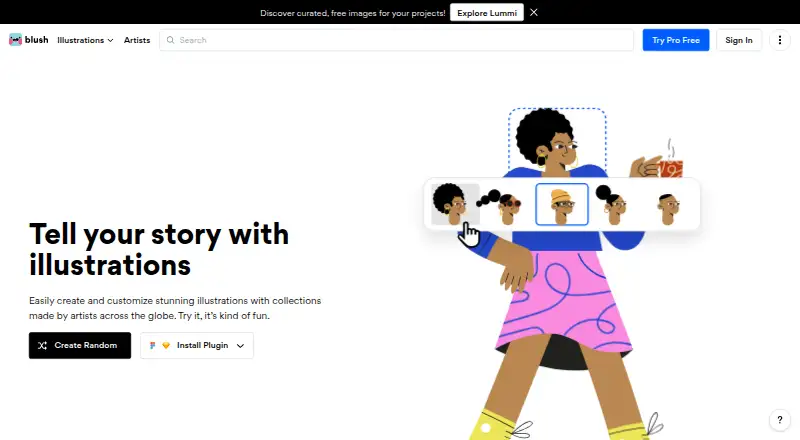
What Blush is
Blush is an illustration tool for creating and customizing artwork from artists around the world. Users can combine illustrations and adjust details such as characters’ hair, expressions, clothing, posture, and position, then use color filters to apply chosen color combinations. Its assets include characters, scenes, stickers, avatars, objects, and shapes. Blush is available on the web and through Sketch and Figma plugins, so users can work with it as a web app or from those design tools.
The Free plan costs nothing and includes thousands of free illustrations with unlimited downloads. Blush Pro adds one-click color customization, vectorized illustrations, unlimited designs for reuse, and early access to new collections. The maker also points to Pro for more illustrations, print-resolution PNGs, and formats such as SVG. Illustrations can be used in personal or professional projects without attribution. For organizations, Blush Teams offers shared illustration systems, brand consistency, and asset distribution across teams, with a library of more than 10,000 illustrations and smart features. The maker names designers, marketers, content creators, product teams, developers, educators, corporations, and startups among its intended users.
Who it suits
Blush suits designers, marketers, content creators, and product teams who need customizable illustrations for their work. Developers, educators, corporations, and startups are also among the audiences the maker identifies, while Blush Teams is aimed at organizations distributing assets across teams.
What it does well
- Customize characters’ hair, expressions, clothing, posture, and position.
- Color filters support chosen illustration color combinations.
- Free plan includes thousands of illustrations and unlimited downloads.
- Illustrations may be used personally or professionally without attribution.
- Sketch and Figma plugins complement the web app.
What to know first
- One-click color customization is part of the Pro plan.
- Vectorized illustrations and unlimited reusable designs require Pro.
- Print-resolution PNGs and formats such as SVG are directed to Pro.
Limits
The Free plan includes thousands of illustrations and unlimited downloads. The maker directs users seeking more illustrations, print-resolution PNGs, or formats such as SVG to Pro.
Plans
| Plan | Billed and limits | Price |
|---|---|---|
| Free | Thousands of free illustrations · unlimited downloads | Free |
| Doodler | unlimited downloads · up to 5 saved designs · no card required | Free |
| Pro annual | $144 per year · 10,000+ illustrations · unlimited saved designs · color customization · high-resolution PNG · SVG | $12 a month |
| Pro quarterly | $45 per quarter · 10,000+ illustrations · unlimited saved designs · color customization · high-resolution PNG · SVG | $15 a month |
| Pro monthly | $20 monthly · 10,000+ illustrations · unlimited saved designs · color customization · high-resolution PNG · SVG | $20 a month |
| Blush Pro | One-click color customization · vectorized illustrations · unlimited designs for reuse · early access to new collections | On request |
As blush.design lists them, read 3 Oct 2026. The maker's own page has the final word.
Getting started
- Open https://blush.design.
- Use Blush on the web or access it through a Sketch or Figma plugin.
- Start with the Free plan, listed as free.
- Choose Pro for its additional customization, reuse, and collection features.
- Consider Blush Teams for shared illustration systems and team asset distribution.
Blush is an illustration tool for mixing and customizing artist-made assets in a web app or design plugins. It suits people who need adaptable illustrations for creative or professional work; its free plan is unusually generous on downloads, while Pro is aimed at users who need vector output and faster color changes.
Overview
Blush gives users a library of characters, scenes, stickers, avatars, objects, and shapes to combine into illustrations. Customization reaches details such as hair, expressions, clothing, posture, and position, so it can be more useful than a static image library when a design needs a particular look. Color filters add another way to align an illustration with a project’s palette.
Personal and professional use is permitted without attribution, and commercial use is supported. That makes Blush practical for designers, marketers, content creators, product teams, developers, educators, businesses, and startups that need illustrations without adding a credit line. It is less compelling for buyers whose priority is a broad, conventional stock-vector catalog rather than remixable artist-made work.
Key features
Customize and combine
Users can adjust individual character traits and positions, then use color filters to change the overall palette. Those controls help create variations suited to different compositions, but one-click color customization is reserved for Pro.
Design-tool access
Blush is available on the web and through Sketch and Figma plugins. That puts the library within two established design workflows as well as the browser, though the platform range is narrower than alternatives that also support mobile or desktop operating systems.
Team assets
Blush Teams is positioned around shared illustration systems, consistent branding, and asset distribution across teams, with a library of more than 10,000 illustrations and smart features. It is the more relevant option for organizations coordinating assets across groups; its pricing is custom.
Pricing
Blush is freemium. Free costs nothing and includes thousands of free illustrations and unlimited downloads. It is a strong starting point for individuals and small projects that can work with the free selection and do not need the Pro export and customization features.
Blush Pro has custom pricing. It adds one-click color customization, vectorized illustrations, unlimited designs for reuse, and early access to new collections. The free plan gives up those capabilities, as well as access to more illustrations, print-resolution PNGs, and formats such as SVG; users who need those options should weigh Pro against their output requirements before committing.
Blush Teams also has custom pricing. Its shared library and distribution focus make it the plan to consider when brand consistency across teams matters more than an individual’s illustration workflow.
Platforms
Blush supports web and extension access, including Sketch and Figma plugins. That is a useful fit for browser-based work and teams using those design tools, but it does not cover the broad mobile and desktop platform mix offered by some competing illustration services.
Who it's for
Blush is best for people who want to shape an illustration to fit a layout rather than select a finished stock image unchanged. Designers and product teams can adapt characters and scenes; marketers and content creators can create palette variations; educators, developers, corporations, and startups can use the assets in personal or professional projects without attribution. Teams needing shared asset rules should look at Blush Teams. Those who require vector files, print-resolution PNGs, or more illustrations are more likely to need Pro.
Pros and cons
- Pros: The free plan combines thousands of illustrations with unlimited downloads, so users can make repeated use without a download quota.
- Pros: Character-level controls and color filters make the library adaptable to a specific design direction rather than limited to fixed artwork.
- Pros: Personal and professional use without attribution, including commercial projects, reduces friction for business use.
- Cons: Vectorized illustrations, one-click color customization, more illustrations, and additional export options require Pro, which has custom pricing.
- Cons: Access is centered on web, Sketch, and Figma, so users seeking support across a wider range of devices may prefer another service.
Alternatives
- Ouch! by Icons8 is worth considering when broader platform coverage matters; its free illustrations require attribution.
- Openclipart suits readers seeking a free service with no specific usage limits stated; it also offers a patron membership.
- Vecteezy is another freemium option, with plans organized around image or video access and download bundles.
- VectorStock offers a pay-per-image route with a Pro license and no ongoing commitment, for buyers who prefer purchasing individual vectors.
- Clker is a free web-based alternative for readers who want a service that states no fees or charges.
- DrawKit is another web and extension option, with a free Basic plan that requires no account and includes unlimited free content.
- GetIllustrations may suit developers who need API access: its free Developer API plan includes 1,500 calls per month.
- Humaaans is a free library credited to Pablo Stanley, offered under CC0 with a pay-what-you-want model.
- Browse more options in Stock Vector Libraries or Stock Illustration Websites.
Verdict
Choose Blush if you want to build and customize artist-made illustrations, especially if unlimited free downloads and use without attribution matter. Its strongest case is the combination of detailed remixing controls and a useful free plan. Look elsewhere if you need a different platform range or a conventional stock-vector service; choose Pro only when vectorized output, one-click recoloring, or its expanded illustration and export options justify custom pricing.
Verdict
Choose Blush if you want to create and customize artist-made illustrations, with a free plan that includes thousands of assets and unlimited downloads. Pro is suited to users who need vectorized illustrations, one-click color customization, or more illustration and export options. Organizations distributing assets across teams can consider Blush Teams.
Questions
Is Blush free?
Yes. Its Free plan is listed as free and includes thousands of free illustrations with unlimited downloads.
What platforms does Blush support?
Blush is available as a web app and as Sketch and Figma plugins.
What does Pro add?
Pro includes one-click color customization, vectorized illustrations, unlimited designs for reuse, and early access to new collections.
Can I use Blush illustrations in commercial projects?
Yes. The maker says illustrations can be used for personal or professional projects without attribution.
What is Blush Teams?
Blush Teams promotes shared illustration systems, brand consistency, and asset distribution across teams. Its advertised library has more than 10,000 illustrations and smart features.
Facts from Blush's own pages
- API availability
- An independent directory reports that Blush presents no public API. · librairy.io, 14 Oct 2026
- Artist attribution
- AIGA reports that packs identify their artists and that attribution is encouraged but not required. · eyeondesign.aiga.org, 14 Oct 2026
- Artist compensation
- AIGA reports that Blush artists are paid an agreed flat fee upfront for their illustration sets. · eyeondesign.aiga.org, 14 Oct 2026
- Collection library
- The team page advertises a library exceeding 10,000 illustrations. · teams.blush.design, 14 Oct 2026
- Color customization
- Blush provides one-click color filters for rapidly recoloring illustrations. · teams.blush.design, 14 Oct 2026
- Color tools
- Blush provides color filters for customizing illustrations with chosen color combinations. · blog.blush.design, 3 Oct 2026
- Commercial usage
- Blush's blog says creations can be used commercially without mandatory artist attribution. · blog.blush.design, 14 Oct 2026
- Company size
- LinkedIn lists Blush as a privately held design-services company with 2–10 employees. · linkedin.com, 14 Oct 2026
- Company specialties
- LinkedIn lists design and illustration as Blush's specialties. · linkedin.com, 14 Oct 2026
- Component editing
- Official content says users can alter backgrounds, colors, expressions and other illustration elements. · blog.blush.design, 14 Oct 2026
- Custom illustration building
- Users assemble characters and scenes from vector body parts, props and emotions. · dayflow.blush.design, 14 Oct 2026
- Customization
- Users can customize illustration elements such as characters’ hair, facial expressions, clothing, posture, and position. · blog.blush.design, 3 Oct 2026
- Design integrations
- Blush is offered as a web app plus Figma and Sketch plugins. · docs.blush.design, 14 Oct 2026
- Documentation depth
- The official documentation currently contains a welcome page explaining the product, supported tools and user types. · docs.blush.design, 14 Oct 2026
- Download formats
- The free tier offers downloads, while Pro adds print-resolution PNG files and SVG exports. · blog.blush.design, 14 Oct 2026
- Founded
- Product Hunt lists Blush as launched in 2020. · producthunt.com, 14 Oct 2026
- Free plan limits
- The maker describes a free plan and says users looking for more illustrations, print-resolution PNGs, or formats such as SVG can get Pro. · blog.blush.design, 3 Oct 2026
- Headquarters
- LinkedIn lists the headquarters in Walnut, California. · linkedin.com, 14 Oct 2026
- Industry criticism
- AIGA's Eye on Design notes criticism that modular illustration libraries can encourage visual homogenization. · eyeondesign.aiga.org, 14 Oct 2026
- Integrations
- Blush is available as a web app and as Sketch and Figma plugins. · docs.blush.design, 3 Oct 2026
- Intended users
- The maker lists designers, marketers, content creators, product teams, developers, educators, corporations, and startups as users. · docs.blush.design, 3 Oct 2026
- License ownership
- The official team site identifies Blush Design Inc and marks the service copyright as all rights reserved. · teams.blush.design, 14 Oct 2026
- Limit: advanced vector editing
- The same agency review reports limits for strict design-system work and advanced vector manipulation. · easyweb-agency.fr, 14 Oct 2026
- Limit: originality
- An agency review says Blush output can look less distinctive than fully bespoke illustration work. · easyweb-agency.fr, 14 Oct 2026
Where Blush stands on Freedom251
- Stock Vector Libraries#2 of 24
- Stock Illustration Websites#5 of 31
- Figma Plugins#3 of 14