Freedom251 › Web Design Software

Locofy
What Locofy is
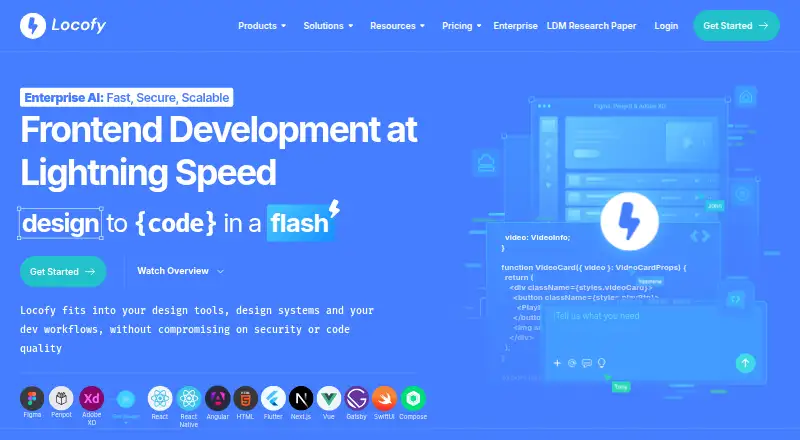
Locofy converts design files into responsive frontend code for web and mobile apps. Designers can work through plugins for Figma, Penpot, and Adobe XD, then choose from project options covering React, Next.js, HTML/CSS, Gatsby, Vue, Angular, Flutter, React Native, Swift, and Jetpack Compose. A live preview runs on actual code, giving teams a way to review and refine the generated result. Code export and deployment are available through Netlify and Vercel integrations.
Locofy MCP can generate frontend code from Figma inside compatible tools such as Cursor, Claude Code, Windsurf, Gemini CLI, and GitHub Copilot. Monthly self-service plans support one-frame-at-a-time conversion; Enterprise offers multiple frames in one run. GitHub sync is available with Enterprise and legacy annual self-service subscriptions. Locofy says it is ISO 27001 and SOC 2 certified and does not use customer data to train its large design models. The Free plan costs nothing and includes 2,000 LDMtokens and Hobby features for 7 days, after which it automatically converts to Hobby. Hobby costs $40 a month; Pro costs $80 a month.
Who it suits
Locofy suits designers and developers who want to turn files from Figma, Penpot, or Adobe XD into frontend code for web or mobile projects. It may also suit teams using compatible coding assistants or those that need Enterprise options such as multiple-frame conversion, GitHub sync, or private deployment.
What it does well
- Plugins support Figma, Penpot, and Adobe XD.
- Project options span web, mobile, and frontend frameworks.
- Live preview runs on actual code.
- Netlify and Vercel integrations support export and deployment.
- Enterprise includes multiple-frame conversion and GitHub sync.
What to know first
- Monthly self-service plans convert one frame at a time.
- GitHub sync is unavailable on monthly self-service plans and the 5-day free trial.
- Free access automatically converts to Hobby after 7 days.
Limits
The Free plan provides Hobby features for 7 days before automatically converting to Hobby. Hobby costs $40 a month and supports 2,000 LDMtokens, individual use, one-frame-at-a-time conversion, and 10 frames per project. Pro costs $80 a month and supports 4,000 LDMtokens, individual use, one-frame-at-a-time conversion, and 25 frames per project.
Plans
| Plan | Billed and limits | Price |
|---|---|---|
| Free | 2,000 LDMtokens · Hobby features for 7 days · Automatically converts to Hobby after 7 days | Free |
| Hobby | billed monthly · 2,000 LDMtokens · 1 frame conversion at a time · Individual use · 10 frames per project | $40 a month |
| Pro | billed monthly · 4,000 LDMtokens · 1 frame conversion at a time · Individual use · 25 frames per project · Content is not used to train or improve the platform | $80 a month |
| Enterprises | Custom token amount and price · Unlimited teams and collaboration · Unlimited frames per project · Dedicated support Slack channel | On request |
As locofy.ai lists them, read 7 Oct 2026. The maker's own page has the final word.
Getting started
- Visit the Locofy website.
- Use a plugin for Figma, Penpot, or Adobe XD, or use the web platform.
- Choose a plan; the Free plan includes Hobby features for 7 days and then converts to Hobby.
- Convert a design frame and review the result in the live preview.
- Export code or deploy through the Netlify or Vercel integration.
Verdict
Choose Locofy if your workflow starts with a supported design tool and you want to generate frontend code across its listed web and mobile targets. Its actual-code preview and deployment integrations support a path from design review to deployment. Look elsewhere if you need multiple-frame conversion or GitHub sync on a monthly self-service plan.
Questions
Does Locofy have a free plan?
Yes. The Free plan costs nothing, includes 2,000 LDMtokens and Hobby features for 7 days, then automatically converts to Hobby.
How much do the paid plans cost?
Hobby is $40 a month and Pro is $80 a month. Enterprise has a custom price.
Which design tools and code targets does Locofy support?
Its plugins support Figma, Penpot, and Adobe XD. Listed project options include React, Next.js, HTML/CSS, Gatsby, Vue, Angular, Flutter, React Native, Swift, and Jetpack Compose.
Can I use GitHub sync on a monthly plan?
GitHub sync is available on Enterprise and legacy annual self-service subscriptions, but not on monthly self-service plans or the 5-day free trial.
Does Locofy offer a trial?
Yes. The Free plan includes Hobby features for 7 days.
What does Locofy say about security and customer data?
Locofy says it is ISO 27001 and SOC 2 certified and does not use customer data to train its large design models.
Facts from Locofy's own pages
- AI workflow
- Locofy MCP lets users generate frontend code from Figma inside compatible tools including Cursor, Claude Code, Windsurf, Gemini CLI, and GitHub Copilot. · locofy.ai, 7 Oct 2026
- Code targets
- Its documentation lists React, Next.js, HTML/CSS, Gatsby, Vue, Angular, Flutter, React Native, Swift, and Jetpack Compose project options. · locofy.ai, 7 Oct 2026
- Deployment
- The design-to-code page lists code export and deployment through Netlify and Vercel integrations. · locofy.ai, 7 Oct 2026
- Design tools
- Locofy offers plugins for Figma, Penpot, and Adobe XD. · locofy.ai, 7 Oct 2026
- Enterprise options
- Enterprise plan options include a dedicated private cloud, self-hosted or on-premise deployment, and SAML SSO authentication. · locofy.ai, 7 Oct 2026
- GitHub availability
- GitHub sync is available on Enterprise plans and legacy annual self-service subscriptions, but not on monthly self-service plans or the 5-day free trial. · locofy.ai, 7 Oct 2026
- Plan limits
- Monthly self-service plans support converting one frame at a time; converting multiple frames in one run is listed for Enterprise. · locofy.ai, 7 Oct 2026
- Prototyping
- Locofy provides a live preview running on actual code so users can review and refine generated designs. · locofy.ai, 7 Oct 2026
- Security
- Locofy says it is ISO 27001 and SOC 2 certified and does not use customer data to train its large design models. · locofy.ai, 7 Oct 2026
- Support
- Locofy’s getting-started documentation directs users to its Discord server or [email protected] for help. · locofy.ai, 7 Oct 2026
- What it does
- Locofy converts designs into responsive, developer-friendly frontend code for web and mobile apps. · locofy.ai, 7 Oct 2026
Where Locofy stands on Freedom251
- Web Design Software#13 of 41
- Developer Handoff Software#11 of 25
- AI Screenshot-to-Code Tools#14 of 24