Freedom251 › Fleet software: management, telematics and maintenance

Fleet Maintenance Pro
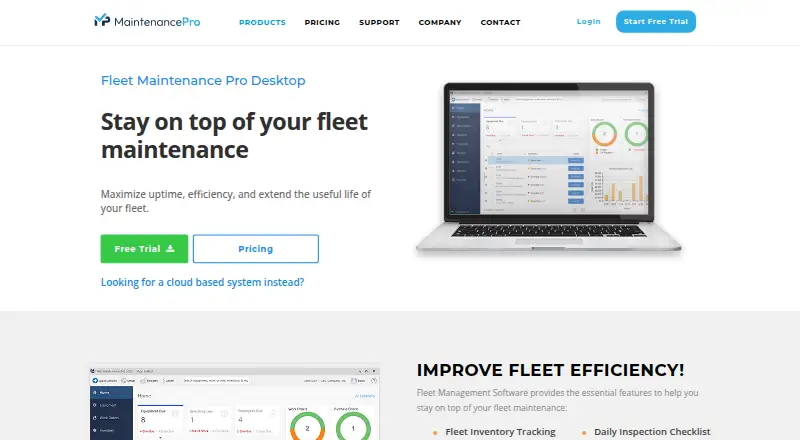
What Fleet Maintenance Pro is
Fleet Maintenance Pro helps organizations manage maintenance for vehicles and equipment, with the aim of supporting uptime and extending fleet useful life. All editions can track an unlimited number of fleet vehicles and equipment. Preventive maintenance can be scheduled by date, mileage, kilometers, hours, or fuel consumption, with automated notifications when work is due. Repair requests can generate work orders that record parts and labor, and the software records fuel transactions. It can also import exported data from an existing fuel card system.
The Shop Edition adds parts inventory management, stock tracking, purchasing, and reorder notifications. Reports can be printed, emailed, or exported, and an optional editor can adjust included reports. Cloud access works from desktops, tablets, and smartphones, with dedicated iPhone and Android apps. The cloud plan page lists integration options such as GPS and API; the Enterprise web version can import meter readings and asset locations daily from a GPS provider. The cloud plan page also describes data encryption and automatic 24/7 cloud backups. Fleet Maintenance Pro is available for Android, iOS, web, and Windows, with cloud and Windows desktop editions. A 30-day free trial is offered. Cloud plans include Basic at $24 a month and Premium at $41 a month; Windows desktop editions are sold as one-time purchases.
Who it suits
Fleet Maintenance Pro suits organizations that need to schedule maintenance, record repairs and fuel, and keep fleet or equipment records. The cloud edition fits users who want access from desktop, tablet, or smartphone, while the Shop Edition is aimed at companies handling maintenance in-house and managing parts inventory.
What it does well
- All editions track an unlimited number of vehicles and equipment.
- Schedules service by date, distance, hours, or fuel consumption.
- Repair requests can generate work orders with parts and labor.
- Shop Edition adds stock tracking and reorder notifications.
- Cloud version supports desktop, tablet, and smartphone access.
What to know first
- There is no free plan.
- Cloud subscriptions start at $24 a month.
- The Windows desktop editions require one-time purchases of 1495.00 USD or 1995.00 USD.
Limits
There is no free plan. The Basic cloud plan costs $24 a month, while the Windows desktop Deluxe and Shop editions cost 1495.00 USD and 1995.00 USD one time, respectively.
Plans
| Plan | Billed and limits | Price |
|---|---|---|
| Deluxe (Windows desktop) | one-time purchase · email notifications · user permissions · photos/documents · vendors · multiple locations · itemized parts · maintenance calendar · graphing · asset assignment · daily inspection checklists | $1,495, paid once |
| Shop (Windows desktop) | one-time purchase · all Deluxe features · work orders · stock inventory · labor tracking · purchase orders · recurring expenses · email work orders · downtime analysis | $1,995, paid once |
| Basic (Cloud Version) | $24 /user/mo; page also shows “Starting at $30/mo” and says annual billing saves $60 · For start-ups or small companies | $24 a month |
| Basic (cloud annual billing) | per user per month, annual billing · up to 50 vehicles/equipment · 10 operator users per full user · single location | $30 a month |
| Basic (cloud monthly) | per user per month · up to 50 vehicles/equipment · 10 operator users per full user · single location · PM scheduling · repair tracking · work orders · DOT inspections · vendor/employee management · repair portal · mobile apps · 5 custom asset fields | $35 a month |
| Premium | $41/user/mo; page says annual billing saves $96 · Best for larger companies or enterprise corps | $41 a month |
| Premium (cloud annual billing) | per user per month, annual billing · up to 500 vehicles/equipment · multiple locations · parts inventory · purchase orders · barcoding | $50 a month |
| Premium (cloud monthly) | per user per month · up to 500 vehicles/equipment · multiple locations · parts inventory · itemized parts/labor · electronic signatures · multiple warehouses · purchase orders · barcoding · 10 custom asset fields | $60 a month |
The first 8 of 10 plans, as mtcpro.com lists them, read 15 Oct 2026. The maker's own page has the final word. Every plan
Getting started
- Visit mtcpro.com/fleet-maintenance-pro/ to review the editions.
- Choose a cloud plan or a Windows desktop edition.
- Use the 30-day free trial to evaluate Fleet Maintenance Pro.
- Access the cloud version from a desktop, tablet, or smartphone, or use its iPhone or Android app.
- Set preventive maintenance schedules and add fleet vehicle and equipment records.
Verdict
Choose Fleet Maintenance Pro if you need vehicle and equipment records alongside preventive maintenance, repair work orders, and fuel tracking. Look elsewhere if you require a free plan; cloud use is subscription-based, while the Windows desktop editions have substantial one-time prices.
Questions
Does Fleet Maintenance Pro have a free plan or trial?
There is no free plan. The maker offers a 30-day free trial.
How much does Fleet Maintenance Pro cost?
Basic (Cloud Version) is $24 a month and Premium is $41 a month. Deluxe (Windows Desktop) costs 1495.00 USD one time, and Shop (Windows Desktop) costs 1995.00 USD one time.
Which platforms does it support?
Fleet Maintenance Pro is available for Android, iOS, web, and Windows. The cloud version works from desktops, tablets, and smartphones and has dedicated iPhone and Android apps.
Can it integrate with GPS or other applications?
The cloud plan page lists integration options such as GPS and API. The Enterprise web version can import meter readings and asset locations daily from a GPS provider.
What does the Shop Edition add?
It includes stock tracking, reorder notifications, purchasing, and parts inventory management.
How many vehicles can it track?
All editions can track an unlimited number of fleet vehicles and equipment.
Facts from Fleet Maintenance Pro's own pages
- API
- Enterprise customers receive a JSON REST API with JWT authentication and endpoints for inventory, equipment, work orders, purchase orders, vendors and GPS meter updates. · mpweb.mtcpro.com, 15 Oct 2026
- API token scope
- API results follow the permissions of the account used to obtain the token, and tokens expire after 24 hours. · mpweb.mtcpro.com, 15 Oct 2026
- Backups
- Cloud subscriptions include automatic 24/7 data backup. · mtcpro.com, 15 Oct 2026
- Cloud access
- The cloud version is accessible from desktops, tablets, and smartphones, and offers dedicated iPhone and Android apps. · mtcpro.com, 8 Oct 2026
- Company founded
- LinkedIn lists Innovative Maintenance Systems as founded in 1994. · linkedin.com, 15 Oct 2026
- Company size
- LinkedIn lists the company size as 2–10 employees. · linkedin.com, 15 Oct 2026
- Customers
- The maker says it serves more than 15,000 customers globally. · mtcpro.com, 15 Oct 2026
- Documentation
- The knowledge base is organized by product version and includes setup, equipment, maintenance, work orders, inventory, reports, security and error articles. · support.mtcpro.com, 15 Oct 2026
- Fleet records
- All editions track an unlimited number of fleet vehicles and equipment. · mtcpro.com, 8 Oct 2026
- Founded
- 1994 · mtcpro.com, 28 Sept 2026
- Fuel and meter data
- The software records fuel transactions and can import exported data from an existing fuel card system. · mtcpro.com, 8 Oct 2026
- Fuel imports
- A fuel-import utility can bring transactions from an existing fuel-card system into the fleet records. · mtcpro.com, 15 Oct 2026
- GPS integration
- Enterprise cloud accounts can connect GPS/telematics providers for daily meter readings, locations and diagnostic codes. · mpweb.mtcpro.com, 15 Oct 2026
- Headquarters
- LinkedIn lists headquarters in Wake Forest, North Carolina. · linkedin.com, 15 Oct 2026
- Installation
- Network installations provide client/server, client-only and server-only options and require firewall ports 12010 and 12011. · support.mtcpro.com, 15 Oct 2026
- Integrations
- The cloud plan page lists integration options with other applications such as GPS and API; the web product page says its Enterprise version can import meter readings and asset location daily from a GPS provider. · mtcpro.com, 8 Oct 2026
- Inventory
- The Shop Edition includes stock tracking, reorder notifications, purchasing, and parts inventory management. · mtcpro.com, 8 Oct 2026
- Legal/developer name
- The Apple listing identifies the developer as Innovative Maintenance Systems, LLC. · apps.apple.com, 15 Oct 2026
- Limit: integrations
- A reviewer reported no QuickBooks compatibility and requested stronger GPS capability. · softwareadvice.com, 15 Oct 2026
- Limit: inventory
- Reviewers described limitations around special-ordering parts for specific units and some inventory workflows. · softwareadvice.com, 15 Oct 2026
- Limit: mobile reliability
- Google Play reviews include complaints about crashes, errors and reports not always sending. · play.google.com, 15 Oct 2026
- Limit: reporting
- Reviewers said report customization and the report builder can be difficult or require an add-on. · softwareadvice.com, 15 Oct 2026
- Limit: workflow clicks
- A 2025 reviewer said entering work orders requires irritatingly many clicks. · softwareadvice.com, 15 Oct 2026
- Mobile apps
- The Maintenance Pro Web mobile apps support maintenance, repairs, work orders, inventory and barcode scanning through the device camera. · apps.apple.com, 15 Oct 2026