Freedom251 › Passport Photo Maker Software

ePassport Photo Maker
What ePassport Photo Maker is
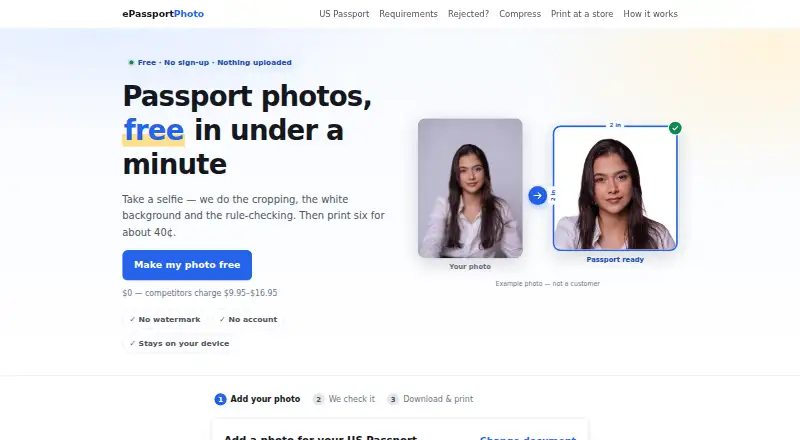
ePassport Photo Maker is a free web tool for preparing passport and visa photos from a selfie. It crops the image, replaces the background with plain white, and checks criteria including head size, eye height, tilt, expression, lighting, and resolution. Listed formats cover US passport and visa, green card, baby passport, USCIS, EAD, DV Lottery, Canadian, UK, and Australian photos. You can download a digital file or a 4×6 print sheet at no charge and without a watermark; each sheet holds six photos. The site says processing happens in the browser and images are not uploaded or stored unless you choose email delivery or accept server processing when local AI cannot run. It says the tool does not smooth skin, remove blemishes, or reshape faces, and that a special backdrop is unnecessary. The service does not guarantee acceptance: the reviewing office makes the final decision. It runs on the web and offers email support.
Who it suits
It suits people who need a passport or visa photo in one of the listed formats and want a digital file or print sheet. It is web-based and offers a free plan.
What it does well
- Free downloads with no watermark
- Checks head size, eye height, tilt, lighting, and resolution
- Print sheet holds six photos
- Browser-based processing; no special backdrop required
What to know first
- Acceptance by a reviewing authority is not guaranteed
- Server processing may be needed if local AI cannot run
Limits
The free plan provides a passport photo and 4×6 print sheet, without a watermark or account requirement. Acceptance is not guaranteed; the reviewing office makes the final decision.
Plans
| Plan | Billed and limits | Price |
|---|---|---|
| Free | Free; no payment · Passport photo and 4×6 print sheet · no watermark · no account | Free |
As epassport-photo.com lists them, read 3 Oct 2026. The maker's own page has the final word.
Getting started
- Visit the ePassport Photo Maker website.
- Prepare a selfie for the document format you need.
- Choose the relevant listed passport, visa, or other document format.
- Use the crop, white-background, and photo-rule checks.
- Download the digital file or the 4×6 print sheet.
Overview
ePassport Photo Maker is a web tool for preparing passport and visa photos from a selfie, including cropping, background replacement and photo-rule checks. It suits people who want a no-cost way to produce both a digital image and a print sheet without creating an account. Its useful combination of checks and downloads makes it a practical starting point, but it cannot ensure that an authority will accept the result.
Key features
The service covers formats for US passports and visas, green cards, baby passports, USCIS, EAD, DV Lottery, Canadian, UK and Australian documents. It checks head size, eye height, tilt, whether eyes are open, expression, lighting and resolution. Those checks address several common requirements in one workflow, which is more useful than cropping alone; they are not a guarantee of compliance with every individual case.
Background removal places the subject on a plain white field, so a special backdrop is not required. The service says it does not smooth skin, remove blemishes or reshape faces. That restraint is appropriate for an official photo, though this is not a portrait-retouching tool.
Downloads include a digital file and a 4×6 print sheet, both free and without a watermark. The sheet holds six passport photos and can be printed as an ordinary photo print at listed retailers. This covers a basic physical-print need without requiring a separate layout step.
Photo processing runs in the browser. Images are not uploaded or stored unless a user opts for email delivery or accepts server processing when local AI cannot run. The service says it sets no cookies and uses no third-party analytics, advertising pixels or trackers; its AI model files are served from its own domain. These are meaningful privacy protections, with the stated exceptions worth keeping in mind. The maker can be contacted at [email protected].
Pricing
The Free plan costs nothing, with no payment and no account required. It includes passport-photo preparation and a 4×6 print sheet, without a watermark. There is no paid tier or trial to weigh against it, so it fits occasional personal use as well as anyone who needs a basic free download. Its trade-off is not a plan cap but the service's acceptance limit: the reviewing office makes the final decision, and the tool does not guarantee approval.
Platforms
ePassport Photo Maker runs on the web, making it accessible through a browser rather than tied to a listed desktop or mobile app. Its browser-based processing also supports its privacy approach, subject to the server-processing exception when local AI cannot run.
Who it's for
This is a good fit for someone preparing one of the supported document-photo formats who wants rule checks, a digital download and a ready-to-print sheet without paying or signing up. It is less suitable for anyone who needs a guarantee of acceptance, face retouching, or a workflow that never offers server processing.
Pros and cons
Pros
- Free, complete downloads: The digital image and six-photo 4×6 sheet are available without a watermark or account.
- Checks beyond cropping: It evaluates head size, eye position, pose, expression, lighting and resolution, helping users catch multiple common issues before submission.
- Browser-first privacy: Images stay local unless the user chooses email delivery or agrees to server processing when needed; the service also says it sets no cookies or third-party trackers.
Cons
- No approval guarantee: The authority reviewing the photo retains final control, so users with strict submission requirements still need to verify those requirements.
- Not a retouching app: It intentionally avoids smoothing skin, removing blemishes and reshaping faces.
- Processing may leave the browser: Local AI may not run in some cases, when server processing requires user acceptance.
Alternatives
Passport Photo Maker Software is the broader directory list to consult when comparing more tools. Consider Cutout.Pro if you need its wider Android, iOS, desktop, web and API platform coverage and are comfortable with a paid subscription starting at $5 a month for 80 credits. Passport Room offers a free tier capped at three finished photos per day and a 0.99 USD one-off Pro option for 30 days; it may suit a phone user who prefers a daily allowance or short paid period. PhotoID lets users process and preview for free on iOS or Android, but requires a subscription to download final photos, so it is a less direct choice for free exports.
ID Photo Maker is an iOS option with free shoot, crop and preview, plus a 0.99 USD one-off PRO upgrade or a 19.99 USD yearly auto-renewing full version. IDPhoto4You is another free web alternative, with multiple print sizes and standards for 73 countries. idpic.app is a free web alternative that requires no account or subscription. MakePassportPhoto offers a free DIY plan with manual editing and one paper-size download but no compliance check or background correction; its paid Automatic (AI) plan costs $2.99, paid once. Passphoto Maker is a free, open Windows 10/11 64-bit option if a Windows desktop application is preferable.
Verdict
Choose ePassport Photo Maker if you want a free browser-based route from selfie to checked document photo, with both digital and print-ready downloads and no account requirement. Its strongest case is that the essential preparation and output are included at no charge. Look elsewhere if you need retouching, a platform-specific app, or assurance that a photo will pass an authority's review.
Verdict
ePassport Photo Maker combines photo preparation, rule checks, and downloadable outputs without charging for its listed plan. Check the relevant authority's requirements, since the service leaves final acceptance to the reviewing office.
Questions
Is ePassport Photo Maker free?
Yes. Its Free plan costs nothing, with no payment, and includes a passport photo and 4×6 print sheet.
Which photo formats does it support?
Listed formats include US passport, visa, green card, baby passport, USCIS, EAD, DV Lottery, and Canadian, UK, and Australian photos.
What can I download?
You can download a digital file and a 4×6 print sheet at no charge and without a watermark. The sheet contains six passport photos.
Does the service upload or store my photo?
The site says processing runs in the browser and images are not uploaded or stored unless you choose email delivery or accept server processing when local AI cannot run.
Does it change facial features?
The site says it does not smooth skin, remove blemishes, or reshape faces.
Will an authority accept the finished photo?
The service does not guarantee acceptance. The reviewing office makes the final approval decision.
Facts from ePassport Photo Maker's own pages
- Acceptance limit
- The service does not guarantee that an authority will accept a photo; final approval belongs to the reviewing office. · epassport-photo.com, 3 Oct 2026
- Analytics
- The site says it uses no third-party analytics, advertising pixels, or third-party trackers, and sets no cookies. · epassport-photo.com, 3 Oct 2026
- Background
- Background removal places the subject on a plain white background, and the site says a special backdrop is not required. · epassport-photo.com, 3 Oct 2026
- Face processing
- The site says it does not smooth skin, remove blemishes, or reshape faces. · epassport-photo.com, 3 Oct 2026
- Headquarters
- Pokhara, Nepal · epassport-photo.com, 23 Sept 2026
- Output
- Users can download a digital file and a 4×6 print sheet, both free and without a watermark. · epassport-photo.com, 3 Oct 2026
- Photo checks
- Checks include head size, eye height, tilt, eyes open, expression, lighting, and resolution. · epassport-photo.com, 3 Oct 2026
- Printing
- A 4×6 sheet holds six passport photos and can be printed as an ordinary photo print at listed retailers. · epassport-photo.com, 3 Oct 2026
- Privacy
- Photo processing runs in the browser and images are not uploaded or stored unless the user chooses email delivery or accepts server processing when local AI cannot run. · epassport-photo.com, 3 Oct 2026
- Purpose
- Creates passport and visa photos by cropping a selfie, replacing the background, and checking photo rules. · epassport-photo.com, 3 Oct 2026
- Security detail
- The site says its AI model files are served from its own domain rather than a third-party CDN. · epassport-photo.com, 3 Oct 2026
- Support
- Users can contact the maker by email at [email protected]. · epassport-photo.com, 3 Oct 2026
- Supported documents
- The site lists US passport, visa, green card, baby passport, USCIS, EAD, DV Lottery, Canadian, UK, and Australian photo formats. · epassport-photo.com, 3 Oct 2026
Where ePassport Photo Maker stands on Freedom251
- Passport Photo Maker Software#3 of 29