Freedom251 › Passport Photo Maker Software
PhotoID
What PhotoID is
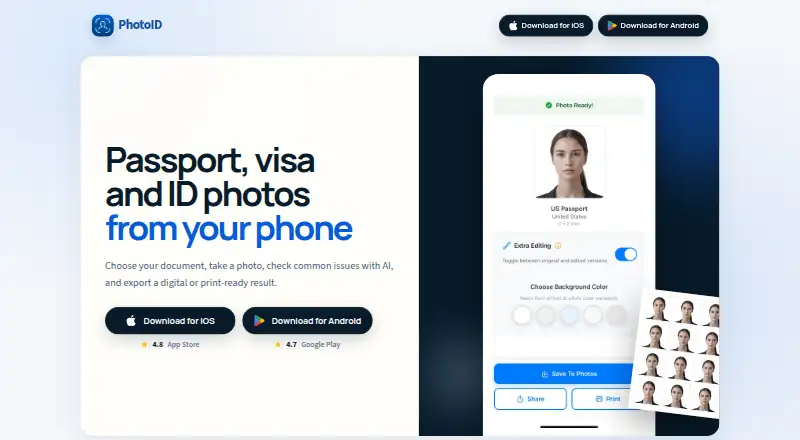
PhotoID creates passport, visa, and identity-document photos using a phone, with digital files and print-ready layouts as outputs. Templates cover more than 100 countries and 200 document types. Before export, the app checks the background, face position, lighting and shadows, sharpness, and overall image quality. It accepts JPEG, PNG, and HEIC images from a camera or photo gallery. Users can optionally remove or replace the background with white, blue, or gray, then export high-resolution JPG or PDF layouts with multiple copies per sheet and no watermark. PhotoID is available on Android and iOS and requires an internet connection plus camera and photo-library permissions. Its Free plan costs nothing and supports processing and previews; a subscription is required to download final photos. Photos go to OpenAI for analysis and may be stored there for up to 30 days under the stated retention policy. Optional background removal uses Replicate, where data is automatically removed after approximately one hour by default. PhotoID says it does not store photo copies on its servers; saved outputs remain on the user's device. Acceptance by authorities is not guaranteed, so check their current requirements.
Who it suits
It suits people preparing passport, visa, residence-permit, ID-card, work-permit, or student-ID photos. It may also suit those who need print layouts or want image checks before export.
What it does well
- Templates cover over 100 countries and 200 document types.
- Checks background, face position, lighting, sharpness, and image quality.
- Optional background replacement offers white, blue, or gray.
- Exports high-resolution JPGs or multi-copy PDF layouts without watermarks.
What to know first
- Downloading final photos requires a subscription.
- An internet connection and camera and photo-library permissions are required.
- Photos are sent to OpenAI and retained up to 30 days.
- Authorities may not accept processed photos.
Limits
The Free plan allows processing and previewing photos; downloading final photos requires a subscription.
Plans
| Plan | Billed and limits | Price |
|---|---|---|
| Free | Process and preview photos; subscription required to download final photos | Free |
As photoid.app lists them, read 2 Oct 2026. The maker's own page has the final word.
Getting started
- Visit https://photoid.app/.
- Install PhotoID on Android or iOS.
- Allow camera and photo-library permissions and connect to the internet.
- Take a photo or select a JPEG, PNG, or HEIC image from the gallery.
- Choose a document template, process the photo, and preview it.
- Subscribe to download the final photo as a JPG or PDF layout.
PhotoID is a phone app for preparing passport, visa and other identity-document photos. It is best suited to people who want document-specific templates and image checks on iOS or Android. Its main drawback is decisive: the free plan lets you process and preview photos, but downloading a finished image requires a subscription.
Overview
PhotoID turns a phone-camera or gallery image into a digital document photo or a print-ready layout. Its templates span more than 100 countries and 200 document types, including residence permits, work permits and student IDs, making it useful for people handling more than standard passport photos.
The app checks image characteristics before export, but it cannot guarantee acceptance by every authority. Requirements can change and differ by document, so verify the current rules for your destination before relying on the result. For more options in this category, browse our Passport Photo Maker Software list.
Key features
- Image checks: PhotoID analyzes the background, face position, lighting and shadows, sharpness and overall image quality. That can catch common problems before you prepare an export, though it does not replace checking official requirements.
- Optional background editing: The app can remove or replace a background with white, blue or gray. This offers flexibility when a source image has the wrong backdrop, but users still need to ensure the edited result meets the applicable rules.
- Broad document templates: Coverage across more than 100 countries and 200 document types suits people preparing different kinds of identity documents. The range does not guarantee that every authority will accept a particular photo.
- Phone-based input and output: Use JPEG, PNG or HEIC images from the camera or photo gallery. Exports are high-resolution JPGs or PDF layouts with multiple copies per sheet and no watermark.
- Internet and permissions: PhotoID requires an internet connection, camera permission and photo-library permission, so it is not an offline option.
- Photo processing and privacy: The app says it does not keep photo copies on its own servers and that saved outputs remain on the user's device. For AI analysis, photos go to OpenAI and may be stored for up to 30 days under its retention policy; optional background removal uses Replicate's cjwbw/rembg API, where data is automatically removed after approximately one hour by default. PhotoID says transfers to OpenAI use encrypted connections and that it does not collect or store personal identification data.
Pricing
PhotoID's Free plan costs nothing. It covers processing and previewing photos, but a subscription is required to download final photos. That makes it useful for checking a prospective result, not for completing a document photo without paying. No paid-plan price or terms are provided here, so treat the subscription as custom pricing and confirm its terms before choosing the app.
Platforms
PhotoID is available on Android and iOS. Its internet requirement and camera and photo-library permissions are part of using the app; it is not a desktop or web-based alternative.
Who it's for
PhotoID fits people preparing passport, visa, residence-permit, ID-card, work-permit, student-ID or related document photos who want checks, background options and a print layout in a phone app. It is a poor fit for anyone who needs a free downloadable result, an offline workflow or assurance that an authority will accept the photo.
Pros and cons
Pros
- Wide document coverage: Templates for over 100 countries and 200 document types extend beyond passport use.
- Useful preparation tools: Image checks, optional background changes and multi-copy print layouts cover several common steps in one mobile workflow.
- No watermark on exports: Finished JPG and PDF outputs are described as watermark-free.
Cons
- Free use stops at preview: Downloading the final photo requires a subscription, limiting the free plan to evaluation.
- Acceptance is not assured: Users must confirm current requirements with the relevant authority.
- External processing: AI analysis sends photos to OpenAI, where they may remain for up to 30 days; optional background removal sends data to Replicate.
- Internet required: The app cannot serve users who need to prepare photos offline.
Alternatives
Choose Cutout.Pro if you want a broader cross-platform service spanning mobile, web and desktop, with a subscription at $5 a month billed monthly for 80 credits/month. Choose Passport Room if a web option matters or you want a free allowance of 3 finished photos per day with no account and no watermark; its Pro plan is a 0.99 USD one-off payment for 30 days.
ePassport Photo Maker is a free web option offering a passport photo and 4×6 print sheet without watermark or account. IDPhoto4You is another free web option, with multiple print sizes and standards for 73 countries. idpic.app is free to use on the web with no account or subscription required.
MakePassportPhoto offers a free, ad-supported manual-editing option with one paper-size download and no compliance check or background correction; its Automatic (AI) option costs $2.99, paid once. Passphoto Maker is a free, open-source Windows 10/11 option. Smartphone iD offers digital-photo verification by AI and a human for $8.50 as a one-time purchase, with the exact price varying by document.
Verdict
Choose PhotoID if you want broad document templates, image checks and print-ready output in an iOS or Android app, and accept that downloading a finished photo requires a subscription. Its strongest case is the combination of document coverage and phone-based preparation; look elsewhere if you need a free final download, offline access or guaranteed acceptance by an authority.
Verdict
PhotoID combines document templates, image checks, optional background changes, and print-ready exports in a phone app. Review the relevant authority's current requirements and note the subscription requirement for downloading final photos.
Questions
Is PhotoID free?
Yes. The Free plan costs nothing and lets users process and preview photos. A subscription is required to download final photos.
Which platforms does PhotoID support?
PhotoID is available on Android and iOS.
What photo formats can I use, and what can I export?
It accepts JPEG, PNG, and HEIC photos from the camera or gallery. Exports include high-resolution JPGs and PDF layouts with multiple copies per sheet, without a watermark.
Does PhotoID guarantee a photo will be accepted?
No. PhotoID does not guarantee acceptance by every authority; users must verify current requirements.
Where are photos processed and stored?
Photos are sent to OpenAI for analysis and retained there for up to 30 days under the stated policy. PhotoID says it does not store photo copies on its own servers, and saved outputs remain on the device.
Does PhotoID require internet access or permissions?
Yes. An internet connection, camera permission, and photo-library permission are required.
Facts from PhotoID's own pages
- AI checks
- The app checks background, face position, lighting and shadows, sharpness, and image quality before export. · photoid.app, 2 Oct 2026
- AI processor
- Photos are sent to OpenAI for AI analysis and stored there for up to 30 days under the stated retention policy. · photoid.app, 2 Oct 2026
- Authority disclaimer
- PhotoID does not guarantee that processed photos will be accepted by every authority, so users must verify current requirements. · photoid.app, 2 Oct 2026
- Background processor
- Optional background removal uses Replicate's cjwbw/rembg API, with data automatically removed after approximately one hour by default. · photoid.app, 2 Oct 2026
- Background removal
- PhotoID optionally removes or replaces backgrounds with white, blue, or gray. · play.google.com, 2 Oct 2026
- Data storage
- PhotoID says it does not store copies of photos on its own servers; saved outputs remain on the user's device. · photoid.app, 2 Oct 2026
- Document coverage
- The app provides templates for more than 100 countries and 200 document types. · play.google.com, 2 Oct 2026
- Export formats
- PhotoID exports high-resolution JPG or PDF layouts, including multiple copies per sheet, without a watermark. · play.google.com, 2 Oct 2026
- Headquarters
- Sheridan, Wyoming, United States · photoid.app, 28 Sept 2026
- Intended users
- The app is intended for people preparing passport, visa, residence-permit, ID-card, work-permit, student-ID, and related document photos. · photoid.app, 2 Oct 2026
- Internet requirement
- The support page says an internet connection, camera permission, and photo-library permission are required. · photoid.app, 2 Oct 2026
- Purpose
- PhotoID creates passport, visa, and ID photos from a phone and exports digital or print-ready results. · photoid.app, 2 Oct 2026
- Security
- The privacy policy states that photos are transmitted to OpenAI using secure, encrypted connections and that no personal identification data is collected or stored. · photoid.app, 2 Oct 2026
- Support
- Email support is available at [email protected], with typical responses within 24–48 hours on business days. · photoid.app, 2 Oct 2026
- Supported inputs
- The app supports JPEG, PNG, and HEIC photos from the camera or photo gallery. · photoid.app, 2 Oct 2026
Where PhotoID stands on Freedom251
- Passport Photo Maker Software#13 of 29