Freedom251 › Passport Photo Maker Software
IDPhoto4You
What IDPhoto4You is
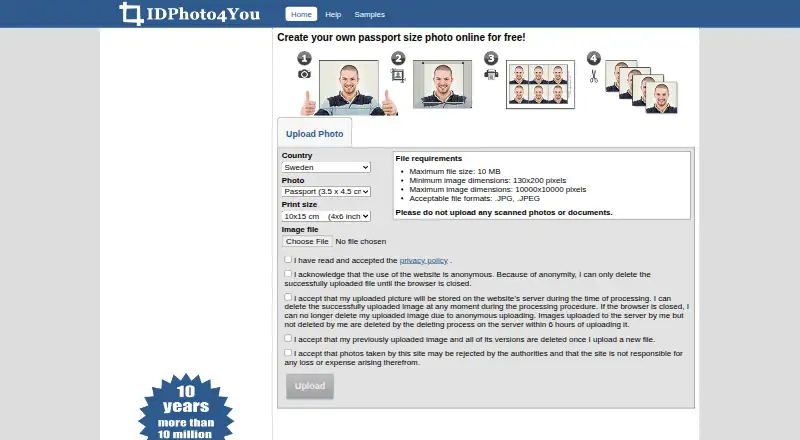
IDPhoto4You is a free web tool for preparing passport, visa, and ID photos, with standards for 73 countries. Users upload a JPG or JPEG, position the crop frame manually, and adjust brightness or contrast. The tool no longer uses face detection to set the crop, so users place the frame themselves. A simple picture mode prepares images for CVs, social media accounts, or online applications. Finished images can be downloaded as printable files for home printing or delivery to a digital photo lab. Uploads must be no larger than 10 MB and between 130×200 and 10000×10000 pixels. Use is anonymous and does not require personal details. The site says uploaded images are automatically deleted within six hours; users can also delete them during the active browser session, but lose control after the browser closes. It says HTTPS encrypts images during upload and download. The site warns that authorities may reject generated photos and disclaims responsibility for resulting loss or expense. IDPhoto4You offers multiple print sizes and JPG export, with a Free plan costing free.
Who it suits
It suits people who need to prepare passport, visa, or ID photos online, as well as simple images for CVs or online profiles. Users must be comfortable positioning the crop frame themselves.
What it does well
- Photo standards cover 73 countries.
- Brightness and contrast can be adjusted.
- Simple picture mode supports CV and social images.
- Use is anonymous and requires no personal details.
- Uploads are automatically deleted within six hours.
What to know first
- Crop framing must be adjusted manually.
- Authorities may reject photos created with the tool.
- Uploads must be JPG or JPEG and meet size limits.
Limits
The free plan includes passport, visa, and ID photo creation, multiple print sizes, and standards for 73 countries. Uploads must be JPG or JPEG, up to 10 MB, and between 130×200 and 10000×10000 pixels; the site says authorities may reject the resulting photos.
Plans
| Plan | Billed and limits | Price |
|---|---|---|
| Free | Free of charge · Passport, visa and ID photo creation · multiple print sizes · standards for 73 countries | Free |
As idphoto4you.com lists them, read 7 Oct 2026. The maker's own page has the final word.
Getting started
- Open the IDPhoto4You website in a web browser.
- Upload a JPG or JPEG between 130×200 and 10000×10000 pixels and no larger than 10 MB.
- Choose a photo standard or use simple picture mode.
- Position the crop frame and adjust brightness or contrast as needed.
- Download the printable JPG image to print yourself or send to a digital photo lab.
Verdict
IDPhoto4You offers a free way to prepare printable ID-style photos online, with country standards and manual image controls. Its site cautions that authorities may reject the resulting photos.
Questions
How much does IDPhoto4You cost?
The Free plan costs nothing and is billed free of charge.
Does IDPhoto4You offer a free trial?
No. The listed pricing model is free, with a Free plan and no free trial.
Which platforms does it support?
IDPhoto4You runs on the web.
What file can I upload and download?
Uploads must be JPG or JPEG and meet the listed size and dimension limits. Prepared images are downloaded as printable JPGs.
Who owns and develops IDPhoto4You?
The about page identifies Majer János as the owner and developer.
Does the site guarantee that authorities will accept a photo?
No. The site says authorities may reject photos it creates and disclaims responsibility for resulting loss or expense.
Facts from IDPhoto4You's own pages
- Editing
- Users manually crop photos and can adjust brightness and contrast. · idphoto4you.com, 7 Oct 2026
- Face detection
- The site says it no longer uses face detection to determine the crop frame, so users adjust the frame manually. · idphoto4you.com, 7 Oct 2026
- Limits of guarantee
- The site says authorities may reject photos it creates and disclaims responsibility for resulting loss or expense. · idphoto4you.com, 7 Oct 2026
- Output
- Users download the prepared printable image and can print it themselves or send it to a digital photo lab. · idphoto4you.com, 7 Oct 2026
- Owner and developer
- The about page identifies Majer János as the owner and developer and says the site launched in 2009. · idphoto4you.com, 7 Oct 2026
- Photo standards
- The site offers photo standards for 73 countries. · idphoto4you.com, 7 Oct 2026
- Privacy
- Use is anonymous and does not require personal details; uploaded images are automatically deleted from the server within six hours. · idphoto4you.com, 7 Oct 2026
- Privacy data controller
- The privacy statement lists Majer János in Göd, Hungary as the data controller. · idphoto4you.com, 7 Oct 2026
- Purpose
- IDPhoto4You is a free online tool for creating passport, visa and ID photos. · idphoto4you.com, 7 Oct 2026
- Simple picture mode
- A simple picture mode prepares images for CVs, social media accounts, or online applications. · idphoto4you.com, 7 Oct 2026
- Support
- The site lists [email protected] as its contact email. · idphoto4you.com, 7 Oct 2026
- Transport security
- The site says HTTPS encrypts pictures during upload and download. · idphoto4you.com, 7 Oct 2026
- Upload limits
- Uploads must be JPG or JPEG, no larger than 10 MB, and between 130×200 and 10000×10000 pixels. · idphoto4you.com, 7 Oct 2026
- User deletion
- Users can delete uploaded images during the active session, but lose control of them after the browser session closes. · idphoto4you.com, 7 Oct 2026
Where IDPhoto4You stands on Freedom251
- Passport Photo Maker Software#4 of 29