Freedom251 › Passport Photo Maker Software

ID Photo Maker
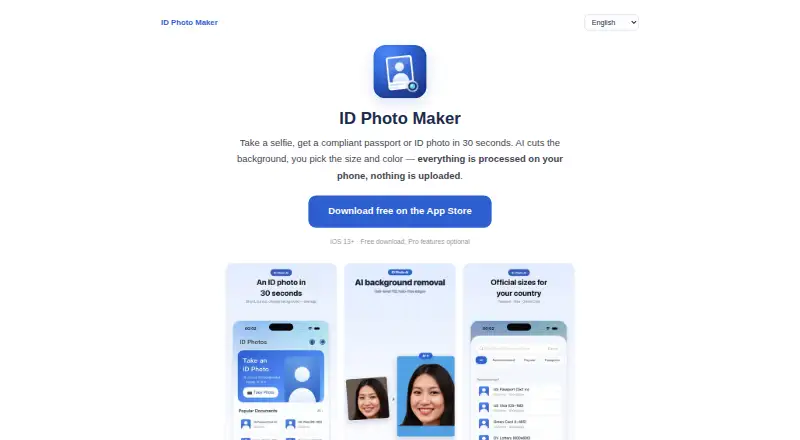
What ID Photo Maker is
ID Photo Maker is an iOS app for preparing passport and ID photos from a selfie. It offers more than 40 country formats, including US passport, Schengen visa, Japan résumé, and Korea ID layouts. Its presets follow stated guidance for head size, margins, and background; strict document presets also display a no-retouch reminder. The app removes backgrounds with AI and lets users choose white, blue, red, or a custom color. Exports can use exact pixel dimensions and a target file size, with a stated example of 240 KB or less for DS-160. It can arrange multiple copies on a 4×6 inch print sheet for printing at a photo kiosk or drugstore. Listed uses include passport, visa, green card, DV lottery, résumé headshot, employee badge, school, and club ID photos.
Standard editing, including background removal, beautification, and cropping, runs on-device; those photos are not uploaded, stored, or viewed by the maker. Optional AI Attire sends a selected photo over an encrypted connection to the maker's server and then to OpenAI's image API; the maker says it does not retain the photo. Optional Cloud Album uses the user's private Apple iCloud database, which the maker says it cannot access. The free plan covers shooting, cropping, and preview. A one-time PRO upgrade is 0.99 USD, while the yearly full version is $19.99 a year and includes HD cutout, formal attire, beauty, print sheet, and cloud album.
Who it suits
It suits iPhone users who need document photos in country-specific formats or want to prepare several listed ID and résumé photo types. It also fits people who want to adjust the background and export to specified dimensions or file-size targets.
What it does well
- More than 40 country formats are included.
- AI background removal offers white, blue, red, or custom colors.
- Exports support exact pixel dimensions and target file sizes.
- Multiple copies can be arranged on a 4×6 inch print sheet.
- Standard editing runs on-device, according to the privacy policy.
What to know first
- The app is for iOS; the homepage states iOS 13+.
- Formal attire, beauty, print sheet, and cloud album are in the yearly full version.
- Optional AI Attire sends a selected photo to the maker's server and OpenAI.
Limits
The free plan covers shooting, cropping, and preview. The yearly full version costs $19.99 a year and includes HD cutout, formal attire, beauty, print sheet, and cloud album.
Plans
| Plan | Billed and limits | Price |
|---|---|---|
| Free | shoot · crop · preview | Free |
| Upgrade to PRO | upgrade to PRO | $0.99, paid once |
| PRO upgrade | full-version feature unlock | $0.99, paid once |
| Full version (yearly) | yearly auto-renewing subscription · HD cutout · formal attire · beauty · print sheet · cloud album | $19.99 a year |
| Full version yearly | auto-renewing yearly subscription · HD cutout · attire · beauty · print sheet · cloud album | $19.99 a year |
As idphotomaker.app lists them, read 15 Oct 2026. The maker's own page has the final word.
Getting started
- Open the App Store download linked from the maker's website.
- Use the free plan to shoot, crop, and preview a photo.
- Choose a country photo format and adjust the background as needed.
- Export to the required pixel dimensions or target file size.
- Upgrade to PRO for 0.99 USD once, or choose the yearly full version for its listed features.
Overview
ID Photo Maker is an iOS app that converts a selfie into passport, visa, résumé, and other identification photos. It is best for iPhone users who need country-specific dimensions, controlled file exports, or a ready-to-print layout. Its free tier handles the basic workflow, while several of the most useful finishing tools sit behind a one-time upgrade or yearly subscription.
More than 40 presets cover formats such as US passports, Schengen visas, Japan résumé photos, and Korea ID images. The app also accommodates green-card and DV-lottery applications, employee badges, school and club IDs, and professional résumé headshots. That breadth makes it more versatile than a passport-only utility, although the iOS requirement rules out Android, desktop, and browser users.
Key features
Presets are built around official-style requirements for head size, margins, and background. Strict document presets display a no-retouch reminder, a useful safeguard when preparing an application photo rather than a social portrait. The guidance can reduce formatting errors, but applicants remain responsible for meeting the receiving authority's current rules.
AI background removal separates the subject and offers white, blue, red, or a custom replacement color. This is practical when a source selfie has a distracting background or when a form demands a particular color. Standard editing, including cropping, beautification, and background removal, runs on the device; the maker says those photos are not uploaded, stored, or viewed by it.
Export controls specify exact pixel dimensions and target file sizes. A stated example supports files of 240 KB or less for DS-160 submissions, which is valuable when an online form rejects oversized images. The app also arranges multiple copies on a 4×6-inch print sheet for printing at a kiosk or drugstore, connecting digital preparation with inexpensive physical prints.
Optional AI Attire can alter clothing, but it changes the privacy profile: the selected image travels over an encrypted connection to the maker's server and is forwarded to OpenAI's image API. The maker says it does not retain that photo. Cloud Album stores images in the user's private Apple iCloud database, which the maker says it cannot access. Apple handles payments and iCloud services, RevenueCat validates subscriptions, and OpenAI supplies the optional attire generation.
Pricing
The Free plan costs nothing and includes shooting, cropping, and previewing. It is suitable for checking a composition or deciding whether the app's workflow fits, but it does not provide the complete export-and-print feature set.
“Upgrade to PRO” costs 0.99 USD once. The listing identifies this as an upgrade rather than a recurring plan, making it the lower-cost route for users who need PRO access without committing to an annual subscription; the included features are not itemized beyond the upgrade itself.
The Full version costs $19.99 a year, billed yearly as an auto-renewing subscription. It includes HD cutout, formal attire, beauty tools, print sheet, and Cloud Album. This is the appropriate plan for regular applicants or anyone who needs the print layout and cloud storage, but annual renewal matters for people who only need one photo session. Formal attire and print-sheet access are not part of the free plan.
Platforms
ID Photo Maker is available on iOS 13 and later through the App Store. There is no Android, Windows, macOS, Linux, or web version, so users working outside Apple's mobile platform need another service.
Who it's for
Choose it for an iPhone-based application workflow involving multiple national formats, exact upload limits, or printed copies. It is especially useful for people preparing passports, visas, green cards, DV-lottery entries, résumé headshots, workplace badges, and school or club IDs without sending ordinary edits to a server. Occasional users can start free, while frequent or print-focused users will need to weigh the 0.99 USD upgrade against the 19.99 USD yearly plan.
Pros and cons
Pros
- 40+ country and document formats: Covers varied requirements from US passports and Schengen visas to résumé and ID standards.
- Precise exports: Pixel dimensions and target file sizes help with strict online application limits such as the ≤240 KB DS-160 example.
- Print-ready layout: A 4×6-inch sheet puts several copies on one inexpensive kiosk or drugstore print.
- On-device standard editing: Ordinary photo processing stays on the device according to the privacy policy.
Cons
- Apple-only availability: Android, web, and computer users cannot use the app.
- Key extras require payment: HD cutout, formal attire, beauty, print sheet, and Cloud Album are bundled with the yearly plan.
- AI Attire involves external processing: The selected photo is sent through the maker's server to OpenAI, unlike standard edits.
- Annual auto-renewal: The 19.99 USD plan renews yearly, which may be excessive for a one-off application.
Alternatives
For a broader cross-platform editor, Cutout.Pro runs on Android, iOS, web, Windows, macOS, Linux, and via API, with a 5.00 USD monthly plan for 80 credits.
ID Photo Studio suits users wanting Android support alongside iOS, with free core compliant-photo features and standard print sizes; premium pricing is custom.
Passport Room is a better fit for Android, iOS, or web users who want three finished photos per day free, no account, and watermark-free exports.
PhotoID offers free processing and previews on Android and iOS, but downloading final photos requires a subscription.
PhoyoID is a free GNU GPL desktop option for Linux, macOS, and Windows, with Java 1.8 required for its cross-platform version.
ePassport Photo Maker provides a free web workflow with passport photos and a 4×6 print sheet, no watermark, payment, or account.
IDPhoto4You is a free web tool covering passport, visa, and ID photos with multiple print sizes and standards for 73 countries.
idpic.app is a free web option with no account or subscription and no stated usage limits.
You can also compare more choices in Passport Photo Maker Software.
Verdict
ID Photo Maker is a strong choice for iPhone owners who need many country formats, exact digital constraints, and a 4×6 print sheet in one workflow. Its on-device standard editing is a meaningful privacy advantage. Look elsewhere if you need Android, desktop, or web access, or if formal attire and print-sheet output are essential without paying for the yearly full version.
Verdict
Choose ID Photo Maker if you need a range of country formats, specified export sizes, or a print sheet from an iOS device. Look elsewhere if you need a platform other than iOS or want formal attire and print sheet access without the yearly full version.
Questions
Is ID Photo Maker free?
Yes. The free plan costs nothing and covers shooting, cropping, and preview.
What does the paid version cost?
Upgrade to PRO is 0.99 USD once. The full version is $19.99 a year, billed yearly as an auto-renewing subscription.
Which platforms does it support?
It is an iOS app. The maker's homepage states iOS 13+.
What does the yearly full version include?
It includes HD cutout, formal attire, beauty, print sheet, and cloud album.
How are standard photos handled?
The privacy policy says standard editing runs on-device and those photos are not uploaded, stored, or viewed by the maker. Optional AI Attire sends a selected photo over an encrypted connection to the maker's server and forwards it to OpenAI's image API.
Where can I get support?
The maker's homepage provides an email contact for support.
Facts from ID Photo Maker's own pages
- Account requirement
- Registration is not required and the maker says it does not collect names, phone numbers, or contacts. · idphotomaker.app, 15 Oct 2026
- AI Attire data path
- If AI Attire is used, the selected photo is sent over encryption to the maker's Alibaba Cloud server in Singapore and forwarded to OpenAI's image API. · idphotomaker.app, 15 Oct 2026
- AI attire exception
- Optional AI Attire uploads a selected photo over an encrypted connection to the maker's server and forwards it to OpenAI's image API; the maker says it does not retain the photo. · idphotomaker.app, 8 Oct 2026
- AI Attire retention
- The maker says AI Attire images exist only in memory for the request, while it retains an anonymous style, duration, and cost record. · idphotomaker.app, 15 Oct 2026
- API and SDKs
- The maker's public home page and App Store listing describe the consumer app but provide no public API or SDK. · idphotomaker.app, 15 Oct 2026
- Apple platform listing
- The App Store lists the product as a free iPhone and iPad photo app with in-app purchases and says it is not verified for macOS. · apps.apple.com, 15 Oct 2026
- App size
- The App Store lists an app size of 47.4 MB. · apps.apple.com, 15 Oct 2026
- Background removal
- AI removes the background with hair-level detail and lets users choose white, blue, red, or a custom color. · idphotomaker.app, 15 Oct 2026
- Cloud album
- The optional cloud album uses the user's private Apple CloudKit database, which the maker says it cannot access. · idphotomaker.app, 15 Oct 2026
- Compliance guidance
- The maker says presets follow official specifications for head size, margins, and background, and strict document presets show a no-retouch reminder. · idphotomaker.app, 8 Oct 2026
- Compliance presets
- The maker says each preset follows official head-size, margin, and background specifications and that strict-document presets show a no-retouch reminder. · idphotomaker.app, 15 Oct 2026
- Country formats
- The maker lists more than 40 country and document formats, including US passport, Schengen visa, Japan résumé, and Korean ID sizes. · idphotomaker.app, 15 Oct 2026
- Developer identity
- Apple identifies the seller and developer as 佳奇 王 (Wang Jiaqi). · apps.apple.com, 15 Oct 2026
- Exact file export
- Exports can use exact pixel dimensions and a target file-size limit, including a stated 240 KB-or-less example for DS-160. · idphotomaker.app, 15 Oct 2026
- File export
- Users can export exact pixel dimensions and target file sizes, including a stated ≤240 KB example for DS-160. · idphotomaker.app, 8 Oct 2026
- Formal attire
- An optional one-tap feature changes a T-shirt to a suit or blouse. · idphotomaker.app, 15 Oct 2026
- Languages
- The App Store lists English plus French, German, Indonesian, Italian, Japanese, Korean, Portuguese, Simplified Chinese, Spanish, Thai, and Vietnamese. · apps.apple.com, 15 Oct 2026
- Licence
- The opened maker pages and App Store listing do not state an open-source licence. · idphotomaker.app, 15 Oct 2026
- Limit: optional upload
- Although ordinary editing is local, using AI Attire sends the selected image to the maker's server and OpenAI. · idphotomaker.app, 15 Oct 2026
- Limit: paid features
- The free tier covers shooting, cropping, and previewing, while HD cutout, attire, beauty, print sheets, and cloud albums require paid access. · apps.apple.com, 15 Oct 2026
- Limit: platform scope
- The product is distributed as an iPhone and iPad app; the maker does not present Android, Linux, Windows, or browser editions on the opened pages. · idphotomaker.app, 15 Oct 2026
- Limit: subscription renewal
- The paid weekly and yearly options renew automatically through Apple unless cancelled in account settings. · apps.apple.com, 15 Oct 2026
- Mac compatibility
- Apple lists macOS 14 or later on an Apple M1-or-newer Mac as a compatibility option, while marking the app as not verified for macOS. · apps.apple.com, 15 Oct 2026
- On-device processing
- Standard background removal, cropping, beautification, and editing run on the device and are not uploaded, stored, or viewed by the maker. · idphotomaker.app, 15 Oct 2026
Where ID Photo Maker stands on Freedom251
- Passport Photo Maker Software#5 of 29