Freedom251 › Passport Photo Maker Software

IDPhoto Pro
What IDPhoto Pro is
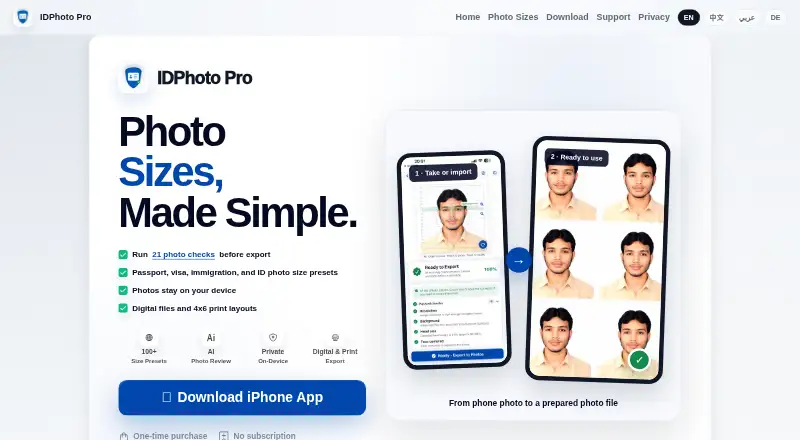
IDPhoto Pro prepares passport, visa, immigration, and ID photo files from pictures you take or import. Its photo-size page lists 113 presets spanning those document types and print sizes. Before export, the app checks requirements such as head size, face position, eye-line height, top margin, background, sharpness, and file-size guidance. Editing options include background replacement and light repair. You can export at 300 DPI in JPG, PNG, HEIF, or PDF, and compress files to a target size in KB for upload portals. Print layouts include 4x6 inch, A4, and Letter, with crop marks and auto fill also listed. Photo processing and checks happen on the device; photos are not uploaded to a server for processing. The app is available for iPhone through the App Store, with a free plan and a one-time unlock for 4.99 USD in the U.S. App Store. It creates photo files only, not official documents, and the receiving authority makes the final acceptance decision.
Who it suits
IDPhoto Pro suits iPhone users preparing photo files for passport, visa, immigration, or ID applications, especially when they need size checks or print layouts. It may also suit users who want photos processed on their device rather than uploaded for processing.
What it does well
- Lists 113 presets for document and print sizes.
- Checks head size, face position, eye line, background, and sharpness.
- Offers background replacement and light repair.
- Exports 300 DPI files in JPG, PNG, HEIF, or PDF.
- Processes photos and checks on the device.
What to know first
- Currently available for iPhone; Android is not available yet.
- The app creates photo files, not official documents.
- It cannot guarantee acceptance by the receiving authority.
Limits
The app only creates photo files and cannot guarantee acceptance; the receiving authority decides. The one-time unlock costs 4.99 USD in the U.S. App Store, and prices vary by storefront.
Plans
| Plan | Billed and limits | Price |
|---|---|---|
| One-time unlock | One-time unlock in the U.S. App Store; no subscription or recurring charge. · Prices vary by storefront; check your local App Store before purchase. | $4.99, paid once |
As passportidphoto.com lists them, read 9 Oct 2026. The maker's own page has the final word.
Getting started
- Open the IDPhoto Pro page at https://www.passportidphoto.com/en.
- Get the current iPhone release through the App Store.
- Take a photo or import one into the app.
- Choose a photo preset and review the app's checks.
- Edit or export the photo, or select a print layout.
- Use the free plan or purchase the one-time unlock through Apple.
Verdict
Choose IDPhoto Pro if you need an iPhone app to prepare and check passport, visa, immigration, or ID photo files, with device-based processing and print layouts. Look elsewhere if you need Android support, official document generation, or a guarantee that an authority will accept the photo.
Questions
How much does IDPhoto Pro cost?
It has a free plan and a One-time unlock for 4.99 USD in the U.S. App Store. The unlock has no subscription or recurring charge, and prices vary by storefront.
Is IDPhoto Pro available on Android?
No. The current release is available for iPhone through the App Store, and the maker says Android is not available yet.
What photo formats can it export?
It supports 300 DPI JPG, PNG, HEIF, and PDF exports, with target-KB compression for upload portals.
Does IDPhoto Pro create passports or other official documents?
No. It creates photo files only; it does not generate IDs, passports, visas, or other official documents.
Are photos uploaded for processing?
No. Photo processing and checks happen on the device, and photos are not uploaded to a server for processing.
Can IDPhoto Pro guarantee that a photo will be accepted?
No. The app says it cannot guarantee acceptance; the receiving government, embassy, visa center, or application portal makes the final decision.
Facts from IDPhoto Pro's own pages
- Acceptance limitation
- IDPhoto Pro says it cannot guarantee acceptance by a government, embassy, visa center, or application portal; final acceptance is decided by the receiving authority. · passportidphoto.com, 9 Oct 2026
- Cloud and analytics
- Local app data is not synced to an IDPhoto Pro cloud account, and the app does not include ad or third-party analytics SDKs in this version. · passportidphoto.com, 9 Oct 2026
- Data collection
- The privacy policy says this version does not collect photos, face images or templates, government ID or passport numbers, location data, contact lists, advertising identifiers, or third-party analytics events. · passportidphoto.com, 9 Oct 2026
- Export formats
- The app supports 300 DPI JPG, PNG, HEIF, and PDF export, with target-KB compression for upload portals. · passportidphoto.com, 9 Oct 2026
- Image editing
- Supported features include background replacement and light repair. · passportidphoto.com, 9 Oct 2026
- Local processing
- Photo processing and photo checks happen on the device, and photos are not uploaded to a server for processing. · passportidphoto.com, 9 Oct 2026
- Photo checks
- The app checks common requirements including head size, face position, eye line height, top margin, background, sharpness, and file-size guidance. · passportidphoto.com, 9 Oct 2026
- Photo presets
- The photo sizes page lists 113 app presets covering passport, visa, immigration/ID, and print sizes. · passportidphoto.com, 9 Oct 2026
- Platform availability
- The current release is available for iPhone through the App Store, and the maker says Android is not available yet. · passportidphoto.com, 9 Oct 2026
- Print layouts
- Print layouts include 4x6 inch, A4, and Letter formats; the home page also lists crop marks and auto fill. · passportidphoto.com, 9 Oct 2026
- Product limitation
- The app creates photo files only and does not generate IDs, passports, visas, or other official documents. · passportidphoto.com, 9 Oct 2026
- Purchase handling
- Purchases are processed by Apple, and IDPhoto Pro says it receives purchase entitlement information from StoreKit but not payment card information. · passportidphoto.com, 9 Oct 2026
- Purpose
- IDPhoto Pro prepares passport, visa, immigration, and ID photo files from photos users take or import. · passportidphoto.com, 9 Oct 2026
- Support
- Users can contact support by email at [email protected] and are asked to include the selected photo size, issue, and a screenshot when possible. · passportidphoto.com, 9 Oct 2026
Where IDPhoto Pro stands on Freedom251
- Passport Photo Maker Software#6 of 29