Freedom251 › Passport Photo Maker Software
IDVisaPhoto
What IDVisaPhoto is
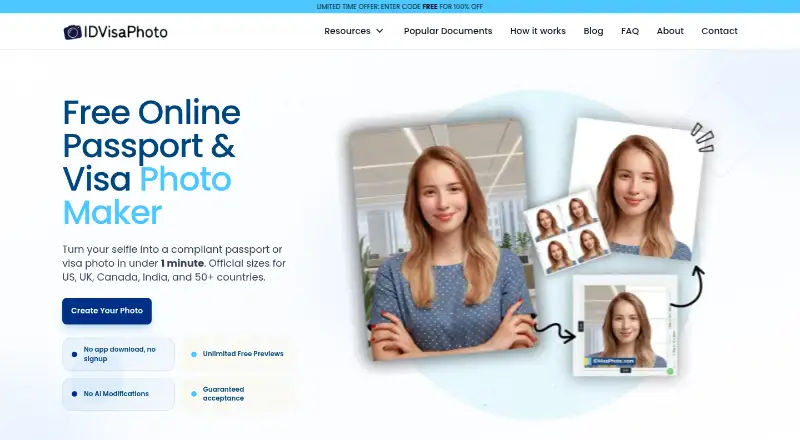
IDVisaPhoto is a browser-based service that turns a selfie or uploaded image into a passport, visa, or ID photo formatted for government requirements. The service covers document photo sizes for more than 100 countries, including passports, visas, ID cards, and immigration documents. It says its AI checks photos against more than 50 official standards in under a minute, and offers unlimited free previews before payment. Its tools can replace backgrounds with compliant solid colors, adjust dimensions, check requirements, and prepare images for digital or print use. The company says its checks do not alter faces or add synthetic edits; optional expert manual verification is available before delivery. It says it follows ICAO 9303 and country-specific requirements, updating its system as government rules change. The browser service requires no app download or signup. Original uploads are not stored, while processed photos for incomplete orders are deleted after one hour and completed-order photos after seven days. A rejection for non-compliance with selected requirements may qualify for a refund or free reprocessing under stated conditions.
Who it suits
It suits individuals and families who want to prepare passport, visa, or ID photos at home using a browser. It may also suit people who want free previews before deciding to pay.
What it does well
- Supports photo sizes for 100+ countries.
- Free previews are unlimited.
- No app download or signup required.
- Original uploaded photos are not stored.
What to know first
- Payment is required after previews to receive a result.
- Rejection refunds require documentation within 60 days.
- Original-image or user-error rejections are excluded from refund eligibility.
Limits
Unlimited previews are free, but payment is required to complete an order. A rejection-based refund or free reprocessing is subject to policy conditions, including official rejection documentation within 60 days and exclusions for original-image or user-error causes.
Getting started
- Open the IDVisaPhoto website in a browser.
- Upload a photo or take a selfie.
- Choose the relevant document requirements.
- Review the free previews and photo preparation.
- Pay when satisfied to complete the order.
Verdict
IDVisaPhoto combines broad document coverage with browser-based photo preparation and free previews. Review the rejection policy conditions if relying on its refund or reprocessing option.
Questions
Does IDVisaPhoto have a free plan?
Yes. It offers unlimited free previews; users pay only when satisfied.
What does IDVisaPhoto cost?
The listed pricing model is paid, but no price amount is provided here.
Which platforms does it support?
It runs in a browser and requires no app download.
Does it require an account?
No signup is required.
What happens if an authority rejects a photo?
A rejection for non-compliance with the selected requirements may qualify for a full refund or free reprocessing. The policy requires official rejection documentation within 60 days and excludes cases caused by the original image or user error.
Who makes IDVisaPhoto?
The business is identified as YouOne Labs, located in Noida, Uttar Pradesh, India.
Facts from IDVisaPhoto's own pages
- Acceptance guarantee
- The refund policy says a photo rejected for non-compliance with the selected document requirements can qualify for a full refund or free reprocessing, subject to its conditions. · idvisaphoto.com, 7 Oct 2026
- Access
- The service runs in a browser and the home page says it requires no app download or signup. · idvisaphoto.com, 5 Oct 2026
- Account and install
- The service runs in a browser and requires no app download or signup, according to its homepage. · idvisaphoto.com, 7 Oct 2026
- Coverage
- The homepage lists photo sizes for 100+ countries and says photos are checked against 50+ official standards. · idvisaphoto.com, 7 Oct 2026
- Customers
- The company describes the service as intended to help individuals and families create compliant passport, ID, and visa photos at home. · idvisaphoto.com, 5 Oct 2026
- Face edits
- The site says its AI handles measurements and compliance checks without altering faces or making synthetic edits. · idvisaphoto.com, 7 Oct 2026
- Guarantee
- The refund policy says that if an authority rejects a processed photo for non-compliance with the selected document requirements, the customer can receive a full refund or free reprocessing, subject to the policy conditions. · idvisaphoto.com, 5 Oct 2026
- Image retention
- The privacy policy says original uploads are never stored, uncompleted-order processed photos are deleted after one hour, and completed-order processed photos after seven days. · idvisaphoto.com, 5 Oct 2026
- Maker
- The About page identifies the business as YouOne Labs and gives its location as Noida, Uttar Pradesh, India. · idvisaphoto.com, 7 Oct 2026
- Manual review
- The About page says expert manual verification is optional. · idvisaphoto.com, 7 Oct 2026
- Payment security
- The privacy policy says it does not store full payment card details and uses third-party payment processors that comply with PCI DSS standards. · idvisaphoto.com, 7 Oct 2026
- Photo adjustments
- The About page says its technology can replace backgrounds, adjust dimensions, verify compliance, and optimize images for digital and print formats. · idvisaphoto.com, 7 Oct 2026
- Photo preparation
- The company says its technology can replace backgrounds with compliant solid colors, adjust dimensions, verify requirements, and optimize images for digital and print use. · idvisaphoto.com, 5 Oct 2026
- Previews
- The site offers unlimited free previews and says users pay only when satisfied. · idvisaphoto.com, 7 Oct 2026
- Privacy
- The privacy policy says original uploaded photographs are never stored, uncompleted-order processed photos are deleted after 1 hour, and completed-order photos after 7 days. · idvisaphoto.com, 7 Oct 2026
- Processing
- The site says AI processes portraits into compliant ID photos in under a minute. · idvisaphoto.com, 7 Oct 2026
- Product
- IDVisaPhoto turns a selfie or uploaded photo into a passport, visa, or ID photo formatted for government requirements. · idvisaphoto.com, 5 Oct 2026
- Purpose
- IDVisaPhoto turns selfies into passport, visa, and ID photos formatted for government requirements. · idvisaphoto.com, 7 Oct 2026
- Refund limit
- For rejection-related refund eligibility, the policy requires official rejection documentation within 60 days and excludes rejection caused by user error in photo submission. · idvisaphoto.com, 7 Oct 2026
- Standards
- The About page lists ICAO 9303 and country-specific requirements among the standards it follows. · idvisaphoto.com, 7 Oct 2026
- Support
- The homepage lists support hours as Monday to Friday, 9:00 AM to 5:00 PM EST. · idvisaphoto.com, 7 Oct 2026
Where IDVisaPhoto stands on Freedom251
- Passport Photo Maker Software#15 of 29