Freedom251 › Passport Photo Maker Software

Photo Pass
What Photo Pass is
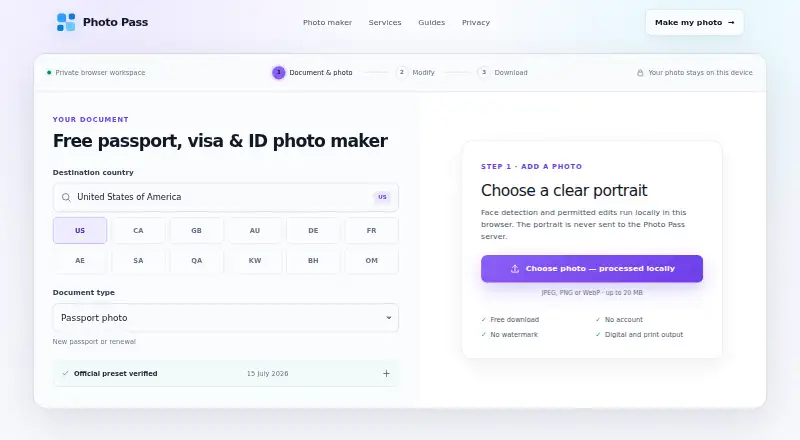
Photo Pass is a browser-based tool for preparing passport, visa, immigration, and identity photos. Select a portrait and use face detection, framing, permitted background tools, and quality adjustments; editing and export run on the user’s device. It accepts JPEG, PNG, or WebP portraits up to 20 MB and creates digital photos at exact dimensions or printable sheets in A4, A5, and 6 × 4 formats. The maker lists 70 verified services with requirements linked to their sources and review dates, preferring official government and issuing-authority material. A browser document scanner can combine front and back images of an ID card or driving licence into a PDF or JPEG locally. The Free plan provides downloads without an account or watermark. Photo Pass says a selected portrait is not sent to its application server or included in analytics or support requests, although the application may record page paths, browser user agent, approximate country, selected service, export actions, and technical event metadata. It is independent of governments and issuing authorities; acceptance of a photo is decided by the relevant authority, with no guarantee from Photo Pass.
Who it suits
Photo Pass suits individuals or organizations preparing document photos through a browser, including users who need a printable sheet or exact-size digital image. It supports lawful document-photo preparation but does not provide immigration advice or application checks.
What it does well
- Offers presets for 70 verified services with source links and review dates.
- Edits and exports portraits on the user’s device.
- Accepts JPEG, PNG, and WebP images up to 20 MB.
- Creates exact-size digital photos and printable sheets.
- Combines both sides of an ID into a local PDF or JPEG.
- Free downloads require no account and have no watermark.
What to know first
- Photo Pass does not guarantee that an authority will accept a photo.
- The web tool may record usage and technical event metadata.
- It does not provide immigration advice or application checks.
Limits
The Free plan provides downloads without an account or watermark. Photo Pass does not guarantee acceptance; the issuing authority makes the final decision.
Plans
| Plan | Billed and limits | Price |
|---|---|---|
| Free | Free downloads · no account · no watermark | Free |
As photo-pass.com lists them, read 8 Oct 2026. The maker's own page has the final word.
Getting started
- Visit the Photo Pass website in a browser.
- Select a JPEG, PNG, or WebP portrait up to 20 MB.
- Choose a service preset from the listed requirements.
- Adjust framing, permitted background tools, or quality, then export a digital photo or printable sheet.
Verdict
Choose Photo Pass if you need browser-based document-photo preparation, locally processed edits, and free downloads without an account or watermark. Look elsewhere if you need immigration guidance, application checks, or a guarantee of acceptance by an issuing authority.
Questions
How much does Photo Pass cost?
The Free plan is listed as free and includes downloads, no account, and no watermark.
Which platforms does Photo Pass support?
Photo Pass is listed as a web application.
What image formats can I upload?
It accepts JPEG, PNG, or WebP portraits up to 20 MB.
Does Photo Pass send my portrait to its server?
Photo Pass says the selected portrait is not sent to its application server or included in analytics or support requests. The application may record usage and technical event metadata.
Will an authority accept a photo prepared with Photo Pass?
Photo Pass does not guarantee acceptance. The issuing authority makes the final decision.
Is Photo Pass affiliated with a government?
No. Photo Pass states that it is independent and not affiliated with or endorsed by a government or issuing authority.
Facts from Photo Pass's own pages
- Acceptance limitation
- The issuing authority makes the final decision, and Photo Pass does not guarantee that a prepared photo will be accepted. · photo-pass.com, 8 Oct 2026
- Audience
- The tool supports lawful personal or organizational document-photo preparation, but does not provide immigration advice or application checks. · photo-pass.com, 8 Oct 2026
- Data handling
- The selected portrait is not sent to the application server or included in analytics or support requests. · photo-pass.com, 8 Oct 2026
- Document scanner
- The browser scanner combines front and back ID card or driving licence images into a PDF or JPEG locally. · photo-pass.com, 8 Oct 2026
- Exports
- The tool creates exact-size digital photos and printable sheets in A4, A5, and 6 × 4 formats. · photo-pass.com, 8 Oct 2026
- Government affiliation
- Photo Pass states that it is independent and is not affiliated with or endorsed by any government or issuing authority. · photo-pass.com, 8 Oct 2026
- Photo editing
- Face detection, framing, permitted background tools, quality adjustments, and export run on the user’s device. · photo-pass.com, 8 Oct 2026
- Photo formats
- The maker accepts JPEG, PNG, or WebP portraits up to 20 MB. · photo-pass.com, 8 Oct 2026
- Purpose
- Photo Pass prepares passport, visa, immigration, and identity photos using a browser-based crop and export tool. · photo-pass.com, 8 Oct 2026
- Requirement sourcing
- Each published preset records its source and review date, with preference given to official government and issuing-authority sources. · photo-pass.com, 8 Oct 2026
- Reviewed presets
- The maker lists 70 verified services with source-linked requirements and review dates. · photo-pass.com, 8 Oct 2026
- Support
- Users can contact the support queue with product questions, privacy requests, accessibility reports, or official-requirement corrections. · photo-pass.com, 8 Oct 2026
- Usage analytics
- The application may record page paths, browser user agent, approximate country, selected service, export actions, and technical event metadata. · photo-pass.com, 8 Oct 2026
Where Photo Pass stands on Freedom251
- Passport Photo Maker Software#17 of 29