Freedom251 › Game Streaming Software

DualStream Relay
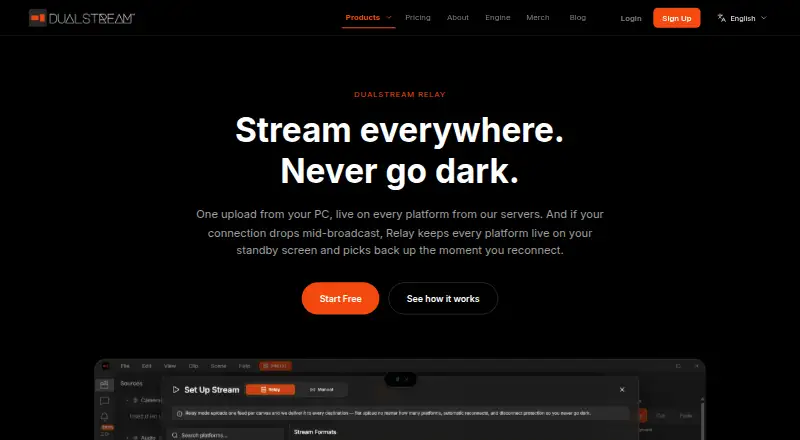
What DualStream Relay is
DualStream Relay sends a stream from a PC to DualStream servers, which distribute it to multiple destinations. It supports Twitch, YouTube, Kick, and custom RTMP; Twitch, YouTube, and Kick can be connected without manually copying stream keys. If the connection drops, Relay can keep platforms live on a custom standby screen and resume the stream after reconnection. Users can upload the screen shown during interruptions. Supported output varies by destination: up to 2160p60 on YouTube, 2K on Twitch with Enhanced Broadcasting, and 1080p60 on Kick, Facebook, TikTok, and custom RTMP. The service is available for Windows, macOS, and iOS. A Premium subscription also covers the OBS plugin and MCP server. The free Test Drive plan includes instant replay clips with a watermark; Premium includes watermark-free clips, multistreaming, and Disconnect Protection. Premium costs $9.99 a month, with the first 30 days free, or $99 a year.
Who it suits
Relay suits streamers who want to send a PC stream to several platforms and have a standby screen for connection interruptions. It supports Windows, macOS, and iOS.
What it does well
- Supports Twitch, YouTube, Kick, and custom RTMP.
- Connects three major platforms without copying stream keys.
- Can resume streaming after reconnection.
- Premium covers desktop and mobile apps, OBS plugin, and MCP server.
What to know first
- Free instant replay clips have a watermark.
- Premium costs $9.99 a month or $99 a year.
- Output resolution varies by destination.
Limits
Test Drive includes instant replay clips with a watermark. Premium Monthly costs $9.99 a month after the first 30 days free; Premium Annual costs $99 a year.
Plans
| Plan | Billed and limits | Price |
|---|---|---|
| Test Drive | Free forever · No payment required · Desktop and Mobile direct streaming · Instant replay clips with watermark | Free |
| Premium Annual | $99 a year · Relay multistreaming · Disconnect Protection · Watermark-free clips | $99 a year |
| Premium Monthly | First 30 days FREE. Cancel anytime. · Relay multistreaming · Disconnect Protection · Watermark-free clips | $9.99 a month |
As dualstream.gg lists them, read 3 Oct 2026. The maker's own page has the final word.
Getting started
- Visit https://www.dualstream.gg/relay.
- Choose the free Test Drive plan or start Premium Monthly or Premium Annual.
- Install the app for Windows, macOS or iOS.
- Connect Twitch, YouTube or Kick with one click, or set up a custom RTMP destination.
- Upload a custom standby screen if you want viewers to see it during a connection interruption.
DualStream Relay is a multistreaming service for creators who send a PC broadcast to several platforms and want viewers to see a standby screen during a connection drop. Its strongest case is combining distribution with that fallback; the free plan is more limited, with direct streaming and watermarked replay clips.
Overview
Relay sends one stream from a PC to DualStream’s servers, which distribute it to Twitch, YouTube, Kick, or custom RTMP destinations. One-click setup for Twitch, YouTube, and Kick avoids copying stream keys, making Relay a sensible choice for creators who want those destinations without managing separate connections. Custom RTMP extends the destination options.
Disconnect Protection keeps platforms live on a custom standby screen if the connection drops, then resumes the stream after reconnection. That can preserve a broadcast through a brief interruption, but it does not prevent the interruption itself; creators who need uninterrupted delivery regardless of their connection should not treat it as a fix for unreliable connectivity.
Key features
Destination-specific quality
Relay supports up to 2160p60 on YouTube, 2K on Twitch with Enhanced Broadcasting, and 1080p60 on Kick, Facebook, TikTok, and custom RTMP. The higher ceilings suit creators prioritizing resolution on YouTube or eligible Twitch streams. The lower ceiling on other listed destinations means Relay is not a way to deliver the same maximum resolution everywhere.
Apps, clips, and security
One Premium subscription covers the Windows and macOS apps, iPhone app, OBS plugin, and MCP server. The Test Drive plan includes replay clips with a watermark; Premium removes it. The privacy policy says OAuth tokens and stream keys are encrypted at rest using AES-256-GCM, and data is encrypted in transit using TLS 1.2 or later. Chat messages are relayed in real time to the account holder’s authenticated DualStream sessions and are not persistently stored.
Pricing
Test Drive: free, free forever with no payment required. It includes desktop and mobile direct streaming and instant replay clips with a watermark. It is the no-cost choice for trying direct streaming, but it does not include the Premium multistreaming or Disconnect Protection features.
Premium Monthly: $9.99 a month, with the first 30 days free and cancellation anytime. It includes Relay multistreaming, Disconnect Protection, and watermark-free clips. Choose it to try the full feature set without committing annually.
Premium Annual: $99 a year for the same listed Premium features. It costs less than paying the monthly rate for 12 months, but requires an annual payment rather than monthly billing.
The company offers discounts for teams and organizations. Contact [email protected] for support or team pricing.
Platforms
Relay supports Windows, macOS, and iOS. Premium also covers the OBS plugin and MCP server. The listed output maximum is 1080p, while higher destination-specific ceilings apply to YouTube and Twitch with Enhanced Broadcasting.
Who it's for
Relay is best for streamers who want one PC stream distributed to several platforms, especially those who value a custom standby screen during connection interruptions. It is less suited to creators who only need free direct streaming, or who expect every destination to support the same high-resolution output.
Pros and cons
Pros
- Disconnect Protection keeps destinations live with a custom standby screen during a connection drop, then resumes the stream on reconnection.
- One-click Twitch, YouTube, and Kick setup avoids manual stream-key copying.
- One Premium subscription covers the Windows and macOS apps, iPhone app, OBS plugin, and MCP server.
- The annual Premium plan costs less than 12 months at the monthly rate.
Cons
- The free plan lacks Premium’s multistreaming and Disconnect Protection, and its replay clips carry a watermark.
- Output limits differ by destination; Kick, Facebook, TikTok, and custom RTMP top out at 1080p60.
- Disconnect Protection covers the viewer-facing interruption with a standby screen; it does not stop a dropped connection.
Alternatives
Restream is worth considering if broader platform support matters: it runs on Android, iOS, Linux, macOS, web, and Windows, while its free plan supports two channels at once and adds branding.
Streamster offers a free plan with two streaming channels and a recommended maximum resolution of 720p. It may suit creators who can work within that cap and do not need a free trial.
PRISM Live Studio has Android, iOS, macOS, and Windows apps; its PRISM Plus plan supports up to six channels for $9.99 a month. Consider it if six-channel support is the priority.
OBS Studio is a free option for Windows, macOS, and Linux with no watermarks or usage limitations. Choose it if those terms matter more than Relay’s paid multistreaming and connection-drop protection.
OneStream Live has a free plan with two multistreaming destinations, 720p, one team seat, 1 GB of storage, and three scheduled events. It suits creators who need those scheduling and storage allowances within a free tier.
ApexStream is an alternative for creators seeking a web-based streaming tool.
LiveReacting offers a free plan limited to three streams per month, 30 minutes per stream, 720p at 30 FPS, one destination, and a watermark. Consider it if that monthly allowance fits your use.
Meld Studio is a Windows and macOS alternative whose free plan includes multistreaming, 4K recording with multitrack audio, and one-click clipping.
Browse more options in Game Streaming Software.
Verdict
Choose DualStream Relay if you want to distribute one PC stream to multiple destinations and keep a custom standby screen in place during connection drops. Premium brings those features together across its supported apps, while the free plan is for direct streaming and watermarked clips. Look elsewhere if you need free multistreaming or a consistent high-resolution ceiling across destinations.
Verdict
Relay combines multistreaming with a standby-screen option for connection drops. The free plan has watermarked replay clips; Premium adds watermark-free clips and the listed streaming features.
Questions
Is there a free plan?
Yes. Test Drive is free forever and requires no payment. It includes desktop and mobile direct streaming and instant replay clips with a watermark.
How much does Premium cost?
Premium Monthly costs $9.99 a month, with the first 30 days free and cancellation at any time. Premium Annual costs $99 a year.
Which streaming destinations does Relay support?
Relay supports Twitch, YouTube, Kick and custom RTMP destinations. The listed output support also includes Facebook and TikTok.
Which platforms can I use Relay on?
Relay is available on Windows, macOS and iOS. The same Premium subscription also covers the OBS plugin and MCP server.
What happens if my connection drops?
With Disconnect Protection, platforms stay live on a custom standby screen and the stream resumes when you reconnect.
How are chat messages handled?
The privacy policy says chat messages are relayed to the account holder’s authenticated DualStream sessions in real time and are not persistently stored.
Facts from DualStream Relay's own pages
- App access
- The same Premium subscription covers the Windows and macOS apps, iPhone app, OBS plugin, and MCP server. · dualstream.gg, 3 Oct 2026
- Audience
- DualStream says it is built for streamers and aims to make professional streaming tools accessible to everyone. · dualstream.gg, 3 Oct 2026
- Destinations
- Relay supports Twitch, YouTube, Kick, and custom RTMP destinations. · dualstream.gg, 3 Oct 2026
- Disconnect Protection
- If your connection drops, platforms stay live on a custom standby screen and resume the stream when you reconnect. · dualstream.gg, 3 Oct 2026
- Free plan limit
- Test Drive includes instant replay clips with a watermark; Premium includes watermark-free clips. · dualstream.gg, 3 Oct 2026
- Platform setup
- Twitch, YouTube, and Kick can be connected with one click without copying stream keys. · dualstream.gg, 3 Oct 2026
- Privacy
- The privacy policy says chat messages are relayed to the account holder’s authenticated DualStream sessions in real time and are not persistently stored. · dualstream.gg, 3 Oct 2026
- Security
- The privacy policy says OAuth tokens and stream keys are encrypted at rest using AES-256-GCM, and data is encrypted in transit using TLS 1.2 or later. · dualstream.gg, 3 Oct 2026
- Standby screen
- Users can upload a custom Standby screen for viewers to see during a connection interruption. · dualstream.gg, 3 Oct 2026
- Stream quality
- Relay supports up to 2160p60 on YouTube, 2K on Twitch with Enhanced Broadcasting, and 1080p60 on Kick, Facebook, TikTok, and custom RTMP. · dualstream.gg, 3 Oct 2026
- Support
- The company lists [email protected] as its contact email and says it offers discounts for teams and organizations. · dualstream.gg, 3 Oct 2026
- What it does
- Relay sends one stream from your PC to DualStream servers, which broadcast it to multiple platforms. · dualstream.gg, 3 Oct 2026
Where DualStream Relay stands on Freedom251
- Game Streaming Software#1 of 45
- Live Streaming Encoders#2 of 69
- Multistreaming Software#2 of 43