Freedom251 › Game Streaming Software

Demo Scope
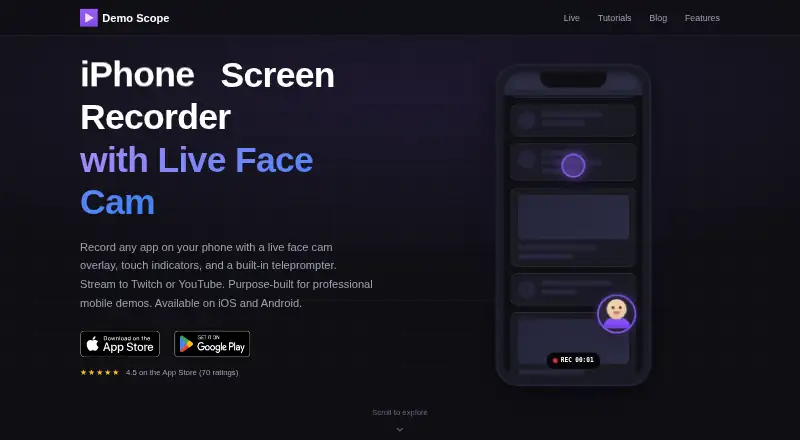
What Demo Scope is
Demo Scope is a mobile screen recorder for making demonstrations with a picture-in-picture face cam and touch indicators. It runs on iOS and Android, and can use websites, videos, and photos as content sources. You can move and resize the face cam, choose a circle, square, or rectangle shape, and select the front or back camera. Touch indicators show taps and swipes; their size is adjustable, with six colors to choose from.
The app can stream to Twitch, YouTube Live, Facebook Live, or a custom RTMP server. On iOS, recordings save to Camera Roll as MP4 files at the device’s native resolution. The free iOS version allows recordings and streams up to 10 minutes each with a small watermark. Its one-time Pro purchase removes the time cap and watermark and unlocks Other App mode. Free Android use has a five-minute recording and streaming cap and a small watermark; Android devices must run version 10 or later.
The privacy policy says recordings remain on the device and that streams go directly to the configured platform. The app collects anonymous usage analytics through Firebase Analytics. The maker presents it for startup founders, product teams, streamers, content creators, educators, and QA testers.
Who it suits
Demo Scope suits people who need to record or stream mobile demos with a face cam and visible taps or swipes, including educators, product teams, and content creators. It also fits streamers and QA testers who want to send output to supported streaming services or a custom RTMP server.
What it does well
- Face cam can be repositioned, resized, reshaped, and switched between cameras.
- Touch indicators show taps and swipes with six color options.
- Uses websites, videos, and photos as content sources.
- Streams to Twitch, YouTube Live, Facebook Live, and custom RTMP servers.
- iOS recordings save as MP4 at the device’s native resolution.
- Privacy policy says recordings stay on-device and streams go directly to platforms.
What to know first
- Free iOS recordings and streams are capped at 10 minutes and carry a watermark.
- Free Android recordings and streams are capped at five minutes and carry a watermark.
- Android requires version 10 (API level 29) or higher.
Limits
The free iOS version limits recordings and streams to 10 minutes each, adds a small watermark, and reserves Other App mode for Pro. Free Android use has a five-minute recording and streaming cap with a small watermark.
Plans
| Plan | Billed and limits | Price |
|---|---|---|
| Free (iOS) | recordings and streams up to 10 minutes each · small watermark · Other App mode requires Pro | Free |
| Free (Android) | recordings and streams up to 5 minutes · small watermark | Free |
| Pro (iOS) | one-time purchase · removes watermark and time limit · unlocks Other App mode | $19.99, paid once |
As demoscope.app lists them, read 11 Oct 2026. The maker's own page has the final word.
Getting started
- Visit the Demo Scope website.
- Install it on iOS or on an Android device running Android 10 (API level 29) or higher.
- Start with the free version, which has a watermark and time limit.
- On iOS, choose the one-time Pro purchase for 19.99 USD to remove the watermark and time limit and unlock Other App mode.
- Choose a website, video, or photo as a content source, then configure the face cam and touch indicators.
- Select Twitch, YouTube Live, Facebook Live, or a custom RTMP server if you want to stream.
Verdict
Choose Demo Scope if you want a mobile recorder with adjustable face-cam framing, touch indicators, and streaming destinations. Consider Pro on iOS if you need recordings longer than 10 minutes, no watermark, or Other App mode; the free Android version has a five-minute cap.
Questions
What does Demo Scope cost?
The listed free plans cost nothing. Pro for iOS is a one-time purchase listed at $19.99, paid once.
Is there a free plan or trial?
There are free plans for iOS and Android. The product facts say there is no free trial.
Which platforms are supported?
Demo Scope supports iOS and Android. Android requires version 10 (API level 29) or higher.
What are the free recording limits?
Free iOS recordings and streams can run up to 10 minutes each, with a small watermark. On Android, the cap is five minutes, also with a small watermark.
Where can it stream?
It supports Twitch, YouTube Live, Facebook Live, and custom RTMP servers.
How does it handle recordings and streams?
Its privacy policy says recordings stay on the device, while streams go directly from the device to the configured platform. It also collects anonymous usage analytics through Firebase Analytics.
Facts from Demo Scope's own pages
- Android recording limit
- The Android free version includes a five-minute recording and streaming cap and a small watermark. · demoscope.app, 11 Oct 2026
- Android requirements
- The Android app supports devices running Android 10 (API level 29) or higher. · demoscope.app, 11 Oct 2026
- Content sources
- The app can use websites, videos, and photos as content sources. · demoscope.app, 11 Oct 2026
- Face cam
- The face cam can be repositioned, resized, switched between circle, square, and rectangle shapes, and use the front or back camera. · demoscope.app, 11 Oct 2026
- Intended users
- The maker presents the app for startup founders, product teams, streamers, content creators, educators, and QA testers. · demoscope.app, 11 Oct 2026
- iOS recording limit
- The iOS free version allows recordings and streams up to 10 minutes each with a small watermark; Pro removes the time limit and watermark. · demoscope.app, 11 Oct 2026
- Privacy
- The privacy policy says recordings stay on the device and the app collects anonymous usage analytics through Firebase Analytics. · demoscope.app, 11 Oct 2026
- Product
- Demo Scope is a mobile screen recorder for creating demos with a picture-in-picture face cam and touch indicators. · demoscope.app, 11 Oct 2026
- Recording output
- iOS recordings save to the Camera Roll in MP4 format at the device’s native resolution. · demoscope.app, 11 Oct 2026
- Streaming data
- The privacy policy says streams are sent directly from the device to the configured platform and do not pass through Demo Scope’s servers. · demoscope.app, 11 Oct 2026
- Streaming integrations
- Demo Scope supports streaming to Twitch, YouTube Live, Facebook Live, and custom RTMP servers. · demoscope.app, 11 Oct 2026
- Support
- The support page offers email support at [email protected] and says replies are sent as soon as possible. · demoscope.app, 11 Oct 2026
- Touch indicators
- Touch indicators show taps and swipe gestures, with six color choices and adjustable size. · demoscope.app, 11 Oct 2026
Where Demo Scope stands on Freedom251
- Game Streaming Software#5 of 45