Freedom251 › Live Streaming Encoders

evmux
by evmux
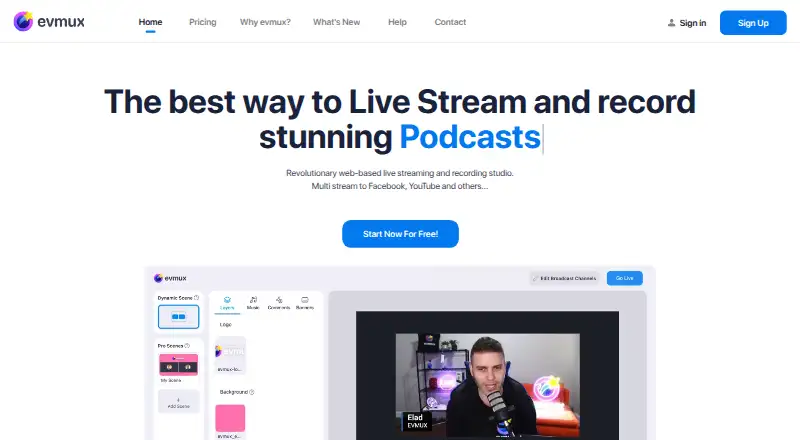
What evmux is
evmux is a web-based studio for live streaming and recording podcasts and other live content. Its drag-and-drop scene builder lets users prepare customized scenes for broadcasts. Studio tools include backstage guest communication, push-to-talk, animated lower thirds, and multi-camera support. Users can record and download branded content, with separate audio and video tracks for each participant. Native integrations listed include YouTube, Facebook, LinkedIn, X, TikTok, Instagram, Twitch, and Kick; custom RTMP is available on paid plans. The App Market includes widgets such as polls, giveaways, trivia, chat, tickers, and TradingView charts. Desktop use requires Chrome or Edge, while iPhone and iPad can open the mobile form in Safari. Desktop Safari and Firefox are blocked, and virtual backgrounds are unavailable on phones and tablets. The free plan costs nothing and includes 1080p, up to 12 participants, two destinations, a seven-minute cloud recording, 3GB storage, two hours per stream, 30 hours monthly, and a watermark. Paid monthly plans include Basic at $25 a month, Pro at $49 a month, and Professional at $299 a month.
Who it suits
It suits creators, businesses, and event organizers producing podcasts, talk shows, or sports events. Desktop users need Chrome or Edge; iPhone and iPad users can use the mobile form in Safari.
What it does well
- Supports separate participant audio and video tracks.
- Native integrations include eight listed streaming destinations.
- Includes backstage communication and push-to-talk.
- Free plan supports up to 12 participants.
What to know first
- Desktop Safari and Firefox are blocked.
- Free cloud recordings are limited to seven minutes.
- Free plan includes a watermark.
- Virtual backgrounds are unavailable on phones and tablets.
Limits
The Free plan allows up to 12 participants and two destinations, with a seven-minute cloud recording, 3GB storage and a watermark. It allows streams of up to two hours each and 30 hours monthly. The listed Free plan also supports up to 1080p.
Plans
| Plan | Billed and limits | Price |
|---|---|---|
| Free | 1080p · up to 12 participants · 2 destinations · 7-minute cloud recording · 3GB storage · 2 hours per stream, 30 hours monthly · watermark | Free |
| Basic | billed monthly · Custom scenes and overlays · Multistreaming · Recording | $25 a month |
| Pro | billed monthly · ISO local recordings · Multiple cameras · Multistreaming | $49 a month |
| Professional | billed monthly · Business plan · evmux Player · Extended recording and streaming | $299 a month |
| Basic (Individual) | $25 /Mo billed monthly; $19 /Mo billed annually · 2 collaborator seats · 4 destinations · unlimited streams, up to 6 hours per session · 20GB storage | $25 a month |
| Professional (Business) | $299 /Mo billed monthly; $239 /Mo billed annually · 7 collaborator seats · 6 studios live at once · up to 10 hours per session · 150GB storage · player for 10,000 concurrent viewers | $299 a month |
| Pro (Individual) | $49 /Mo billed monthly; $39 /Mo billed annually · 4 collaborator seats · 9 destinations · 2 studios live at once · up to 6 hours per session · 50GB storage | $49 a month |
| Basic (Business) | $99 /Mo billed monthly; $79 /Mo billed annually · 5 collaborator seats · 4 studios live at once · up to 8 hours per session · 100GB storage · player for 1,000 concurrent viewers | $99 a month |
The first 8 of 9 plans, as evmux.com lists them, read 10 Oct 2026. The maker's own page has the final word. Every plan
Getting started
- Open https://www.evmux.com/.
- Use Chrome or Edge on desktop, or Safari on iPhone or iPad.
- Choose the Free plan or a paid plan that fits your streaming and recording needs.
- Build scenes with the drag-and-drop scene builder.
- Select a native streaming destination; custom RTMP is available on paid plans.
- Add App Market widgets or studio tools as needed.
Overview
evmux is a browser-based studio for producing live streams and recordings, with scene building, guest tools and multistreaming. It is best suited to creators, businesses and event organizers who want production features in one studio and can work in Chrome or Edge on desktop. Its strengths are the range of studio tools and destinations; its free plan is notably constrained by short recordings, limited storage and a watermark.
Key features
A drag-and-drop scene builder lets producers prepare customized layouts and switch among them during a broadcast. Animated lower thirds, backstage guest communication and push-to-talk add useful controls for interviews and talk shows. Multi-camera support and separate audio and video recordings for each participant offer more flexibility when editing or repurposing a session.
evmux supports native destinations including YouTube, Facebook, LinkedIn, X, TikTok, Instagram, Twitch and Kick; custom RTMP is available on paid plans. That broad spread suits creators who publish across social and streaming platforms, though the free plan allows only two destinations. Its App Market adds widgets such as polls, giveaways, trivia, chat, tickers and TradingView charts, which can make a broadcast more interactive.
The maximum stream quality is 1080p, and vertical video is supported. Custom branding is available. On phones and tablets, virtual backgrounds are unavailable, so mobile users get a narrower production toolkit.
Pricing
The free plan costs nothing. It includes 1080p, up to 12 participants, two destinations, 3GB of storage and a two-hour stream limit, capped at 30 hours monthly. Cloud recordings last just seven minutes, and the output carries a watermark. It is suitable for trying the studio or brief broadcasts, but not for clean, long-form recordings.
Basic is $25 a month, billed monthly, with custom scenes and overlays, multistreaming and recording. The individual Basic plan at the same monthly price specifies two collaborator seats, four destinations, unlimited streams of up to six hours per session and 20GB of storage. The individual Pro plan is $49 a month billed monthly or $39 a month billed annually; it raises the allowance to four seats and nine destinations, permits two studios live at once and provides 50GB of storage, alongside ISO local recordings and multiple cameras. The annual rate is cheaper, but entails annual billing.
Business plans add concurrent studios and a viewer-facing player. Basic Business costs $99 a month billed monthly or $79 a month billed annually, with five seats, four live studios, sessions up to eight hours, 100GB storage and a player for 1,000 concurrent viewers. Professional Business costs $299 a month billed monthly or $239 a month billed annually; it provides seven seats, six live studios, sessions up to ten hours, 150GB storage and a player for 10,000 concurrent viewers. These tiers are aimed at teams running multiple streams or serving larger audiences, rather than solo users.
A separate Professional plan is $299 a month, billed monthly, and includes a business plan, evmux Player, and extended recording and streaming. Enterprise has custom pricing and includes a dedicated support manager, unlimited storage and concurrent broadcasts. There is no free trial.
Platforms
The studio runs on desktop Chrome or Edge; desktop Safari and Firefox are blocked. iPhone and iPad can open its mobile form in Safari, but virtual backgrounds do not work on phones or tablets. This browser restriction makes evmux a poor fit for teams that need to produce from desktop Safari or Firefox.
Who it's for
Creators making podcasts or talk shows can benefit from guest communication, participant recordings and reusable scenes. Businesses and event organizers may value multistreaming, widgets, concurrent studio capacity and the player options on business plans. Sports-event producers are also among the audiences evmux identifies. Those who need a short, simple stream can start free; regular production teams should compare paid-tier seat, storage and session limits against their workload.
Pros and cons
- Pros: Native destinations span major social and streaming services, while paid plans add custom RTMP.
- Pros: Scene tools, guest controls, multi-camera support and participant-level recordings cover several stages of live production and post-production.
- Pros: Individual and business tiers specify seats, storage, session lengths and concurrent studios, helping teams match a plan to production needs.
- Cons: The free plan's seven-minute cloud recordings, 3GB storage, two destinations and watermark make it unsuitable for polished or sustained output.
- Cons: Desktop Safari and Firefox are blocked, limiting browser choice.
- Cons: Customer data may be used to improve services and develop AI models; users can opt out by contacting [email protected]. Personal information is hosted on AWS and may be transferred to or stored outside a user's jurisdiction.
Alternatives
Choose Restream if broader platform coverage matters: it supports Android, iOS, Linux, macOS, web and Windows, and its free plan allows two channels at once with six hours recorded per stream, though it carries Restream branding.
Streamster is another freemium option; its free plan allows two streaming channels, with a 4,000 kbps maximum bitrate and 720p recommended maximum resolution. Consider it if those limits fit your stream better than evmux's 1080p, participant and recording setup.
PRISM Live Studio offers mobile and desktop apps for Android, iOS, macOS and Windows, plus a free plan and a free trial. It may suit users who prefer installed software or need those platforms.
DualStream Relay has a free Test Drive with desktop and mobile direct streaming and instant replay clips with a watermark; consider it if those capabilities are the priority.
mimoLive offers a free plan with its full feature set, a watermark, an iPhone and iPad remote surface app and community support. It may suit users who want that remote-control app or prefer its platform mix.
Choose OBS Studio if you want free software without watermarks or usage limits and can work on Linux, macOS or Windows.
OneStream Live has a free plan with two destinations, 720p, one team seat, 1GB of storage and three scheduled events; consider it if scheduled events are more useful than evmux's production tools.
SplitCam Multistream is a free alternative for users seeking multistreaming, scene composition, a virtual camera or AI background features.
For broader category browsing, see Live Streaming Software, Game Streaming Software and Live TV streaming services.
Verdict
evmux is a strong fit for creators and teams who want a browser-based studio with multistreaming, guest controls, scenes and participant-level recordings in one workflow. Its paid plans make room for longer sessions and larger teams, while the free tier is best treated as a limited starting point. Look elsewhere if you require desktop Safari or Firefox, need a generous free recording allowance, or want to produce with virtual backgrounds on a phone or tablet.
Verdict
evmux combines live production tools, recording, and multiple listed destinations in a browser-based studio. The free plan has limits on recording time, storage, destinations, and includes a watermark; desktop browser support is limited to Chrome or Edge.
Questions
Is evmux free?
Yes. The Free plan is listed as free.
What does the Free plan include?
It includes up to 1080p, 12 participants, two destinations, a seven-minute cloud recording, 3GB storage, a watermark, two hours per stream and 30 hours monthly.
Which platforms and browsers does evmux support?
The listed platforms are iOS and web. The studio runs on desktop Chrome or Edge, and iPhone and iPad can open its mobile form in Safari.
Which streaming destinations are integrated?
Native integrations are listed for YouTube, Facebook, LinkedIn, X, TikTok, Instagram, Twitch and Kick. Custom RTMP is available on paid plans.
How much do paid plans cost?
Listed monthly prices are 25.00 USD for Basic, 49.00 USD for Pro and 299.00 USD for Professional.
Who makes evmux?
The maker is evmux, headquartered in Delaware, USA. The company was founded in 2020.
Facts from evmux's own pages
- AI data
- The privacy policy says evmux may use customer data to improve services and develop AI models, and describes an opt-out by contacting [email protected]. · evmux.com, 10 Oct 2026
- Branding and scenes
- Its drag-and-drop scene builder lets users prepare customized scenes and play them during a broadcast. · evmux.com, 10 Oct 2026
- Browser limitation
- Desktop Safari and Firefox are blocked, and virtual backgrounds are unavailable on phones and tablets. · evmux.com, 10 Oct 2026
- Browser support
- The studio runs on desktop Chrome or Edge; iPhone and iPad can open its mobile form in Safari. · evmux.com, 10 Oct 2026
- Destinations
- The pricing page lists native integrations for YouTube, Facebook, LinkedIn, X, TikTok, Instagram, Twitch and Kick, plus custom RTMP on paid plans. · evmux.com, 10 Oct 2026
- Founded
- 2020 · evmux.com, 28 Sept 2026
- Free plan
- Yes · evmux.com, 20 Sept 2026
- Headquarters
- Delaware, USA · evmux.com, 28 Sept 2026
- Intended users
- evmux describes its intended audiences as creators, businesses and event organizers, and names podcasts, talk shows and sports events as use cases. · evmux.com, 10 Oct 2026
- Privacy and hosting
- Its privacy policy says personal information is hosted on AWS servers and may be transferred to or stored in countries outside a user's jurisdiction. · evmux.com, 10 Oct 2026
- Product
- evmux describes itself as a web-based live streaming and recording studio for podcasts and other live content. · evmux.com, 10 Oct 2026
- Recording
- Users can record and download branded content, including separate audio and video tracks for each participant. · evmux.com, 10 Oct 2026
- Studio features
- The studio includes backstage guest communication, push-to-talk, animated lower thirds and multi-camera support. · evmux.com, 10 Oct 2026
- Support
- evmux directs users with technical questions to [email protected]. · evmux.com, 10 Oct 2026
- Widgets
- Its App Market includes widgets such as polls, giveaways, trivia, chat, tickers and TradingView charts. · evmux.com, 10 Oct 2026
Where evmux stands on Freedom251
- Live Streaming Encoders#8 of 69
- Game Streaming Software#6 of 45
- Cloud Live Streaming Studios#3 of 22
- Multistreaming Software#6 of 43
- Live TV streaming services#54 of 169
- Live Streaming Software#48 of 137
- Live streaming software#55 of 134