Freedom251 › Live TV streaming services
mimoLive
by mimoLive
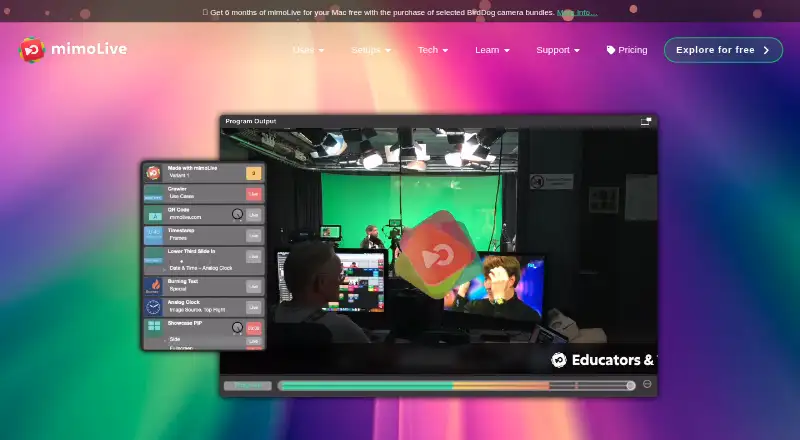
What mimoLive is
mimoLive is a live video production application built around a many-in, many-out engine. It brings together switching, graphics, DVR playback, ISO recording, streaming, transcoding, scaling, keying, multiview, and audio and video routing. Its graphics tools use customizable layers that can be rearranged and saved as sets or variants. You can stream and record to separate destinations, and record input sources on independent tracks. Real-time chroma keying supports green, blue, and other background colors. The maker lists YouTube, Facebook, Instagram, Twitch, LinkedIn, Zoom, RTMP services, and other destinations, with multistreaming to as many as six destinations. Zoom participants can be brought in as sources, while a virtual camera sends mimoLive output to Zoom. NDI supports video input, output, and conversion. An HTTP API can control parts of the application on the local machine or network when enabled. Browser-based remote controls work on Chrome devices, and an iPhone and iPad remote app is available. Version 6.18 requires an Intel or Apple Silicon Mac running macOS 13.0 or higher. The Free plan costs nothing and includes the full feature set with a watermark.
Who it suits
mimoLive suits educators, event producers, community broadcasters, creators, corporate media teams, studios, and broadcasters who need a live production toolkit. Its Mac requirements and mix of routing, recording, graphics, and streaming tools make it relevant to productions using those capabilities.
What it does well
- Combines switching, graphics, recording, routing, and streaming tools.
- Supports real-time keying for green, blue, and other backgrounds.
- Can stream and record to separate destinations.
- Multistreams to as many as six destinations.
- Zoom and NDI support expand available video sources and outputs.
What to know first
- Version 6.18 requires macOS 13.0 or higher on an Intel or Apple Silicon Mac.
- The Free plan includes a watermark.
- The HTTP API is not well protected, and the maker advises against public internet exposure.
Limits
The Free plan costs nothing and includes the full feature set, but adds a watermark. It includes community support; Studio offers professional support and Broadcast offers priority support.
Plans
| Plan | Billed and limits | Price |
|---|---|---|
| Free | No charge · Watermark · Full feature set · iPhone and iPad remote surface app · Community support | Free |
| Broadcast | $200 per user per month · No watermark · Full feature set · iPhone and iPad remote surface app · Priority support · Branded mimoCall client | $200 a month |
| Studio | $70 per user per month · No watermark · Full feature set · iPhone and iPad remote surface app · Professional support | $70 a month |
As mimolive.com lists them, read 14 Oct 2026. The maker's own page has the final word.
Getting started
- Visit the mimoLive website.
- Use an Intel or Apple Silicon Mac running macOS 13.0 or higher for version 6.18.
- Choose the Free plan or review the Studio and Broadcast plan options.
- Use the iPhone or iPad remote app, or Chrome-based browser controls, if you need remote control.
Overview
mimoLive is a live video production application for Mac, built for productions that need to combine sources, graphics, recording, and streaming in one place. It is best suited to educators, event producers, creators, corporate media teams, studios, and broadcasters. Its breadth makes it a capable production hub, though the Mac requirement and the watermark on its free plan are meaningful constraints.
Key features
Production and graphics
mimoLive combines a switcher, graphics generator, DVR playback, ISO recorder, streaming encoder, transcoder, scaler, keyer, multiview, and audio and video routing. That range suits productions with several moving parts; it is more than most users need if they only want to send a simple stream.
Customizable graphics layers can be rearranged and saved as sets and variants, which helps teams prepare reusable layouts. Real-time chroma keying supports green, blue, and other background colors, giving presenters options for virtual backgrounds and set design.
Recording, streaming, and control
Streams and recordings can be sent to separate destinations, and input sources can be recorded to independent tracks. That gives editors more flexibility after a production. Multistreaming supports up to six destinations, with stream scheduling and looping or replay also available; maximum resolution is 4K.
Listed destinations include YouTube, Facebook, Instagram, Twitch, LinkedIn, Zoom, and RTMP services. The Zoom integration can bring meeting participants into a production and send the finished output back to Zoom through a virtual camera. NDI input, output, and conversion extend routing to camera feeds and Zoom participant feeds.
The HTTP API can control aspects of mimoLive on the local machine or network when enabled. The maker warns that it is not well protected, so exposing it directly to the public internet is a poor choice. Browser-based remote controls work on Chrome devices, and an iPhone and iPad remote app is also available.
Pricing
The Free plan costs free and includes the full mimoLive feature set and the iPhone and iPad remote app, but adds a watermark and community support. It is a practical way to access the full production toolkit without a charge, provided the watermark is acceptable.
Studio has custom pricing and removes the watermark while retaining the full feature set and remote app; it includes professional support. It fits users who need clean output and a higher support level. Broadcast also has custom pricing and includes those features, plus priority support and a branded mimoCall client, making it the tier for productions that need those specific additions.
All three plans include the full feature set, so the stated differences are watermark and support, with the branded mimoCall client exclusive to Broadcast.
Platforms
Production requires an Intel or Apple Silicon Mac running macOS 13.0 or higher for version 6.18. The browser-based studio option is not available. Chrome devices can use browser remote controls, and iPhone and iPad can run the remote surface app; these controls do not remove the Mac requirement for production.
Who it's for
mimoLive is a strong fit for educators, event producers, community broadcasters, creators, corporate media teams, studios, and broadcasters who need layered graphics, source routing, recording, and multistreaming in a Mac-centered workflow. It is less suitable for teams that need a browser-based production studio or production on Windows, Linux, or mobile devices.
Pros and cons
- Broad production toolkit: switching, graphics, recording, keying, and routing sit within one application, suiting complex live setups.
- Flexible output: separate stream and recording destinations, independent input tracks, and up to six streaming destinations support both live delivery and later editing.
- Useful meeting and network connections: Zoom and NDI can bring remote participants and camera feeds into the production workflow.
- Free access has a watermark: the full feature set is available at no charge, but clean output requires a paid plan.
- Production is Mac-dependent: version 6.18 requires macOS 13.0 or higher, and there is no browser-based studio.
- API exposure needs care: its weak protection makes direct public-internet access inadvisable.
Alternatives
OBS Studio is a better fit for users who want free software with no watermarks or usage limits and can work on Linux, Mac, or Windows. Restream suits users who want a broader platform footprint, including web and mobile, and can accept a free plan limited to two channels at once, Restream branding, and six hours of recording per stream.
PRISM Live Studio, Streamlabs Multistream, XSplit Broadcaster, Meld Studio, OneStream Live, and Agora Interactive Live Streaming are other options to compare.
Browse more choices in Live Streaming Software, Virtual Camera Software, Game Streaming Software, and Live TV streaming services.
Verdict
Choose mimoLive if your production runs on a Mac and needs layered graphics, flexible routing, independent recording, and multistreaming from one application. Its full feature set is available on the free plan, but the watermark makes Studio the more suitable choice for clean output, while Broadcast is for teams that also need priority support and a branded mimoCall client. Look elsewhere if you need browser-based or cross-platform production, or if a watermark-free free plan matters more than an integrated production toolkit.
Verdict
Choose mimoLive if you need a Mac-based production application with layered graphics, routing, recording, and multistreaming. The Free plan includes the full feature set, though it adds a watermark; Studio removes it and includes professional support, while Broadcast adds priority support and a branded mimoCall client.
Questions
Is mimoLive free?
Yes. The Free plan costs nothing and includes the full feature set with a watermark.
Which platforms does mimoLive support?
Version 6.18 requires an Intel or Apple Silicon Mac running macOS 13.0 or higher. Browser-based remote controls can be used on Chrome devices, and an iPhone and iPad remote app is available.
Can mimoLive stream to multiple destinations?
Yes. It supports multistreaming to as many as six destinations. The maker lists YouTube, Facebook, Instagram, Twitch, LinkedIn, Zoom, and RTMP services among its destinations.
Does mimoLive work with Zoom and NDI?
Yes. Zoom participants can be used as sources, and mimoLive output can be sent to Zoom through a virtual camera. NDI supports input, output, and video-source conversion.
What do the paid plans include?
Studio includes no watermark, the full feature set, the iPhone and iPad remote surface app, and professional support. Broadcast adds priority support and a branded mimoCall client. Prices for these plans are not provided here.
Who makes mimoLive?
The maker is mimoLive, headquartered in Germering, Germany.
Facts from mimoLive's own pages
- API extensibility
- Document, layer, source, output-destination and layer-set identifiers persist to disk, and the API has endpoint, shell, AppleScript, PHP and Automation Layer examples. · mimolive.com, 14 Oct 2026
- API security
- API authentication can use a SHA-256 password header or query parameter, while the manual warns that exposing the built-in HTTP server directly to the public internet is poorly protected. · mimolive.com, 14 Oct 2026
- Automation and API
- The HTTP API can control aspects of mimoLive and is available on the local machine or local network when enabled. · mimolive.com, 10 Oct 2026
- Browser-based studio
- No · mimolive.com, 20 Sept 2026
- Company facts
- LinkedIn lists Boinx Software International GmbH as privately held, founded in 1996, headquartered in Germering, Bavaria, with 11–50 employees. · linkedin.com, 14 Oct 2026
- Company legal name
- The maker is Boinx Software International GmbH, and mimoLive is its trademark. · mimolive.com, 14 Oct 2026
- Company origin
- Boinx says brothers Achim and Oliver Breidenbach founded the company in 1996 and that it is based in the greater Munich area. · boinx.com, 14 Oct 2026
- Developer integrations
- Official documentation links integrations for AI agents, X-keys, Elgato Stream Deck and Bitfocus Companion, plus custom layers. · mimolive.com, 14 Oct 2026
- Documentation and support
- Support includes an online manual, release and beta downloads, licence recovery, FastSpring subscription management, Discord community, email support and paid 45-minute coaching. · mimolive.com, 14 Oct 2026
- Free evaluation
- The evaluation edition has the complete feature set, no time limit and adds a watermark, including for commercial use if the watermark remains. · mimolive.com, 14 Oct 2026
- Free plan
- Yes · mimolive.com, 20 Sept 2026
- Green screen
- The product provides real-time chroma keying for green, blue or other background colors. · prweb.com, 14 Oct 2026
- Hardware integrations
- Supported hardware includes Blackmagic DeckLink and ATEM devices, with SDI, HDMI and NDI output options. · mimolive.com, 14 Oct 2026
- Headquarters
- Germering, Germany · mimolive.com, 28 Sept 2026
- HTTP API
- The product exposes a JSON:API-based HTTP API on port 8989 under /api/v1 for scripts and external applications. · mimolive.com, 14 Oct 2026
- Input support
- Inputs include USB, HDMI, SDI, Thunderbolt and NDI cameras, iOS devices, screen capture, Syphon, SRT, RTMP, RTSP and browser sources. · mimolive.com, 14 Oct 2026
- Integrations
- The maker lists destinations including YouTube, Facebook, Instagram, Twitch, LinkedIn, Zoom, RTMP services, and others on its homepage. · mimolive.com, 10 Oct 2026
- Intended users
- The maker describes use by educators, event producers, community broadcasters, creators, corporate media teams, studios, and broadcasters. · mimolive.com, 10 Oct 2026
- Layered graphics
- Its graphics engine uses customizable layers that can be rearranged and saved as layer sets and variants. · mimolive.com, 10 Oct 2026
- Layer workflow
- Productions are built from stacked layers whose positions, sizes and settings can be changed during a show, with reusable layer sets and variants. · mimolive.com, 14 Oct 2026
- Licence
- mimoLive is proprietary commercial software; its licence rules prohibit copying, decompiling, reverse engineering, modifying or sublicensing it. · mimolive.com, 14 Oct 2026
- Limit: cloud workflow
- FitGap notes that mimoLive is a desktop application rather than a browser-based cloud studio and lacks audience features such as event lobbies, viewer analytics and geo-blocking. · us.fitgap.com, 14 Oct 2026
- Limit: editing and price
- A G2 reviewer reports no video-editing capability, extra charges for some advanced features and less competitive pricing than Wirecast or vMix. · g2.com, 14 Oct 2026
- Limit: learning curve
- FitGap reports that operators moving from scene-based tools may need extra onboarding to understand the layer-and-document model. · us.fitgap.com, 14 Oct 2026
Where mimoLive stands on Freedom251
- Live TV streaming services#1 of 169
- Live Streaming Software#1 of 137
- Live streaming software#1 of 134
- Game Streaming Software#2 of 45
- Live Streaming Encoders#6 of 69
- Twitch Streaming Software#3 of 26
- YouTube Live Streaming Tools#3 of 26
- Virtual Camera Software#8 of 34