Freedom251 › Live TV streaming services

XSplit Broadcaster
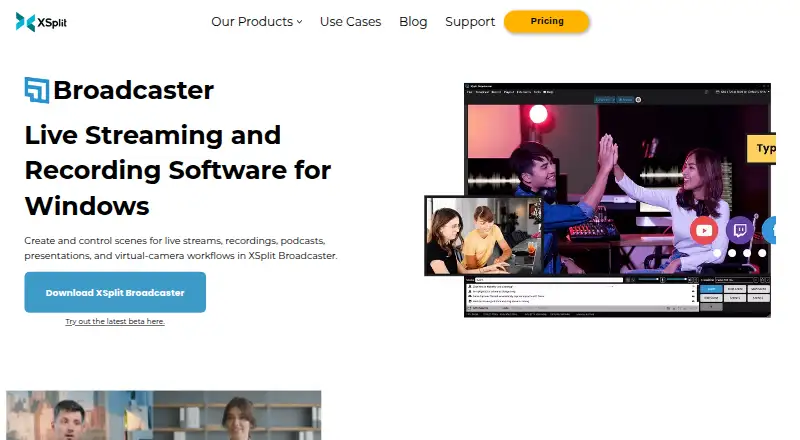
What XSplit Broadcaster is
XSplit Broadcaster is a Windows application for creating and controlling scenes for live streams, recordings, podcasts, presentations, and virtual-camera workflows. It supports multiple audio tracks, cue points, and recording different scenes at the same time. Users can stream through native platform plugins or Custom RTMP, and simultaneous broadcasting to multiple services is a Premium feature. The free plan allows streaming up to 720p without a watermark, supports up to four scenes, and adds a watermark above 720p. Broadcaster can remove, replace, or blur webcam backgrounds without a green screen. Other listed capabilities include NVIDIA NVENC encoding, including AV1, and adding macros, scripts, the XJS framework, or API integrations. Team, Zoom, and NDI are named for bringing remote guests into productions. It is not browser-based; minimum requirements list Windows 10 64-bit, 8 GB RAM, and 250 MB available storage. The free plan is listed as free; paid plans start at $14.99 a month.
Who it suits
It may suit Windows users producing streams, recordings, podcasts, or presentations, including gaming, education, church, corporate, and large-event use. The free tier fits users who can work within its resolution and scene limits.
What it does well
- Supports multiple audio tracks and cue points
- Can record different scenes at the same time
- Blurs or replaces webcam backgrounds without a green screen
- Free streaming up to 720p without a watermark
- Supports native plugins and Custom RTMP
What to know first
- Windows platform only
- Free license is limited to four scenes
- Free plan adds a watermark above 720p
- Simultaneous multistreaming requires Premium
Limits
The free plan supports up to four scenes and streaming at up to 720p without a watermark; higher-resolution streams carry a watermark. It does not include simultaneous multistreaming. Premium supports unlimited scenes and simultaneous broadcasting to multiple streaming services.
Plans
| Plan | Billed and limits | Price |
|---|---|---|
| Free | 720p streaming without a watermark · Maximum 4 scenes · No simultaneous multistreaming | Free |
| Broadcaster Free | Up to 720p without a watermark · free use has limits and missing features | Free |
| Lifetime | Once · Premium features · no recurring subscription | $119.99, paid once |
| Monthly | Monthly · Premium features · short commitment | $14.99 a month |
| Yearly | Yearly · Premium features · $5/month shown | $59.99 a year |
As xsplit.com lists them, read 20 Sept 2026. The maker's own page has the final word.
Getting started
- Visit the XSplit Broadcaster website.
- Use a Windows device meeting the listed minimum requirements: Windows 10 64-bit, 8 GB RAM, and 250 MB available storage.
- Choose the Free plan or a paid plan with Premium features.
- Use native platform plugins or Custom RTMP to stream to a supported destination.
XSplit Broadcaster is Windows software for building scenes and controlling live productions, recordings, podcasts, presentations, and virtual-camera workflows. It is best suited to creators and event producers who want desktop production controls and can work within Windows. Its strength is the breadth of production tools; its main drawback is that the free license has meaningful caps and key multistreaming capability requires Premium.
Overview
Broadcaster uses an encoder-based workflow rather than a browser studio. Native platform plugins and Custom RTMP give users options for sending streams, including to services that accept RTMP. That flexibility, paired with scene controls and recording features, makes it more than a simple streaming output tool. But it is Windows-only, so Mac and Linux users should look elsewhere.
Key features
- Scene-based production: The free license allows up to four scenes, while Premium removes the scene ceiling. Four is enough for a compact setup, but productions with many segments or layouts will need the paid tier.
- Recording controls: Multiple audio tracks, cue points, and the ability to record different scenes at the same time offer useful control for creators producing more than a single live output.
- Streaming destinations: Native plugins and Custom RTMP cover a range of destinations, but simultaneous broadcasting to multiple services is Premium-only. That makes the free plan a poor fit for creators who need to reach several platforms at once.
- Guests and webcam backgrounds: Team, Zoom, and NDI are named as guest options. Broadcaster can also remove, replace, or blur a webcam background without a green screen, a practical advantage for speakers working from variable environments.
- Encoding and customization: NVIDIA NVENC support, including AV1, provides an encoding option for compatible workflows. Macros, custom scripts, the XJS framework, and API integrations give technically inclined users ways to customize production behavior.
- Other production controls: Stream scheduling is supported, and the maximum resolution is 4K. The free plan's 720p cap means those capabilities do not make the free tier a 4K streaming option.
Pricing
Broadcaster has a free tier and three paid Premium options. The free plan costs nothing and supports streaming up to 720p without a watermark, with a watermark above that resolution; it also caps scenes at four and excludes simultaneous multistreaming. It is a reasonable starting point for modest single-service productions, but not for higher-resolution or multi-destination work.
- Monthly: $14.99 a month, billed monthly, with Premium features. It suits users who need Premium capabilities without committing to an annual term.
- Yearly: $59.99 a year, equivalent to $5 per month, with Premium features and a discounted annual subscription. This is the lower-cost option for users willing to pay for a year upfront.
- Lifetime: $199.99 a month, with all Premium features and new versions for life. The stated monthly term makes this option difficult to compare directly with the monthly and annual subscriptions.
No free trial is offered. Minimum requirements are Windows 10 64-bit, 8 GB RAM, and 250 MB of available storage.
Platforms
Broadcaster runs on Windows, with Windows 10 64-bit as the stated minimum operating system. It is not a browser-based studio. Its Windows-only scope is a decisive limitation for anyone producing on macOS or Linux.
Who it's for
The product is aimed at gaming, education, churches, corporate events, and large events. Its scene controls, guest options, and simultaneous scene recording make it a stronger fit for producers who need to manage a structured desktop production than for someone seeking a lightweight, browser-based way to broadcast. Small or straightforward productions can start free; users who need more scenes, higher resolution, or multistreaming should budget for Premium.
Pros and cons
- Pro: Multiple audio tracks, cue points, and concurrent scene recording support more controlled production workflows.
- Pro: Background removal, replacement, and blur work without a green screen, while Team, Zoom, and NDI provide named guest routes.
- Pro: NVENC including AV1, plus scripts, macros, XJS, and API integrations, gives technical users encoding and customization options.
- Con: The free plan is limited to four scenes and 720p without a watermark; above 720p it adds a watermark.
- Con: Multistreaming requires Premium, leaving free users unable to broadcast simultaneously to multiple services.
- Con: Windows is the only supported platform, excluding Mac and Linux workflows.
Alternatives
Restream is worth considering when broad platform availability and multistreaming are priorities: it has web, mobile, and desktop platforms, while its free plan allows two channels at once but includes Restream branding and recording limits.
OBS Studio is the stronger fit for users who want free software without watermarks or usage limitations and need Linux or macOS support as well as Windows.
PRISM Live Studio is an option for creators who want mobile as well as desktop support and a free basic plan, or a paid plan that supports up to six channels.
mimoLive is an alternative for Apple-platform users; it supports macOS and iOS, with a free plan that carries a watermark.
Meld Studio may suit users looking for a free plan that includes multistreaming and 4K recording with multitrack audio, and it supports macOS and Windows.
OneStream Live is worth comparing for web and mobile access or scheduled events; its free plan includes two multistream destinations, 720p, one team seat, 1 GB of storage, and three scheduled events.
Agora Interactive Live Streaming is an option for app and API workflows across mobile, desktop, and web, with a free allowance of 10,000 participant minutes.
Lightstream is a browser-based alternative; its free plan includes up to three scenes and five destinations, with a logo, 720p output, and a 10-hour stream limit.
For broader comparisons, see Live Streaming Software, Virtual Camera Software, Game Streaming Software, and Live TV streaming services.
Verdict
XSplit Broadcaster is a good choice for Windows-based creators and event producers who want scene-led production, detailed recording controls, and options for guests and webcam backgrounds. The paid tiers are necessary for multistreaming and unlimited scenes, while the free plan is constrained by its four-scene and 720p limits. Choose it when those desktop production controls matter; look elsewhere if you need cross-platform support or unrestricted free use.
Verdict
XSplit Broadcaster offers scene-based production and streaming tools, with a free tier and paid Premium options. Check the four-scene and 720p limits if considering the free plan; multistreaming across services requires Premium.
Questions
Is XSplit Broadcaster free?
Yes. The Free plan costs nothing and supports streaming up to 720p without a watermark, with a maximum of four scenes.
How much do the paid plans cost?
Monthly is $14.99 a month, Yearly is $59.99 a year, and Lifetime is listed at $199.99 a month.
Which platforms does it support?
The listed platform is Windows. The minimum requirements specify Windows 10 64-bit, 8 GB RAM, and 250 MB of available storage.
Can I multistream with the free plan?
No. Simultaneous broadcasting to multiple streaming services is a Premium feature.
Can it stream to different services?
Users can stream through native platform plugins or use Custom RTMP for platforms that support RTMP.
Who makes XSplit Broadcaster?
The listed maker is XSplit Broadcaster, headquartered in Hong Kong and founded in 2009.
Facts from XSplit Broadcaster's own pages
- Browser-based studio
- No · xsplit.com, 20 Sept 2026
- Developer customization
- The product page says users can add macros, custom scripts, the XJS framework, and API integrations. · xsplit.com, 5 Oct 2026
- Encoding
- It supports NVIDIA NVENC encoding, including AV1. · xsplit.com, 5 Oct 2026
- Free plan
- Yes · xsplit.com, 20 Sept 2026
- Free tier limit
- The free plan streams up to 720p without a watermark, with a watermark above that resolution. · xsplit.com, 5 Oct 2026
- Headquarters
- Hong Kong · xsplit.com, 28 Sept 2026
- Integrations
- The product page names Team, Zoom, and NDI as ways to bring remote guests into productions. · xsplit.com, 5 Oct 2026
- Intended users
- XSplit describes use in gaming, education, churches, corporate events, and large events. · xsplit.com, 5 Oct 2026
- Multistreaming
- Simultaneous broadcasting to multiple streaming services is a Premium feature. · xsplit.com, 5 Oct 2026
- Production
- It supports multiple audio tracks, cue points, and recording different scenes at the same time. · xsplit.com, 5 Oct 2026
- Purpose
- XSplit Broadcaster creates and controls scenes for live streams, recordings, podcasts, presentations, and virtual-camera workflows. · xsplit.com, 5 Oct 2026
- Scene limit
- The free license supports up to 4 scenes, while Premium supports unlimited scenes. · xsplit.com, 5 Oct 2026
- Security and privacy
- XSplit says it protects personal information using commercially acceptable means and notes that no electronic transmission or storage method is completely secure. · xsplit.com, 5 Oct 2026
- Paid from
- 14.99 · xsplit.com, 20 Sept 2026
- Stream destinations
- Users can stream through native platform plugins or use Custom RTMP for platforms that support RTMP. · xsplit.com, 5 Oct 2026
- Support
- The product page advertises support and lifetime updates and links to its FAQ. · xsplit.com, 5 Oct 2026
- System requirements
- The product page lists Windows 10 64-bit, 8 GB RAM, and 250 MB available storage as minimum requirements. · xsplit.com, 5 Oct 2026
- Webcam backgrounds
- Broadcaster can remove, replace, or blur a webcam background without a green screen. · xsplit.com, 5 Oct 2026
Where XSplit Broadcaster stands on Freedom251
- Live TV streaming services#32 of 169
- Live Streaming Software#30 of 137
- Live streaming software#30 of 134
- Live Streaming Encoders#33 of 69
- Virtual Camera Software#23 of 34
- YouTube Live Streaming Tools#19 of 26
- Twitch Streaming Software#19 of 26
- Game Streaming Software#34 of 45