Freedom251 › Live TV streaming services

Streamlabs Multistream
What Streamlabs Multistream is
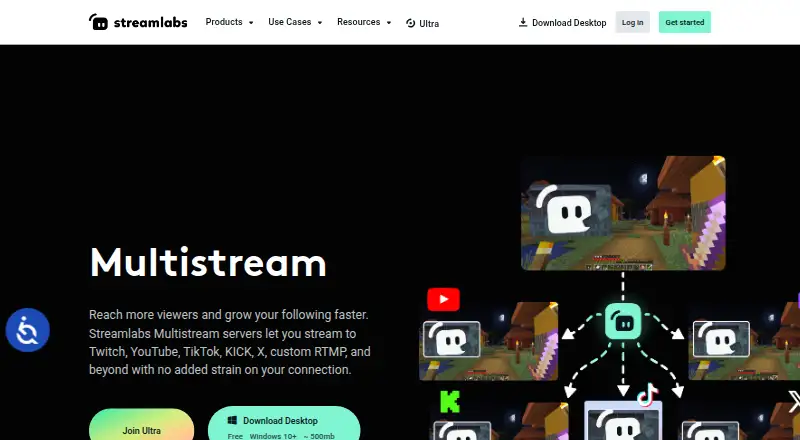
Streamlabs Multistream sends one live broadcast to multiple destinations, with Streamlabs servers splitting the incoming feed so each destination does not require extra upload bandwidth. Listed destinations include Twitch, YouTube, TikTok, Kick, Facebook, Instagram, Patreon, X, and custom RTMP endpoints. The service supports horizontal and vertical canvases through Dual Output, with one destination per canvas available for free. Creators can set separate titles and descriptions for each platform and customize the layout and resolution of each canvas. Multichat lets users read and post comments on YouTube, Twitch, and Facebook Pages; chat on Kick, X, and Facebook Profiles is readable. Stream Shift lets a creator move a live broadcast between a PC, mobile device, or another computer without ending it. Users can stream through Streamlabs Desktop, the OBS Plugin with Ultra, the Mobile app, or other software configured using the Dashboard and RTMP credentials. It is available on web, Windows, macOS, iOS, and Android, and includes stream scheduling. A free plan is available; paid access starts at $15.75/mo (annual).
Who it suits
It suits streamers, gamers, and creators who want to broadcast to several platforms and manage audience conversations. Its cloud processing and mobile app may fit creators who want to stream from different devices.
What it does well
- Streams to listed services including Twitch and YouTube.
- Cloud servers split the feed across destinations.
- Dual Output supports horizontal and vertical canvases.
- Stream Shift moves broadcasts between devices.
- Stream scheduling is supported.
What to know first
- Free Dual Output allows one destination per canvas.
- Windows requires version 10 or later.
- macOS requires version 12 or later.
Limits
The Starter plan includes one vertical destination, one horizontal destination, one guest or camera, and 1 GB of cloud storage. The listed Ultra plan at $27/mo billed monthly supports 3+ destinations, up to 11 guests or cameras, and 10 GB of cloud storage.
Plans
| Plan | Billed and limits | Price |
|---|---|---|
| Ultra | Monthly pricing shown as $27/mo · 3+ destinations · Up to 11 guests or cameras · 10 GB cloud storage | $27 a month |
| Starter | Free, always · Dual Output: one horizontal and one vertical destination; full Multistream is an Ultra feature | Free |
| Streamlabs Ultra | Starting at $15.75/mo · Multistream to multiple destinations; 3+ destinations | $15.75 a month |
As streamlabs.com lists them, read 20 Sept 2026. The maker's own page has the final word.
Getting started
- Visit the Streamlabs Multistream website.
- Choose a way to stream: Streamlabs Desktop, the Mobile app, the OBS Plugin with Ultra, or other software configured through the Dashboard and RTMP credentials.
- Connect the destinations you want to use from the listed platforms or custom RTMP destinations.
- Set platform-specific titles and descriptions, and configure the layout and resolution for each Dual Output canvas if needed.
- Select a plan that fits your destination, guest or camera, and storage needs.
Overview
Streamlabs Multistream sends one live broadcast to several platforms through Streamlabs’ servers. It is best suited to creators who want a single workflow for reaching multiple audiences, especially across horizontal and vertical formats. Its cloud distribution can spare upload bandwidth, but the free destination cap and desktop requirements may rule it out for some setups.
Key features
Streamlabs servers split an incoming stream into separate feeds, so creators do not need to upload a separate feed for every destination. Supported endpoints include Twitch, YouTube, TikTok, Kick, Facebook, Instagram, Patreon, X, and custom RTMP destinations. That breadth makes it useful for creators who publish across a mix of social platforms and custom endpoints.
Dual Output offers one horizontal and one vertical canvas, with layout and resolution set independently. Stream titles and descriptions can also vary by platform. The free setup allows one destination per canvas, enough to send each format to one place but not to distribute either format broadly without upgrading.
Multichat combines chat, but its capabilities differ by service: creators can read and post comments on YouTube, Twitch, and Facebook Pages, while Kick, X, and Facebook Profiles support reading only. That distinction matters for anyone who needs to reply from a single interface across all destinations.
Stream Shift allows a creator to hand a live stream from a PC to a mobile device or another computer without ending it. Scheduling is also supported. Multistream can be used with Streamlabs Desktop, the OBS Plugin with Ultra, the Streamlabs Mobile app, or other streaming software configured through the Dashboard and RTMP credentials; this gives creators multiple routes in, though the OBS Plugin requires Ultra.
Pricing
Streamlabs uses a freemium model. The free plan includes Dual Output with one destination for each canvas, which suits a creator testing a horizontal-and-vertical workflow or streaming to two destinations. It is a narrow free tier if the goal is simultaneous reach across several platforms.
Starter has custom pricing and includes one vertical destination, one horizontal destination, one guest or camera, and 1 GB of cloud storage. It may suit a creator who needs a modest increase in production capacity, but its destination allowance remains one per format.
Ultra costs $27/mo on monthly billing and includes 3+ destinations, up to 11 guests or cameras, and 10 GB of cloud storage. It fits creators who need more destinations and a larger guest or camera setup. Streamlabs Ultra starts at $15.75/mo and includes multistreaming to multiple destinations, with 3+ destinations. The starting price is lower than Ultra’s monthly price, but the plan description does not include the guest and storage allowances shown for Ultra, so creators weighing those needs should compare the tiers carefully.
Platforms
Streamlabs lists Android, iOS, macOS, web, and Windows. Streamlabs Desktop runs on Windows 10 or later and macOS 12 or later; mobile multistreaming uses the Streamlabs Mobile app. The desktop minimums matter for creators with older computers, while mobile support offers a route for broadcasts that do not depend on a desktop setup.
Who it's for
Streamlabs Multistream is a strong fit for streamers, gamers, and other creators who want to reach several services from one broadcast and tailor horizontal and vertical presentations. It is less compelling for someone who needs free distribution to many destinations, replies in every supported chat, or desktop use on an operating system below the stated minimums.
Pros and cons
- Pros: Cloud forwarding avoids the added upload bandwidth of sending individual feeds to each destination.
- Pros: Separate horizontal and vertical canvases, with per-platform titles and descriptions, support format-specific presentation.
- Pros: Stream Shift can move a broadcast between a PC, mobile device, or another computer without ending it.
- Cons: The free Dual Output setup is limited to one destination per canvas, restricting free reach.
- Cons: Chat posting is limited to YouTube, Twitch, and Facebook Pages; other supported chat destinations allow reading only.
- Cons: Streamlabs Desktop requires Windows 10+ or macOS 12+, excluding older desktop systems.
Alternatives
Restream is worth considering for creators who want a freemium alternative with a free tier that supports two channels at once, though that tier includes Restream branding and limits recorded streams to six hours each, with 15 days of recording storage.
OBS Studio is the simpler choice for creators who want free streaming software without watermarks or usage limitations and do not need Streamlabs’ multistream destination features. It runs on Linux, macOS, and Windows.
mimoLive is another freemium option for Apple-oriented creators, with a free tier that includes a watermark, its full feature set, an iPhone and iPad remote surface app, and community support.
PRISM Live Studio may suit creators who want a free basic plan or a paid plan supporting up to six channels for $9.99 per month.
XSplit Broadcaster is a Windows-only option whose free tier offers 720p streaming without a watermark and up to four scenes, but no simultaneous multistreaming.
Meld Studio is a free freemium alternative for macOS and Windows that includes multistreaming and 4K recording with multitrack audio.
OneStream Live is worth a look for creators who want a free plan with two multistream destinations, 720p, one team seat, 1 GB of storage, and three scheduled events.
Agora Interactive Live Streaming is an alternative for teams evaluating a freemium interactive live-streaming product.
For broader category comparisons, see Live Streaming Software or Live TV streaming services.
Verdict
Choose Streamlabs Multistream if you want cloud-forwarded broadcasting, format-specific horizontal and vertical outputs, and the option to shift a live stream between devices. Its strongest reason to choose it is the combination of multi-destination distribution and practical production controls; look elsewhere if free reach beyond two destinations, universal chat replies, or support for an older desktop system is essential.
Verdict
Streamlabs Multistream combines multi-destination broadcasting with chat, scheduling, and device handoff. Its free Dual Output destination limit and desktop system requirements are worth checking against your setup.
Questions
Is Streamlabs Multistream free?
Yes. A free plan is available. The Starter plan includes one vertical destination, one horizontal destination, one guest or camera, and 1 GB of cloud storage.
How much does a paid plan cost?
The pricing note lists paid access from $15.75/mo billed annually. Ultra is listed at $27/mo billed monthly, with 3+ destinations, up to 11 guests or cameras, and 10 GB of cloud storage.
Which platforms and destinations does it support?
Platforms listed are Android, iOS, macOS, web and Windows. Destinations include Twitch, YouTube, TikTok, Kick, Facebook, Instagram, Patreon, X and custom RTMP.
Can I use it with OBS or other streaming software?
Yes. It works with the OBS Plugin with Ultra, or other streaming software configured through the Dashboard and RTMP credentials. Streamlabs Desktop and the Streamlabs Mobile app are also options.
What does Multichat support?
It supports reading and posting comments on YouTube, Twitch and Facebook Pages. It supports reading chat on Kick, X and Facebook Profiles.
Who makes Streamlabs Multistream?
The maker is Streamlabs Multistream. Streamlabs is headquartered in Lausanne, Switzerland, and was founded in 2014.
Facts from Streamlabs Multistream's own pages
- Chat
- Multichat supports reading and posting comments on YouTube, Twitch, and Facebook Pages, and reading chat on Kick, X, and Facebook Profiles. · streamlabs.com, 11 Oct 2026
- Cloud processing
- Streamlabs says its servers split one incoming stream into multiple feeds, avoiding extra upload bandwidth for each destination. · streamlabs.com, 11 Oct 2026
- Company
- Streamlabs describes itself as a provider of tools and software for live streamers and content creators. · streamlabs.com, 11 Oct 2026
- Desktop platforms
- Streamlabs Desktop runs on Windows and macOS; the page specifies Windows 10+ and macOS 12+ minimum requirements. · streamlabs.com, 11 Oct 2026
- Destinations
- The product lists Twitch, YouTube, TikTok, Kick, Facebook, Instagram, Patreon, X, and custom RTMP destinations. · streamlabs.com, 11 Oct 2026
- Dual Output
- Dual Output provides a horizontal and a vertical canvas, and allows one destination per canvas for free. · streamlabs.com, 11 Oct 2026
- Founded
- 2014 · streamlabs.com, 28 Sept 2026
- Free plan
- Yes · streamlabs.com, 20 Sept 2026
- Headquarters
- Lausanne, Switzerland · streamlabs.com, 28 Sept 2026
- Intended users
- Streamlabs Desktop is described as for streamers, gamers, and creators who want to broadcast content and engage their audience. · streamlabs.com, 11 Oct 2026
- Mobile platform
- Streamlabs says users can multistream from a mobile device with the Streamlabs Mobile app. · streamlabs.com, 11 Oct 2026
- Per-platform customization
- Creators can customize stream title and description per platform, and set layout and resolution per Dual Output canvas. · streamlabs.com, 11 Oct 2026
- Software options
- Multistream works with Streamlabs Desktop, the OBS Plugin with Ultra, the Mobile app, or other streaming software configured through the Dashboard and RTMP credentials. · streamlabs.com, 11 Oct 2026
- Paid from
- 15.75 · streamlabs.com, 20 Sept 2026
- Stream Shift
- Stream Shift lets a creator move a stream between a PC and mobile device or another computer without ending the stream. · streamlabs.com, 11 Oct 2026
- Support
- The Multistream page directs users with questions to Streamlabs support. · streamlabs.com, 11 Oct 2026
- What it does
- Streamlabs Multistream broadcasts one live stream to multiple platforms, with Streamlabs servers forwarding it to each destination. · streamlabs.com, 11 Oct 2026
Where Streamlabs Multistream stands on Freedom251
- Live TV streaming services#5 of 169
- Live Streaming Software#5 of 137
- Live streaming software#5 of 134
- RTMP Streaming Services#7 of 32
- Multistreaming Software#15 of 43
- YouTube Live Streaming Tools#13 of 26