Freedom251 › Live TV streaming services

SplitCam Multistream
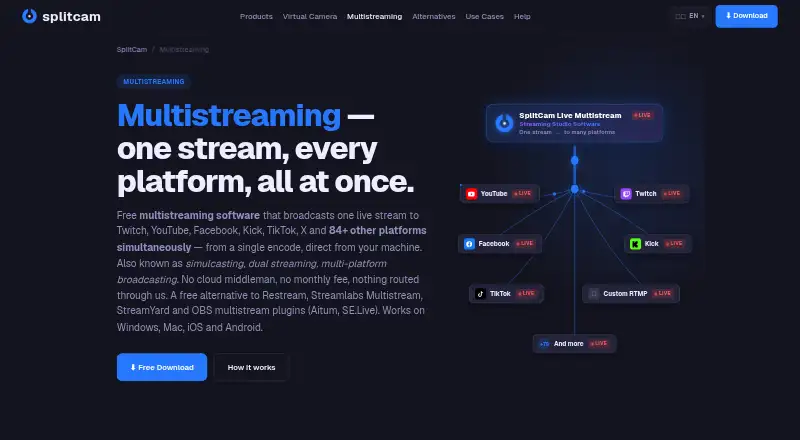
What SplitCam Multistream is
SplitCam Multistream is a free streaming tool for sending a stream to multiple destinations in encoder mode. Its listed tools include scene composition, a virtual camera, AI background removal, and an audio mixer. The Free plan costs nothing, is billed Free forever, has no subscription, and includes no watermark. The maximum listed resolution is 4K. SplitCam Multistream is available on Windows, macOS, iOS, and Android, giving users desktop and mobile platform options. Its studio is not browser-based, so users need to work through its supported apps rather than a browser studio. For people choosing streaming software, the main considerations are its encoder-based multistreaming, maximum resolution, device platform list, and bundled scene, audio, and background tools. The maker is SplitCam Multistream, founded in 2003.
Who it suits
SplitCam Multistream suits people who want to stream to multiple destinations from a supported Windows, macOS, iOS, or Android platform. It may fit users looking for scene composition, audio mixing, a virtual camera, or AI background removal without a subscription.
What it does well
- Free forever, with no subscription.
- No watermark is listed.
- Supports resolutions up to 4K.
- Includes scene composition and an audio mixer.
What to know first
- Studio is not browser-based.
- Listed platforms are Windows, macOS, iOS, and Android.
Limits
The Free plan costs nothing and is billed Free forever. Its maximum resolution is 4K; the studio is not browser-based and the primary stream mode is encoder.
Plans
| Plan | Billed and limits | Price |
|---|---|---|
| Free | Free forever; no subscription · Multistreaming · Scene composition · Virtual camera · AI background removal · Audio mixer · No watermark | Free |
| SplitCam Multistream | Free forever; no subscription · 84+ platforms · up to 8 destinations comfortably · more destinations depend on hardware and upload bandwidth | Free |
As splitcam.com lists them, read 20 Sept 2026. The maker's own page has the final word.
Getting started
- Visit the SplitCam Multistream website.
- Choose the app for Windows, macOS, iOS, or Android.
- Use the Free plan, which is billed Free forever with no subscription.
SplitCam Multistream is a free encoder-based app for sending one live production to many services from a computer or phone. It fits streamers, churches, educators, podcasters, sellers, brands and webcam creators who need broad distribution without a recurring bill. Its central advantage is direct, highly configurable multistreaming; the compromise is that your own hardware and upload line carry the work.
Overview
SplitCam publishes to more than 84 preconfigured platforms and accepts custom RTMP or RTMPS destinations. The app sends the feed from your device to each platform’s ingest endpoint rather than through a cloud middleman. That keeps the path local, but makes your computer’s CPU and GPU and your network connection important parts of the setup.
Every destination can use its own bitrate, resolution and frame rate. An integrated upload-speed test checks whether your connection can sustain the chosen outputs. If one service drops, SplitCam attempts to reconnect it while the other destinations continue. The maker says up to eight destinations work comfortably; higher counts depend on available CPU, GPU and upload bandwidth. Budget upload capacity for the combined bitrate of all streams, plus about 20 percent headroom.
Key features
Encoder and destination control
This is an encoder workflow, not a browser studio. That suits creators who already work with a desktop or mobile production setup and want granular output settings. It is less suitable if you expect to open a tab and stream without installing or managing an app. Direct delivery avoids making a relay service the central path, while also leaving reliability dependent on your local resources.
Scenes, camera and audio
Scenes and sources support composed productions, while the virtual camera can expose that production to compatible apps. AI background removal and effects add presentation options, and the audio mixer provides control over the sound mix. These tools make SplitCam more than a simple forwarding utility, particularly for shows that combine cameras, media and a managed soundtrack.
Mobile streaming
Android and iOS versions support multistreaming and RTMP, with both vertical and horizontal canvases. In-app multi-platform chat is useful when a phone is the primary production device and the host needs to follow several audiences in one place. Mobile users should still account for the same combined-bitrate and connection demands as desktop users.
Privacy and recovery
Streaming account names, profile pictures and access tokens are stored in the app’s private device storage and are not sent to SplitCam servers. An optional Restream mode instead routes video and stream keys through a SplitCam relay, giving users a choice of architecture. Free English-language support is offered through Telegram, with an FAQ for common questions.
Pricing
SplitCam’s plans cost nothing, billed Free forever with no subscription. The Free plan includes multistreaming, scene composition, a virtual camera, AI background removal, an audio mixer and no watermark. The SplitCam Multistream plan is also free, with 84-plus platforms and up to eight comfortable destinations; beyond that, hardware and upload bandwidth set the practical limit. There is no free trial because the product is already free, and there is no paid tier in these plans to buy additional capacity. Maximum output resolution is 4K.
This structure is best for individuals and small teams who can supply their own processing power and bandwidth. It does not shift encoding or bandwidth costs to a hosted service, so users with modest hardware or a constrained upload connection may need fewer destinations or lower per-destination settings.
Platforms
SplitCam runs on Android, iOS, macOS and Windows. Its studio is not browser-based, so a supported app and a capable device are required. The encoder approach is a good fit for desktop production; the mobile builds add vertical and horizontal layouts and consolidated chat for phone-led broadcasts.
Who it's for
Choose SplitCam for gaming streams, worship services, lessons, podcasts, live shopping, brand broadcasts or webcam content when the same live event needs to reach several platforms at once. It is especially compelling when custom RTMP endpoints, per-platform quality settings and a no-watermark free plan matter. Look elsewhere if you need a browser-only workflow, hosted encoding, or a service to absorb the network load of many simultaneous outputs.
Pros and cons
- Pros: More than 84 presets plus custom RTMP/RTMPS destinations cover a wide range of services.
- Pros: Independent bitrate, resolution and frame-rate controls let each platform receive an appropriate feed.
- Pros: Reconnection attempts can restore a failed destination without stopping the others.
- Pros: Scenes, virtual camera, AI background removal, effects and audio mixing support a complete production.
- Pros: The free-forever plans include 4K output and no watermark.
- Cons: Direct streaming requires upload capacity for every output, plus roughly 20 percent spare bandwidth.
- Cons: More than eight destinations is not a fixed entitlement; CPU, GPU and bandwidth determine whether it is practical.
- Cons: There is no browser studio, which rules out a zero-install workflow.
Alternatives
For a phone-as-webcam tool with a 480p free tier and paid HD features, consider DroidCam. Animaze is a better fit for avatar-focused streaming, with a free item library and a paid tier that removes its watermark. Choose Camo Studio when a 720p-or-below free webcam feed without ads or a watermark is the priority. FineCam offers a watermark-bearing free plan and paid scene and resolution limits. Iriun Webcam is a straightforward free option across desktop and mobile, with ads in its Android app. xpression camera suits users seeking a personal-license plan with a seven-day trial. PhotoDirector is a macOS and Windows choice centered on photo and video editing rather than multistream delivery. VCam is preferable when a web-enabled workspace and member or storage limits fit your use case. Browse Webcam Software, Virtual Camera Software, Game Streaming Software, Live TV streaming services or Live Streaming Software for broader categories.
Verdict
SplitCam Multistream is the right choice for creators who want a no-subscription, no-watermark way to send one production to many platforms, with detailed per-destination controls and useful scene, camera and audio tools. Choose it when your device and upload connection can handle the combined outputs. Look elsewhere if you need browser-based production or hosted infrastructure that removes those local capacity constraints.
Verdict
SplitCam Multistream pairs encoder-based multistreaming with scene and audio tools on a free plan. Its studio is not browser-based, so choose it only if the supported apps fit your workflow.
Questions
How much does SplitCam Multistream cost?
The Free plan costs nothing, billed Free forever, with no subscription.
Is there a free plan?
Yes. It includes multistreaming, scene composition, a virtual camera, AI background removal, and an audio mixer, with no watermark.
Which platforms are supported?
Windows, macOS, iOS, and Android are listed.
Does it have a browser-based studio?
No. Its studio is not browser-based.
What is its maximum resolution?
The maximum listed resolution is 4K.
Who makes SplitCam Multistream?
The maker is SplitCam Multistream, founded in 2003.
Facts from SplitCam Multistream's own pages
- Bandwidth requirement
- Users need upload capacity for the combined bitrates of all selected streams, plus about 20% safety margin. · splitcam.com, 9 Oct 2026
- Browser-based studio
- No · splitcam.com, 20 Sept 2026
- Connection check
- A built-in Upload Speed Test checks whether the connection can handle the selected stream bitrates. · splitcam.com, 9 Oct 2026
- Destinations
- The maker lists 84+ preconfigured platforms and says custom RTMP or RTMPS destinations are supported. · splitcam.com, 9 Oct 2026
- Direct streaming
- The multistreaming page says streams go directly from the user’s machine to each platform’s ingest endpoint without a cloud middleman. · splitcam.com, 9 Oct 2026
- Founded
- 2003 · splitcam.com, 28 Sept 2026
- Free plan
- Yes · splitcam.com, 20 Sept 2026
- Intended users
- The multistreaming page describes use by gaming streamers, churches, educators, podcasters, live shoppers and brands, and webcam creators. · splitcam.com, 9 Oct 2026
- Mobile features
- The iOS and Android builds support multistreaming and RTMP, vertical and horizontal canvases, and in-app multi-platform chat. · splitcam.com, 9 Oct 2026
- Per-destination controls
- Users can configure bitrate, resolution and framerate independently for each destination. · splitcam.com, 9 Oct 2026
- Platform limits
- The maker says up to 8 destinations work comfortably, while higher counts depend on available CPU/GPU capacity and upload bandwidth. · splitcam.com, 9 Oct 2026
- Privacy
- The privacy policy says streaming account names, pictures, and access tokens are stored in the app’s private device storage and are not sent to SplitCam servers; it also describes an optional Restream mode that routes video and stream keys through a SplitCam relay. · splitcam.com, 9 Oct 2026
- Purpose
- SplitCam sends one live stream from the user’s device to multiple platforms simultaneously. · splitcam.com, 9 Oct 2026
- Reconnect
- The maker says SplitCam automatically tries to reconnect to a destination that drops while other destinations continue streaming. · splitcam.com, 9 Oct 2026
- Studio features
- SplitCam includes scenes and sources, a virtual camera, AI background removal, effects, and an audio mixer. · splitcam.com, 9 Oct 2026
- Support
- The maker offers free English-language support through Telegram and directs users to its FAQ for common questions. · splitcam.com, 9 Oct 2026
Where SplitCam Multistream stands on Freedom251
- Live TV streaming services#12 of 169
- Live Streaming Software#12 of 137
- Live streaming software#12 of 134
- Facebook Live Streaming Tools#3 of 26
- Multistreaming Software#10 of 43
- Live Streaming Encoders#17 of 69
- Game Streaming Software#14 of 45
- YouTube Live Streaming Tools#9 of 26
- Webcam Software#15 of 41
- Virtual Camera Software#14 of 34