Iriun Webcam
What Iriun Webcam is
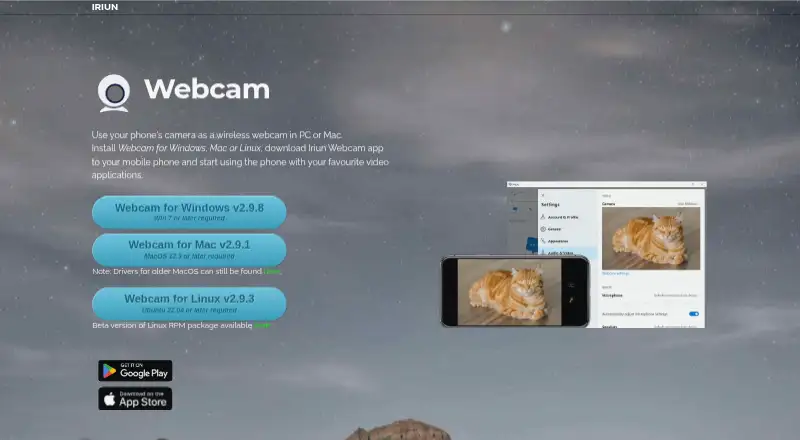
Iriun Webcam lets you use a phone camera as a wireless webcam on a PC or Mac. Setup requires installing the computer software and phone app, then using the phone with a video application. The Android app can connect over Wi-Fi or USB and supports resolutions up to 4K, depending on the phone model. Its listed camera features include pinch zoom and mirroring, and it can work with the phone screen off. The Android listing names Teams, Zoom, and OBS as compatible video applications. Desktop downloads are listed for Windows 7 or later, macOS 12.3 or later, and Ubuntu 22.04 or later; the iOS app requires iOS 13.0 or later and iPadOS 13.0 or later. The Android app is free with ads and in-app purchases. Pro removes ads and the watermark, adds manual ISO, exposure, and white balance adjustments, and enables desktop remote camera control. The German App Store listing shows Pro for 7,99 €.
Who it suits
Iriun Webcam suits people who want to use a phone camera with video applications on a PC or Mac. Pro adds manual camera adjustments and remote desktop control for people who need those options.
What it does well
- Android connection over Wi-Fi or USB
- Resolution support up to 4K, depending on phone
- Works with Teams, Zoom, and OBS
- Phone can operate with screen off
What to know first
- Android app contains ads and in-app purchases
- Maximum resolution depends on the phone model
- Pro version removes the watermark and ads
Limits
The free Android app includes ads and in-app purchases. Pro removes the ads and watermark and adds manual ISO, exposure, and white balance adjustments plus desktop remote camera control.
Plans
| Plan | Billed and limits | Price |
|---|---|---|
| Free | Android app contains ads and in-app purchases | Free |
| Pro version | No watermark · no ads · manual ISO, exposure and white balance adjustment · remote camera control from desktop | On request |
As iriun.com lists them, read 30 Sept 2026. The maker's own page has the final word.
Getting started
- Download and install the computer software for Windows, macOS, or Ubuntu.
- Install the Iriun phone app on Android or iOS.
- Connect the phone and computer over Wi-Fi or USB when using Android.
- Use the phone camera with a video application such as Teams, Zoom, or OBS.
Overview
Iriun Webcam is a phone-to-computer camera tool for people who want to use a mobile device in desktop video apps. It makes the most sense when flexible Wi-Fi or USB connection and Android camera controls matter more than built-in background effects.
Its appeal is a practical combination of wireless or wired use and support for resolutions up to 4K on compatible Android phones. The trade-off is that the Android app includes ads and in-app purchases, while Pro is needed to remove the watermark and unlock manual image adjustments.
Key features
Setup involves installing the computer software and phone app, then using the phone with a video application. On Android, Wi-Fi offers a cable-free connection, while USB gives users a wired alternative. The app names Teams, Zoom and OBS as compatible video applications, making it a fit for common meeting and streaming workflows.
The Android app supports resolutions up to 4K, though the phone model determines the maximum. Pinch zoom and mirroring provide basic framing options, and the app can work with the phone screen off. Those features make a phone camera more adaptable for calls or streaming, but the resolution ceiling is not guaranteed across devices.
Pro adds manual ISO, exposure and white balance adjustments, plus remote camera control from the desktop. These are useful for people who want to tune an image rather than rely on automatic settings. Iriun also provides a virtual camera, but no background tools; users who want built-in background treatments should look elsewhere.
Google Play displays the developer's declarations that no data is collected and no data is shared with third parties. Support is available by email at [email protected].
Pricing
Iriun is freemium. The Free plan costs nothing and includes an Android app with ads and in-app purchases. It is the straightforward starting point for users who can accept ads and the watermark, but does not include Pro's image controls or desktop remote camera control.
The Pro version removes ads and the watermark and adds manual ISO, exposure and white balance adjustment, along with remote camera control from the desktop. The German App Store shows an in-app purchase called “Pro version” for 7,99 €, but that price display does not establish a recurring term.
Platforms
Iriun supports Android, iOS, Linux, macOS and Windows. The official site offers desktop downloads for Windows 7 or later, macOS 12.3 or later, and Ubuntu 22.04 or later. The App Store says the iOS app requires iOS 13.0 or later and iPadOS 13.0 or later. The Android app's 4K ceiling depends on the phone model.
Who it's for
Iriun suits people who want to use a phone camera as a webcam on a PC or Mac, particularly Android users who value the choice of Wi-Fi or USB, pinch zoom, mirroring or a screen-off workflow. Pro is better suited to users who want to remove the watermark and adjust camera settings manually. It is a weaker fit for anyone looking for built-in background tools.
Pros and cons
- Pros: Wi-Fi and USB connection options on Android give users a choice between wireless convenience and a wired setup.
- Pros: Android resolution support reaches up to 4K, subject to the phone model.
- Pros: Pro combines watermark and ad removal with manual image adjustments and desktop remote camera control.
- Cons: The Android Free app includes ads, and the watermark-free experience requires Pro.
- Cons: There are no background tools, so users seeking built-in effects need another option.
Alternatives
DroidCam is another freemium phone-to-webcam option across Android, iOS, Linux, macOS and Windows. Its free plan caps video at 480p SD without a watermark, with HD and other Pro features requiring an upgrade; choose it if that stated free-plan arrangement better fits your priorities.
Animaze is a freemium option for Android, iOS and Windows, with a free Basic plan that includes 80+ free items. Consider it if those items are more relevant to your needs than Iriun's phone-camera controls.
Camo Studio has a free Camo plan for 720p and below without a watermark, ads or spam, across Android, iOS, macOS and Windows. It may suit users who prefer that stated free-plan limit and set of terms.
FineCam offers a free plan with all features and a watermark on Android, iOS, macOS and Windows. Choose it if access to all features matters more than avoiding a watermark.
SplitCam Multistream is a free option with multistreaming, scene composition, a virtual camera and AI background features for Android, iOS, macOS and Windows; consider it if those capabilities are the priority.
xpression camera is a freemium alternative for Android, iOS, macOS and Windows.
PhotoDirector is a freemium alternative for macOS and Windows.
VCam is a freemium alternative for macOS, web and Windows.
For more options, browse Webcam Software.
Verdict
Choose Iriun Webcam if you want to turn a phone camera into a computer webcam and value Android's Wi-Fi or USB connection choices, camera controls and screen-off operation. Its strongest reason to choose Pro is the combination of watermark removal and manual adjustments; its main reason to look elsewhere is the lack of background tools, alongside a free Android app that includes ads.
Verdict
Iriun Webcam turns a phone camera into a PC or Mac webcam, with Android connection and camera options described in its listing. The Android app includes ads and in-app purchases; Pro adds controls and removes the watermark.
Questions
Is Iriun Webcam free?
Yes. The Android app has a free option, and the listed Free plan costs nothing. The Android app contains ads and in-app purchases.
How much does Pro cost?
The German App Store listing displays an in-app purchase called “Pro version” for 7,99 €.
Which platforms does it support?
The listed platforms are Android, iOS, Linux, macOS, and Windows. Desktop downloads are listed for Windows 7 or later, macOS 12.3 or later, and Ubuntu 22.04 or later; the iOS app requires iOS 13.0 or later and iPadOS 13.0 or later.
Which video applications can use Iriun Webcam?
The Android app listing names Teams, Zoom, and OBS.
What does Pro add?
Pro removes ads and the watermark, enables manual ISO, exposure, and white balance adjustments, and adds remote camera control from the desktop.
How does the phone connect to the computer?
The Android app listing says it connects over Wi-Fi or USB.
Facts from Iriun Webcam's own pages
- Camera features
- The Android app listing names pinch zoom and mirroring, and says the app works with the phone screen off. · play.google.com, 30 Sept 2026
- Connection options
- The Android app listing says it connects over Wi-Fi or USB. · play.google.com, 30 Sept 2026
- Data safety
- Google Play displays the developer-provided declarations that no data is shared with third parties and no data is collected. · play.google.com, 30 Sept 2026
- Desktop versions
- The official site lists Windows 7 or later, macOS 12.3 or later, and Ubuntu 22.04 or later downloads. · iriun.com, 30 Sept 2026
- Headquarters
- Oulu, Finland · iriun.com, 28 Sept 2026
- Integrations
- The Android app listing names Teams, Zoom and OBS as video applications it can work with. · play.google.com, 30 Sept 2026
- iOS compatibility
- The App Store listing says the app requires iOS 13.0 or later and iPadOS 13.0 or later. · apps.apple.com, 30 Sept 2026
- Pro features
- The Android app listing says Pro removes ads and the watermark, enables manual ISO, exposure and white balance adjustments, and adds desktop remote camera control. · play.google.com, 30 Sept 2026
- Pro pricing display
- The German App Store listing shows an in-app purchase named “Pro version” for 7,99 €. · apps.apple.com, 30 Sept 2026
- Purpose
- Iriun Webcam lets you use a phone camera as a wireless webcam on a PC or Mac. · iriun.com, 30 Sept 2026
- Setup
- The maker says to install the computer software and phone app, then use the phone with video applications. · iriun.com, 30 Sept 2026
- Support
- The Google Play listing provides [email protected] as the support email. · play.google.com, 30 Sept 2026
- Video resolution
- The Android app listing says it supports resolutions up to 4K, with maximum resolution depending on the phone model. · play.google.com, 30 Sept 2026
Where Iriun Webcam stands on Freedom251
- Webcam Software#8 of 41