Freedom251 › Virtual Camera Software
CamLooper
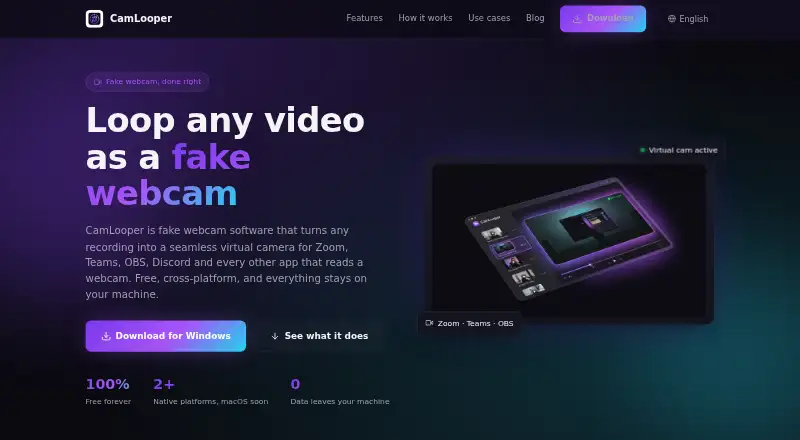
What CamLooper is
CamLooper turns video recordings into a virtual camera feed for video-call, streaming, and other apps that accept a webcam. Choose to play a clip once or loop it continuously with clean cuts. The app lists MP4, MOV, MKV, and WebM as supported common formats, and also lets users record in the app. Resolution, framerate, looping, and quality options can be adjusted. Compatible apps named by CamLooper include Zoom, Microsoft Teams, Google Meet, OBS Studio, Discord, Slack, Streamlabs, Skype, Webex, and Jitsi. Video processing runs locally through FFmpeg, and the app says it does not upload video files. It does not require an account or report which files are played or their contents or metadata. CamLooper is free to use, including commercially, and is supported by in-app ads. When ads are displayed, third-party ad network metadata and anonymous ad-impression analytics may be collected. Windows installation is available through the Microsoft Store or a direct EXE download; listed Linux distributions include Debian 11+, Ubuntu 22.04+, Fedora 38+, and RHEL 9+ for x86_64. The native macOS installer remains in the release pipeline pending Apple Developer notarization.
Who it suits
CamLooper suits people who want to use prerecorded or in-app recorded video as a webcam feed in supported calling and streaming apps. Its free commercial use and local video processing may appeal to users who want to avoid uploading their clips.
What it does well
- Plays a clip once or loops it with clean cuts.
- Accepts MP4, MOV, MKV, and WebM files.
- Lets users adjust resolution, framerate, looping, and quality.
- Processes video locally and does not upload video files.
- Requires no account and supports commercial use for free.
What to know first
- The app is supported by in-app ads.
- Native macOS installation is pending Apple Developer notarization.
- It does not provide scene composition or background effects.
Limits
The Free plan costs nothing and includes commercial use, with in-app ads. The native macOS installer is still pending Apple Developer notarization.
Plans
| Plan | Billed and limits | Price |
|---|---|---|
| Free | Free to use, including commercially · supported by in-app ads | Free |
As camlooper.com lists them, read 8 Oct 2026. The maker's own page has the final word.
Getting started
- Open the CamLooper website.
- On Windows 10 version 1809 or later or Windows 11, install through the Microsoft Store or download the direct EXE.
- On x86_64 Linux, use Debian 11+, Ubuntu 22.04+, Fedora 38+, or RHEL 9+.
- Open a supported video file or record in the app.
- Choose playback, resolution, framerate, loop, and quality options.
- Use CamLooper with a compatible app that accepts a webcam feed.
Verdict
Choose CamLooper if you need a free virtual camera feed from video on Windows or Linux, with local processing and adjustable playback. CamLooper lists compatible video-call and streaming apps. Look elsewhere if you need native macOS installation or scene composition and background effects.
Questions
How much does CamLooper cost?
It is free to use, including commercially, and is supported by in-app ads.
Which platforms does it support?
It supports Windows and Linux. Windows support covers Windows 10 version 1809 or later and Windows 11; listed Linux options are Debian 11+, Ubuntu 22.04+, Fedora 38+, and RHEL 9+ on x86_64.
Can CamLooper use prerecorded video?
Yes. The site lists MP4, MOV, MKV, and WebM as supported common formats, and the app can also record video.
Which apps are compatible?
CamLooper lists Zoom, Microsoft Teams, Google Meet, OBS Studio, Discord, Slack, Streamlabs, Skype, Webex, and Jitsi.
Does CamLooper upload video or require an account?
The app says video processing runs locally through FFmpeg and video files are not uploaded. It does not require an account.
Is a macOS version available?
The native macOS installer is still in the release pipeline pending Apple Developer notarization.
Facts from CamLooper's own pages
- Accounts and telemetry
- The app does not require an account and does not report which video files users play or their contents or metadata. · camlooper.com, 8 Oct 2026
- Ads and analytics
- The app is free and ad-supported; the privacy policy says third-party ad network metadata and anonymous ad-impression analytics may be collected when ads are displayed. · camlooper.com, 8 Oct 2026
- Integrations
- The site lists Zoom, Microsoft Teams, Google Meet, OBS Studio, Discord, Slack, Streamlabs, Skype, Webex, and Jitsi as compatible apps. · camlooper.com, 8 Oct 2026
- Linux support
- CamLooper lists Debian 11+, Ubuntu 22.04+, Fedora 38+, and RHEL 9+ for x86_64 Linux. · camlooper.com, 8 Oct 2026
- Local processing
- Video processing runs locally through FFmpeg, and video files are not uploaded by the app. · camlooper.com, 8 Oct 2026
- Looping
- Videos can loop indefinitely with clean cuts, or play once. · camlooper.com, 8 Oct 2026
- macOS status
- The native macOS installer is still in the release pipeline pending Apple Developer notarization. · camlooper.com, 8 Oct 2026
- Product
- CamLooper turns recordings into a virtual camera feed for video-call, streaming, and other apps that accept a webcam. · camlooper.com, 8 Oct 2026
- Quality controls
- Users can choose resolution and framerate and adjust loop and quality options. · camlooper.com, 8 Oct 2026
- Support
- The download page directs users to email support for questions or bug reports. · camlooper.com, 8 Oct 2026
- System requirements
- The minimum listed requirements are 4 GB RAM, 100 MB disk, and an Intel Core i3 or AMD equivalent. · camlooper.com, 8 Oct 2026
- Usage limits
- CamLooper says not to use it for proctored exams, identity or KYC verification, job interviews, or impersonation. · camlooper.com, 8 Oct 2026
- Video input
- The site lists MP4, MOV, MKV, and WebM as supported common formats, and says users can also record in the app. · camlooper.com, 8 Oct 2026
- Windows support
- CamLooper supports Windows 10 version 1809 or later and Windows 11, with installation through the Microsoft Store or a direct EXE download. · camlooper.com, 8 Oct 2026
Where CamLooper stands on Freedom251
- Virtual Camera Software#3 of 34
- Webcam Software#7 of 41